
WGP T6 Plus
WGP Teleheer T6 Plus Motorcycle Bluetooth Headset User Manual
Model: T6 Plus | Brand: WGP
Sarrera
This manual provides detailed instructions for the installation, operation, and maintenance of your WGP Teleheer T6 Plus Motorcycle Bluetooth Headset. Please read this manual thoroughly before using the device to ensure proper function and safety. The T6 Plus is designed for motorcycle riders, offering full-duplex Bluetooth real-time intercom communication, hands-free calling, music playback, and voice assistant integration.
Ezaugarri nagusiak
- Full Duplex Bluetooth Real-time Intercom: Stable signal transmission up to 1500 meters (93 MPH) with ceramic antenna.
- Hands-free & Multi-function Keys: Bluetooth 5.1 connectivity, supports call handling (answer/refuse/redial), music playback. Automatic switch to phone mode for incoming calls. Large button design for easy operation with gloves.
- IP65 Waterproof & Dustproof Design: Withstands various weather conditions, operational down to -15°F.
- HD Speakers & Ultra High Quality Sound: High-definition sound quality, especially for bass, with effective wind noise reduction.
- All-in-One Type-C Port: Integrated audio, data transfer, and charging.
- Bateriaren iraupen luzea: 850 mAh battery providing 30 hours of continuous use and 500 hours standby.
Paketearen edukia
Mesedez, egiaztatu elementu guztiak zure paketean daudela:
- WGP Teleheer T6 Plus Bluetooth Headset Unit (2 units for 2-pack)
- Kasko bozgorailuak
- Mikrofonoa (aurpegi irekiko kaskoetarako mikrofono biguna, aurpegi osoko kaskoetarako mikrofono biguna)
- Mounting Clip (clamp and adhesive options)
- USB motako C kargatzeko kablea
- Erabiltzailearen eskuliburua

Image: A detailed diagram illustrating the components of the WGP Teleheer T6 Plus headset, including the main unit with its Type-C port, indicator light, and control buttons (OFF/ON, Volume+, Volume-, Telephone, Connect). It also shows the securing clip, microphone, and trumpet (speakers), providing a clear visual guide to the parts included and their connections.
Konfigurazioa eta Instalazioa
1. Gailua kargatzea
Before first use, fully charge the T6 Plus headset. Connect the provided USB Type-C cable to the headset's Type-C port and the other end to a USB power adapter (not included). The indicator light will show charging status and turn off when fully charged.
- Kargatzeko denbora: 2-3 ordu gutxi gorabehera.
- Indicator light: Red during charging, off when fully charged.
2. Entzungailuak kaskoan instalatzea
The T6 Plus can be installed using either the clamp mount or the adhesive mount.
- Aukeratu muntatzeko kokapena: Select a flat area on the left side of your helmet where the headset unit can be easily accessed.
- Bozgorailuak instalatu: Attach the speakers inside the helmet's ear pockets using the adhesive pads. Ensure they are positioned directly over your ears for optimal sound quality.
- Mikrofonoa instalatu:
- For full-face helmets: Use the soft wire microphone and position it inside the chin bar, close to your mouth.
- For open-face or modular helmets: Use the boom microphone and position it in front of your mouth.
- Unitate Nagusia Muntatu:
- Clamp Mendia: Irristatu clamp between the helmet shell and the inner padding. Secure it tightly.
- Itsasgarriaren muntaia: Clean the chosen surface on the helmet. Peel off the protective film from the adhesive mount and firmly press it onto the helmet for at least 30 seconds. Allow 24 hours for the adhesive to cure before use.
- Konektatu kableak: Plug the speaker/microphone cable into the Type-C port on the main headset unit.

Image: A WGP Teleheer T6 Plus headset unit mounted on the side of a motorcycle helmet. This image demonstrates the typical installation position of the headset on a helmet, showing its compact design and how it integrates with the helmet's exterior. The control buttons are visible, indicating ease of access for the rider.
Funtzionamendu-argibideak
1. Piztu/Itzali
- Piztu: Eduki sakatuta Pizteko botoia for 3 seconds until the indicator light flashes.
- Itzali: Eduki sakatuta Pizteko botoia for 3 seconds until the indicator light turns off.
2. Bluetooth Pairing with Mobile Phone
- Ensure the T6 Plus is powered off.
- Eduki sakatuta Pizteko botoia for approximately 5-7 seconds until the indicator light flashes red and blue alternately, indicating pairing mode.
- On your mobile phone, enable Bluetooth and search for "Teleheer T6 Plus".
- Select "Teleheer T6 Plus" from the list of available devices to connect. Once connected, the indicator light will flash blue slowly.
3. Intercom Pairing (Two Units)
To establish intercom communication between two T6 Plus units:
- Ensure both T6 Plus units are powered off.
- On Unit 1, press and hold the Pizteko botoia for 5-7 seconds until the indicator light flashes red and blue alternately.
- On Unit 2, press and hold the Pizteko botoia for 5-7 seconds until the indicator light flashes red and blue alternately.
- Sakatu labur Pizteko botoia on either Unit 1 or Unit 2 (one short press). The units will search for each other.
- Behin konektatuta, bi unitateetako adierazle-argiak urdinez keinuka hasiko dira poliki, eta baieztapen-tonu bat entzungo duzu.
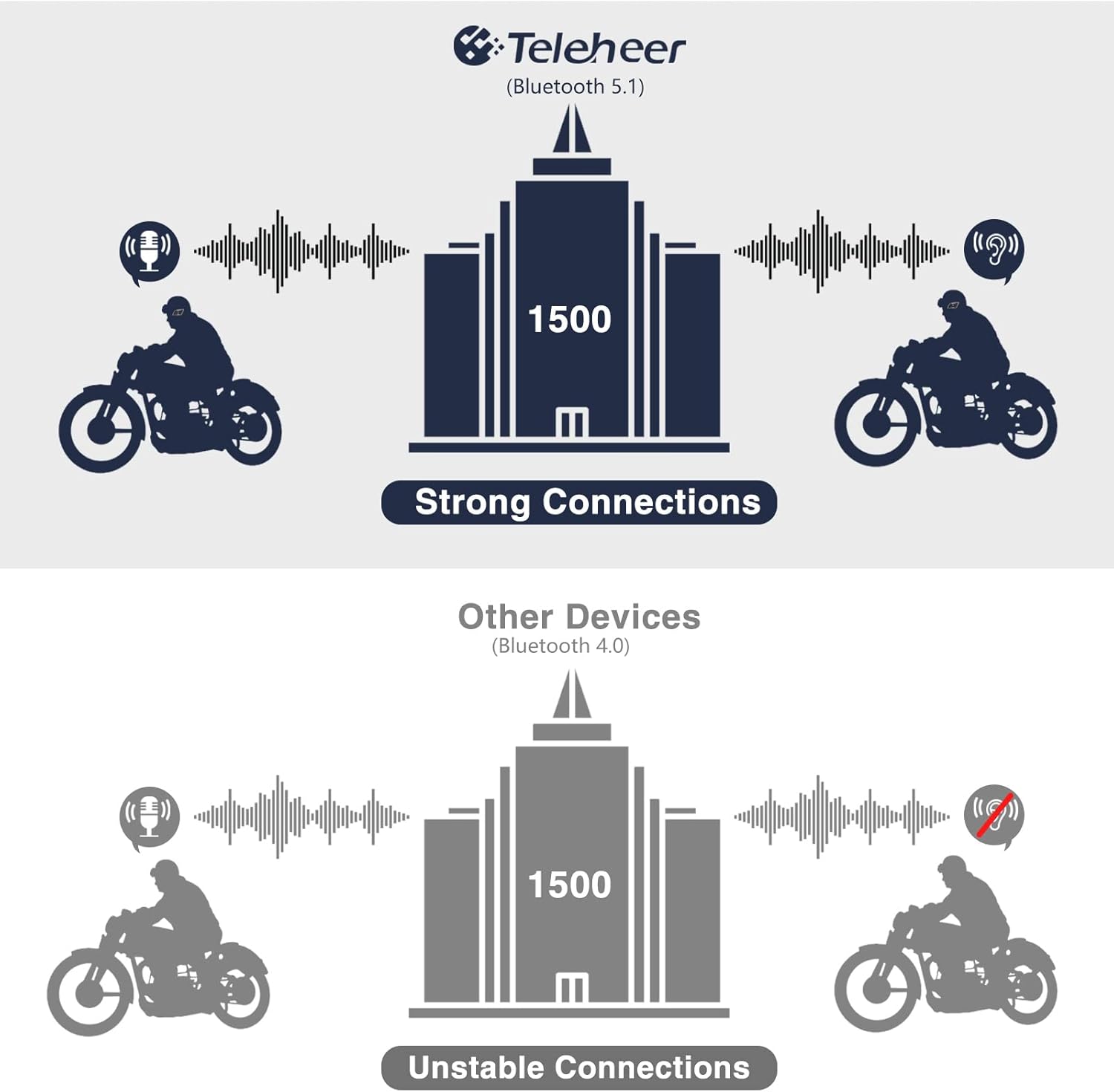
Image: A graphic illustrating the effective intercom range of the Teleheer T6 Plus (Bluetooth 5.1) compared to older Bluetooth 4.0 devices. The T6 Plus shows stable connections over 1500m, while older devices show unstable connections over shorter distances. This highlights the improved signal stability and range due to Bluetooth 5.1 and the ceramic antenna.
4. Phone Call Functions
- Erantzun deia: Sakatu laburra Telefonoaren botoia.
- Amaitu deia: Sakatu laburra Telefonoaren botoia.
- Deiari uko egin: Eduki sakatuta Telefonoaren botoia 2 segundoz.
- Berriz markatu azken zenbakia: Sakatu bi aldiz Telefonoaren botoia.
5. Musika erreproduzitzea
- Erreproduzitu/Pausatu: Sakatu laburra Telefonoaren botoia.
- Hurrengo ibilbidea: Sakatu laburra Bolumena igotzeko botoia.
- Aurreko pista: Sakatu laburra Bolumenaren beherako botoia.
- Bolumenaren doikuntza: Eduki sakatuta Bolumena igo/jaisteko botoiak bolumena handitzeko edo gutxitzeko.
6. Ahots-laguntzailea (Siri/Google laguntzailea)
- Aktibatu Ahots Laguntzailea: Sakatu bi aldiz Pizteko botoia.

Image: A graphic depicting the voice assistant feature of the Teleheer T6 Plus, showing a helmeted rider interacting with their phone via voice commands like "Hey Siri" or "Ok Google". This illustrates the hands-free convenience for navigation, calls, and other smartphone functions while riding.
Mantentzea eta zaintzea
- Garbiketa: Garbitu entzungailuen unitatea zapi leun batekin,amp oihal. Ez erabili produktu kimiko gogorrak edo garbitzaile urratzaileak.
- Uraren erresistentzia: The device is IP65 waterproof. While it can withstand water jets, avoid submerging it in water for extended periods. Ensure the Type-C port cover is securely closed when not charging.
- Biltegiratzea: Gorde gailua leku fresko eta lehor batean erabiltzen ez duzunean. Saihestu tenperatura altuetatik.
- Bateria zaintzea: To prolong battery life, avoid fully discharging the battery frequently. Charge the device regularly, even if not in use for long periods.

Image: A WGP Teleheer T6 Plus headset unit partially submerged in water with splashes, demonstrating its IP65 waterproof rating. The image emphasizes the device's ability to withstand water exposure, making it suitable for various weather conditions during riding.
Arazoak konpontzea
| Arazoa | Kausa posiblea | Irtenbidea |
|---|---|---|
| Gailua ez da pizten. | Bateria baxua. | Kargatu gailua guztiz. |
| Ezin da telefonoarekin parekatu. | Device not in pairing mode; Bluetooth off on phone; too many paired devices. | Ensure device is in pairing mode (red/blue flashing). Turn on phone's Bluetooth. Delete old Bluetooth connections on phone. |
| Intercom connection unstable or short range. | Obstructions; out of range; interference. | Ensure clear line of sight. Stay within 1500m range. Avoid strong electromagnetic interference. |
| Bozgorailuetatik ez dago soinurik. | Speakers not connected properly; volume too low. | Check speaker connection to Type-C port. Increase volume. |
| Mikrofonoak ez du ahotsa jasotzen. | Microphone not connected properly; microphone position. | Check microphone connection. Ensure microphone is close to your mouth. |
| Wind noise during calls/intercom. | High speed; improper microphone placement. | Ensure microphone is positioned correctly to minimize wind exposure. The device has DSP noise suppression, but extreme conditions may affect performance. |
Zehaztapenak
| Ezaugarri | Xehetasuna |
|---|---|
| Ereduaren izena | Teleheer T6 Plus |
| Bluetooth bertsioa | Bluetooth 5.1 |
| Interfono barrutia | Up to 1500 meters (93 MPH) |
| Bateria Edukiera | 850 mAh |
| Erabilera Etengabeko Denbora | 30 ordu |
| Egonean Denbora | 500 ordu |
| Kargatzeko ataka | C motakoa |
| Uraren Erresistentzia | IP65 (Jet-proof) |
| Funtzionamendu-tenperatura | -15°F-ra arte |
| Antena Materiala | Zeramika |
| Kontrol-metodoa | Touch / Physical Buttons |
| Elementuaren pisua | 14.4 ontza (408 gramo inguru) |
| Neurriak (paketea) | 8.54 x 3.9 x 2.95 hazbete |
Bermea eta Laguntza
For warranty information and technical support, please refer to the official WGP webwebgunera edo jarri harremanetan bezeroarentzako arreta-zerbitzura zuzenean. Gorde erosketa-agiria erosketaren frogagiri gisa berme-erreklamazioetarako.
Laguntza gehiago lortzeko, bisita dezakezu produktuaren orria Amazonen edo jarri harremanetan saltzailearekin zuzenean Amazon plataformaren bidez.
Ask a question about this manual
Ask about setup, troubleshooting, compatibility, parts, safety, or missing instructions. Manuals+ will review the question and use this page’s manual context to help answer it.