
1. Sarrera
This manual provides detailed instructions for the operation and maintenance of your Jectse Bluetooth Speaker Alarm Clock. Please read this manual thoroughly before using the product to ensure proper function and longevity.
The Jectse Bluetooth Speaker Alarm Clock is a multi-functional device featuring a digital clock, dual alarm capabilities, an LED mirror display, FM radio, and Bluetooth connectivity for audio playback. It also supports music playback via a memory card.
2. Produktua amaitu daview
2.1. Ezaugarri nagusiak
- Bluetooth 5.0 konexioa: Wirelessly stream audio from compatible devices.
- Alarma bikoitza: Ezarri bi alarma independente esnatzeko ordu desberdinetarako.
- LED Mirror Display: Clear digital time display that also functions as a mirror.
- FM irratia: Digitally tuned FM radio (87.5MHz-108MHz) for news, music, and weather.
- Memoria txartelaren erreprodukzioa: Supports music playback from a memory card (up to 32GB, not included).
- Bateria kargagarria integratua: 1600mAh lithium battery for portable use.
- Diseinu trinkoa: Product dimensions are approximately 116 x 51 x 33mm (4.6 x 2 x 1.3 inches).
2.2. Paketearen edukia
- 1 x Jectse Alarm Clock Speaker
- 1 x Mikro USB kargatzeko kablea
- 1 x Erabiltzailearen eskuliburua (dokumentu hau)
2.3. Produktuen diagrama
Beheko irudia kontsultatu informazio gehiago lortzekoview of the device's components and controls.
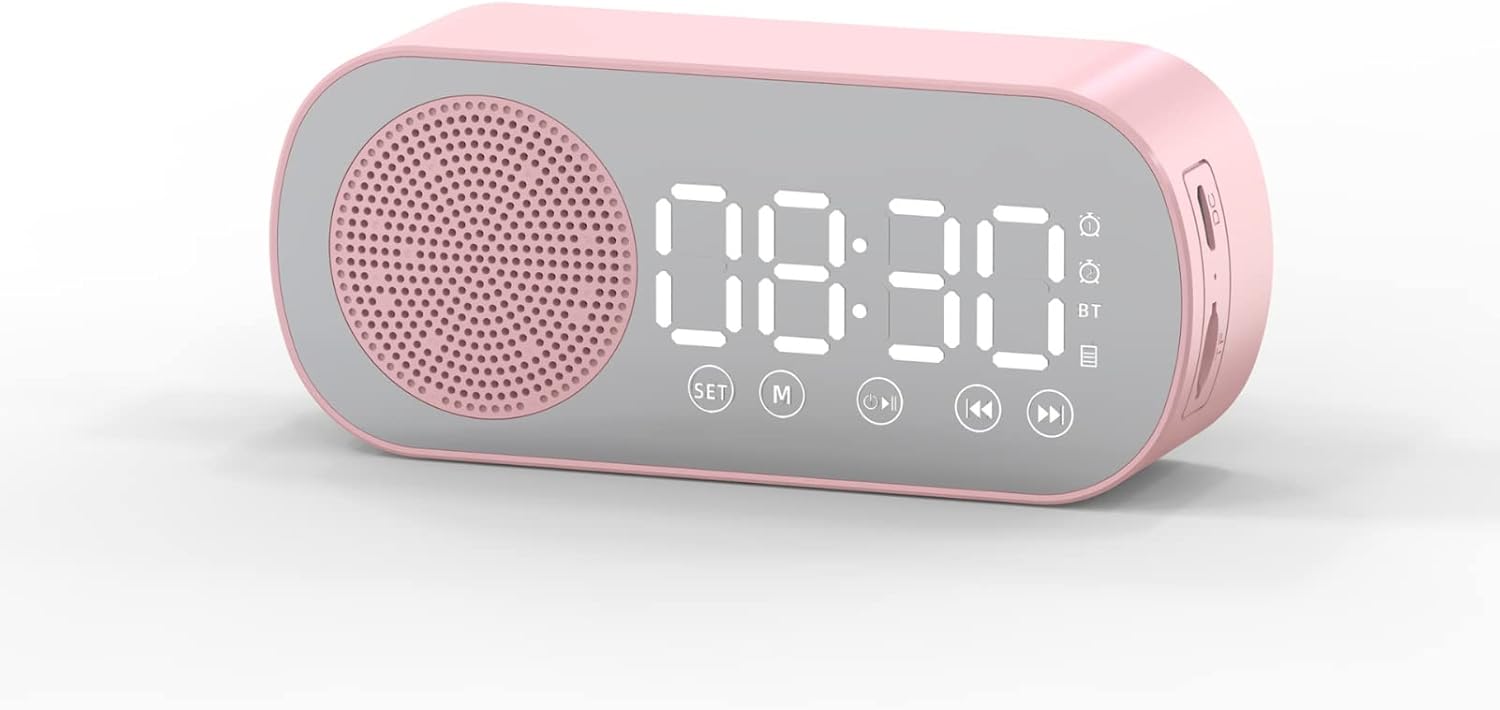
1. irudia: Aurrealdea view of the Jectse Bluetooth Speaker Alarm Clock, showing the speaker grille, LED display, and control buttons (SET, M, Play/Pause, Previous, Next).

2. irudia: Aldea view of the alarm clock with dimensions: 116mm (4.6in) length, 51mm (2in) height, and 33mm (1.3in) depth.
3. Konfigurazioa
3.1. Hasierako kargatzea
Before first use, fully charge the device. Connect the provided Micro USB charging cable to the charging port on the side of the alarm clock and the other end to a standard USB power adapter (not included).

3. irudia: The alarm clock and its Micro USB charging cable.
LED pantailako bateriaren adierazleak kargatze-egoera erakutsiko du. Karga oso batek normalean ordu batzuk behar ditu.
4. Funtzionamendu-argibideak
4.1. Piztu/Itzali
Eduki sakatuta Power/Mode (M) gailua pizteko edo itzaltzeko botoia.
4.2. Ordua ezartzea
- Erloju moduan, luze sakatu EZARTU botoia sakatu orduko digituak keinuka hasi arte.
- Erabili Previous (◀◀) eta Next (▶▶) ordua doitzeko botoiak.
- Sakatu EZARTU button again to switch to minute adjustment. Use the Previous (◀◀) eta Next (▶▶) minutuak doitzeko botoiak.
- Sakatu EZARTU botoia hirugarren aldiz sakatu berresteko eta ordua ezartzeko modutik irteteko.
4.3. Setting Alarms (Dual Alarm Function)
The device supports two independent alarms. Follow these steps for each alarm:

4. irudia: The alarm clock illustrating the dual alarm feature with two distinct alarm settings.
- In clock mode, short press the EZARTU button once to enter Alarm 1 setting mode. The alarm icon and hour digits will flash.
- Erabili Previous (◀◀) eta Next (▶▶) ordua doitzeko botoiak.
- Sakatu EZARTU again to adjust minutes. Use Previous (◀◀) eta Next (▶▶) doitzeko.
- Sakatu EZARTU a third time to select the alarm sound (e.g., buzzer, FM radio). Use Previous (◀◀) eta Next (▶▶) aukeren artean ziklatzeko.
- Sakatu EZARTU a fourth time to confirm Alarm 1 settings.
- To set Alarm 2, repeat steps 1-5, but short press the EZARTU button twice to enter Alarm 2 setting mode.
- To enable/disable an alarm, short press the EZARTU button until the desired alarm icon flashes, then press the Play/Pause (▶▌▌) botoia aktibatzeko edo desaktibatzeko.
Note: The alarm volume is independent of the main speaker volume and may be fixed or adjustable within the alarm settings. If the alarm sound is too loud, check if there's an option to adjust it during the alarm setup process.
4.4. Bluetooth modua
- Sakatu Power/Mode (M) button repeatedly until "BT" appears on the display, indicating Bluetooth mode.
- On your mobile device, enable Bluetooth and search for "Jectse Speaker" or a similar device name.
- Select the device to pair. A confirmation sound will indicate successful pairing.
- You can now play audio from your device through the speaker. Use the Play/Pause (▶▌▌), Previous (◀◀), eta Next (▶▶) erreprodukzioa kontrolatzeko botoiak.
4.5. FM Irrati modua

5. irudia: The alarm clock functioning as an FM radio on a bedside table.
- Sakatu Power/Mode (M) botoia behin eta berriz sakatu pantailan "FM" agertu arte.
- Sakatu Play/Pause (▶▌▌) botoia eskuragarri dauden FM irratiak automatikoki eskaneatu eta gordetzeko.
- Erabili Previous (◀◀) eta Next (▶▶) buttons to switch between saved stations.
- For better reception, ensure the device is not obstructed and try repositioning it.
4.6. Memory Card Playback
Insert a memory card (Micro SD card, up to 32GB, not included) into the designated slot on the device. The device will automatically switch to memory card mode and begin playing audio files. Erabili Play/Pause (▶▌▌), Previous (◀◀), eta Next (▶▶) erreprodukzioa kontrolatzeko botoiak.
4.7. Bolumenaren doikuntza
In any audio playback mode (Bluetooth, FM, Memory Card), press and hold the Previous (◀◀) button to decrease volume or the Next (▶▶) bolumena handitzeko botoia.
4.8. LED Mirror Display

6. irudia: The alarm clock's LED display also functions as a mirror.
The front panel of the device features an LED display that shows the time and other information. When not actively displaying information, the surface can be used as a mirror.

7. irudia: The LED display showing multiple functions and indicators, including time, battery level, and Bluetooth status.
5. Mantentzea
- Garbiketa: Erabili zapi leun eta lehor bat gailua garbitzeko. Ez erabili garbitzaile edo disolbatzaile urratzailerik.
- Biltegiratzea: Gorde gailua leku fresko eta lehor batean, eguzki-argitik eta muturreko tenperaturetatik babestuta.
- Bateria zaintzea: Bateriaren iraupena luzatzeko, saihestu bateria maiz erabat deskargatzea. Kargatu gailua aldizka, denbora luzez erabiltzen ez baduzu ere.
- Uraren esposizioa: Gailu hau ez da iragazgaitza. Saihestu uraren edo hezetasun handiaren eraginpean jartzea.
6. Arazoak
| Arazoa | Kausa posiblea | Irtenbidea |
|---|---|---|
| Gailua ez da pizten. | Bateria baxua. | Kargatu gailua emandako USB kablea erabiliz. |
| Ezin da Bluetooth bidez parekatu. | Bluetooth not enabled on device or phone; device not in pairing mode. | Ensure the alarm clock is in Bluetooth mode ("BT" displayed) and your phone's Bluetooth is on and searching. Move devices closer. |
| FM irratiaren harrera eskasa da. | Seinale ahula; interferentziak. | Reposition the device. Avoid placing near other electronic devices that may cause interference. |
| Alarm is too loud/quiet. | Alarm volume not adjusted during setup. | Re-enter alarm setting mode and check if there is an option to adjust alarm volume. Some models may have a fixed alarm volume. |
| Pantaila zaila da irakurtzen. | Lighting conditions; display brightness setting. | Adjust ambient lighting. Check if there is a display brightness setting (refer to specific model instructions if available, not detailed in general description). |
7. Zehaztapenak
| Ezaugarri | Xehetasuna |
|---|---|
| Eredua | Jectsesb81t679n01182 |
| Materiala | ABS (akrilonitrilo butadieno estirenoa) |
| Produktuaren Tamaina | Gutxi gorabehera 116 x 51 x 33 mm (4.6 x 2 x 1.3 hazbete) |
| Bateria mota | Litiozko bateria (barruan) |
| Bateria Edukiera | 1600mAh |
| Bluetooth bertsioa | 5.0 |
| Erreproduzitzeko moduak | Bluetooth, Memory Card (Max 32G, not included) |
| Erloju moduak | Digital Clock, Dual Alarm Clock, FM Radio |
| FM Irrati Maiztasuna | 87.5MHz-108MHz |
| Konektibitate Teknologia | Bluetootha, USBa |
| Elementuaren pisua | 5.3 ontza |
8. Bermea eta Laguntza
Bermeari buruzko informazioa eta bezeroarentzako laguntza lortzeko, kontsultatu erosketa unean emandako dokumentazioa edo jarri harremanetan zure dendariarenkin. Gorde erosketa-agiria erosketaren frogagiri gisa.