
Sarrera
This manual provides comprehensive instructions for the proper setup, operation, and maintenance of your WANGCL ZK-1002MT Bluetooth 5.0 Subwoofer Amplifier Board. Please read this manual thoroughly before using the product to ensure optimal performance and safety.
Produktua amaituview
The ZK-1002MT is a high-power audio stereo amplifier board featuring Bluetooth 5.0 connectivity and AUX input. It is designed to deliver clear audio with independent treble and bass adjustment. This module is suitable for driving 30-200W, 4-8Ω speakers, providing a robust audio experience.

1. irudia: Aurrealdea view of the ZK-1002MT amplifier board, showing the main controls and branding.
Zehaztapenak
| Ezaugarri | Zehaztapena |
|---|---|
| Eredua | ZK-1002MT |
| Bluetooth bertsioa | 5.0 (oztoporik gabe, 15 metro) |
| Sarrera-metodoa | AUX + Bluetooth |
| Kanal kopurua | Left and right dual channels (stereo) |
| Egokitzailearen hornidura | DC 12~24 V / 5A or more |
| Adaptation Speaker | 30~200 W, 4~8 Ω |
| Seinalea zarata erlazioa | > 90 dB |
| Neurriak | 99 mm x 60 mm x 21 mm |
| Irteera Potentzia | 200 Watts (Total, 100W per channel) |
Note: The power of the adapter power supply must be greater than the actual working power of the amperrendimendu optimorako zalifikatzailea.
Konfigurazio Argibideak
- Deskonprimitu osagaiak: Carefully remove all items from the packaging. The package typically includes the amplifier board, knobs, screws, and copper pillars for assembly.
- Muntatu C-a.asing (if applicable): Zure bada amplifier board came with a DIY casing, assemble it using the provided screws and copper pillars. Ensure all components are securely fitted.
- Konektatu bozgorailuak: Connect your passive speakers to the designated left and right channel output terminals. Ensure correct polarity (+ and -) for each speaker. The amplifier supports 4-8Ω speakers with power ratings between 30-200W.
- Konektatu elikadura iturria: Connect a DC 12-24V / 5A or higher power adapter to the DC 12-24V power input port (5.5*2.1mm DC plug). Do not use a 24V battery pack directly. Ensure the power supply is sufficient for the amplifier's working power.
- Connect Audio Input (Optional):
- For AUX input, connect your audio source (e.g., smartphone, MP3 player) to the AUX-IN port using a standard 3.5mm audio cable.
- For Bluetooth input, ensure no AUX cable is connected and proceed to the operating instructions for pairing.
- Instalatu botoiak: Place the treble, bass, and volume control knobs onto their respective shafts on the ampargitzaile taula.

Figure 2: Detailed connection diagram for power, speakers, and AUX input.

3. Irudia: Lehertuta view ren amplifier board and included assembly components.
Funtzionamendu-argibideak
- Piztu: Once all connections are secure, plug in the power adapter. The amplifier board will power on automatically.
- Bolumenaren doikuntza: Use the rightmost knob labeled 'VOL' to adjust the overall volume level. Turn clockwise to increase volume and counter-clockwise to decrease.
- Agudoen doikuntza: Use the leftmost knob labeled 'TREBLE' to adjust the high-frequency response. Turn clockwise for more treble, counter-clockwise for less.
- Baxuen doikuntza: Use the middle knob labeled 'BASS' to adjust the low-frequency response. Turn clockwise for more bass, counter-clockwise for less.
- Bluetooth bidezko lotura
- Ensure no AUX cable is connected to the ampbiziagoa.
- Zure Bluetooth gailuan (adibidez, telefonoan), gaitu Bluetootha eta bilatu eskuragarri dauden gailuak.
- Select 'ZK-1002MT' from the list to pair. A confirmation sound may indicate successful pairing.
- Behin parekatuta, audioa haririk gabe erreproduzitu dezakezu zure gailutik.
- AUX sarreraren erabilera: If an AUX cable is connected, the amplifier will automatically switch to AUX input. Disconnect the AUX cable to enable Bluetooth mode.
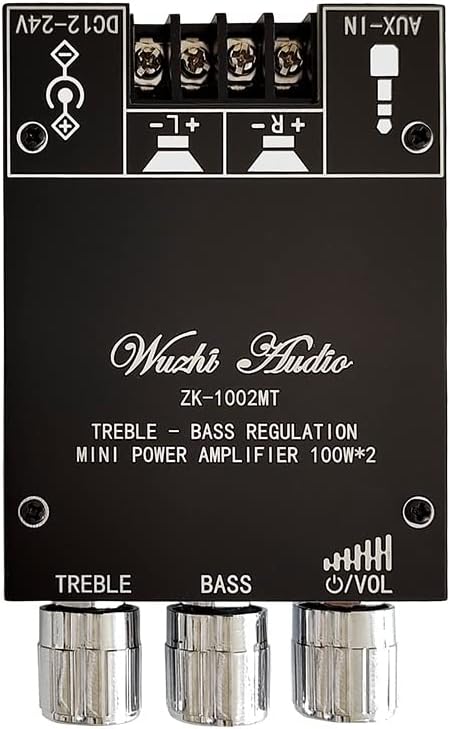
Figure 4: Close-up of the treble, bass, and volume control knobs.
Mantentzea
- Garbiketa: Erabili zapi leun eta lehor bat garbitzeko ampLikido-taula. Ez erabili garbitzaile likidorik edo disolbatzailerik.
- Ingurumena: Funtzionatu amplifier in a dry, well-ventilated area. Avoid exposure to moisture, extreme temperatures, and direct sunlight.
- Beroa xahutzea: Ensure the heat sink (visible on the board) is not obstructed to allow for proper cooling. Adequate airflow is crucial for stable operation.
- Konexioak: Periodically check all connections (power, speakers, audio cables) to ensure they are secure and free from corrosion.

5. irudia: Goikoa view ren amplifier board highlighting the heat sink for thermal management.
Arazoak konpontzea
| Arazoa | Kausa posiblea | Irtenbidea |
|---|---|---|
| Ez dago soinu irteerarik | Incorrect speaker connection; insufficient power supply; volume too low; incorrect input mode. | Check speaker polarity and connections. Ensure power supply meets 12-24V/5A requirements. Increase volume. Verify correct input (Bluetooth/AUX). |
| Soinu baxua edo distortsionatua | Insufficient power supply current/voltage; speaker impedance mismatch; audio source volume too low. | Ensure power supply is 5A or more and within 12-24V. Use speakers within 4-8Ω. Increase volume on the audio source device. |
| Bluetooth parekatzeak huts egin du | AUX cable connected; device too far; Bluetooth not enabled on source; ampLifigadorea ez dago parekatze moduan. | Disconnect AUX cable. Ensure device is within 15 meters. Enable Bluetooth on your device. Restart amplifier and try pairing again. |
| Gehiegi berotzea | Aireztapen eskasa; gehiegizko karga. | Ensure adequate airflow around the heat sink. Reduce volume or speaker load if operating at maximum capacity for extended periods. |
Bermearen informazioa
Based on the available product information, there is no specific warranty description provided for the WANGCL ZK-1002MT amplifier board. Please refer to the retailer's return policy or contact the seller directly for any warranty-related inquiries.
Laguntza
If you encounter any issues not covered in this manual or require further assistance, please contact your point of purchase or the manufacturer's customer support. When contacting support, please provide your product model (ZK-1002MT) and a detailed description of the issue.