
1. Sarrera
The Zelotes F17 Vertical Wireless Mouse is designed for enhanced comfort and productivity, featuring an ergonomic vertical design that promotes a natural hand posture. This manual provides comprehensive instructions for setting up, operating, maintaining, and troubleshooting your new mouse.

Image: The Zelotes F17 Vertical Wireless Mouse, showcasing its ergonomic design and the included USB receiver.
2. Paketearen edukia
Mesedez, egiaztatu elementu guztiak zure paketean daudela:
- 1 x Zelotes Wireless Vertical Mouse
- 1 x USB hargailua
- 1 x Argibide eskuliburua
3. Konfigurazio gida
Follow these steps to set up your Zelotes F17 Vertical Wireless Mouse:
- Instalatu bateriak: The mouse requires two AA batteries (not included). Locate the battery compartment on the underside of the mouse. Open the cover, insert the batteries according to the polarity indicators, and close the cover.
- Berreskuratu USB hargailua: The USB receiver is conveniently stored next to the battery compartment. Gently pull it out.
- Konektatu USB hargailua: Plug the USB receiver into an available USB port on your computer (Laptop, PC, Mac).
- Piztu: Locate the On/Off switch on the underside of the mouse and slide it to the 'On' position. The mouse is plug-and-play, requiring no driver installation.

Image: The underside of the Zelotes F17 mouse, illustrating the battery compartment and the integrated storage slot for the USB receiver.
Video: A demonstration of the Zelotes F17 Vertical Wireless Mouse in use, highlighting its ergonomic grip and functionality.
4. Funtzionamendu-argibideak
The Zelotes F17 mouse features 6 buttons and adjustable DPI settings for optimal control.
4.1 Ergonomic Grip
The vertical design allows your hand to rest in a natural handshake position, reducing wrist and forearm strain during prolonged use.
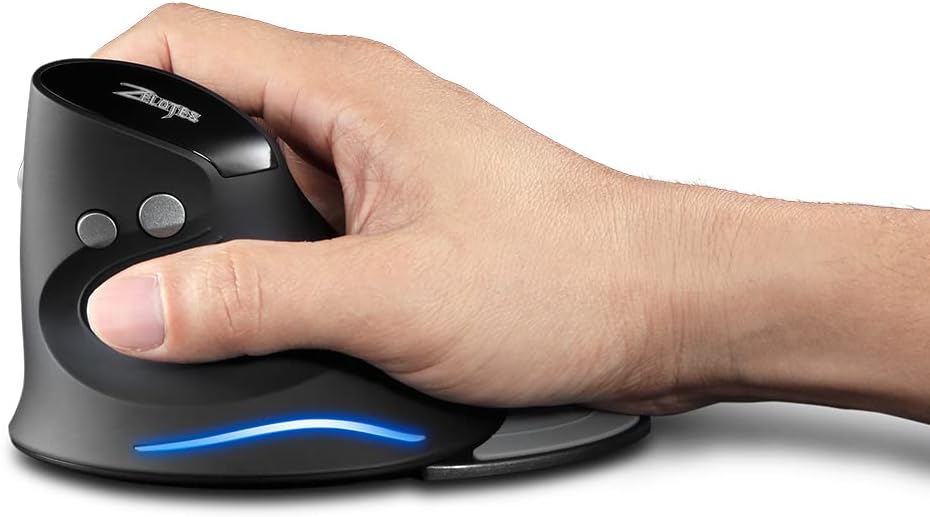
Image: A hand demonstrating the natural, ergonomic grip on the Zelotes F17 vertical mouse.
4.2 Botoien funtzioak
- Ezkerreko klik: Klik egiteko funtzio nagusia.
- Egin klik eskuineko botoiarekin: Bigarren mailako klik funtzio estandarra.
- Korritzeko gurpila: Gora edo behera joan, eta egin klik erdiko botoiaren funtzionaltasuna ikusteko.
- DPI botoia: Cycles through DPI settings (1200/1600/2400 DPI).
- Aurrera/Atzera botoiak: Located on the thumb side, these buttons allow for quick navigation in web nabigatzaileak edo file esploratzaileak.
4.3 DPI erregulagarria
Press the DPI button (located near the scroll wheel) to switch between 1200, 1600, and 2400 DPI settings. This allows you to adjust the mouse sensitivity to suit your task, whether it's precise graphic design or fast-paced gaming.
4.4 Detachable Palm Rest
The Zelotes F17 includes a detachable palm rest for additional wrist support. You can easily attach or remove it based on your preference and comfort needs.

Image: The Zelotes F17 mouse with its detachable palm rest separated, illustrating the modular design.
5. Mantentzea
To ensure the longevity and optimal performance of your Zelotes F17 mouse, follow these maintenance guidelines:
- Garbiketa: Erabili zapi leun eta lehor bat saguaren gainazala garbitzeko. Zikinkeria egoskorra bada, garbitu pixka bat.ampGarbitu zapi bat urarekin edo garbiketa-soluzio leun batekin. Saihestu produktu kimiko gogorrak edo material urratzaileak.
- Bateria ordezkatzea: When the mouse's performance degrades or the LED illumination dims, it's time to replace the AA batteries. Refer to Section 3.1 for battery installation instructions.
- Biltegiratzea: Denbora luzez erabiltzen ez duzunean, itzali sagua bateriaren iraupena aurrezteko. Gorde USB hargailua saguaren azpialdean dagoen zirrikitu espezifikoan, galtzea saihesteko.
6. Arazoak
If you encounter issues with your Zelotes F17 mouse, try the following solutions:
| Arazoa | Kausa posiblea | Irtenbidea |
|---|---|---|
| Sagua ez du erantzuten | Low battery; USB receiver disconnected; Mouse is off. | Replace batteries; Re-insert USB receiver; Turn mouse On. |
| Kurtsorearen mugimendu irregularra | Sentsore optiko zikina; Gainazal desegokia; Bateria baxua. | Clean optical sensor; Use on a smooth, non-reflective surface; Replace batteries. |
| LED illumination not working | Low battery; Mouse is off. | Replace batteries; Turn mouse On. |
| DPI ezarpena ez da aldatzen | DPI button malfunction. | Ensure the mouse is powered on and connected. If the issue persists, contact customer support. |
7. Zehaztapenak
Key technical specifications for the Zelotes F17 Vertical Wireless Mouse:
| Ezaugarri | Xehetasuna |
|---|---|
| Produktuaren neurriak | 4.33 x 3.39 x 3.15 hazbete |
| Elementuaren pisua | 3.53 ontza |
| Elementuaren eredu-zenbakia | F17 |
| Marka | zelotes |
| Kolorea | Beltza |
| Konektibitate Teknologia | USB (2.4 GHz haririk gabekoa) |
| Ezaugarri Berezia | Ergonomic Design, Removable Wrist Rest, LED Illumination |
| Mugimenduak detektatzeko teknologia | Optikoa |
| DPI ezarpenak | 1200/1600/2400 DPI |
| Botoi kopurua | 6 |
| Energia iturria | 2 x AA pila (ez daude barne) |
| Bateragarritasuna | Win11, Win10, Win8, Win7, Mac OS |

Image: A diagram illustrating the dimensions of the Zelotes F17 Vertical Wireless Mouse.
8. Bermea eta Laguntza
For warranty information or technical support, please refer to the contact details provided on the product packaging or the official Zelotes webgunea. Gorde erosketa-agiria erosketaren frogagiri gisa.