
Sarrera
Welcome to the user manual for your Samsung Galaxy A03s. This guide provides essential information to help you set up, operate, maintain, and troubleshoot your device. The Samsung Galaxy A03s is an AT&T GSM Unlocked Android Smartphone featuring 32GB storage, a long-lasting battery, three camera lenses, and an Infinite Display.
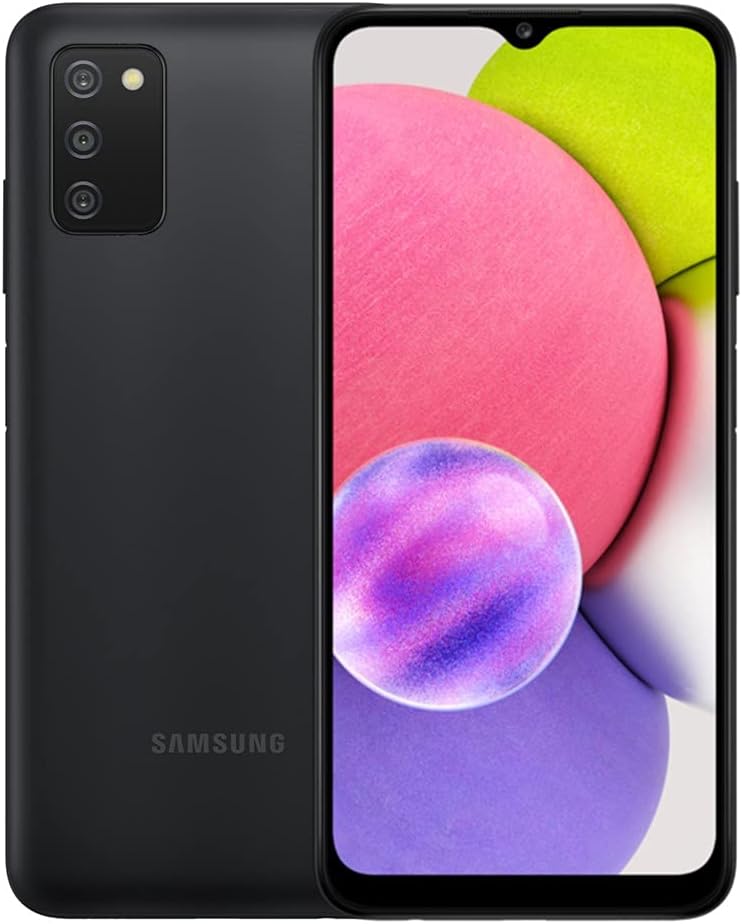
Produktua amaituview
Ezagutu zure Samsung Galaxy A03s-en osagai fisikoak.


Konfigurazioa
1. SIM txartela eta microSD txartela sartzea
Your Samsung Galaxy A03s uses a Hybrid SIM Tray, allowing for either two SIM cards or one SIM card and one microSD card for expandable storage.
- Bilatu SIM txartelaren erretilua gailuaren alboan.
- Insert the SIM ejection tool (not included with renewed product) into the small hole next to the tray to eject it.
- Jarri Nano-SIM txartela(k) eta/edo microSD txartela erretiluan, urre-koloreko kontaktuak behera begira dituela.
- Kontu handiz bultzatu erretilua berriro zirrikituan klik egin arte.
Note: Ensure the phone is powered off before inserting or removing SIM/microSD cards.
2. Hasierako pizte eta konfigurazio morroia
- Sakatu eta eutsi pizteko/alboko tekla Samsung logotipoa agertu arte.
- Jarraitu pantailan agertzen diren argibideei hasierako konfigurazioa osatzeko, hizkuntza hautatzea, Wi-Fi konexioa, Google kontuan saioa hastea eta segurtasun ezarpenak barne.
Zure gailua funtzionatzea
1. Oinarrizko nabigazioa
- Hasierako pantaila: Irristatu ezkerrera edo eskuinera hasierako pantailen artean nabigatzeko.
- Aplikazioen tiradera: Irristatu hatza gora hasierako pantailatik instalatutako aplikazio guztietara sartzeko.
- Jakinarazpenen panela: Irristatu hatza behera pantailaren goialdetik view jakinarazpenak eta ezarpen azkarrak.
- Azken aplikazioak: Tap the Recent Apps button (three vertical lines) to view eta azkenaldian erabilitako aplikazioen artean aldatu.
2. Deiak egitea eta mezuak bidaltzea
- Deiak: Ireki Telefonoa aplikazioan, idatzi zenbakia eta sakatu deitzeko ikonoa.
- Mezuak: Ireki Mezuak app, tap the new message icon, enter the recipient, and type your message.
3. Kameraren erabilera
The Samsung Galaxy A03s features a triple camera system for versatile photography.
- Ireki Kamera aplikazioa.
- Hautatu nahi duzun modua (Argazkia, Bideoa, Erretratua, etab.).
- Sakatu obturadorearen botoia irudi bat ateratzeko edo bideo grabaketa hasteko/gelditzeko.
1. bideoa: Amaitu daview of the Samsung Galaxy A03s. This video demonstrates the physical appearance of the phone, its unlocked status, and basic navigation through the user interface, highlighting its suitability for various uses and good condition.
Mantentzea
1. Bateria zaintzea
- Bateriaren iraupena maximizatzeko, saihestu tenperatura altuenak.
- Use the original charger or a certified compatible charger.
- Gaitu energia aurrezteko moduak bateria baxua denean.
2. Software eguneraketak
Egiaztatu eta instalatu software eguneraketak aldizka, errendimendu eta segurtasun optimoa bermatzeko.
- Joan zaitez Ezarpenak > Software eguneratzea.
- Sakatu Deskargatu eta instalatu.
3. Zure gailua garbitzea
- Erabili zapi leun eta lihorik gabeko bat pantaila eta gorputza garbitzeko.
- Saihestu produktu kimiko gogorrak edo material urratzaileak erabiltzea.
Arazoak konpontzea
| Gaia | Kausa posiblea | Irtenbidea |
|---|---|---|
| Telefonoa ez da pizten | Bateria baxua, software akatsa | Charge the phone for at least 30 minutes. Perform a forced restart by holding the Power and Volume Down buttons for 7-10 seconds. |
| Aplikazioak huts egiten edo blokeatzen | RAM nahikoa ez, aplikazioen gatazka, aplikazio zaharkitua | Close background apps. Clear app cache/data (Ezarpenak > Aplikazioak > hautatu aplikazioa > Biltegiratzea). Update apps from Play Store. |
| Bateriaren iraupen eskasa | High screen brightness, excessive background app usage, old battery | Reduce screen brightness. Enable power-saving mode. Restrict background data for certain apps. Consider battery replacement if device is old. |
| Sarearen konexio arazoak | SIM card issue, network settings, carrier problem | Ensure SIM card is properly inserted. Toggle Airplane mode on/off. Reset network settings (Ezarpenak > Zuzendaritza orokorra > Berrezarri > Berrezarri sarearen ezarpenak). Contact your carrier. |
For more advanced troubleshooting or issues not listed here, please refer to Samsung's official support webwebgunean edo jarri harremanetan bezeroarentzako zerbitzuarekin.
Zehaztapenak
| Ezaugarri | Xehetasuna |
|---|---|
| Modelo zenbakia | SM-A037W / SM-A037U |
| Sistema eragilea | Android |
| Bistaratzeko tamaina | 6.5 hazbete |
| Ebazpena | 720 x 1560 |
| RAM | 2 GB |
| Barne Biltegiratzea | 32 GB |
| Biltegiratze zabalgarria | Yes, via microSD (Hybrid SIM Tray) |
| Bateria Edukiera | 5000 milioiamp Orduak |
| Atzeko kamera | Triple Camera Lenses |
| Konektibitatea | Bluetooth, Wi-Fi, USB |
| Neurriak (L x W x H) | 6.46 x 2.99 x 0.36 hazbete |
| Elementuaren pisua | 7 ontza |
| Audio Jack | 3.5 mm |
Bermea eta Laguntza
This product is part of Amazon Renewed. Amazon Renewed products are professionally inspected and tested to work and look like new. If not satisfied with the purchase, renewed products are eligible for replacement or refund under the Amazon Renewed Guarantee.
- Itzultzeko politika: Eligible for replacement or refund within 90 days under the Amazon Renewed Guarantee.
- Fabrikatzailearen laguntza: For specific technical support or warranty claims related to manufacturing defects, please visit the official Samsung support webwebgunean edo jarri harremanetan bere bezeroarentzako zerbitzuarekin.
- Amazonen laguntza berritua: For issues related to the renewed condition or the Amazon Renewed Guarantee, please contact Amazon customer service.