
1. Sarrera
Eskerrik asko erosketagatik.asing the zelotes T80 Wired Gaming Mouse. This manual provides essential information for setting up, operating, and maintaining your new gaming mouse. Please read it thoroughly to ensure optimal performance and longevity of your device.
2. Konfigurazioa
2.1 Zer dago kutxan
- 1 x T80 Gaming Mouse
- 1 x Argibide eskuliburua
2.2 Sagua konektatzea
- Unpack the zelotes T80 Gaming Mouse and the instruction manual from the box.
- Locate an available USB port on your computer (Laptop, PC, Mac).
- Konektatu saguaren USB konektorea USB atakan.
- The mouse is plug-and-play and should be automatically recognized by your operating system (Windows 11/10/8/7, Mac OS). No additional drivers are typically required for basic functionality.
For advanced customization of buttons and lighting, please refer to the manufacturer's webeskuragarri dauden software deskargak ikusteko gunea.
3. Funtzionamendu-argibideak
3.1 Botoien funtzioak
The zelotes T80 Gaming Mouse features 7 programmable buttons designed for enhanced gaming and productivity.
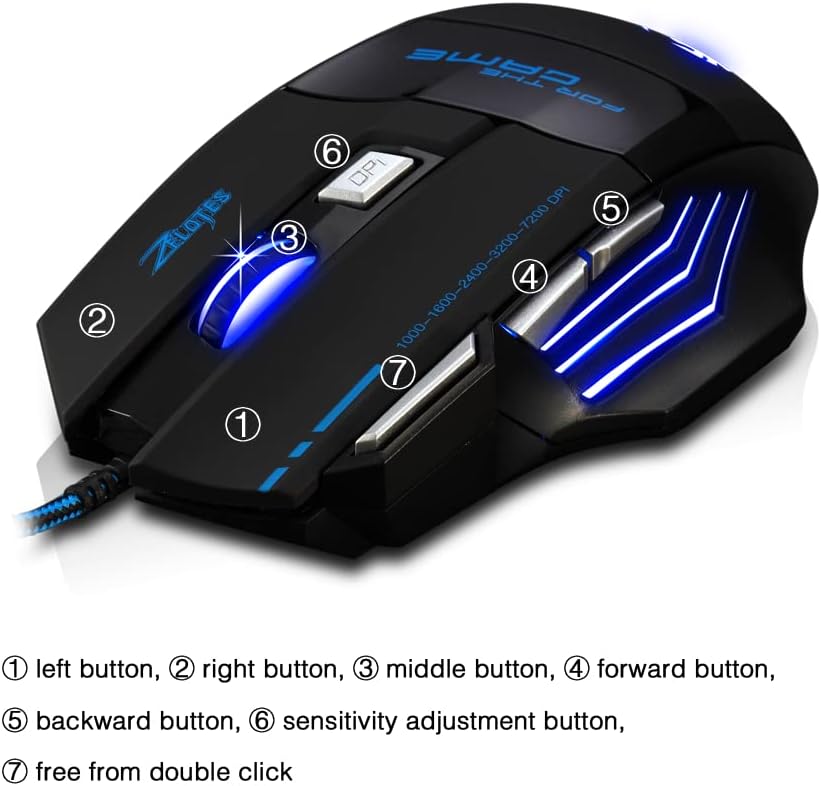
- Ezkerreko botoia (1): Ezkerreko klik funtzio estandarra.
- Eskuineko botoia (2): Eskuineko botoiarekin klik egiteko funtzio estandarra.
- Middle Button / Scroll Wheel (3): Scrolls up/down and acts as a middle-click button.
- Aurrera botoia (4): Aurrera nabigatzen du web nabigatzaileak edo file esploratzaileak.
- Atzera botoia (5): Atzeraka nabigatzen du web nabigatzaileak edo file esploratzaileak.
- Sensitivity Adjustment (DPI) Button (6): DPI ezarpenen artean txandakatzen da.
- Quick Fire Button (7): Equipped for rapid firing, allowing continuous shooting with a single press (functions as a double-click by default).
3.2 DPI doikuntza
The mouse offers 5 adjustable DPI settings to match your preference for gaming or office work. Use the Sensitivity Adjustment (DPI) Button (6) to cycle through the following settings:
- 1000 DPI
- 1600 DPI
- 2400 DPI
- 3200 DPI
- 7200 DPI
3.3 LED Backlight Illumination
The zelotes T80 features multi-mode LED backlighting that enhances your visual experience and gaming atmosphere. The LED lights cycle through various colors, providing dynamic illumination.

3.4 Diseinu ergonomikoa
The mouse is designed with an ergonomic shape and skin-friendly material for a comfortable grip and soft touch. Its sweat-resistant and anti-slip features ensure comfort during prolonged use, reducing arm fatigue.

4. Mantentzea
- Mantendu sagua garbi, zapi leun eta lehor batekin garbituz.
- Avoid exposing the mouse to extreme temperatures, direct sunlight, or liquids.
- Do not attempt to disassemble the mouse, as this may void the warranty.
5. Arazoak
- Saguak ez du erantzuten: Ensure the USB cable is securely plugged into the computer. Try a different USB port or restart your computer.
- Kurtsorearen mugimendua irregularra da: Garbitu saguaren beheko aldean dagoen sentsore optikoa. Ziurtatu sagua gainazal egoki batean erabiltzen ari zarela (adibidez, sagu-alfonbra batean).
- LED argiak ez dute funtzionatzen: Check if the mouse is properly connected. Some operating systems or software might interfere with lighting controls.
6. Zehaztapenak
| Ezaugarri | Deskribapena |
|---|---|
| Produktuaren neurriak | 5.12 x 4.09 x 1.77 hazbete |
| Elementuaren pisua | 5.5 ontza |
| Modelo zenbakia | T80 |
| Marka | zelotes |
| Kolorea | Beltza |
| Konektibitate Teknologia | USB (kablea) |
| Mugimenduak detektatzeko teknologia | Optikoa |
| DPI ezarpenak | 1000/1600/2400/3200/7200 DPI (5 adjustable levels) |
| Botoiak | 7 (Programmable, including Quick Fire Button) |
| Ezaugarri Berezia | Ergonomic Design, LED Illumination, Sweat-resistant, Anti-slip |
| Bateragarritasuna | Windows 11/10/8/7, Mac OS |
7. Produktuen bideoak
7.1 T80 7200DPI Gaming Mouse Overview
Bideo honek laburpen bat eskaintzen duview of the zelotes T80 Gaming Mouse, highlighting its 7200 DPI capability and overall design. It demonstrates the mouse's appearance and some features in action.
8. Bermea eta Laguntza
For warranty information or technical support, please refer to the contact details provided on the product packaging or visit the official zelotes webgunea. Gorde erosketa-agiria erosketaren frogagiri gisa, berme-erreklamazioetarako.