
1. Sarrera
This manual provides detailed instructions for the safe and efficient operation of your YOTON 17.5" Portable DVD Player. Please read this manual thoroughly before using the device and retain it for future reference. This portable DVD player is designed for versatile entertainment, offering a high-definition viewing experience with its swivel screen and multi-format support.
2. Zer dago kutxan
- 1 x Portable DVD Player YD155
- 1 x Urruneko agintea (bateria ez dago barne)
- 1 x AC kargagailua
- 1 x 3-in1 AV Cable (male)
- 1 x Auto kargagailua

Image: Contents of the YOTON Portable DVD Player package, including the player, remote control, AC charger, AV cable, and car charger.
3. Produktua amaitu daview & Ezaugarriak
3.1. High-Definition Swivel Screen
Enjoy crystal-clear viewing on the 1280*800 resolution swivel screen that rotates 270° and flips 180° for perfect angles. The anti-glare display reduces eye strain during extended use, ideal for movies, shows, and educational content.

Image: The YOTON Portable DVD Player displaying its 15.6-inch screen.

Image: Illustration highlighting the wide viewing angle capabilities of the YOTON Portable DVD Player's screen.
3.2. Bateria iraunkorra
The 5000mAh rechargeable battery delivers 6+ hours of continuous playback. It includes a certified AC adapter and a 70" car charger for home, car, or travel use, ensuring you never worry about sudden power loss during trips.

Image: The YOTON Portable DVD Player with an overlay indicating its 5000mAh high-capacity battery.

Image: Graphic illustrating the 6-hour battery life and the included car charger and AC power adapter.
3.3. Multi-Format Support & Region-Free Playback
The player supports direct playback of various disc formats including CD, DVD, DVD±R, CD-R(RW), SVCD-R(RW), DVD±RW, and VCD. Note: It does not support Blu-ray and Dolby discs. It also supports multi-media files via USB and SD Card (up to 32G), such as VOB, AVI, MPEG, MP3, WMA, and JPEG. Its region-free design allows easy playback of discs from all regions.

Image: The YOTON Portable DVD Player with a visual representation of supported disc formats like VCD and DVD.

Image: Graphic illustrating the region-free capability and various supported media formats (VCD, DVD, USB, SD card).
3.4. Dual Stereo Speakers
Equipped with dual stereo speakers, the player provides sufficient sound experience for an immersive viewesperientzia.

Image: The YOTON Portable DVD Player with a graphic overlay showing sound waves emanating from its dual stereo speakers.

Image: Illustration emphasizing the dual speaker setup for superior audio performance.
3.5. Azken memoria funtzioa
The break-point memory function allows the player to pick up from where you left off last time, ensuring a seamless viewesperientzia.

Image: The YOTON Portable DVD Player illustrating its last memory function, resuming playback from where it was stopped.

Image: Graphic demonstrating the break-point memory function, showing the player resuming from its last position.
3.6. USB & SD Card Support
The device supports multi-media files via USB and SD Card (up to 32G). This allows for flexible playback of various digital content.

Image: The YOTON Portable DVD Player highlighting its USB and SD card input slots.

Irudia: Xehetasun handikoa view of the YOTON Portable DVD Player's side ports, including USB, SD card, headphone jack, AV in/out, DC, and Game USB.
3.7. External Connectivity (Sync Screen to TV)
Easily create a private theater for your family by syncing the screen to a television, projector, or another similar player using the AV output.

Image: The YOTON Portable DVD Player connected to a television, demonstrating its screen sync capability.

Image: Graphic showing the YOTON Portable DVD Player's ability to sync its screen to a television, projector, or another player.
3.8. Vibration Absorption Technology
Built-in vibration absorption technology prevents skips and freezes when moving, ensuring smooth viewing in cars, planes, or while walking. This makes it perfect for travel entertainment.
3.9. Child & Senior-Friendly Design
Simple one-touch controls and loud stereo speakers make it easy for kids and elderly users to enjoy movies and music. The device also includes a parental control function for safe viewing.
3.10. Produktuaren bideo ofiziala
Video: An official product video from YOTON showcasing the features and usage of the YOTON Portable DVD Player.
4. Konfigurazioa
- Bateria kargatzea: Before first use, fully charge the internal 5000mAh battery using the provided AC charger. The indicator light will show charging status. For car use, connect the provided car charger to the vehicle's 12V power outlet.
- Piztu/Itzali: Locate the power switch (ON/OFF) on the side of the device. Slide it to the 'ON' position to power on.
- Disko bat sartzea: Gently slide the disc tray release to open the disc compartment. Place your DVD or CD disc onto the spindle, ensuring it is seated correctly. Close the disc compartment.
- Kanpoko gailuak konektatzea:
- USB/SD txartela: Insert a USB flash drive or SD card (up to 32GB) into the respective slots to play media files.
- Entzungailuak: Plug 3.5mm headphones into the headphone jack for private listening.
- AV In/Out: Use the 3-in-1 AV cable to connect to an external display (TV, projector) via AV OUT, or to display content from another device on the DVD player's screen via AV IN.
- Gamepad: Connect a compatible gamepad to the dedicated Game USB port for gaming (if supported by media).
5. Funtzionamendu-argibideak
5.1. Oinarrizko erreprodukzioa
- After inserting a disc or connecting a USB/SD device, the player will typically begin loading automatically.
- Use the controls on the player or the remote control to navigate menus, play, pause, stop, fast forward, rewind, and adjust volume.
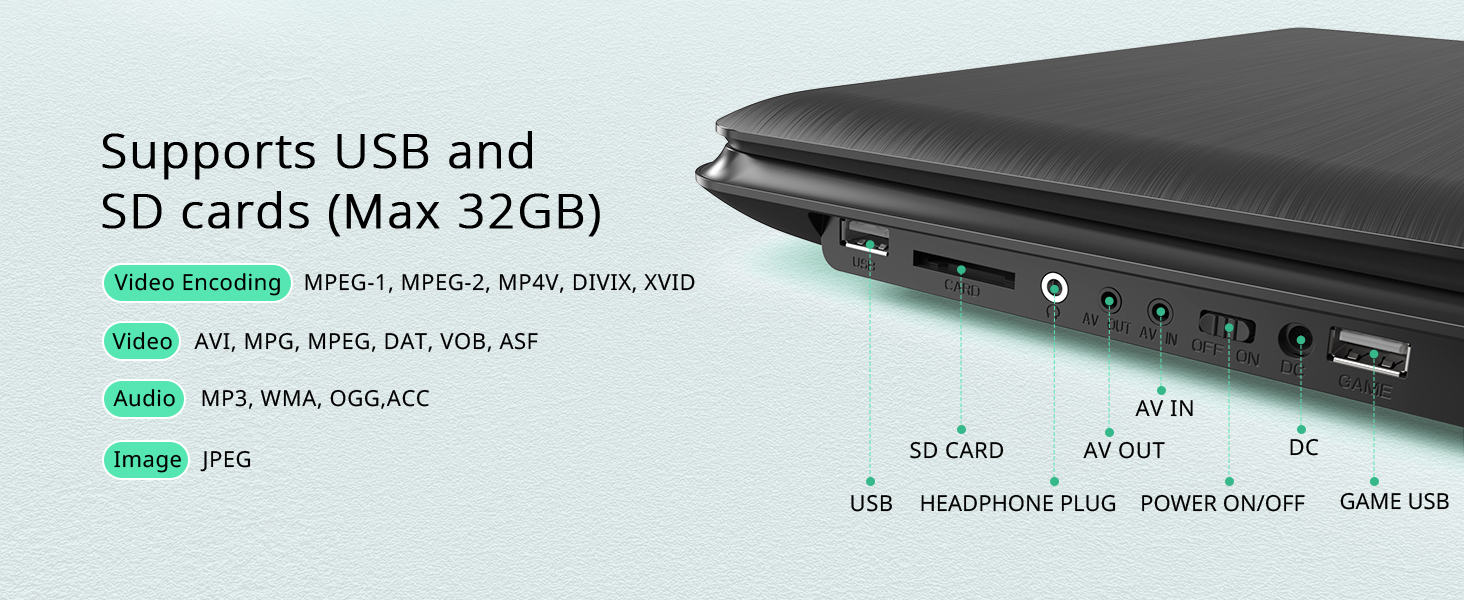
Image: Close-up of the YOTON Portable DVD Player's control panel, showing buttons for playback, volume, and menu navigation.
5.2. Pantailaren doikuntza
- The screen can swivel 270° and flip 180° to achieve optimal viewangeluak.
- Adjust the screen position carefully to avoid putting strain on the hinge.
5.3. Media Playback Notes
- Only supports 720*480 resolution video files and 2650*1440 resolution image files.
- Does not support 1080P, 4K, or Blu-ray discs.
6. Mantentzea
- Mantendu gailua garbi, zapi leun eta lehor batekin.
- Avoid exposing the player to extreme temperatures, direct sunlight, or high humidity.
- Handle discs carefully to prevent scratches and ensure smooth playback.
- When not in use for extended periods, fully charge the battery and store the device in a cool, dry place.
7. Arazoak
Q: Video Player doesn't work?
- Please make sure the power switch is set to the ON position and check the battery. Connect the DVD Player to the power adapter and then check the status of the indicator light.
- If the power switch is ON and the power adapter is connected, but no indicator light is shown, it indicates a problem with the motherboard or power adapter.
- If the power adapter is connected and the indicator light is on, it indicates a problem with the motherboard.
- Mesedez, jar zaitez gurekin harremanetan laguntza lortzeko: support.vp@yoton.co
Q: Video Player doesn't read the disc?
- Please clean the laser and try other VCD, CD and assumed game CD for testing purposes.
- Disko guztiak ezin badira irakurri, honek laser edo plakaren arazoa adieraziko luke.
- Partial discs cannot be read. The laser is aging or the disc is not compatible.
- The Video Player does not support HD/Blu-ray CD and Dolby discs.
- There is a yellow card inside the Video Player. Please remove it before you insert a disc.
8. Zehaztapenak
| Ezaugarri | Xehetasuna |
|---|---|
| Produktuaren neurriak | 15.35 x 10.24 x 1.97 hazbete |
| Elementuaren pisua | 3.96 kilo |
| ASIN | B09WN25ZB1 |
| Elementuaren modelo-zenbakia | 735940743037 |
| Pilak | 1 litio-ioizko bateriak behar dira. (barne) |
| Eskuragarri dagoen lehen data | 28ko martxoaren 2022a |
| Fabrikatzailea | YOTON |
| Marka | YOTON |
| Media mota | SD, VCD, DVD, AVI, MPG, MPEG, DAT, VOB, OGG, ASF, CD, MP3, WMA, JPEG |
| Kolorea | Beltza |
| Pantailaren tamaina | 15.6 hazbete |
| Bistaratzeko mota | LCDa |
9. Bermea eta laguntza
All products purchased from YOTON are covered by a 1-year warranty. For any concerns about using the product or anything in need, please feel free to reach out at any time. Our professional team will offer you 100% technology support in 24 hours.
9.1. Accessories & Parts
YOTON customers enjoy after-sales service. You can contact our after-sales team directly for free new parts for any broken or missing components.
9.2. Babes Planak
Babes-plan gehigarriak eros daitezke:
- 2 Urteko Babes Plana: 6.99 $ (behin bakarrik)
- 3 Urteko Babes Plana: 8.99 $ (behin bakarrik)
- Babes osoa: One plan covers all eligible past and future purchases for $16.99/month.

Image: Graphic detailing YOTON's customer support, including prompt replies and lifetime professional support.