
HP DeskJet 2755e
HP DeskJet 2755e Series Wireless Inkjet All-in-One Color Printer User Manual
Model: DeskJet 2755e | Brand: HP
Sarrera
This manual provides comprehensive instructions for the setup, operation, maintenance, and troubleshooting of your HP DeskJet 2755e Series Wireless Inkjet All-in-One Color Printer. Please read this manual thoroughly before using your device to ensure optimal performance and longevity.

1. irudia: Aurrealdea view of the HP DeskJet 2755e All-in-One Printer, showing its compact design and paper output tray.
Konfigurazio Gida
1. Desontziratzea eta edukiaren egiaztapena
Carefully remove all components from the packaging. Ensure all items listed below are present. Retain packaging for future transport or service.
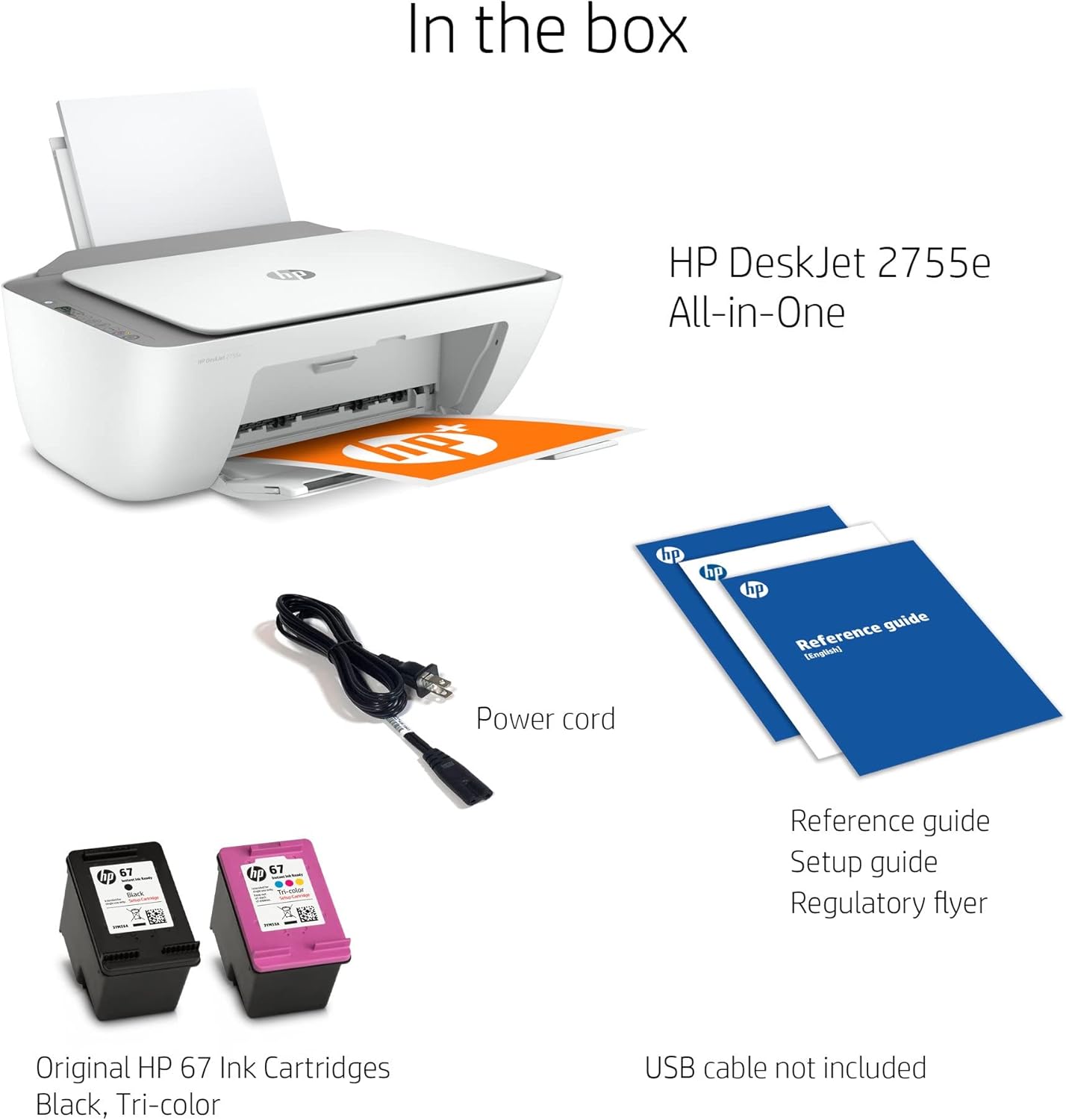
Figure 2: Items included in the box for the HP DeskJet 2755e. Note that a USB cable is not included and must be purchased separately for wired connection.
- HP DeskJet 2755e inprimagailu osoa
- Elikatze kablea
- Original HP 67 Ink Cartridges (Black, Tri-color)
- Reference Guide, Setup Guide, Regulatory Flyer
- HDMI Cable (included as part of this renewed product package)
Note: A USB cable for direct PC connection is not typically included and may need to be purchased separately.
2. Konexio fisikoa
- Jarri inprimagailua gainazal egonkor eta lau batean.
- Connect the power cord to the printer's power port and then to a wall outlet.
- For a wired connection, connect a USB cable (not included) from the printer's USB 2.0 port to your computer.

3. Irudia: Atzealdea view of the printer, highlighting the 60-sheet rear input tray and the USB 2.0 port for PC connection.
3. Tinta-kartutxoen instalazioa
Open the ink cartridge access door. Wait for the carriage to move to the center. Gently insert the black and tri-color ink cartridges into their respective slots until they click into place. Close the access door.
4. Papera kargatzea
Extend the input tray. Load a stack of plain paper into the input tray, print-side down. Adjust the paper guides to fit the paper snugly.
5. Software Installation and Wireless Setup
Turn on the printer. For initial setup and full functionality, download the HP Smart app from your device's app store or visit hp.com/go/hpsmart. Follow the on-screen instructions within the app to connect your printer to your wireless network and install necessary drivers.
Funtzionamendu-argibideak
Inprimaketa
The HP DeskJet 2755e supports wireless and USB printing. It offers a maximum print resolution of 4800 x 1200 dpi for both color and black & white, with print speeds up to 5.5 pages per minute (PPM).
- Ordenagailu batetik: Open the document or image you wish to print. Select "Print" from the application's menu. Choose your HP DeskJet 2755e printer, adjust settings (e.g., paper size, quality), and click "Print".
- Mugikorreko inprimaketa: Use the HP Smart app on your smartphone or tablet to print documents and photos directly from your mobile device.
Kopiatzen
Place the original document face-down on the scanner glass. Use the control panel's copy buttons to select color or black & white copy and the number of copies. Press the copy button to start.
Eskaneatzea
The printer features a flatbed scanner. Place the document or photo face-down on the scanner glass. Open the HP Smart app on your computer or mobile device, select the scan function, and follow the prompts to scan your item. You can choose scan resolution and destination.
Mantentzea
Tinta-kartutxoak ordezkatzea
When an ink cartridge is low or empty, the printer's display or the HP Smart app will indicate it. Purchase genuine HP 67 ink cartridges. Open the cartridge access door, press down on the old cartridge to release it, and pull it out. Insert the new cartridge firmly until it clicks into place. Close the door.
Inprimagailua garbitzea
- Kanpoaldea: Erabili lipurrik gabeko zapi leun bat dampKanpoko gainazalak urarekin garbitu.
- Eskanerraren beira: Erabili lipurrik gabeko zapi leun bat dampened with glass cleaner (non-abrasive) to clean the scanner glass. Avoid spraying cleaner directly onto the glass.
Paper-trazadurak kentzea
If a paper jam occurs, the printer's display will show an error. Carefully open the access doors and remove any jammed paper, pulling gently to avoid tearing. Check the input tray, output tray, and inside the printer. Close all doors and the printer should resume operation.
Arazoak konpontzea
This section addresses common issues you might encounter with your HP DeskJet 2755e printer.
Inprimagailuak ez du erantzuten
- Ziurtatu inprimagailua piztuta dagoela eta entxufe batera konektatuta dagoela.
- Check USB cable connection (if applicable) or wireless network connection.
- Berrabiarazi inprimagailua eta ordenagailua/gailu mugikorra.
- Verify that the correct printer is selected in your print dialog.
Inprimatze-kalitate eskasa
- Egiaztatu tinta mailak eta ordezkatu kartutxo hutsak edo baxuak daudenak.
- Run a print head cleaning cycle from the HP Smart app or printer software.
- Ziurtatu inprimatze-lanerako paper egokia erabiltzen ari zarela.
- Verify print settings (e.g., print quality, paper type) in your print dialog.
Paper-atalak
Refer to the "Clearing Paper Jams" section under Maintenance for detailed steps.
Konektibitate arazoak
- Haririk gabekoa: Ensure your printer is within range of your Wi-Fi router. Restart your router and printer. Re-run the wireless setup using the HP Smart app.
- USBa: Saiatu zure ordenagailuko beste USB ataka bat edo beste USB kable bat erabiltzen.
For more detailed troubleshooting, visit the official HP support website or consult the HP Smart app.
Zehaztapen Teknikoak
| Ezaugarri | Zehaztapena |
|---|---|
| Ereduaren izena | DeskJet 2755e |
| Funtzioak | Print, Copy, Scan (All-in-One) |
| Inprimatzeko Teknologia | Inkjet |
| Konektibitatea | Haririk gabekoa, USBa |
| Inprimatzeko gehienezko bereizmena (koloretan) | Gehienez 4800 x 1200 dpi |
| Inprimatzeko gehienezko bereizmena (zuri-beltzean) | Gehienez 4800 x 1200 dpi |
| Inprimatzeko abiadura | Up to 5.5 PPM (pages per minute) |
| Eskaner mota | Ohe laua |
| Gehienezko sarrera-orriaren edukiera | 60 fitxa |
| Irteerako orriaren edukiera | 25 fitxa |
| Onartutako orri-tamainak | 4x6, 5x7, 8x10 inches, A3 (Max Media Size) |
| Duplex Inprimaketa | Simplex (Manual Duplex Supported via Software) |
| Produktuaren neurriak (W x P x H) | 16.7 x 11.97 x 6.06 hazbete |
| Kontrol-metodoa | Remote (via HP Smart App), Icon LCD Display |
| Gailu bateragarriak | Smartphones, Computers (Windows, macOS) |

Figure 4: Dimensions of the HP DeskJet 2755e printer, with input and output trays extended.
Bermea eta Laguntza
Bermearen informazioa
This HP DeskJet 2755e printer, being a renewed product, comes with a 90 eguneko berme mugatua. Please refer to the warranty documentation included with your product for specific terms and conditions regarding coverage and claims.
Bezeroarentzako Arreta
For technical assistance, driver downloads, or further troubleshooting, please visit the official HP support website. You can also utilize the HP Smart app for guided support and resources.
HP laguntza Webgunea: support.hp.com
Ask a question about this manual
Ask about setup, troubleshooting, compatibility, parts, safety, or missing instructions. Manuals+ will review the question and use this page’s manual context to help answer it.