
1. Sarrera
The HAPPYMODEL ExpressLRS ES900RX module is a long-range 915MHz wireless transmission receiver designed for FPV drone applications. It is part of a system based on the open-source ExpressLRS software, known for its ultra-long range, stable operation, and low latency. This module is compatible with most OpenTX remote controllers, including Radiomaster TX16S and Jumper T12, T16, T18 series, offering a plug-and-play experience.
Please note: The ES900RX is a newer version replacing the ES915RX due to chip availability. ExpressLRS firmware is continuously updated, and it is recommended to use the ExpressLRS configurator for the latest firmware and best performance.
2. Segurtasun informazioa
Always handle electronic components with care. Ensure proper power supply voltage (5V) to prevent damage. Avoid short circuits. Keep the module away from moisture and extreme temperatures. Disconnect power before making any connections or disconnections. This device is intended for experienced users in the FPV hobby. Improper use may lead to equipment damage or injury.
3. Produktua amaitu daview
The ES900RX is a compact and lightweight receiver module. It operates on the 915MHz frequency band, providing robust long-range communication. The module features an IPEX1 antenna connector for easy antenna attachment.

Figure 3.1: HAPPYMODEL ES900RX 915MHz Receiver Module with included antennas. The module is small, with an IPEX1 connector for the antenna, and is designed for integration into FPV drones.

Figure 3.2: Comparison image showing the older ES915RX module (left) and the newer ES900RX module (right). Key differences include antenna plug type (IPEX4 vs IPEX1), solder pad size, and physical dimensions (16x10x3mm vs 12x12x3mm), and weight (0.7g vs 0.6g). The new ES900RX also supports firmware flash via WiFi.

Figure 3.3: A detailed close-up view of the ES900RX module, highlighting its compact design and component layout. The module is designed for minimal footprint in FPV builds.
4. Zehaztapenak
ES900RX Receiver Module
- MCU: ESP8285
- VCC Input: 5V
- Eragiketa Korrontea: 100 mA gutxi gorabehera
- Rx To FC Protocol: CRSF
- RF maiztasuna: 915MHz (or 868MHz for EU, optional)
- Neurriak: 12 mm x 12 mm x 3 mm
- Pisua: 0.60 gram (excluding antenna)
- Antena konektorea: IPEX1
- Telemetry Output Power: <17dBm
- Ezaugarri bereziak: Ultra-long range, stable operation, low latency, high compatibility, WiFi firmware update capability.
ES900TX Transmitter Module (for reference, not included with ES900RX)
- MCU: ESP32 + ESP8285
- Neurriak: 55 mm x 39 mm x 11 mm
- Pisua: 9.2 gram (TX module only)
- Antena konektorea: SMA
- VCC Input: 5~13V (Recommended 5~9V)
- RF maiztasuna: 915MHz (lehenetsia)
- Irteera potentzia maximoa: <33dBm (For >27dBm operation, a fan for forced cooling is recommended)
- Ezaugarriak: WiFi update firmware function available in v1.0.0 firmware.
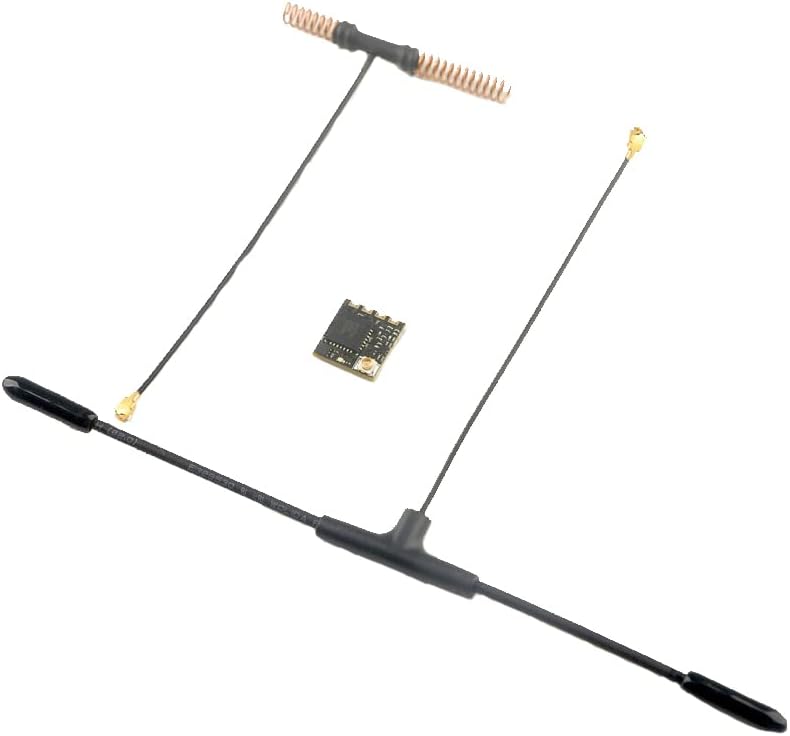
Figure 4.1: The HAPPYMODEL ES900TX Transmitter Module, which pairs with the ES900RX receiver. It features an SMA antenna connector and is designed for external module bays on compatible radio transmitters.
5. Konfigurazio eta funtzionamendu argibideak
5.1 Lote-prozedura
Follow these steps to bind your ES900RX receiver with your ES900TX or ES915TX transmitter module:
- Power Cycle 1: Supply power to the ES900RX. Wait until the red LED on the ES900RX turns off. Immediately disconnect power.
- Power Cycle 2: Reconnect power to the ES900RX. Wait until the red LED turns off. Immediately disconnect power again.
- Lotura modua: Connect power to the ES900RX for the third time. The red LED light will now begin to double flash quickly, indicating that the ES900RX has entered binding mode.
- Transmisorearen konfigurazioa: Insert your ES900TX or ES915TX module into your radio transmitter. Configure the External RF mode to CRSF protocol.
- Initiate Bind: Navigate to the ELRS menu within your radio's system settings. Select and press the [Bind] aukera.
- Berrespena: The red LED on the ES900RX module will turn off, then start blinking slowly, and finally become solid. This sequence confirms a successful binding.
5.2 ES900RX Firmware Update via WiFi
The ES900RX supports firmware updates wirelessly via WiFi. This method requires the receiver to enter WiFi mode:
- Enter WiFi Mode: Make the ES900RX enter binding mode (as described in step 1-3 of the binding procedure). Instead of binding, wait approximately 1 minute. The ES900RX will automatically switch into WiFi mode.
- Konektatu Hotspot-era: On your computer or mobile device, connect to the WiFi hotspot named "ExpressLRS RX". The password for this network is "expresslrs".
- Access Update Page: Ireki a web browser and navigate to the firmware update website by entering "10.0.0.1" in the address bar.
- Select and Update: On webpage, choose the correct firmware file for your ES900RX and click "update".
- Osatzea: Allow 1 to 2 minutes for the update process. A message indicating "firmware update successful and reboot" will confirm the completion of the update.
6. Mantentzea
The ES900RX module requires minimal maintenance. Keep the module clean and free from dust and debris. Ensure antenna connections are secure. Avoid physical stress on the module and its components. Regularly check for firmware updates from the official ExpressLRS project to ensure optimal performance and access to new features.
7. Arazoak
- Lotura-hutsegitea: If the module does not bind, ensure the power cycling sequence is followed precisely. Verify that your transmitter module is correctly configured for CRSF protocol and that the ELRS firmware on both TX and RX is compatible. Try updating firmware on both devices.
- No Signal/Lost Link: Check antenna connections on both the receiver and transmitter. Ensure the transmitter module is powered on and operating correctly. Verify that the frequency band (915MHz) matches between TX and RX.
- Firmwarearen eguneratze-arazoak: If WiFi update fails, ensure you are connected to the "ExpressLRS RX" hotspot and have entered the correct password. Double-check the IP address "10.0.0.1". Ensure the firmware file selected is correct for the ES900RX.
- Etengabeko konexioa: This could be due to interference. Try changing your operating environment or checking for sources of RF noise near your setup. Ensure antennas are positioned optimally and not obstructed.
8. Bermea eta Laguntza
For warranty information and technical support, please refer to the official HAPPYMODEL website or contact your retailer. As ExpressLRS is an open-source project, community support is also available through various online forums and groups dedicated to ExpressLRS. Always ensure you are using official and compatible firmware versions.