
Sarrera
The RAZEAK Syww 8 is an ultra-customizable wireless gaming mouse designed for high-performance gaming. Featuring a Pixart 3395 optical sensor with up to 26000 DPI, triple-mode connectivity (Wired, 2.4G Wireless, Bluetooth 5.0), and software-programmable functions, this mouse offers versatility and precision. Its unique design allows for replaceable mouse shells, click switches, and click spacers, enabling personalized aesthetics and feel.
Paketearen edukia
- RAZEAK Syww 8 Wireless Gaming Mouse
- USB-C-tik USB-A-rako Paracord kablea
- 2.4 GHz USB hargailua
- Erabiltzailearen eskuliburua
Produktua amaituview
Familiarize yourself with the key components and features of your RAZEAK Syww 8 gaming mouse.

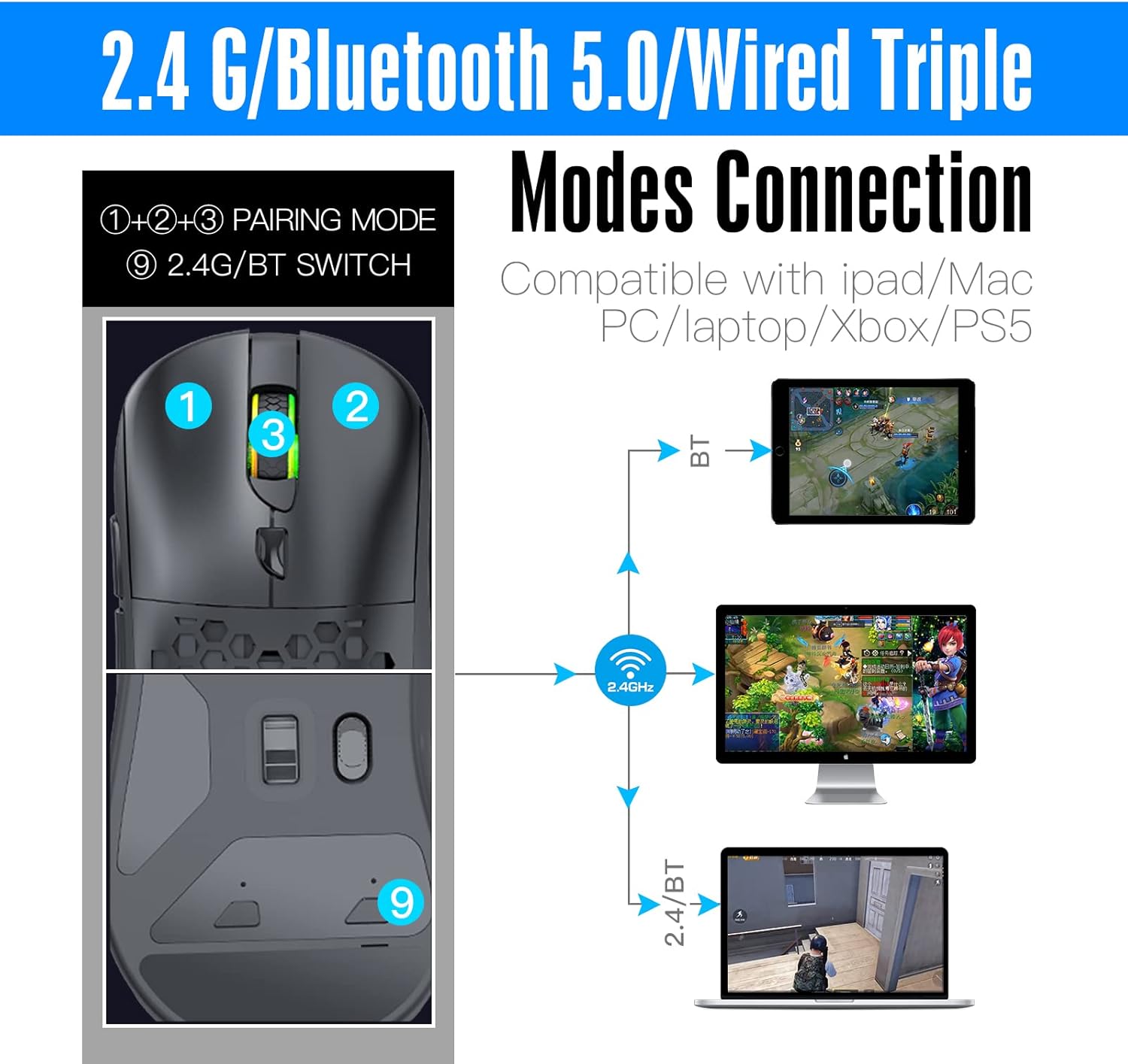
1. irudia: Mouse layout with connection mode switch and pairing buttons. (1) Left Click, (2) Right Click, (3) Scroll Wheel/Middle Click, (9) 2.4G/BT Switch.

2. irudia: The customizable design of the RAZEAK Syww 8, showcasing its replaceable top shell.
3. irudia: Xehetasuna view of the Pixart 3395 advanced optical sensor, providing high precision tracking.

4. irudia: The light, flexible, and durable USB-C paracord cable for wired connection and charging.

5. irudia: The ergonomic and lightweight design (86g) of the mouse, suitable for various grip styles.
Konfigurazioa
Sagua kargatzen
Connect the supplied USB-C paracord cable to the front port of the mouse and the other end to a USB-A port on your computer or a USB power adapter. The mouse will charge automatically. A full charge provides approximately 70 hours of continuous use with the backlight off.
Sagua konektatzen
The RAZEAK Syww 8 supports three connection modes: Wired, 2.4G Wireless, and Bluetooth 5.0. Use the switch on the bottom of the mouse (labeled '9' in Figure 1) to select your desired mode.
1. Kable bidezko modua
- Ensure the mouse is connected to your computer via the USB-C paracord cable.
- The mouse will automatically function in wired mode.
2. 2.4G Haririk gabeko Modua
- Insert the 2.4 GHz USB receiver into an available USB-A port on your computer.
- Slide the switch on the bottom of the mouse to the '2.4G' position.
- The mouse should connect automatically. If not, press the pairing button (if available, refer to specific instructions in the full manual) to initiate pairing.
3. Bluetooth 5.0 Mode
- Slide the switch on the bottom of the mouse to the 'BT' position.
- Zure ordenagailuan edo gailuan, joan Bluetooth ezarpenetara eta gaitu Bluetooth.
- The mouse should appear as 'RAZEAK Syww 8' or similar in the list of discoverable devices. Select it to pair.
- If prompted, confirm the pairing code.
Funtzionamendu-argibideak
DPI doikuntza
The mouse features a Pixart 3395 sensor with adjustable DPI up to 26000. Use the dedicated DPI button (usually located behind the scroll wheel) to cycle through preset DPI levels. The current DPI level may be indicated by an LED color change or through the software.
Softwarearen Pertsonalizazioa
For advanced customization, download the official RAZEAK software from the manufacturer's webgunea. Softwareak aukera ematen dizu:
- Program button functions (6 programmable buttons).
- Adjust DPI settings and create custom profiles.
- Configure backlight modes and colors.
- Konfiguratu makroak komando konplexuetarako.
Customizing Mouse Shells and Switches
The Syww 8 is designed for ultra-customization. You can replace the mouse's back cover, click switches, and click spacers to personalize its appearance and tactile feedback. Refer to the full manual or online guides for detailed instructions on how to safely replace these components.
Mantentzea
Garbiketa
To clean your mouse, use a soft, dry cloth. For stubborn dirt, lightly dampen the cloth with water. Avoid using harsh chemicals or abrasive materials, as these can damage the mouse's surface or internal components.
Bateria zaintzea
To prolong battery life, avoid fully discharging the mouse frequently. Store the mouse in a cool, dry place when not in use for extended periods. The integrated 580mAh lithium battery is not user-replaceable.
Arazoak konpontzea
- Saguak ez du erantzuten: Ensure the mouse is charged. Check the connection mode switch (Wired, 2.4G, BT) is set correctly. For 2.4G, ensure the USB receiver is properly inserted. For Bluetooth, verify pairing in your device's settings. Try connecting via the USB cable to rule out wireless issues.
- Lag or intermittent connection (Wireless): Ensure the USB receiver (for 2.4G) is not obstructed and is close to the mouse. Avoid interference from other wireless devices. For Bluetooth, ensure your device's Bluetooth drivers are up to date.
- Softwareak ez du sagua detektatzen: Ensure the mouse is connected and powered on. Download the latest software version from the official RAZEAK website. Temporarily disable any firewall or antivirus software that might be blocking the application.
- DPI or button settings not saving: Ensure the software is running with administrator privileges. Save your profiles within the software after making changes.
Zehaztapenak
| Ezaugarri | Xehetasuna |
|---|---|
| Ereduaren izena | Syww 8 |
| Modelo zenbakia | RM-X08 |
| Konektibitatea | Kable bidezkoa (USB-C), 2.4G haririk gabekoa, Bluetooth 5.0 |
| Sentsore | Pixart 3395 Optical |
| DPI | Up to 26000 CPI (adjustable) |
| Jarraipen Abiadura | 650 IPS |
| Azelerazioa | 50G |
| Botoiak | 6 (programagarria) |
| Bateria | 580mAh litio-polimeroa |
| Bateriaren iraupena | Approx. 70 hours (backlight off) |
| Pisua | 86 gramo |
| Sistema eragilea | Compatible with PC (Windows), Mac, iPad, Xbox, PS5 |
| Barrutia | 10 metro |
Produktuen Bideoa
1. bideoa: A short demonstration showcasing the RGB lighting effects of the RAZEAK Syww 8 gaming mouse.
Bermea eta Laguntza
RAZEAK offers a 2 urteko bermea for the Syww 8 Wireless Gaming Mouse. If you encounter any product-related questions or issues, please contact RAZEAK customer service directly for assistance. Refer to the official RAZEAK webharremanetarako informazioa eta laguntza baliabide gehiago lortzeko gunea.