
1. Sarrera
This manual provides essential information for the proper setup, operation, and maintenance of your Gigaset Confort 550HX cordless telephone. Please read these instructions carefully to ensure optimal performance and longevity of your device. The Gigaset Confort 550HX is designed for reliable communication within your home or office environment.

Figure 1: Gigaset Confort 550HX Handset and Charging Base
This image displays the Gigaset Confort 550HX cordless phone, featuring a black handset with a clear display and a numeric keypad, resting on its matching black charging base. The screen shows time, date, and call status.
2. Paketearen edukia
Upon unpacking your Gigaset Confort 550HX, please verify that all components are present:
- Gigaset Confort 550HX Handset
- Kargatzeko oinarria
- Power Adapter for Charging Base
- 2 x AAA bateria kargagarriak
- Bateriaren estalkia
- Erabiltzailearen eskuliburua (dokumentu hau)
3. Konfigurazioa
3.1 Bateriaren instalazioa
- Kendu bateriaren estalkia telefonoaren atzealdean.
- Sartu emandako bi AAA bateria kargagarriak, polaritate zuzena (+/-) errespetatuz.
- Jarri bateriaren estalkia bere lekuan klik egin arte.
3.2 Connecting the Charging Base
- Connect the power adapter cable to the charging base.
- Entxufatu korronte-egokigailua entxufe elektriko estandar batean.
- Place the handset onto the charging base. Ensure the display indicates charging.
3.3 Registering the Handset
If your handset is not pre-registered to a base station, or if you are adding an additional handset, follow these steps:
- On the base station (if applicable, refer to your base station manual), press and hold the registration/paging button for approximately 3 seconds. The base station will enter registration mode.
- On the handset, navigate to the 'Settings' menu, then 'Registration', and select 'Register Handset'.
- Sartu sistemaren PINa (lehenetsia normalean 0000 da).
- The handset will search for and register with the base station. A confirmation message will appear on the handset display.
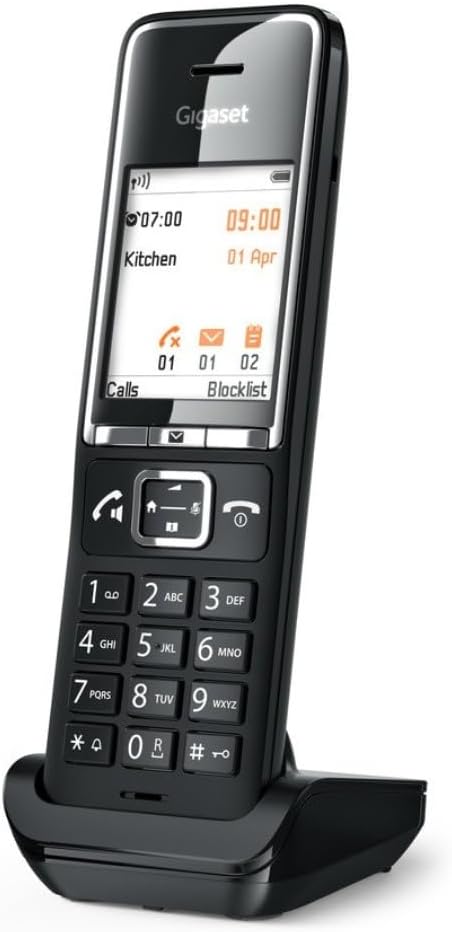
Figure 2: Handset on Charging Base
This image shows the Gigaset Confort 550HX handset positioned on its charging base from an angled perspective. The display is illuminated, showing call information and menu options, indicating it is ready for use or charging.
4. Operating the Handset
4.1 Deiak egitea
- Sartu nahi duzun telefono-zenbakia teklatua erabiliz.
- Sakatu Deitu button (green receiver icon) to initiate the call.
- Dei bat amaitzeko, sakatu Amaitu deia botoia (hartzaile gorriaren ikonoa).
4.2 Deiak jasotzea
Telefonoak jotzen duenean, sakatu Deitu button (green receiver icon) to answer the incoming call.
4.3 Menu Nabigazioa
The handset features an intuitive menu system:
- Sakatu Menua button (usually the center button below the display) to access the main menu.
- Use the navigation keys (up/down arrows) to scroll through menu options.
- Sakatu OK or Hautatu botoia hautaketa berresteko.
- Sakatu Itzuli or Utzi button to return to the previous screen or exit the menu.
4.4 Bolumena doitzea
During a call, use the navigation keys (up/down arrows) to adjust the earpiece volume. Ringtone volume can be adjusted via the 'Settings' menu.

Figure 3: Handset Display in Operation
This image shows the Gigaset Confort 550HX handset on its charging base, with the display active. The screen indicates 'Direktruf aktiv' (Direct Call active) and shows a phone number, along with the current time and date, demonstrating its operational status.
5. Mantentzea
To ensure the longevity and proper functioning of your Gigaset Confort 550HX, follow these maintenance guidelines:
- Garbiketa: Wipe the handset and charging base with a soft, damp oihal. Ez erabili garbitzaile edo disolbatzaile urratzailerik.
- Bateria zaintzea: Use only the recommended rechargeable AAA batteries. If the phone will not be used for an extended period, remove the batteries to prevent leakage.
- Ingurumena: Keep the phone away from extreme temperatures, direct sunlight, and moisture.
6. Arazoak
If you encounter issues with your Gigaset Confort 550HX, refer to the table below for common problems and solutions:
| Arazoa | Kausa posiblea | Irtenbidea |
|---|---|---|
| No display/Handset not turning on | Batteries are flat or incorrectly inserted. | Ensure batteries are correctly inserted and fully charged. Place handset on charging base. |
| Markatze-tonurik ez | Base station not connected or handset out of range. | Check base station power and phone line connection. Move closer to the base station. |
| Ezin ditut deiak egin/jaso | Handset not registered to the base station. | Register the handset to the base station (refer to Section 3.3). |
| Soinu-kalitate eskasa | Interference or handset too far from base. | Move closer to the base station. Avoid placing the base near other electronic devices. |
7. Zehaztapen Teknikoak
Key technical details for the Gigaset Confort 550HX:
| Ezaugarri | Zehaztapena |
|---|---|
| Marka | Gigaset |
| Modelo zenbakia | S30852-H3051-R104 |
| Neurriak (L x W x H) | 50 x 50 x 28 cm |
| Elementuaren pisua | 115 gramo |
| Beharrezko bateriak | 2 AAA bateria kargagarriak |
| Kolorea | Beltza |
| Materiala | Metala |
| Telefono mota | Haririk gabekoa |
| Energia iturria | Bateriaren bidez |
| Erantzungailu mota | Digitala |
8. Bermea eta Laguntza
Your Gigaset Confort 550HX is covered by a manufacturer's warranty. For detailed information regarding warranty terms, conditions, and duration, please refer to the warranty card included with your product or visit the official Gigaset website. For technical support, troubleshooting assistance beyond this manual, or service inquiries, please contact Gigaset customer support through their official channels.