
Sarrera
This manual provides comprehensive instructions for the safe and effective use of your TBPHP P20RL Electric Derma Pen. Please read this manual thoroughly before operating the device and retain it for future reference. The TBPHP P20RL is designed for personal skin care, featuring adjustable needle depth, multiple speed settings, and integrated LED light therapy.
Segurtasun Informazioa
Segurtasun-neurri garrantzitsuak:
- Do not use on irritated, infected, or broken skin.
- Consult a dermatologist before use if you have any underlying skin conditions or concerns.
- Always use new, sterile, individually packaged needle cartridges for each treatment.
- Mantendu haurren eskura.
- Do not share needle cartridges with others.
- Clean and disinfect the device body before and after each use.
- Saihestu begiekin eta muki-mintzekin kontaktua.
- Discontinue use immediately if you experience excessive pain, irritation, or adverse reactions.
- Gorde gailua leku fresko eta lehor batean.
Paketearen edukia
Egiaztatu elementu guztiak zure paketean daudela:
- 1 x TBPHP P20RL Electric Derma Pen
- 25 x Replacement Needle Cartridges (various types including Nano, 12-needle, 24-needle, 36-needle, 42-needle)
- 2 x Litio-ioizko bateria kargagarriak
- 1 x USB kargatzeko kablea
- 1 x Erabiltzailearen eskuliburua (dokumentu hau)

Image: The TBPHP P20RL Electric Derma Pen, shown alongside a selection of 25 needle cartridges and two rechargeable battery units.
Produktua amaituview
Familiarize yourself with the components of your TBPHP P20RL Derma Pen:

Image: A detailed diagram labeling the key components of the derma pen, including the needle cartridge, adjustable dial, scale mark, switch button, power supply port, color switch button, and LCD display showing speed levels 1 through 8.
- Needle Cartridge: Disposable, sterile cartridges for microneedling.
- Adjustable Dial: Used to set the needle depth from 0mm to 3mm.
- Eskala-marka: Indicates the selected needle depth.
- Switch Button (Power/Speed): Controls power on/off and adjusts speed levels.
- Color Switch Button (LED Light): Activates and cycles through the four LED light modes.
- LCD pantaila: Shows the current speed level (1-8).
- Elikatze-hornidura portua: For connecting the USB charging cable for wired operation or charging.
Konfigurazioa
1. Gailua kargatzea
The TBPHP P20RL can be operated wirelessly using its rechargeable batteries or directly via a power cable. Ensure the device is fully charged before first use.
- Insert one of the rechargeable lithium-ion batteries into the base of the derma pen.
- Connect the USB charging cable to the power supply port on the device and plug the other end into a compatible USB power adapter (not always included) or a computer USB port.
- The LCD display may indicate charging status. A full charge typically takes 3-6 hours and provides 3-6 hours of continuous use.

Image: Illustration showing the 500mAh battery capacity and how to insert a rechargeable battery into the derma pen.
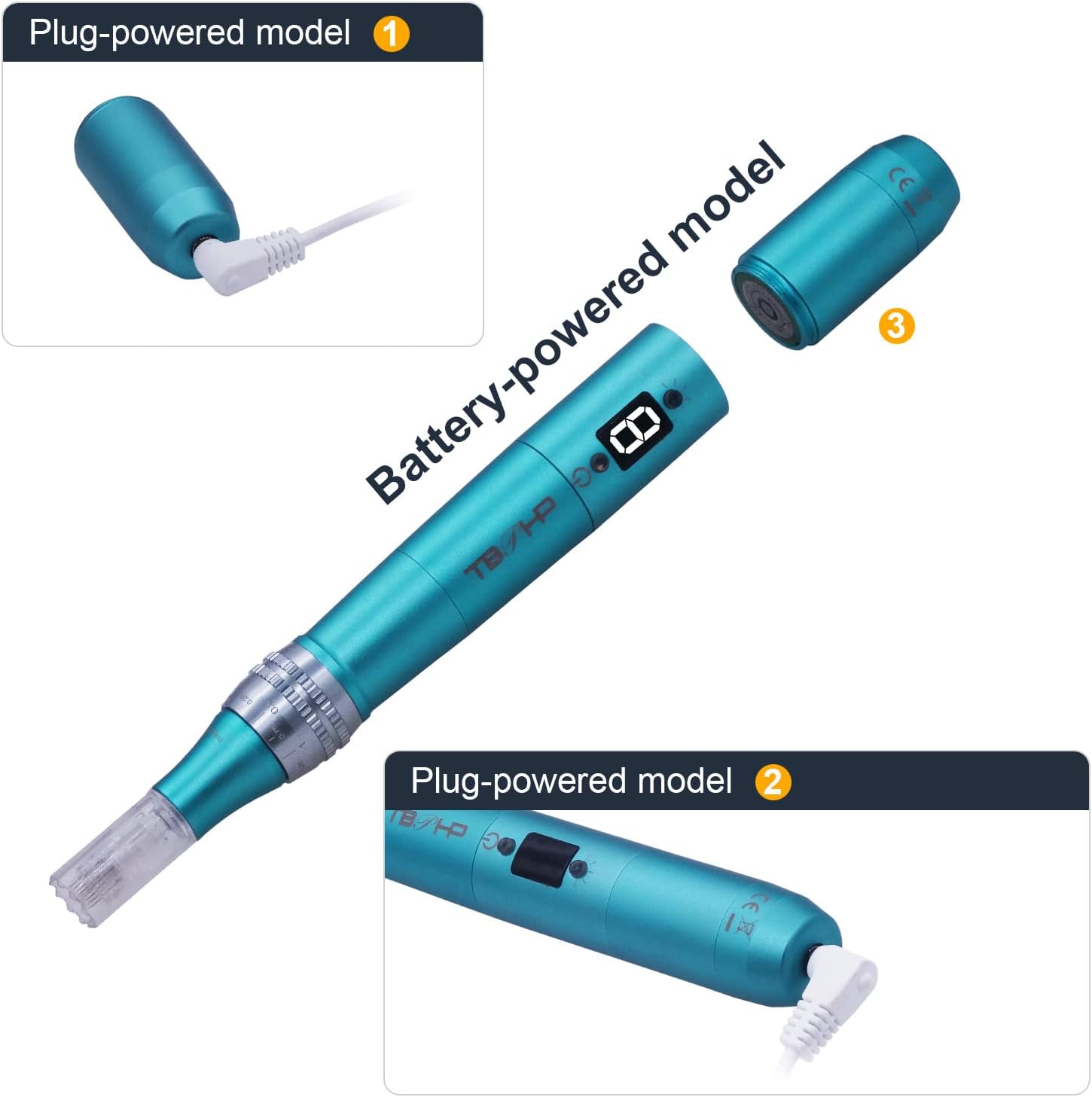
Image: Demonstrates the dual power modes of the derma pen: plug-powered (wired operation) and battery-powered (wireless operation) by inserting the battery.
2. Attaching a Needle Cartridge
- Ziurtatu gailua itzalita dagoela.
- Remove a new, sterile needle cartridge from its individual packaging.
- Align the cartridge with the pen head and twist clockwise until it clicks securely into place. Do not force it.
- To remove, twist counter-clockwise and pull off. Dispose of used cartridges safely.

Image: An illustration showing the various types of replacement needle cartridges (Nano, 12-needle, 24-needle, 36-needle, 42-needle) and their dimensions, along with an arrow indicating the twisting motion for attachment/detachment.
Funtzionamendu-argibideak
1. Powering On/Off and Adjusting Speed
- Gailua pizteko, luze sakatu Aldatu botoia (power/speed button) for approximately 1 second. The LCD display will illuminate, showing the current speed level.
- To adjust the speed, short press the Aldatu botoia. The device has 8 speed levels, ranging from 6,000 to 26,000 RPM. Each press will cycle through the speeds.
- Gailua itzaltzeko, eduki sakatuta Aldatu botoia for approximately 1 second until the display turns off.
2. Adjusting Needle Depth
The needle depth can be adjusted from 0mm to 3mm to suit different skin areas and treatment goals.
- Biratu Markagailu erregulagarria located on the body of the pen, just below the needle cartridge.
- Align the desired depth with the Eskala-marka. Start with a shallower depth (e.g., 0.25mm - 0.5mm) for sensitive areas or initial treatments, and gradually increase as needed.

Irudia: Gertutik view of the adjustable dial on the derma pen, showing the depth settings from 0 to 3.0mm, allowing precise control over needle penetration.
3. Changing LED Light Mode
The device features four different LED light colors, each with specific benefits:
- Sakatu Color Switch Button (light button) to activate the LED light.
- Each subsequent press will cycle through the available colors: Blue, Green, White, Orange.
- Sakatu berriro LED argia itzaltzeko.

Image: Visual representation of the four LED light colors (Blue, Green, White, Orange) and their respective effects on the skin, illustrating the light therapy feature of the derma pen.
| Kolorea | Funtzioa |
|---|---|
| Argi urdina | Anti-acne properties. |
| Argi Berdea | Promotes overall skin balance. |
| Argi Zuria | Aids in reducing redness. |
| Argi laranja | Supports anti-aging effects. |
4. Erabilera-gidalerroak
Before treatment, ensure your skin is clean and free of makeup. Apply a suitable serum or topical product to the treatment area.
- Gently glide the derma pen over the skin in small sections, using light pressure.
- Move the pen in a cross-hatch pattern (vertical, horizontal, and diagonal strokes) to ensure even coverage.
- Avoid dragging the pen across the skin. Lift and re-apply for each new section.
- Do not apply excessive pressure, especially with longer needle depths.
- Treatment duration and frequency depend on individual skin sensitivity and desired results. Typically, treatments are performed every 1-2 weeks.
- After treatment, apply a soothing and hydrating product. Avoid direct sun exposure and use sunscreen.

Image: An illustrative cross-section of skin showing the micro-channels created by the derma pen needles, facilitating product absorption.
Mantentzea
1. Gailua garbitzea
- After each use, ensure the device is turned off and unplugged.
- Remove and safely dispose of the used needle cartridge.
- Wipe the body of the derma pen with an alcohol wipe or a cloth dampened with disinfectant solution.
- Ez sartu gailua uretan edo likidoren batean.
- Utzi gailua airean guztiz lehortzen gorde aurretik.
2. Biltegiratzea
Store the TBPHP P20RL in its original packaging or a clean, dry place away from direct sunlight and extreme temperatures.
Arazoak konpontzea
| Arazoa | Kausa posiblea | Irtenbidea |
|---|---|---|
| Gailua ez da pizten. | Low battery or no battery inserted. Device not properly connected to power (if wired). | Ensure a charged battery is inserted or connect the device to a power source using the USB cable. Charge the battery if needed. |
| Needle cartridge not moving. | Cartridge not securely attached. Device malfunction. | Ensure the needle cartridge is twisted securely into place. If the issue persists, contact customer support. |
| Inconsistent needle depth. | Adjustable dial not set correctly. Worn-out cartridge. | Verify the adjustable dial is set to the desired depth. Replace the needle cartridge with a new one. |
| LED argiak ez dute funtzionatzen. | Light button not pressed. Device malfunction. | Press the Color Switch Button to activate the LED lights. If they still do not work, contact customer support. |
Zehaztapenak
| Ezaugarri | Xehetasuna |
|---|---|
| Eredua | P20RL |
| Marka | TBPHP |
| Abiadura Mailak | 8 (6,000 - 26,000 RPM) |
| Needle Depth | Adjustable 0mm - 3mm |
| LED argi koloreak | Blue, Green, White, Orange |
| Bateria mota | Rechargeable Lithium-ion (500 mAh) |
| Bateriaren iraupena | 3-6 hours continuous use (fully charged) |
| Elikatze Hornidura | Wired (USB) or Wireless (Battery) |
| Neurriak (L x W x H) | 18.1 x 2.55 x 2.55 cm (7.13 x 1.00 x 1.00 hazbete) |
| Pisua | 97.8 gramo (0.22 lb) |
| Materiala | Metala |
| Kolorea | Urdina |
| Jatorrizko Herrialdea | Txina |

Image: A technical drawing illustrating the dimensions of the TBPHP P20RL Derma Pen, showing its length of 7.09 inches and width of 0.90 inches.
Bermea eta Laguntza
Your TBPHP P20RL Electric Derma Pen comes with a 30-day refund or replacement guarantee and 365 days of technical support. For any questions, concerns, or warranty claims, please contact the seller or manufacturer directly through your purchase platform.