
1. Sarrera
This manual provides essential information for the safe and efficient use of your Princess 357250 Smart Air Cooler Fan. Please read these instructions carefully before operating the appliance and retain them for future reference.

Figure 1: Princess 357250 Smart Air Cooler Fan in operation, illustrating air circulation.
The Princess 357250 is a versatile 3-in-1 appliance functioning as a fan, air cooler, and air freshener. It features a 3.5-liter water reservoir, three operating modes, and can be controlled via the HomeWizard Climate app, voice commands, or the included remote control.
2. Segurtasun-argibide garrantzitsuak
Beti jarraitu oinarrizko segurtasun neurriak tresna elektrikoak erabiltzean, sute, deskarga elektriko eta lesio pertsonalen arriskua murrizteko.
- Irakurri argibide guztiak erabili aurretik.
- Ziurtatu liburukiatagAparatuan adierazitakoa zure tokiko sare elektrikoaren bolumenari dagokiotage konektatu aurretik.
- Ez sartu aparatua, kablea edo entxufea uretan edo beste likido batzuetan.
- Gainbegiratzea beharrezkoa da aparaturen bat umeek edo umeen ondoan erabiltzen dutenean.
- Deskonektatu entxufetik erabiltzen ez duzunean, piezak muntatu edo desmuntatu aurretik eta garbitu aurretik.
- Ez erabili aparaturik kablea edo entxufea hondatuta dagoenean, edo aparatuak gaizki funtzionatzen duenean edo nolabait hondatu ondoren.
- Ez erabili kanpoan.
- Ez utzi kablea mahai edo mostrador baten ertzetik zintzilik, ezta gainazal beroak ukitu ere.
- Ez jarri gas edo erregailu elektriko bero baten gainean edo inguruan, edo berotutako labe batean.
- Always place the appliance on a dry, stable, and level surface.
- Erabili soilik fabrikatzaileak gomendatutako edo saltzen dituen eranskinak.
- Ez blokeatu aireztapen-zulorik.
- Do not fill the water tank above the MAX level indicator.
- Ziurtatu beti ur-depositua ondo kokatuta dagoela erabili aurretik.
3. Produktuaren osagaiak
The Princess 357250 Smart Air Cooler Fan comes with the following components:
- Princess 357250 Smart Air Cooler Fan unit
- Urruneko kontrola
- 2 x CR2032 batteries (for remote control)
- Argibide eskuliburua
- Ice packs (typically 2, for enhanced cooling)

2. irudia: Erabilera erosoa lortzeko urrutiko agintea barne.

3. irudia: Adibample of an ice pack used to enhance cooling performance.
4. Konfigurazioa eta hasierako erabilera
4.1 Paketatzea
Carefully remove the air cooler from its packaging. Retain the packaging for future storage or transport. Check that all components listed in Section 3 are present and undamaged.
4.2 Jartzea
Place the air cooler on a firm, level surface. Ensure there is adequate space around the unit for proper air circulation. Do not place it directly against a wall or furniture that could obstruct the air intake or outlet.
4.3 Ur-biltegia betetzea
- Atera ur-depositua unitatearen atzeko behealdetik.
- Fill the water tank with clean, cool water. Do not exceed the 'MAX' fill line.
- For enhanced cooling, place the included ice packs in a freezer until frozen. Once frozen, add them to the water tank.
- Kontu handiz sartu ur-depositua berriro unitatean, bere lekuan klik egin arte.
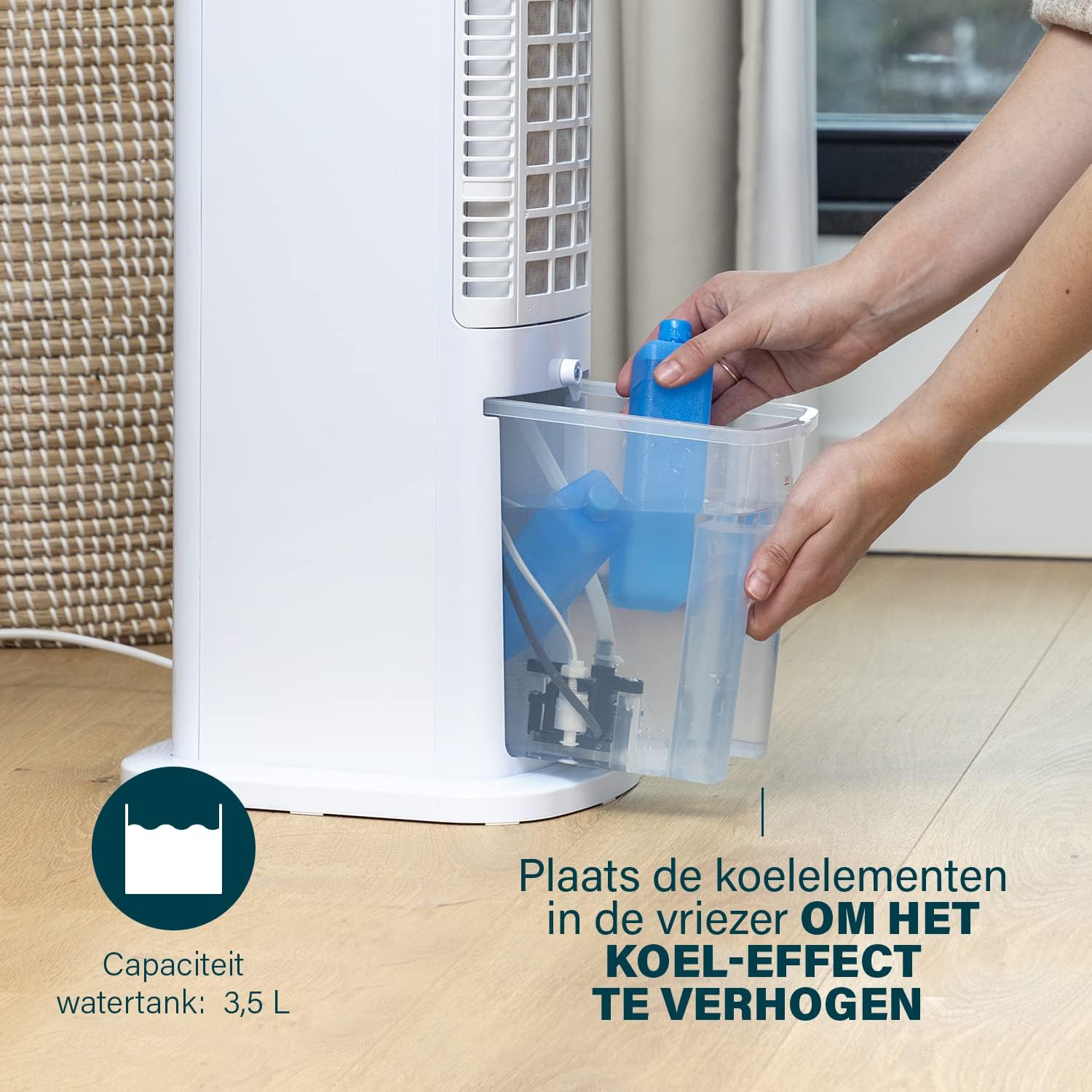
Figure 4: Adding ice packs to the water reservoir to increase cooling effect.
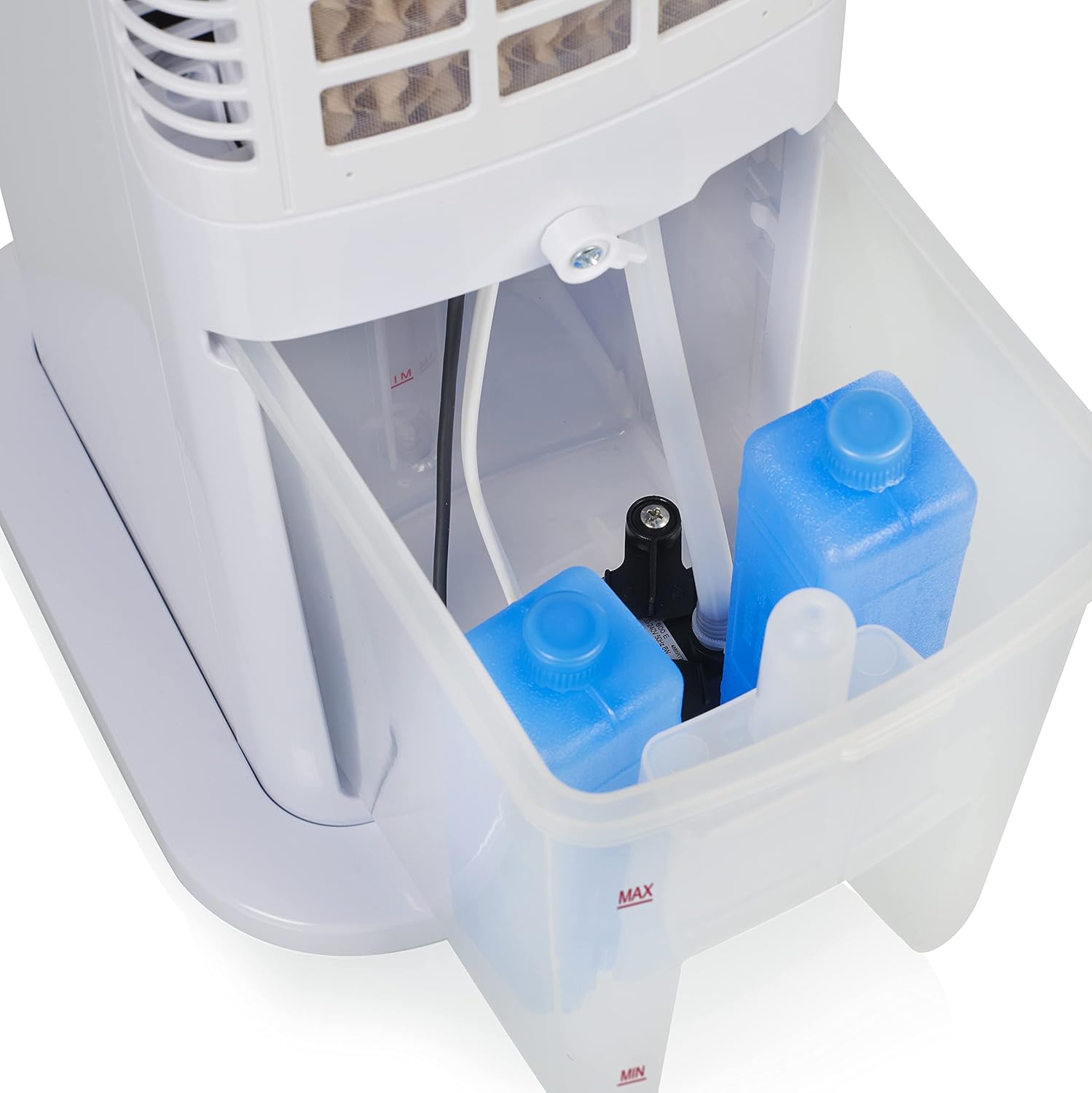
Figure 5: Water tank with ice packs, indicating fill levels.
4.4 Energia-konexioa
Plug the power cord into a suitable electrical outlet (230V). The unit will enter standby mode.
5. Funtzionamendu-argibideak
The Princess 357250 can be operated via its control panel, remote control, or the HomeWizard Climate app.
5.1 Kontrol-panela amaituview
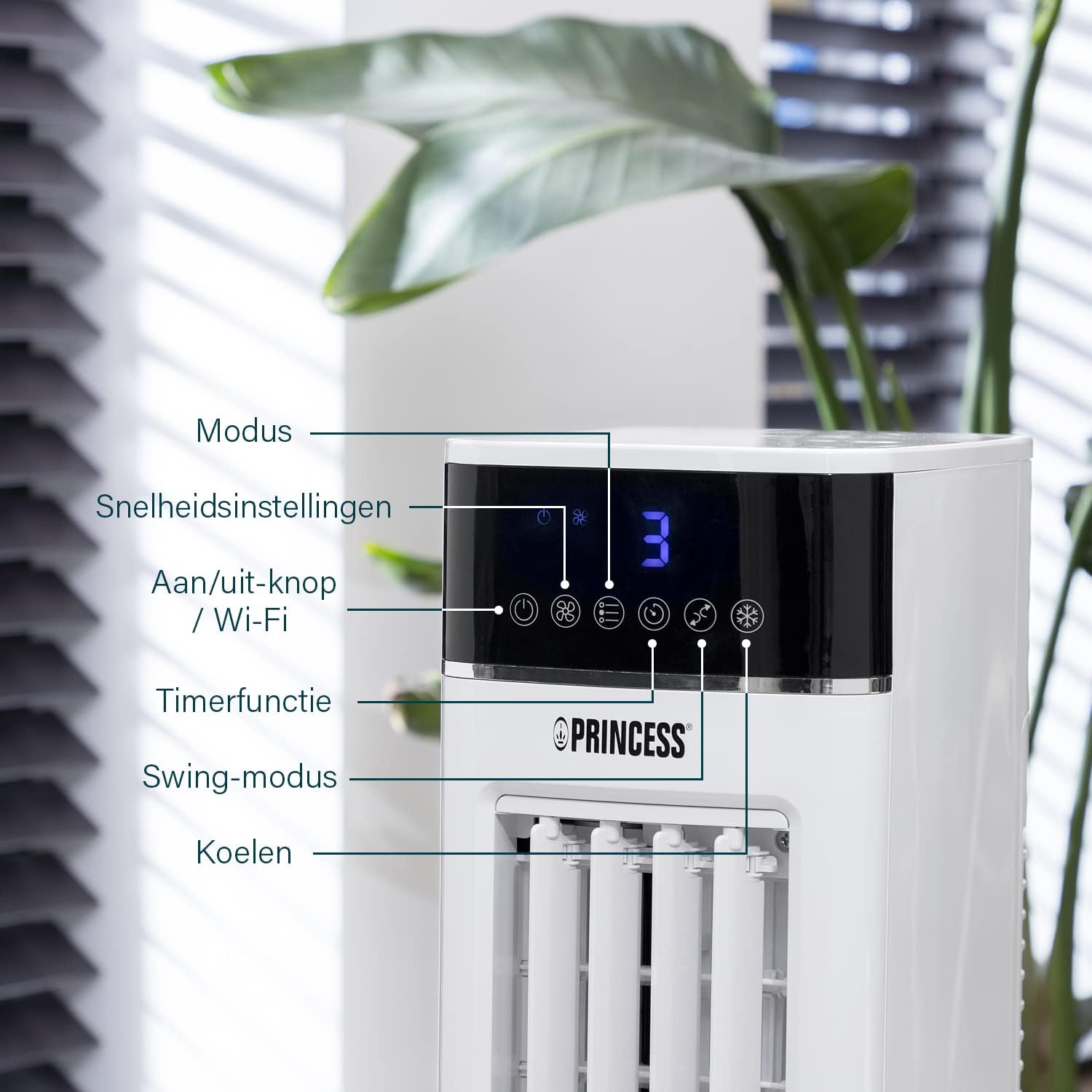
Figure 6: Control panel with various function buttons.
- Power Button (On/Off / Wi-Fi): Turns the unit on or off. Press and hold to activate Wi-Fi pairing mode.
- Modu botoia: Cycles through operating modes (Normal, Natural, Sleep).
- Abiadura botoia: Adjusts fan speed (Low, Medium, High).
- Tenporizadorearen botoia: Sets the operating timer.
- Swing botoia: Activates or deactivates the oscillation function.
- Cool Button: Activates or deactivates the evaporative cooling function (requires water in the tank).

Figure 7: Manual control via the top panel buttons.
5.2 Funtzionamendu moduak
- Modu Normala: Provides a constant airflow at the selected speed.
- Modu Naturala: Simulates natural breeze by varying fan speed intermittently.
- Lo modua: Operates at a lower, quieter speed, gradually decreasing fan speed over time for undisturbed sleep.
5.3 Oszilazio funtzioa
Press the 'Swing' button to activate the oscillation function. The unit will rotate horizontally to distribute air across a wider area (Oscillation range: 50°). Press again to stop oscillation.
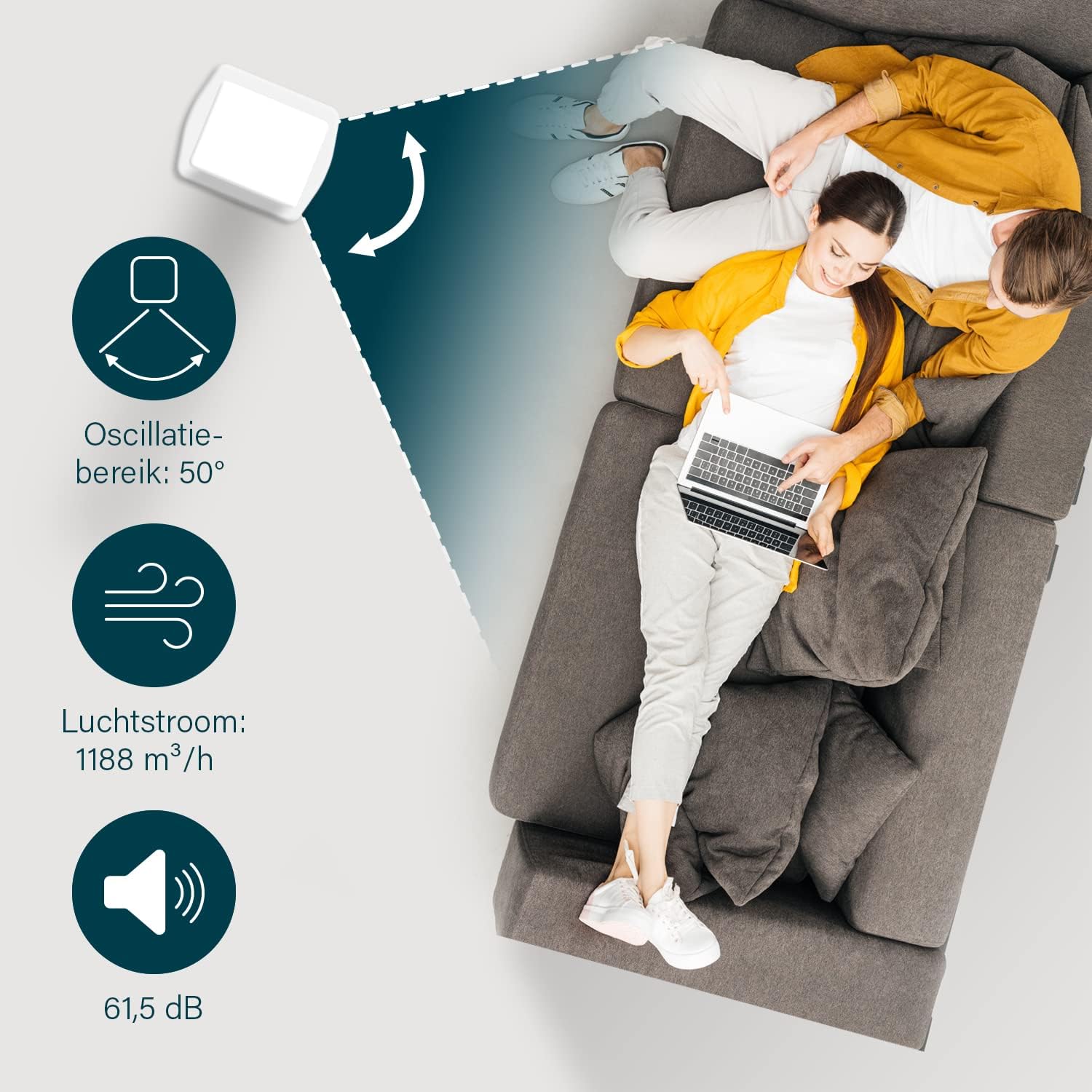
Figure 8: The oscillation function distributes cool air across a 50° range.
5.4 Evaporative Cooling Function
To activate the cooling function, ensure the water tank is filled. Press the 'Cool' button. The unit will use the water from the reservoir to cool the air through evaporation. This function works best in dry climates.

Figure 9: Innovative cooling technology utilizes a membrane system to cool air particles.
5.5 Smart Control (HomeWizard Climate App & Voice Control)
The Princess 357250 can be controlled remotely via the HomeWizard Climate app or voice commands (compatible with Siri and Google Assistant).
- Download the HomeWizard Climate app from your device's app store.
- Follow the in-app instructions to pair your air cooler with your Wi-Fi network. This typically involves pressing and holding the Power/Wi-Fi button on the unit until the Wi-Fi indicator blinks.
- Once paired, you can control all functions of the air cooler from your smartphone or tablet.
- For voice control, link your HomeWizard Climate account with your preferred voice assistant (Siri or Google Assistant) through their respective apps.

Figure 10: Control your air cooler using the HomeWizard Climate app and voice assistants.
6. Mantentzea eta Garbiketa
Regular cleaning ensures optimal performance and extends the lifespan of your air cooler.
6.1 Garbiketa orokorra
- Deskonektatu beti aparatua garbitu aurretik.
- Garbitu kanpoko gainazalak leun batekin, damp oihal. Ez erabili garbitzaile edo disolbatzaile urratzailerik.
- Ziurtatu ez dela urik sartzen kontrol-panelean edo beste atal elektrikoetan.
6.2 Ur depositua garbitzea
The water tank should be cleaned regularly, especially if using the cooling function frequently, to prevent mold and bacteria growth.
- Unplug the air cooler.
- Kendu ur depositua unitatetik.
- Hustu geratzen den ura.
- Clean the inside of the tank with a mild detergent and warm water. Use a soft brush if necessary to remove any residue.
- Garbitu ondo ur garbiarekin.
- Utzi depositua airean guztiz lehortzen unitatean berriro sartu aurretik.
6.3 Cooling Pad Cleaning/Replacement
The cooling pad (evaporative filter) may accumulate dust and mineral deposits over time. Refer to the diagram for its location.

Figure 11: The cooling pad, which should be cleaned periodically.
- Unplug the air cooler.
- Carefully remove the back panel to access the cooling pad.
- Gently remove the cooling pad.
- Rinse the cooling pad under running water to remove dust and deposits. For stubborn deposits, soak in a mild descaling solution (e.g., vinegar and water) for 30 minutes, then rinse thoroughly.
- Allow the cooling pad to dry completely before reinserting.
- Replace the cooling pad if it is damaged or heavily soiled and cannot be cleaned effectively.
7. Arazoak
If you encounter issues with your air cooler, refer to the following table for common problems and solutions.
| Arazoa | Kausa posiblea | Irtenbidea |
|---|---|---|
| Unitatea ez da pizten. | Ez dago elikadura hornidurarik. | Egiaztatu elikatze-kablea ondo konektatuta dagoen entxufe funtzional batera. |
| No cool air/weak cooling effect. | Ur-depositua hutsik edo maila baxuan dago. Hozte funtzioa ez dago aktibatuta. Cooling pad is dirty. | Bete ur depositua. Sakatu 'Hoztu' botoia. Clean or replace the cooling pad (see Section 6.3). |
| Usain desatsegina unitatetik. | Stagnant water or dirty water tank/cooling pad. | Clean the water tank and cooling pad thoroughly (see Section 6.2 & 6.3). Use fresh water. |
| Urruneko kontrola ez dabil. | Bateriak agortuta daude edo gaizki sartuta daude. | Replace the CR2032 batteries. Ensure they are inserted with correct polarity. |
| Aplikazioen kontrola ez dabil. | Wi-Fi connection issue. App not paired correctly. | Check your Wi-Fi network. Re-pair the device with the HomeWizard Climate app (see Section 5.5). |
Irtenbide hauek probatu ondoren arazoa konpontzen ez bada, jarri harremanetan bezeroarentzako arreta-zerbitzuarekin.
8. Zehaztapen Teknikoak
| Ezaugarri | Xehetasuna |
|---|---|
| Modelo zenbakia | 01.357250.01.001 |
| Marka | Printzesa |
| Mota | Smart Air Cooler Fan (3-in-1: fan, air freshener, air cooler) |
| Materiala | Akrilonitrilo Butadieno Estirenoa (ABS) |
| Kolorea | Zuria |
| Muntatze Mota | exentu |
| Kontrol mota | Remote control, Control Panel, HomeWizard Climate App, Voice Control (Siri, Google Assistant) |
| Ur biltegiaren edukiera | 3.5 litro |
| Funtzionamendu moduak | Normala, Naturala, Loa |
| Abiadura kopurua | 3 |
| Oszilazio-tartea | 50 gradu |
| Wattage | 70 Watt |
| liburukiatage | 230 Volt |
| Zarata Maila | 61.5 dezibelio |
| Elementuaren pisua | 4 kilogramo |
| Neurriak (L x W x H) | 28D x 22Z x 76A zentimetro |
| Spare Parts Availability (EU) | 2 Urte |

Figure 12: Dimensions and key specifications of the air cooler.
9. Bermea eta Laguntza
9.1 Bermearen informazioa
This Princess 357250 Smart Air Cooler Fan comes with a 2 urteko fabrikatzailearen bermea from the date of purchase. This warranty covers manufacturing defects and material faults under normal use conditions. It does not cover damage resulting from misuse, neglect, accident, alteration, or unauthorized repair.
Mesedez, gorde zure erosketa-froga berme-erreklamazioetarako.
9.2 Bezeroarentzako laguntza
For technical assistance, warranty claims, or questions regarding your Princess 357250 Smart Air Cooler Fan, please contact your retailer or visit the official Princess weblaguntza-harremanetarako datuak lortzeko gunea.
Honako hau ere kontsulta dezakezu: product page on Amazon.nl informazio eta baliabide osagarrietarako.