
Sarrera
This manual provides detailed instructions for the safe installation, operation, and maintenance of your bimar Wi-Fi Ceiling Fan, Model 1 (Ø 132). Please read this manual thoroughly before using the product and retain it for future reference.
Aurreikusitako erabilera: This high-performance ceiling fan is designed for ventilation in indoor domestic environments. Any other use is considered improper and potentially hazardous. The manufacturer cannot be held responsible for any damages resulting from improper use or repairs performed by unqualified personnel.
Segurtasun-argibide garrantzitsuak
Sute, deskarga elektriko edo pertsonei lesioen arriskua murrizteko, kontuan hartu honako hau:
- Irakurri argibide guztiak haizagailua instalatu aurretik.
- Instalazioa elektrizista kualifikatu batek egin behar du, tokiko eta estatuko arau elektriko guztien arabera.
- Ensure the installation site can support the fan's weight (approximately 6.2 kg).
- Deskonektatu beti zirkuitu-etengailu nagusian korrontea instalazioa edo mantentze-lanak egin aurretik.
- Ez erabili haizagailua kablea edo entxufea hondatuta badago.
- Keep hands, hair, and clothing away from moving blades.
- Do not insert any objects into the fan blades while it is operating.
- Tresna hau ez da gaitasun fisiko, sentsorial edo mental murriztua duten edo esperientzia eta ezagutza falta duten pertsonek (haurrak barne) erabiltzeko, baldin eta haien segurtasunaz arduratzen den pertsona batek gailuaren erabilerari buruz gainbegiratu edo jarraibiderik eman ez badu.
- Haurrak gainbegiratu behar dira aparatuarekin jolasten ez dutela ziurtatzeko.
Kutxan dagoena
Your bimar Wi-Fi Ceiling Fan package includes the following components:
- bimar Wi-Fi Ceiling Fan unit (with 3 blades)
- Urruneko Kontrola
- Mounting hardware (screws, brackets, etc.)
- Argibide eskuliburua (dokumentu hau)

Image: The bimar Wi-Fi Ceiling Fan, featuring three light-colored wooden blades and a brushed metal motor housing and downrod.
Konfigurazioa eta Instalazioa
1. Fan Instalazioa
Elektrizista kualifikatu batek instalazio profesionala egitea oso gomendagarria da. Ensure the ceiling structure can safely support the fan's weight and that all wiring complies with local electrical codes.
- Prestatu muntaketa kokalekua: Turn off power at the circuit breaker. Securely attach the mounting bracket to a ceiling joist or a fan-rated outlet box.
- Muntatu beheranzko haga eta motorra: Attach the downrod to the fan motor housing.
- Zintzilikatu haizagailua: Kontu handiz altxatu haizagailuaren multzoa eta zintzilikatu muntaketa-euskarritik.
- Haizagailua kableatu: Connect the electrical wires (live, neutral, ground) from the ceiling to the fan's wiring, following the wiring diagram provided in the separate installation guide (if applicable).
- Lotu Blades: Securely fasten the three blades to the motor housing.
- Ziurtatu kanola: Raise the canopy to cover the wiring and mounting bracket, securing it in place.

Irudia: Albokoa view of the bimar ceiling fan, illustrating the angle of the light wood blades and the connection to the downrod.
2. Wi-Fi eta aplikazioen konexioa
The bimar Wi-Fi Ceiling Fan is compatible with the Bimar Live Smart app for advanced control and scheduling.
- Deskargatu aplikazioa: Bilatu "Bimar Live Smart" in your smartphone's app store (iOS or Android) and install it.
- Sortu kontu bat: Ireki aplikazioa eta jarraitu pantailan agertzen diren argibideei erabiltzaile-kontu berri bat sortzeko edo saioa hasteko, dagoeneko baduzu.
- Gehitu gailua: Power on the ceiling fan. In the Bimar Live Smart app, tap "Add Device" or the "+" icon. Select "Ceiling Fan" or the appropriate device type.
- Konektatu wifira: Follow the app's instructions to put the fan into pairing mode (usually by pressing a button on the fan or remote for a few seconds). Connect the fan to your home 2.4GHz Wi-Fi network.
- Name the Device: Once connected, you can name your fan for easy identification within the app.

Image: A modern living room featuring the bimar ceiling fan installed, with a smartphone displaying the Bimar Live Smart app interface, indicating Wi-Fi and voice control capabilities.
Funtzionamendu-argibideak
Your bimar Wi-Fi Ceiling Fan offers multiple control options for convenience.
1. Urruneko Kontrolaren Eragiketa
The included remote control allows direct access to all fan functions.
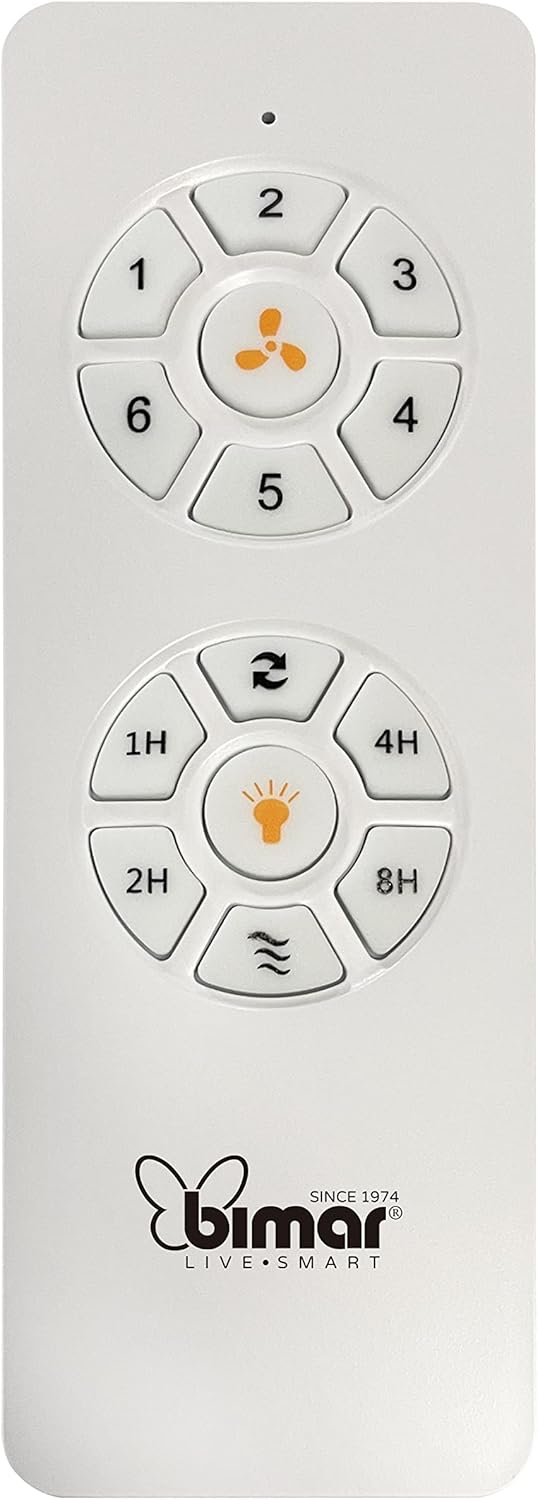
Image: The white remote control for the bimar ceiling fan, showing buttons for fan speed (1-6), fan on/off, timer (1H, 2H, 4H, 8H), mode selection, and reverse function.
- Piztu/Itzali: Sakatu haizagailuaren ikonoaren botoia haizagailua piztu edo itzaltzeko.
- Abiadura doitzea: Use buttons 1-6 to select one of the six available fan speeds.
- Tenporizadorearen funtzioa: Press 1H, 2H, 4H, or 8H to set the fan to automatically turn off after the selected duration.
- Modu aukeraketa: Use the mode button (often represented by waves or arrows) to cycle through Normal, Natural, Sleep, and Breeze modes.
- Uda/Negua modua: The reverse button (often two arrows forming a circle) changes the blade rotation direction.
2. App Control (Bimar Live Smart)
Once connected to the Bimar Live Smart app, you can access enhanced features:
- Urruneko funtzionamendua: Control all fan functions from anywhere with an internet connection.
- Programazioa: Program daily and weekly on/off times for automated operation.
- Tenporizadorea: Adjust the timer from 1 to 8 hours.
- Mode and Speed Selection: Easily switch between the 6 speeds and 4 operating modes.
3. Ahots kontrola
The bimar Wi-Fi Ceiling Fan is compatible with popular voice assistants like Amazon Alexa and Google Assistant. After connecting the fan to the Bimar Live Smart app, link your Bimar account to your voice assistant app (e.g., Alexa app or Google Home app).
Example Ahots komandoak:
- "Alexa, turn on the ceiling fan."
- "Hey Google, set ceiling fan speed to 3."
- "Alexa, turn off the ceiling fan in 1 hour."
4. Operating Modes and Speeds
- 6 Ventilation Speeds: Adjust the airflow intensity to your preference.
- Modu normala: Consistent airflow at the selected speed.
- Modu naturala: Haizagailuaren abiadura aldatuz brisa naturalak simulatzen ditu.
- Lo egiteko modua: Abiadura baxuagoan eta isilagoan funtzionatzen du, atseden lasaia izateko.
- Breeze modua: Provides a gentle, intermittent airflow.
5. Summer/Winter Function
The reversible blade function allows for year-round use:
- Udako modua (erlojuaren orratzen kontrako noranzkoan biratzea): Beheranzko aire-fluxua sortzen du, freskagarritasun-haizea sortuz.
- Neguko modua (erlojuaren orratzen noranzkoan biratzea): Creates an upward airflow, circulating warm air trapped near the ceiling, improving heating efficiency.

Image: A diagram illustrating the airflow patterns for summer (indirect ventilation, pushing air upwards) and winter (direct ventilation, pulling air downwards) modes of a ceiling fan.
Mantentzea
Mantentze-lan erregularrak zure sabaiko haizagailuaren errendimendu optimoa eta iraupen luzea bermatzen ditu.
- Garbiketa: Before cleaning, ensure the fan is turned off and power is disconnected at the circuit breaker. Use a soft, damp cloth to wipe down the blades and motor housing. Do not use abrasive cleaners or solvents.
- Palan ikuskatzea: Periodically check the blades for any signs of damage or warping. Ensure all blade screws are tight.
- Motoren lubrifikazioa: The fan's DC motor is designed for maintenance-free operation and does not require lubrication.
- Loturak estutu: Denborarekin, lotura batzuk askatu daitezke. Urtero egiaztatu eta estutu torloju eta konexio guztiak.

Irudia: Gertutik view of the bimar ceiling fan's brushed metal motor housing and the attachment points for the light wood blades, highlighting areas for cleaning and inspection.
Arazoak konpontzea
| Arazoa | Kausa posiblea | Irtenbidea |
|---|---|---|
| Fan ez da martxan jartzen | No power supply; Remote control battery low; Incorrect wiring. | Check circuit breaker and wall switch. Replace remote batteries. Verify wiring connections (consult electrician). |
| Fan dabil | Palak edo muntatzeko piezak solteak; Palak desorekatuak. | Ensure all blade screws and mounting screws are tight. Use a balancing kit (not included) if necessary. |
| Urruneko kontrola ez dabil | Low battery; Obstruction between remote and receiver; Remote not paired. | Replace remote batteries. Ensure clear line of sight. Refer to pairing instructions in the full manual. |
| Wi-Fi konexio arazoak | Incorrect Wi-Fi password; Router too far; 5GHz network selected. | Verify Wi-Fi password. Move router closer or use a Wi-Fi extender. Ensure you are connecting to a 2.4GHz network. Reset fan and re-attempt pairing. |
| Fan zaratatsua da | Loose screws; Blades hitting an obstruction; Motor issue. | Check and tighten all screws. Ensure nothing is obstructing the blades. If noise persists, contact customer support. |
Zehaztapenak
| Ezaugarri | Xehetasuna |
|---|---|
| Marka | bimar |
| Modelo zenbakia | 1 |
| Produktuaren neurriak | 132 x 132 x 27.5 cm (Diametroa x Diametroa x Altuera) |
| Pisua | 6.2 kg |
| Pala kopurua | 3 |
| Materiala | Egurra |
| Kolorea | Black (Note: Blades are light wood finish as shown in images) |
| Motor Mota | DC (Brushless, energy-saving) |
| Energia-kontsumoa | 35W |
| Kontrol-metodoak | Remote Control, Bimar Live Smart App, Voice Control (Amazon Alexa, Google Assistant) |
| Fan Abiadurak | 6 |
| Funtzionamendu moduak | Normal, Natural, Sleep, Breeze |
| Tenporizadorea | 1 eta 8 ordu |
| Ezaugarri gehigarriak | Silent operation, Summer/Winter mode (reversible blades) |
| Energia iturria | Elektrikoa |
| Instalazio mota | Sabaiko Muntaia |

Image: The three light wood fan blades, detached and laid flat, showcasinhaien diseinua eta ehundura g.


Irudia: Bi views of the bimar ceiling fan, illustrating different downrod lengths: one with a 25 cm downrod and another with a 13 cm downrod, affecting the overall height of the fan.
Bermea eta Laguntza
For warranty information, technical support, or service inquiries, please refer to the warranty card included with your product or visit the official bimar webgunea. Gorde erosketaren egiaztagiria bermearen erreklamazioetarako.
Fabrikatzailea: Bimar S.r.l.
Harremanetarako: Mesedez, bisitatu the bimar store on Amazon or the official bimar webharremanetarako datuak lortzeko gunea.