
1. Sarrera
Eskerrik asko erosketagatik.asing the Blaupunkt PB10DB Bluetooth Karaoke Speaker. This manual provides essential information for the safe and efficient operation of your device. Please read it thoroughly before use and keep it for future reference. The PB10DB is a portable party speaker designed for high-quality audio playback and karaoke, featuring Bluetooth connectivity, USB, and AUX inputs.
2. Segurtasun informazioa
Funtzionamendu segurua bermatzeko eta kalteak saihesteko, jarraitu neurri hauek:
- Ez jarri gailua tenperatura altuen, eguzki-argiaren eraginpean edo hezetasun handiaren eraginpean.
- Keep the speaker away from water and other liquids. The product is indicated as waterproof, but avoid submerging it.
- Do not attempt to disassemble or modify the speaker. Repairs should only be performed by qualified personnel.
- Erabili zehaztutako kargatzeko osagarriak soilik.
- Ziurtatu bozgorailuen inguruan behar bezala aireztatuta dagoela erabiltzen ari den bitartean.
- Entzumen-kalteak saihesteko, saihestu denbora luzez bolumen altuegietan entzutea.
3. Paketearen edukia
Mesedez, egiaztatu elementu guztiak paketean daudela:
- Blaupunkt PB10DB Bluetooth Karaoke Speaker
- Energia-egokigailua/kargatzeko kablea
- Erabiltzailearen eskuliburua (dokumentu hau)
- Microphone (if included in your specific package)
4. Produktua amaitu daview
Familiarize yourself with the various parts of your Blaupunkt PB10DB speaker.
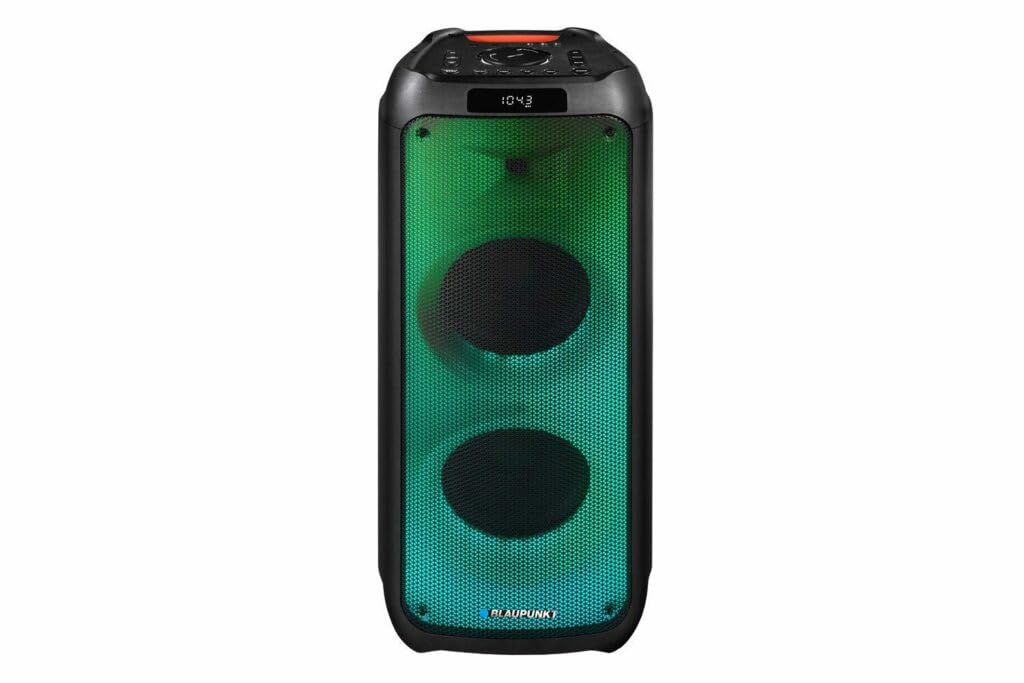
1. irudia: Aurrealdea view of the Blaupunkt PB10DB speaker, showcasing the dual speaker grilles and dynamic LED lighting. The top panel features a display and control buttons.

2. irudia: Angelukoa view of the Blaupunkt PB10DB speaker, highlighting its portable design and the side profile.
Controls and Ports (Typical Layout)
- Pizteko botoia: Bozgorailua piztu/itzali egiten du.
- Modu botoia: Switches between Bluetooth, USB, AUX, and FM radio modes.
- Bolumen kontrola: Master bolumena doitzen du.
- Erreproduzitu/Pausatu botoia: Multimedia erreprodukzioa kontrolatzen du.
- Aurreko/Hurrengo pistaren botoiak: Pistatik nabigatzen du.
- Microphone Input (MIC IN): For connecting a wired microphone for karaoke.
- USB ataka: USB unitate batetik musika erreproduzitzeko edo kanpoko gailuak kargatzeko.
- AUX sarrera (3.5 mm): For connecting external audio devices via an audio cable.
- Kargatzeko ataka: Bozgorailua kargatzeko korronte-egokitzailea konektatzeko.
5. Konfigurazioa
5.1 Bozgorailua kargatzea
- Connect the provided power adapter to the charging port on the speaker.
- Entxufatu egokitzailea korronte-hartune egoki batera.
- Kargatzeko adierazlearen argia piztuko da (kolorea alda daiteke) bozgorailua kargatzen ari dela erakusteko.
- Once fully charged, the indicator light may change color or turn off. Disconnect the charger.
A full charge typically takes several hours and provides approximately 8 hours of playback time.
5.2 Piztu/Itzaltzea
- Pizteko: Press and hold the Power button for a few seconds until the display lights up and you hear an audible prompt.
- Itzaltzeko: Sakatu eta eutsi berriro pizteko botoia segundo batzuetan, pantaila itzali eta soinu-abisu bat entzun arte.
6. Funtzionamendu-argibideak
6.1 Bluetooth parekatzea
- Ensure the speaker is powered on and in Bluetooth mode. If not, press the Mode button until "Bluetooth" or a similar indicator appears on the display. The speaker will enter pairing mode, indicated by a flashing Bluetooth icon or LED.
- Zure gailu mugikorrean (smartphone-a, tableta, etab.), gaitu Bluetooth-a eta bilatu eskuragarri dauden gailuak.
- Select "Blaupunkt PB10DB" from the list of found devices.
- Once paired, the speaker will emit an audible confirmation, and the Bluetooth indicator will stop flashing.
- Orain zure gailuko audioa bozgorailuaren bidez erreproduzitu dezakezu.
Bozgorailuak automatikoki saiatuko da azken parekatutako gailura berriro konektatzen pizten denean.
6.2 Karaoke funtzioa
- Connect a wired microphone (not always included) to the MIC IN port on the speaker.
- Ensure the microphone is switched on (if it has a power switch).
- Play your desired karaoke track via Bluetooth, USB, or AUX.
- Adjust the microphone volume and echo effects (if available on the speaker) using the dedicated controls.
6.3 USB erreprodukzioa
- Sartu MP3 audioa duen USB flash unitate bat files USB atakan sartu.
- Press the Mode button to switch to USB mode. The speaker will automatically begin playing music from the USB drive.
- Erabili Erreproduzitu/Pausatu eta Aurreko/Hurrengo Pista botoiak erreprodukzioa kontrolatzeko.
6.4 AUX sarrera
- Konektatu 3.5 mm-ko audio-kable baten mutur bat (ez dago barne) bozgorailuaren AUX IN atakara.
- Konektatu kablearen beste muturra kanpoko audio gailuaren entzungailuen konektorera edo audio irteerara.
- Sakatu Modu botoia AUX modura aldatzeko.
- Kontrolatu erreprodukzioa eta bolumena kanpoko audio gailutik.
7. Mantentzea
7.1 Garbiketa
- Always power off the speaker and disconnect it from the power source before cleaning.
- Use a soft, dry cloth to wipe the exterior of the speaker.
- Ez erabili garbitzaile, argizari edo disolbatzaile urratzailerik, hauek akabera kaltetu baitezakete.
7.2 Biltegiratzea
- Gorde bozgorailua leku fresko eta lehor batean, eguzki-argitik eta muturreko tenperaturetatik babestuta.
- Denbora luzez gordetzen baduzu, kargatu bateria aldian-aldian (adibidez, 3 hilabetero) bateriaren osasuna mantentzeko.
8. Arazoak
| Arazoa | Kausa posiblea | Irtenbidea |
|---|---|---|
| Bozgorailuak ez du pizten. | Bateria agortuta dago. | Charge the speaker using the provided power adapter. |
| Ez dago soinurik bozgorailutik. | Bolumena baxuegia edo isilarazita dago. Sarrera modu okerra. | Increase volume. Press the Mode button to select the correct input (Bluetooth, USB, AUX). |
| Bluetooth parekatzeak huts egiten du. | Bozgorailua ez dago parekatze moduan. Gailua urrunegi dago. Interferentziak. | Ziurtatu bozgorailua Bluetooth parekatze moduan dagoela. Hurbildu gailua bozgorailura. Itzali beste Bluetooth gailuak. |
| Mikrofonoa ez dabil. | Microphone not connected properly or switched off. Microphone volume too low. | Check microphone connection. Ensure microphone is powered on. Adjust microphone volume. |
| USB bidezko erreprodukzioa ez dabil. | USB unitatea ez dago behar bezala formateatua edo ez da bateragarria file motak. | Ensure USB drive is formatted to FAT32 and contains MP3 fileSaiatu beste USB unitate batekin. |
9. Zehaztapenak
| Ereduaren izena: | PB10DB |
| Marka: | BLAUPUNKT |
| Konektibitate Teknologia: | Laguntzailea, Bluetooth, USB |
| Bozgorailuaren irteera-potentzia maximoa: | 1000 Watt |
| Audio irteera modua: | Estereoa |
| Muntatze mota: | Mahai-muntaia |
| Materiala: | Metala eta Plastikoa |
| Hizlari mota: | Txiogailua |
| Ezaugarri berezia: | Musika |
| Gomendatutako erabilerak: | For music player |
| Kolorea: | Urdina |
| Iragazgaitza: | Egia |
| Kontrol-metodoa: | Ukitu |
| Tweeter diametroa: | 4 zentimetro |
| Bateriaren batez besteko iraupena: | 8 ordu |
| Gailu bateragarriak: | Ordenagailu eramangarria, Smartphone |
| Energia iturria: | Bateriaren bidez |
| Elementuaren pisua: | 105 gramo |
| Produktuaren neurriak (L x W x H): | 24 x 69 x 2.5 cm |
10. Bermea eta Laguntza
Blaupunkt products are designed and manufactured to the highest quality standards. For detailed warranty information, please refer to the warranty card included with your product or visit the official Blaupunkt webgunea.
For technical support, troubleshooting assistance, or service inquiries, please contact Blaupunkt customer support through their official channels.
- Ofiziala Webgunea: www.blaupunkt.com
- Bezeroarentzako arreta: Refer to your regional Blaupunkt webharremanetarako datuak lortzeko gunea.