
1. Sarrera
The XWJNE 2000 Watt Pure Sine Wave Power Inverter is designed to convert 24V DC power from your battery to 110V/120V AC power, suitable for various applications including vehicles, RVs, homes, remote workplaces, and outdoor emergencies. With a true rated continuous power of 2000 watts and a peak power of 4000 watts, this inverter provides stable and efficient power for your electronic devices and appliances. Its pure sine wave output ensures compatibility with sensitive electronics, reducing conversion loss and providing clean power.
This manual provides essential information for the safe and effective operation, setup, and maintenance of your XWJNE Power Inverter.
2. Segurtasun-argibideak
Mesedez, irakurri eta ulertu segurtasun-jarraibide guztiak inbertsorea instalatu edo erabili aurretik. Argibide hauek ez jarraitzeak deskarga elektrikoak, suteak edo lesio larriak eragin ditzake.
- Aireztapen egokia: Ensure the inverter is installed in a well-ventilated area. Do not block the cooling fans or vents.
- Zuzena Voltage: Connect the inverter only to a 24V DC power source. Connecting to an incorrect voltage may damage the unit and connected devices.
- Polaritatea: Always connect the positive (+) terminal of the inverter to the positive (+) terminal of the battery and the negative (-) terminal of the inverter to the negative (-) terminal of the battery. Reverse polarity can cause severe damage.
- Lurreratzea: Properly ground the inverter using the provided body ground wire to prevent electrical hazards.
- Gainkarga babesa: Do not exceed the inverter's rated continuous power (2000W) or peak power (4000W). The inverter features overload protection, but consistent overloading can reduce its lifespan.
- Tenperatura: The dual cooling fans activate automatically when the internal temperature exceeds 50°C (122°F) or when the load is more than halfway, providing over-temperature protection. Ensure adequate airflow around the unit.
- Hezetasuna: Keep the inverter away from water, rain, and excessive moisture.
- Haurrak: Mantendu inbertsore-makina haurren eskura ez dagoen leku batean.
- Mantentzea: Refer to the maintenance section for proper care. Do not attempt to open or service the inverter yourself, as it contains high voltagosagaiak.
3. Paketearen edukia
Upon opening your XWJNE Power Inverter package, please verify that all the following items are included:
- 1 x XWJNE 2000W Pure Sine Wave Power Inverter
- 1 x Remote Control with 16.4ft (5m) cable
- 2 x Car Battery Cables (Red for Positive, Black for Negative)
- 3 x Replaceable Fuses (Spare)
- 1 x giltza
- 1 x 3-in-1 Phone Charger Cable
- 1 x Erabiltzailearen eskuliburua (Dokumentu hau)

Figure 3.1: XWJNE 2000W Power Inverter and its accessories.

Figure 3.2: Package accessories and product size overview.
4. Konfigurazioa eta instalazioa
Follow these steps to properly set up your XWJNE Power Inverter:
- Aukeratu kokapena: Select a dry, well-ventilated area for the inverter, away from direct sunlight, heat sources, and flammable materials.
- Konektatu lurreko kablea: Attach the provided body ground wire to the designated grounding screw on the inverter and to a suitable ground point (e.g., vehicle chassis or earth ground).
- Bateriaren kableak konektatu:
- Ziurtatu inbertsore-makina itzalita dagoela.
- Konektatu gorria positive (+) battery cable to the positive (+) terminal on the inverter. Unscrew the terminal cap, insert the cable lug, and tighten securely.
- Konektatu beltza negative (-) battery cable to the negative (-) terminal on the inverter. Unscrew the terminal cap, insert the cable lug, and tighten securely.
- Konektatu beste muturra gorria positive (+) battery cable to the positive (+) terminal of your 24V battery.
- Konektatu beste muturra beltza negative (-) battery cable to the negative (-) terminal of your 24V battery.
Note: Ensure all connections are tight to prevent overheating and ensure optimal performance.
- Konektatu urrutiko agintea (aukerakoa): If desired, plug the remote control cable into the "Remote" port on the inverter. The remote control allows you to monitor input/output voltage, battery capacity, and turn the inverter on/off from a distance.
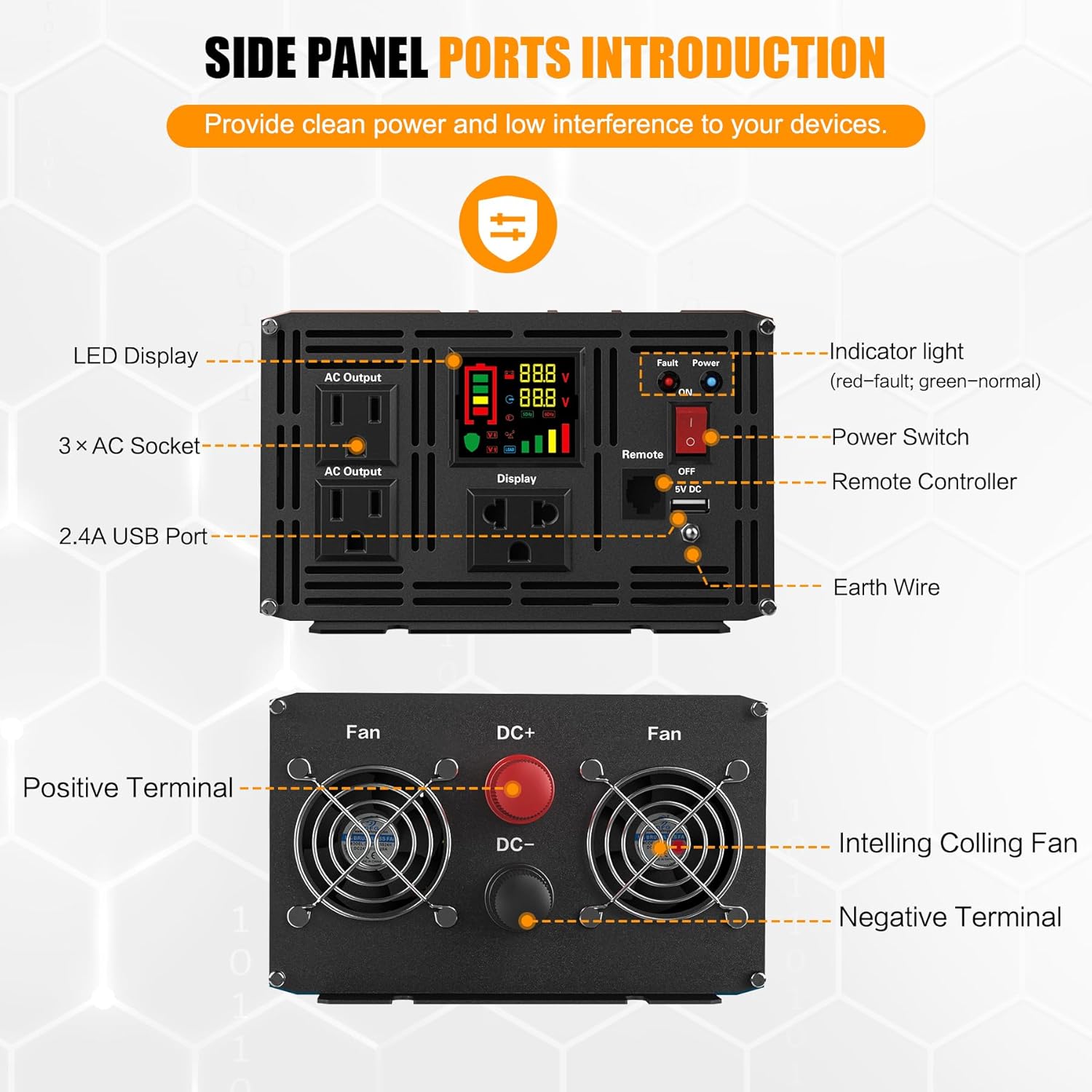
Figure 4.1: Side Panel Ports Introduction.

Figure 4.2: Smart Remote Control connection.
5. Funtzionamendu-argibideak
Once the inverter is properly installed, follow these steps to operate it:
- Piztu: Flip the "Power" switch on the inverter to the "ON" position. If using the remote control, press the ON/OFF button on the remote. The LED display on the inverter will illuminate.
- Monitorearen pantaila: The clear LCD display provides real-time information:
- Sarrera boltage (Battery Voltage)
- Irteera boltage (korronte alternoko irteera)
- Bateriaren edukieraren adierazlea
- Karga ehunekotage
- Protection Indicators (Fault, Over-voltage, Behe-boltage, Over-temperature, Overload)
- Konektatu korronte alternoko gailuak: Plug your 110V/120V AC devices into the three AC output sockets on the inverter. For USB-powered devices, use the 5V DC USB output port.
- Itzali: When you are finished using the inverter, turn off all connected devices first, then flip the "Power" switch on the inverter to the "OFF" position (or press the ON/OFF button on the remote control).

Figure 5.1: Clear LCD Display indicators.

Figure 5.2: Wide Application of the inverter.
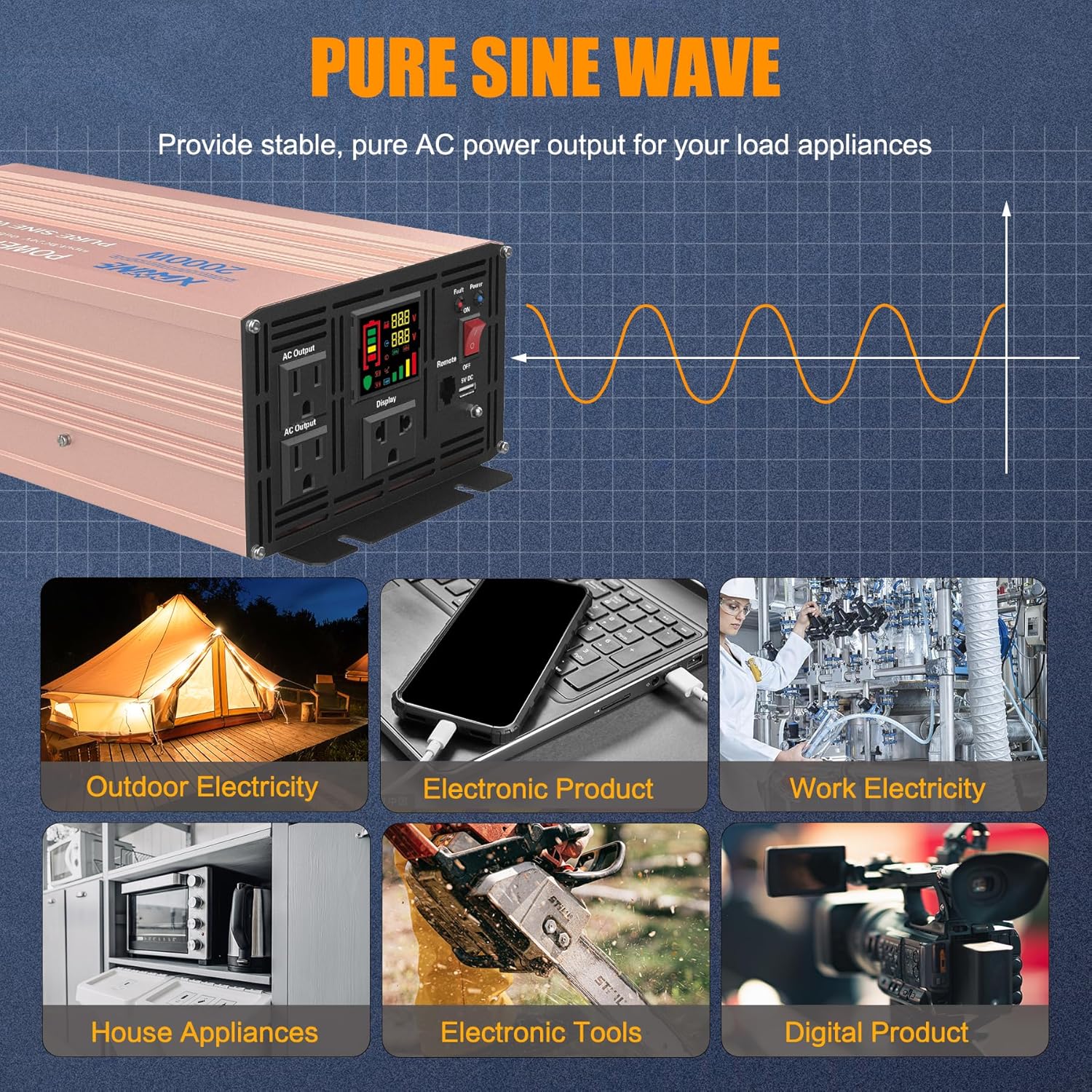
Figure 5.3: Pure Sine Wave output and applications.
6. Mantentzea
To ensure the longevity and optimal performance of your XWJNE Power Inverter, follow these maintenance guidelines:
- Garbiketa: Regularly clean the exterior of the inverter with a soft, dry cloth. Do not use liquid cleaners or solvents.
- Haizagailuen aireztapenak: Keep the cooling fan vents clear of dust and debris to ensure proper airflow. The dual cooling fans are crucial for preventing overheating.
- Konexioak: Periodically check all electrical connections (battery cables, ground wire) to ensure they are secure and free from corrosion. Loose connections can lead to overheating and reduced performance.
- Biltegiratzea: Inbertsorea denbora luzez gordetzen baduzu, deskonektatu bateriatik eta gorde leku fresko eta lehor batean.
- Fusiblearen ordezkapena: If a fuse blows, replace it only with a fuse of the same type and rating as provided (spare fuses are included). Refer to the diagram for fuse location.

Figure 6.1: Dual Cooling System for optimal performance.
7. Arazoak
If you encounter issues with your XWJNE Power Inverter, consult the table below for common problems and their solutions:
| Arazoa | Kausa posiblea | Irtenbidea |
|---|---|---|
| Inbertsoreak ez du pizten. | Bateriaren konexio solteak, bateriaren bolumen baxuatage, blown fuse, power switch off. | Check and tighten battery cable connections. Ensure battery voltage is sufficient (24V). Replace blown fuses. Turn the power switch ON. |
| KA irteerarik ez. | Overload, short circuit, over-temperature, low/over-voltagbabesa aktibatuta. | Reduce load. Check for short circuits in connected devices. Allow inverter to cool down. Check battery voltage. |
| Inverter beeps continuously. | Bateria bolumen baxuatage, overload, over-temperature. | Recharge or replace battery. Reduce load. Allow inverter to cool down. |
| Display shows "Fault" or error code. | Internal fault, severe protection activation (e.g., reverse polarity). | Disconnect from power source, wait a few minutes, then reconnect. If error persists, contact customer support. |
| Fans are constantly running. | High ambient temperature, heavy load. | This is normal operation to prevent overheating. Ensure adequate ventilation. |

Figure 7.1: Multiple Protection features of the inverter.
8. Zehaztapenak
| Ezaugarri | Zehaztapena |
|---|---|
| Eredua | XWJNE Onduleur sinusoïdal pur |
| Etengabeko potentzia nominala | 2000 Watt |
| Potentzia gailurra | 4000 Watt |
| Sarrera DC boltage | 24V DC |
| Irteera AC Voltage | 110V/120V AC |
| Irteerako maiztasuna | 60Hz |
| Irteerako uhin forma | Sine Wave Pure |
| Bihurketa-eraginkortasuna | Gehienez %94.2 |
| USB irteera | 2 x 2.4A (5V DC) |
| AC saltokiak | 3 |
| Hoztea | Dual Cooling Fans (Temperature Controlled) |
| Produktuaren neurriak | 14.96 x 6.69 x 4.13 hazbete |
| Elementuaren pisua | 10.69 kilo |
9. Bermea eta Laguntza
XWJNE stands behind the quality of its products. This product is covered by product liability insurance. For any questions, concerns, or support needs regarding your XWJNE Power Inverter, please do not hesitate to contact us. Our customer support team is committed to answering your questions within 24 hours.
Laguntza gehiago behar baduzu, bisitatu XWJNE Store on Amazon.