
1. Sarrera
The SteelSeries Arctis Nova 1X Gaming Headset delivers an immersive audio experience across multiple platforms. Designed for comfort and clarity, it features the Signature Arctis Sound and a ClearCast Gen 2 Microphone, making it ideal for Xbox Series X|S, PC, PlayStation, Switch, and mobile gaming.
This manual provides detailed instructions for setting up, operating, and maintaining your Arctis Nova 1X headset to ensure optimal performance and longevity.
2. Zer dago kutxan
Upon unboxing your SteelSeries Arctis Nova 1X Gaming Headset, you should find the following components:
- Arctis Nova 1X entzungailuak
- Main Headset Cable (3.5mm)
- Headband (pre-installed or separate, as per packaging)
- Produktuaren Informazio Gida

Irudia: Aurrealdea view of the SteelSeries Arctis Nova 1X Gaming Headset, showcasing its sleek design and microphone.
3. Konfigurazioa
3.1 Entzungailuak konektatzea
The Arctis Nova 1X is a wired headset designed for universal compatibility. To connect your headset:
- Locate the 3.5mm main headset cable.
- Plug one end of the 3.5mm cable into the audio jack on the left earcup of your Arctis Nova 1X headset.
- Plug the other end of the 3.5mm cable into the corresponding audio port on your gaming device (Xbox Series X|S controller, PC, PlayStation controller, Nintendo Switch, or mobile device).
Note: Ensure the cable is securely connected to both the headset and your device for optimal audio and microphone performance.

Image: Diagram illustrating the multi-platform compatibility of the Arctis Nova 1X headset, showing connections to various gaming devices.
4. Entzungailuak erabiltzea
4.1 Bolumen kontrola
Adjust the audio volume directly from the headset:
- Locate the volume wheel on the left earcup.
- Roll the wheel up to increase the volume or down to decrease it.
4.2 Mikrofonoaren isiltasuna
To mute or unmute your microphone:
- Find the microphone mute button on the left earcup, adjacent to the volume wheel.
- Press the button to toggle the microphone on or off. A red indicator will typically show when the microphone is muted.
4.3 Retractable ClearCast Gen 2 Microphone
The ClearCast Gen 2 microphone is retractable for convenience:
- To use the microphone, gently pull it out from the left earcup until it reaches your desired position.
- To store the microphone, push it back into the earcup until it is fully retracted.
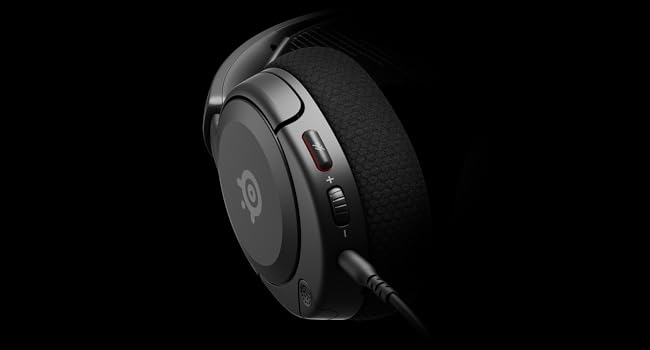
Irudia: Gertuko planoa view of the left earcup of the Arctis Nova 1X, highlighting the volume wheel and microphone mute button for easy access during gameplay.
Video: Official SteelSeries video demonstrating the features of the Arctis Nova 1 headset, including its audio capabilities and microphone design.
5. Erosotasuna eta egokitzapena
The Arctis Nova 1X is designed for extended gaming sessions with its ComfortMAX System:
- Diseinu ultra-arin: Weighing only 236g, the headset minimizes pressure during long use.
- Altuera erregulatzeko belarri-euskarriak: The earcups can be adjusted vertically to fit various head sizes comfortably.
- Flexible Suspension Headband: The elastic headband conforms to your head for a secure yet gentle fit.

Image: The Arctis Nova 1X headset highlighting its ultra-lightweight and slim profile, designed for comfort.

Image: The Arctis Nova 1X headset demonstrating its height-adjustable earcups for a personalized and comfortable fit.
6. Audio Ezaugarriak
Experience superior sound with the Arctis Nova 1X:
- Ahalguztidun Audioa: The Nova Acoustic System with High Fidelity Drivers delivers crystal-clear highs, precise mids, and deep bass.
- 360°-ko audio espaziala: Immerse yourself in the game with surround sound that allows you to pinpoint enemy positions and environmental cues.
- Pro-grade Parametric EQ: Pertsonalizatu zure soinu profesionalafile with the SteelSeries Sonar Audio Software Suite for a competitive edge.

Image: The Arctis Nova 1X headset highlighting its "Almighty Audio" capabilities for a rich sound experience.
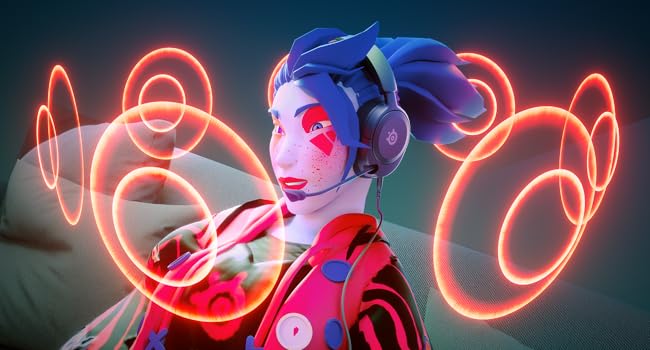
Image: Visual representation of 360° Spatial Audio, showing sound waves surrounding a gamer wearing the Arctis Nova 1X headset.
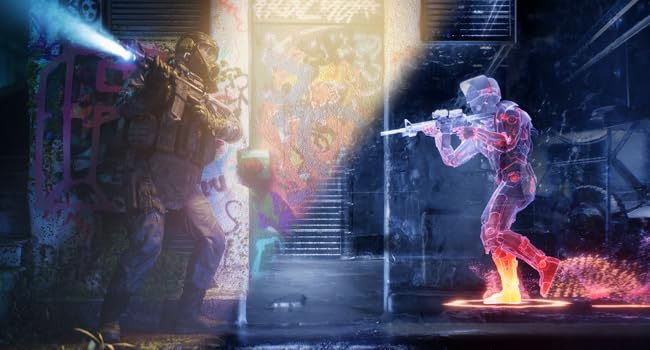
Image: Graphic illustrating the Pro-grade Parametric EQ, suggesting advanced audio customization options available with the headset.
7. Mikrofonoaren ezaugarriak
The ClearCast Gen 2 Mic ensures clear communication:
- AI Noise Cancelling: Advanced AI algorithms filter out background noise, ensuring your voice is heard clearly by teammates.
- Diseinu erretraktila: The microphone can be fully retracted into the earcup when not in use, maintaining a sleek profile.

Image: The Nova 1 AI Microphone, emphasizing its noise-cancelling capabilities for clear voice communication.
8. Mantentzea
To ensure the longevity and optimal performance of your Arctis Nova 1X headset, follow these maintenance guidelines:
- Garbiketa: Erabili oihal leun eta lehor bat entzungailuak eta buruko zinta garbitzeko. Garbiketa sakonago bat egiteko, garbitu apur batamp cloth with mild soap can be used, ensuring no moisture enters the speaker grilles or ports.
- Kableen zainketa: Avoid sharp bends or excessive pulling on the headset cable to prevent internal damage. Store the cable neatly when not in use.
- Biltegiratzea: Gorde entzungailuak leku fresko eta lehor batean, eguzki-argitik eta muturreko tenperaturetatik babestuta.
- Earbud Tips: If applicable, ensure earbud tips (if using with mobile) fit snugly. Replace worn-out earbud tips to maintain sound quality and comfort.
9. Arazoak
If you encounter issues with your Arctis Nova 1X headset, try the following solutions:
- Audiorik ez/Bolumen baxua:
- Ziurtatu 3.5 mm-ko kablea ondo sartuta dagoela entzungailuetan eta gailuan.
- Check the volume wheel on the headset and your device's system volume.
- Probatu entzungailuak beste gailu batekin gailu espezifikoetako arazoak baztertzeko.
- Mikrofonoa ez dabil:
- Ensure the microphone mute button is not activated (red indicator off).
- Ziurtatu mikrofonoa guztiz luzatuta eta behar bezala kokatuta dagoela.
- Check your device's audio settings to ensure the correct microphone input is selected and its volume is not muted.
- Soinu kalitate eskasa:
- Ensure the 3.5mm cable is not damaged and is securely connected.
- Adjust your device's audio settings or equalizer settings.
10. Zehaztapenak
| Ezaugarri | Xehetasuna |
|---|---|
| Marka | SteelSeries |
| Ereduaren izena | Arctis Nova 1X |
| Modelo zenbakia | 61616 |
| Konektibitate Teknologia | Kableatua (3.5 mm-ko jack-a) |
| Belarrien Kokatzea | Belarri gainean |
| Zarata Kontrola | Zarata aktiboaren ezeztapena (mikrofonoa) |
| Audio kontrolatzaile mota | Gidari dinamikoa |
| Maiztasun barrutia | 20 Hz - 20,000 Hz |
| Mikrofonoa | ClearCast Gen 2 (Retractable, AI Noise Cancelling) |
| Gailu bateragarriak | Xbox Series X|S, PC, PlayStation, Switch, Mobile |
| Elementuaren pisua | 1.1 kilo (500 g inguru) |
| Kolorea | Beltza |
| UPC | 850014119737 |
Bideoa: 360 graduko view of the SteelSeries Arctis Nova 1X headset in black, showcasinbere diseinua angelu guztietatik aztertuz.
11. Bermea eta laguntza
11.1 Bermearen informazioa
The SteelSeries Arctis Nova 1X Gaming Headset comes with a 1 urteko berme mugatua erosketa-datatik aurrera. Berme honek fabrikazio-akatsak estaltzen ditu eta zure produktuak erabilera normalaren pean behar bezala funtzionatzen duela ziurtatzen du. Gorde erosketaren egiaztagiria berme-erreklamazioetarako.
For detailed warranty terms and conditions, please refer to the official SteelSeries webgunea edo zure produktuaren ontzian dagoen berme-txartela.
11.2 Bezeroarentzako laguntza
For further assistance, technical support, or warranty claims, please contact SteelSeries customer support through their official webgunea:
You may also find additional resources, FAQs, and software downloads on their support page.