
1. Sarrera
The UMLIFE STC-1000 is a versatile digital temperature controller designed for precise temperature management in various applications. This device features a clear LED display, NTC 10K thermistor sensor, and dual relay outputs for both heating and cooling control. This manual provides detailed instructions for installation, operation, and maintenance to ensure optimal performance and longevity of your temperature controller.
2. Produktua amaitu daview
2.1 Ezaugarri nagusiak
- Digital LED display for clear temperature readings.
- Wide temperature measurement and control range: -50°C to 99°C.
- High control accuracy of 0.1°C.
- Dual relay output for simultaneous heating and cooling control.
- Waterproof NTC 10K thermistor sensor for reliable measurements in various environments.
- Tenperatura kalibratzeko funtzioa.
- Delay start protection for cooling control.
- ABS flame-retardant shell for enhanced safety.
2.2 Osagaiak eta pantaila
Familiarize yourself with the main components and display interface of the STC-1000 controller.

1. irudia: Front panel of the STC-1000 controller showing the digital display, power switch, UP button, Setting button, and DOWN button.
- Digital Display Window: Shows current temperature and parameter settings.
- Switch potentziala: Gailua pizten edo itzaltzen du.
- GORA botoia (▲): Balioak handitzen edo menuetan nabigatzen du.
- BEHERA botoia (▼): Balioak txikitzen edo menuetan nabigatzen du.
- Setting Button (S): Parametroak ezartzeko moduan sartzen da.
- Cool Indicator: Illuminates when cooling relay is active.
- Beroaren adierazlea: Illuminates when heating relay is active.

2. irudia: Physical dimensions of the STC-1000 controller and the included 1-meter NTC 10K waterproof sensor probe.
3. Zehaztapenak
| Parametroa | Balioa |
|---|---|
| Eredua | STC-1000 |
| Tenperatura neurtzeko tartea | -50°C eta 99°C artean |
| Tenperatura kontrolatzeko tartea | -50°C eta 110°C artean |
| Neurketaren Zehaztasuna | ±0.2°C |
| Ebazpena | 0.1°C |
| Kontrolaren zehaztasuna | ±0.1°C |
| Sentsore | NTC 10K L=1M waterproof probe |
| Elikatze Hornidura | DC 12V |
| Energia-kontsumoa | <3W |
| Errele-harremanetarako edukiera | Cool (10A/220VAC), Heat (10A/220VAC) |
| Giro-tenperatura | 0°C eta 60°C artean |
| Biltegiratze Tenperatura | -30°C eta 75°C artean |
| Hezetasun erlatiboa | % 20-84 |
| Muntatzeko Tamaina | 71 mm x 29 mm |
| Produktuaren neurriak | 75 mm x 34.5 mm x 85 mm |
| Elementuaren pisua | 7 ontza (gutxi gorabehera 198 g) |
| Materiala | Akrilonitrilo Butadieno Estirenoa (ABS) |
4. Konfigurazioa eta instalazioa
Segurtasun-ohar garrantzitsua: Installation should be performed by qualified personnel. Ensure power is disconnected before wiring to prevent electric shock. Strictly distinguish between power supply, sensor, and relay interfaces. Maintain proper distance between sensor down-lead and power wires to avoid interference.
4.1 Kableatu-diagrama
Refer to the following diagram for correct wiring connections. This model operates on DC 12V power supply.
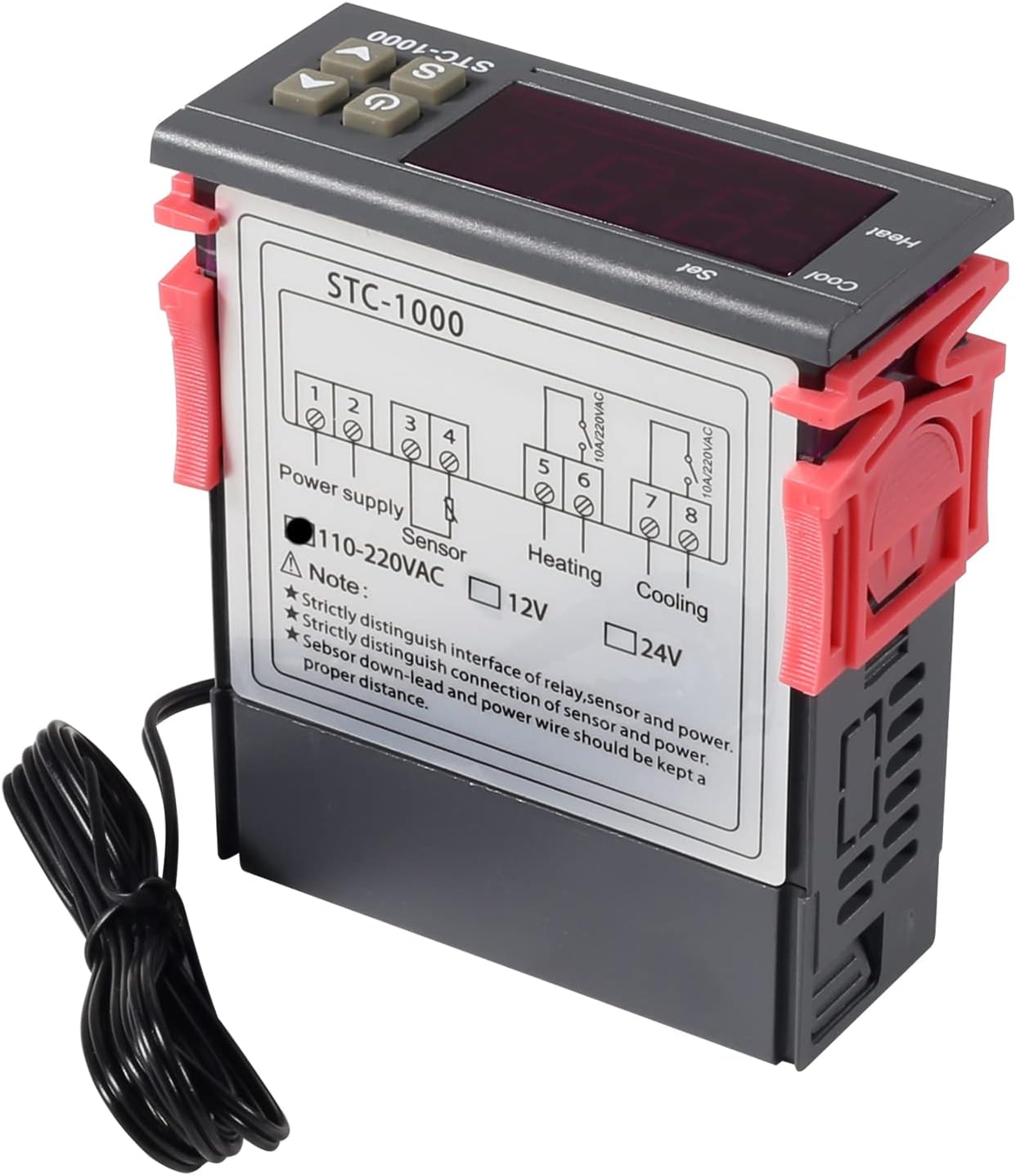
3. irudia: Wiring diagram for the STC-1000 12V temperature controller. Connections are for power supply, NTC sensor, heating relay, and cooling relay.
- Terminals 1 & 2: Power Supply (DC 12V).
- Terminals 3 & 4: NTC Sensor connection.
- Terminals 5 & 6: Heating Relay Output (Connect to heating device).
- Terminals 7 & 8: Cooling Relay Output (Connect to cooling device).
Ensure all connections are secure and insulated. Verify the power supply voltage matches the controller's requirement (DC 12V for this model).
4.2 Muntaketa
The STC-1000 is designed for panel mounting. Cut an opening of 71mm x 29mm in your panel. Insert the controller and secure it using the provided clips or mounting brackets.
5. Funtzionamendu-argibideak
The STC-1000 operates in Celsius only. It cannot be switched to Fahrenheit.
5.1 Piztu/Itzali
- Sakatu Pizteko etengailua button (marked with ⏻) to turn the controller on or off.
5.2 Tenperatura-parametroak ezartzea
The controller has two main temperature settings: the Set Temperature (ST) eta du Difference Temperature (DT), also known as hysteresis.
- To view the Set Temperature (ST): Sakatu labur Setting (S) button. The display will show the current set temperature.
- To modify the Set Temperature (ST):
- Eduki sakatuta Setting (S) botoia sakatu 3 segundo inguru, pantaila keinuka hasi arte.
- Erabili GORA (▲) or BEHERA (▼) buttons to adjust the desired set temperature.
- Sakatu Pizteko etengailua button to save the setting and exit, or wait for 10 seconds for it to save automatically.
5.3 Advanced Parameter Settings (F1-F4)
Parametro aurreratuak atzitu eta aldatzeko:
- Eduki sakatuta Setting (S) botoia sakatu 3 segundo inguru, pantaila keinuka hasi arte.
- Pantaila keinuka ari den bitartean, sakatu botoia Setting (S) button again (do not hold) to cycle through parameters F1, F2, F3, F4.
- Erabili GORA (▲) or BEHERA (▼) buttons to adjust the value of the selected parameter.
- Sakatu Pizteko etengailua button to save the setting and exit, or wait for 10 seconds for it to save automatically.
| Parametroa | Deskribapena | Barrutia | Lehenetsia |
|---|---|---|---|
| F1 | Difference Temperature (Hysteresis): The difference between the set temperature and the temperature at which the relay switches off. | 0.3°C eta 10°C artean | 2.0°C |
| F2 | Highest Set Point Limit: Limits the maximum adjustable set temperature. | Set Temp to 110°C | 110°C |
| F3 | Lowest Set Point Limit: Limits the minimum adjustable set temperature. | -50°C to Set Temp | -50°C |
| F4 | Tenperaturaren Kalibrazioa: Adjusts the temperature reading to match a known accurate thermometer. | -10°C eta 10°C artean | 0.0°C |
5.4 Heating and Cooling Modes
The STC-1000 automatically switches between heating and cooling based on the set temperature (ST) and difference temperature (DT).
- Hozte modua: If the current temperature is higher than (ST + DT), the cooling relay activates. It deactivates when the temperature drops to ST.
- Berokuntza modua: If the current temperature is lower than (ST - DT), the heating relay activates. It deactivates when the temperature rises to ST.
6. Mantentzea
- Garbiketa: Wipe the controller's surface with a soft, dry cloth. Do not use abrasive cleaners or solvents.
- Sentsoreen zainketa: Ensure the NTC sensor probe is clean and free from debris. While waterproof, avoid unnecessary physical damage to the probe or cable.
- Konexioak: Periodically check wiring connections for tightness and signs of corrosion.
- Ingurumena: Operate the controller within the specified ambient temperature and humidity ranges to ensure optimal performance and lifespan.
7. Arazoak
| Arazoa | Kausa posiblea | Irtenbidea |
|---|---|---|
| Display shows "EE" | Sensor error or open circuit. | Check sensor connection. Replace sensor if damaged. |
| Display shows "HHH" | Temperature exceeds upper limit of measurement range. | Ensure the environment temperature is within the sensor's range (-50°C to 99°C). |
| Display shows "LLL" | Temperature falls below lower limit of measurement range. | Ensure the environment temperature is within the sensor's range (-50°C to 99°C). |
| Kontrolagailua ez da pizten | Ez dago energia-iturririk edo bolumen okerratage. | Check power connections and ensure DC 12V is supplied. |
| Berokuntza/Hoztea ez da aktibatzen | Incorrect temperature settings (ST, DT), wiring error, or device malfunction. | Verify ST and DT settings. Check heating/cooling device wiring. Ensure the device is within operating parameters. |
8. Bermea eta Laguntza
UMLIFE products are manufactured to high-quality standards. For warranty information or technical support, please contact UMLIFE customer service through your purchase platform or visit the official UMLIFE website. Please have your product model (STC-1000 12V) and purchase details ready when contacting support.
Laguntza gehiago lortzeko, honako hau ere kontsulta dezakezu: UMLIFE Store on Amazon.