
Sarrera
This manual provides essential instructions for the proper use and care of your Zenit ET 35mm reflex camera body. The Zenit ET is a robust and reliable mechanical camera designed for 35mm film. Please read these instructions carefully before operating your camera to ensure optimal performance and longevity.
Konfigurazioa
1. Lente bat jartzea
The Zenit ET camera body uses an M42 screw mount. To attach a compatible M42 lens:
- Kendu gorputzeko tapoia kamerari eta atzeko tapoia lenteari.
- Carefully align the lens's screw threads with the camera's mount.
- Gently screw the lens clockwise until it is firmly seated. Do not overtighten.
2. Filma kargatzea
The Zenit ET uses standard 35mm film cartridges.
- Open the camera back by pulling up the film rewind knob (located on the left side of the top plate) and then pulling it further to unlatch the back cover.
- Insert a new 35mm film cartridge into the film chamber on the left side. Push the rewind knob down to secure the cartridge.
- Pull the film leader across to the take-up spool on the right. Insert the leader into one of the slots on the take-up spool.
- Advance the film using the film advance lever (on the right side of the top plate) and press the shutter button once or twice until the film perforations engage with the sprockets and the film is taut.
- Itxi kameraren atzealdea ondo finkatu arte.
- Advance the film two more times, pressing the shutter button after each advance, to move past the exposed film leader. The frame counter should now show '1'.
3. Filmaren abiadura ezartzea (ISO/ASA)
The Zenit ET has a film speed reminder dial, typically integrated with the shutter speed dial or a separate dial. Set this to match the ISO/ASA rating of your loaded film. This is a reminder only and does not electronically control the camera's exposure.

Irudia: Goian view of the Zenit ET camera body, highlighting the controls on the top plate including the film advance lever and shutter speed dial.
Kameraren funtzionamendua
1. Setting Shutter Speed
The shutter speed dial is located on the top right of the camera. Rotate this dial to select your desired shutter speed. Common speeds include 1/30, 1/60, 1/125, 1/250, 1/500 seconds, and 'B' for Bulb mode (shutter remains open as long as the button is pressed). Always set the shutter speed aurretik filma aurreratuz.
2. Setting Aperture
Aperture is controlled directly on the lens. Rotate the aperture ring on your attached lens to select the desired f-stop (e.g., f/2.8, f/4, f/5.6). This controls the amount of light entering the camera and the depth of field.
3. Enfokatzea
Begiratu viewfinder. The Zenit ET typically features a split-image rangefinder or microprism collar in the center of the focusing screen. Rotate the focusing ring on your lens until the image in the viewfinder appears sharp and the split-image aligns, or the microprism area clears.
4. Argazki bat ateratzea
- Konposatu zure planoa bidez viewbilatzailea.
- Adjust focus, aperture, and shutter speed as needed for proper exposure.
- Gently press the shutter release button (located on the front-right of the camera body) all the way down to take the picture.
- After taking a picture, advance the film using the film advance lever to prepare for the next shot. The frame counter will increment.

Irudia: Aurrealdea view of the Zenit ET camera body, illustrating the M42 lens mount and the position of the shutter release button.
5. Filma birbobinatzea
Once you have reached the end of the film roll (the film advance lever will stop or become very stiff), it's time to rewind the film back into its cartridge.
- Press and hold the film rewind release button, usually located on the bottom of the camera body.
- Rotate the film rewind knob (on the top left) clockwise until you feel the tension release, indicating the film is fully rewound into the cartridge.
- Ireki kameraren atzealdea eta atera film-kartutxoa.
Mantentzea
Proper maintenance ensures the longevity and reliable operation of your Zenit ET camera.
- Gorputza garbitzea: Use a soft, dry cloth to wipe down the camera body. For stubborn dirt, a slightly damp Oihal bat erabil daiteke, baina ziurtatu hezetasunik ez sartzen kameran.
- Garbiketa Viewfinder and Mirror: Use a blower brush to remove dust from the viewfinder and mirror. Avoid touching these surfaces directly with fingers or abrasive materials. For more persistent dust, a specialized lens cleaning solution and cloth may be used with extreme care.
- Biltegiratzea: When not in use, store the camera in a dry, dust-free environment, preferably in a camera bag or case. Avoid extreme temperatures and high humidity.
- Bateria (hala badagokio): The Zenit ET is a mechanical camera and does not require batteries for basic operation. Some models might have a light meter that requires a battery; consult your specific model's documentation if a light meter is present.
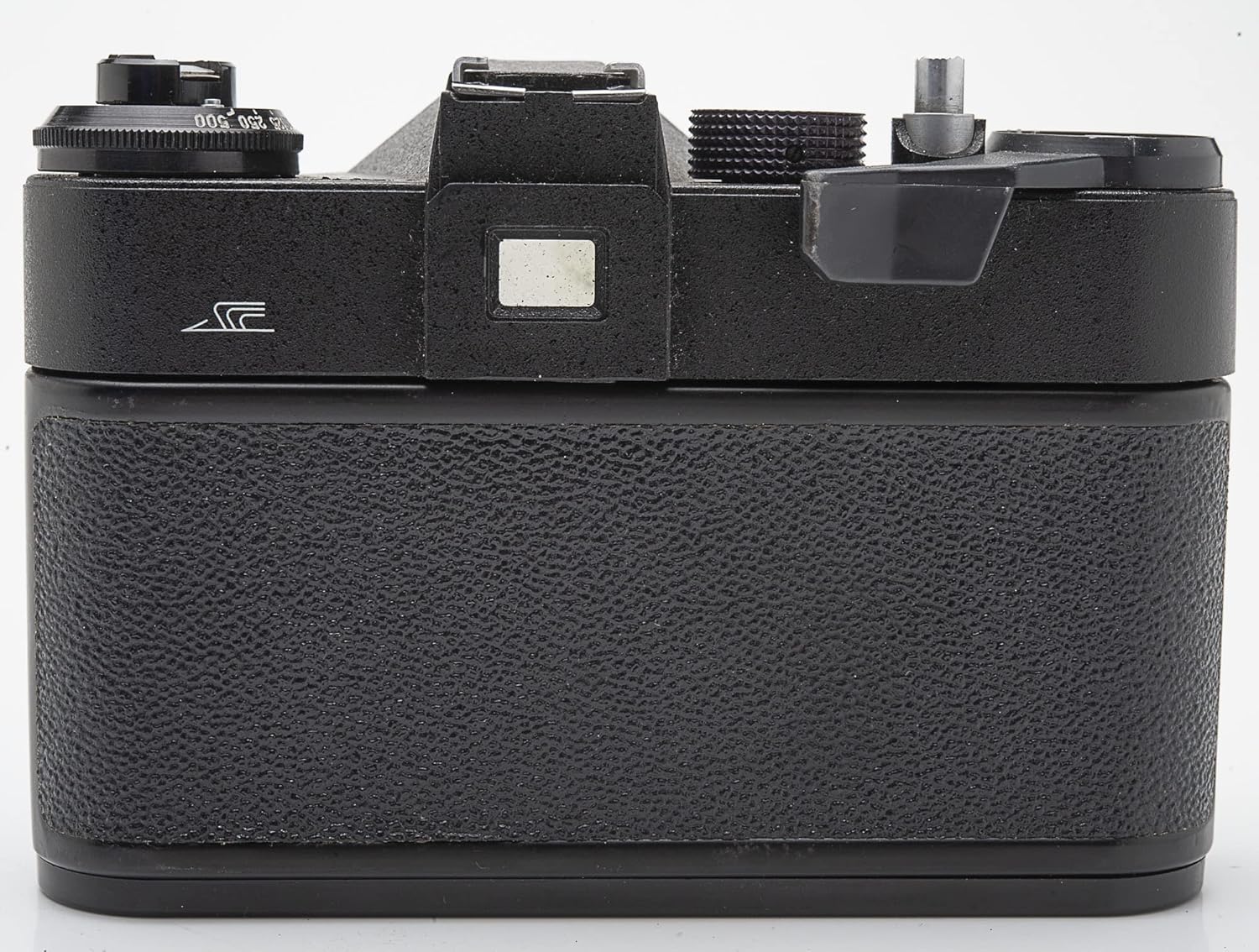
Irudia: Atzealdea view of the Zenit ET camera body, illustrating the textured grip and the viewbilatzailea okularra.
Arazoak konpontzea
Hona hemen arazo ohikoenetako batzuk eta haien irtenbide posibleak:
- Film Advance Lever is Stuck:
Ensure the shutter has been fired. The lever will not advance if the shutter is cocked. If the film is at its end, the lever will also become stiff; rewind the film.
- Shutter Not Firing:
Check if the film advance lever has been fully advanced. The shutter will not fire if it is not cocked. Ensure there is no film jam.
- Light Leaks on Film:
Inspect the camera back seals for wear or damage. Old foam seals can degrade and cause light leaks. These may need to be replaced by a qualified technician.
- Irudi lausoak:
Ensure the lens is properly focused. Check your shutter speed; speeds below 1/60th of a second often require a tripod to prevent camera shake. Verify the lens is clean.
Zehaztapenak
| Ezaugarri | Xehetasuna |
|---|---|
| Marka | Zenit |
| Ereduaren izena | ET |
| Film Formatu Mota | 35 mm |
| Obturazio-abiadura maximoa | 1/1000 segundo |
| Pertsiana mota | Foku Plano Obturagailua |
| Viewbilatzailea Handipena | 0.85x - 0.9x |
| Ezaugarri Berezia | Trinkoa |
| Dakarten osagaiak | Kameraren gorputza bakarrik |
Bermea eta Laguntza
Specific warranty information for the Zenit ET camera body is not provided within this manual. For details regarding warranty coverage or technical support, please refer to the original purchase documentation or contact the seller directly.