
OMOTON WK003
OMOTON 2.4GHz Wireless AZERTY Keyboard Instruction Manual
Eredua: WK003
Marka: OMOTON
1. Sarrera
Thank you for choosing the OMOTON 2.4GHz Wireless AZERTY Keyboard. This ultra-slim, silent keyboard is designed for comfortable and efficient typing across various Windows operating systems. This manual provides detailed instructions for setting up, operating, maintaining, and troubleshooting your new keyboard to ensure optimal performance.
2. Paketearen edukia
Please check the package contents carefully. If any items are missing or damaged, please contact OMOTON customer support.
- 1 x OMOTON 2.4GHz Wireless AZERTY Keyboard
- 1 x USB hargailua
- 1 x Erabiltzailearen eskuliburua
3. Konfigurazio gida
Follow these steps to set up your OMOTON wireless keyboard:
- Instalatu bateriak: Open the battery compartment on the back of the keyboard. Insert two AAA batteries (not included), ensuring correct polarity. Close the compartment.
- Txertatu USB hargailua: Locate the USB receiver, which is magnetically stored in the battery compartment. Plug the USB receiver into an available USB port on your computer.

Image: Battery compartment with USB receiver and AAA batteries.
- Piztu: Slide the ON/OFF switch located on the top right side of the keyboard to the "ON" position.
- Konektatu: Your computer should automatically detect and install the necessary drivers for the keyboard. No additional software is required.

Image: Plug & Play setup with USB receiver.
Teklatua erabiltzeko prest dago orain.
4. Funtzionamendu-argibideak
4.1 Oinarrizko idazketa
Simply begin typing. The keyboard features a standard AZERTY layout for familiar use.
4.2 Fn Lock Function
The keyboard includes a convenient Fn Lock function. By default, the F1-F12 keys perform their standard function. To access the multimedia shortcuts directly without pressing the Fn key, activate the Fn Lock.
- Activate/Deactivate Fn Lock: Sakatu Fn + Échap simultaneously. When activated, the multimedia functions (e.g., volume control, home page) will be directly accessible by pressing F1-F12. When deactivated, F1-F12 will perform their standard functions, and multimedia actions will require pressing Fn + Fx.

Image: Fn Lock function and multimedia keys.
4.3 Multimedia lasterbideak
The keyboard provides 12 multimedia shortcuts for quick access to common functions. These can be used directly when Fn Lock is active, or by pressing Fn in combination with the respective F-key when Fn Lock is inactive.
| Gakoa | Funtzioa |
|---|---|
| F1 | Isildu |
| F2 | Bolumena jaitsi |
| F3 | Bolumena igo |
| F4 | Aurreko Pista |
| F5 | Erreproduzitu/Pausatu |
| F6 | Hurrengo Pista |
| F7 | Brightness Down (System Dependent) |
| F8 | Brightness Up (System Dependent) |
| F9 | Search |
| F10 | Hasiera Orria |
| F11 | Kopiatu |
| F12 | Itsatsi |
4.4 Bateragarritasuna
This keyboard is compatible with Windows 11, 10, 8, 7, XP, and Vista, making it suitable for a wide range of desktop and laptop computers.
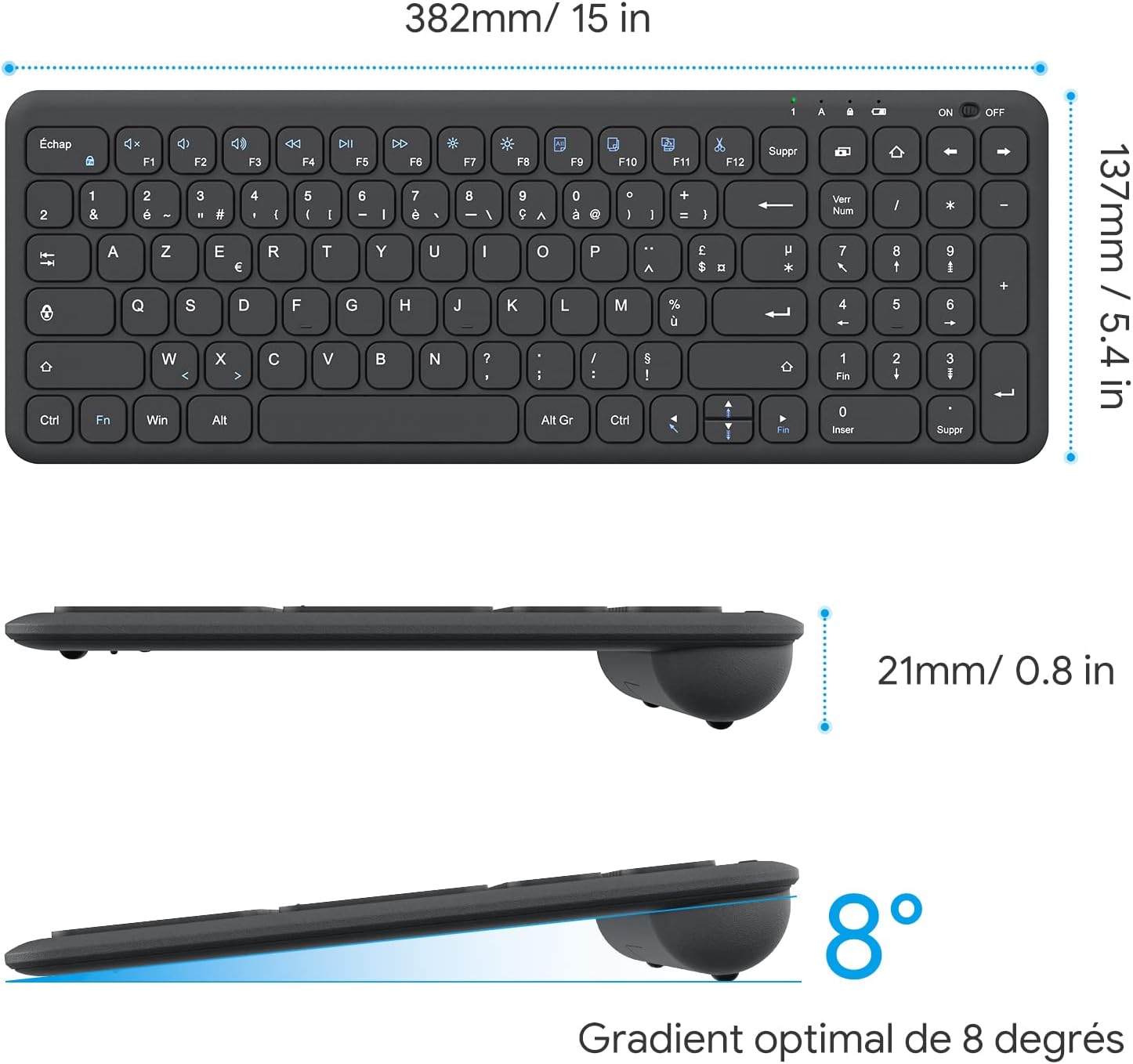
Image: Keyboard compatibility with Windows systems.
5. Mantentzea
5.1 Bateria ordezkatzea
When the keyboard's performance degrades or the indicator light flashes, it's time to replace the batteries. Open the battery compartment on the back and replace the two AAA batteries with new ones, observing polarity.
5.2 Garbiketa
Teklatua garbitzeko, garbitu gainazala astiro-astiro zapi leun eta lehor batekinamp cloth. Avoid using harsh chemicals or abrasive materials. Ensure the keyboard is turned off before cleaning.
5.3 USB Receiver Storage
For convenience and to prevent loss, the USB receiver can be magnetically stored inside the keyboard's battery compartment when not in use or during transport.
6. Arazoak
Teklatuarekin arazoak badituzu, jo ezazu ohiko irtenbide hauetara:
- Teklatuak ez du erantzuten:
- Ziurtatu teklatua piztuta dagoela.
- Egiaztatu bateriak behar bezala instalatuta dauden eta nahikoa karga duten. Beharrezkoa bada, ordezkatu itzazu.
- Egiaztatu USB hargailua ondo konektatuta dagoela ordenagailuko USB ataka funtzional batean. Saiatu beste USB ataka batekin.
- Berrabiarazi ordenagailua.
- Lagging or intermittent input:
- Ensure the keyboard is within the effective operating range (up to 10 meters) of the USB receiver.
- Reduce potential interference by moving the keyboard closer to the receiver or away from other wireless devices (e.g., Wi-Fi routers, cordless phones).
- Check battery level. Low batteries can affect wireless performance.
- Tekla espezifikoak ez dira funtzionatzen:
- Gently clean around the affected key to remove any debris.
- If the issue persists, contact OMOTON customer support for further assistance.
7. Zehaztapenak
Detailed technical specifications for the OMOTON Wireless AZERTY Keyboard:
| Ezaugarri | Xehetasuna |
|---|---|
| Marka | OMOTON |
| Eredua | WK003 |
| Konektibitate Teknologia | 2.4 GHz haririk gabekoa (USB hargailua) |
| Teklatuaren diseinua | AZERTY |
| Gailu bateragarriak | PC, Desktop, Laptop |
| Sistema eragile bateragarriak | Windows 11/10/8/7/XP/Vista |
| Ezaugarri bereziak | 12 Multimedia Shortcuts, Fn Lock, Silent Keys, Ultra-Slim Design, Magnetic USB Receiver Storage |
| Kolorea | Beltza |
| Energia iturria | 2 x AAA bateria (ez daude barne) |
| Neurriak (L x W x H) | 38.1 x 13.7 x 2 cm (15 x 5.4 x 0.8 hazbete) |
| Gako kopurua | 99 |
| Gako Aldaketa Mota | Tactile (Scissor-mechanism) |
| Optimal Gradient | 8 gradu |

Image: Keyboard dimensions and ergonomic design.

Image: Scissor-mechanism key design.
8. Bermearen informazioa
OMOTON products typically come with a manufacturer's warranty. Please refer to the warranty card included with your product or visit the official OMOTON webwebgunean bermearen baldintza zehatzak ikusteko. Gorde erosketa-agiria erosketaren frogagiri gisa bermearen erreklamazioetarako.
9. Bezeroarentzako arreta
If you have any questions, require technical assistance, or experience issues not covered in this manual, please do not hesitate to contact OMOTON customer support. You can usually find contact information on the OMOTON official webgunearen bidez edo produktua erosi duzun dendariaren bidez.
Ask a question about this manual
Ask about setup, troubleshooting, compatibility, parts, safety, or missing instructions. Manuals+ will review the question and use this page’s manual context to help answer it.