
1. Sarrera
Thank you for choosing the RAZEAK RM-X18 Wired Gaming Mouse. This manual provides detailed instructions to help you set up, operate, and customize your new gaming mouse. Please read this manual thoroughly before use to ensure optimal performance and longevity of your device.
2. Produktua amaitu daview
The RAZEAK RM-X18 is a high-performance wired gaming mouse designed for PC gamers, featuring programmable buttons, adjustable DPI, and customizable RGB lighting.
2.1 Paketearen edukia
- RAZEAK RM-X18 Wired Gaming Mouse
- Erabiltzailearen eskuliburua
2.2 Saguaren ezaugarriak
- 8 botoi programagarriak: Customize functions, DPI settings, RGB lighting, and record macros via software.
- 2 Using Modes: Switch between Gaming and Office modes by pressing the middle and right buttons simultaneously.
- 9 RGB Backlight Modes: Enhance gaming atmosphere with 16 million customizable colors.
- 6 DPI maila erregulagarri: Default settings of 500/1000/1500/2000/3000/4000 DPI, with software customization for numerical values and indicator colors.
- Diseinu ergonomikoa: Provides a comfortable grip for extended use.
2.3 botoien diseinua
Refer to the image below for the button identification on your RAZEAK RM-X18 mouse.
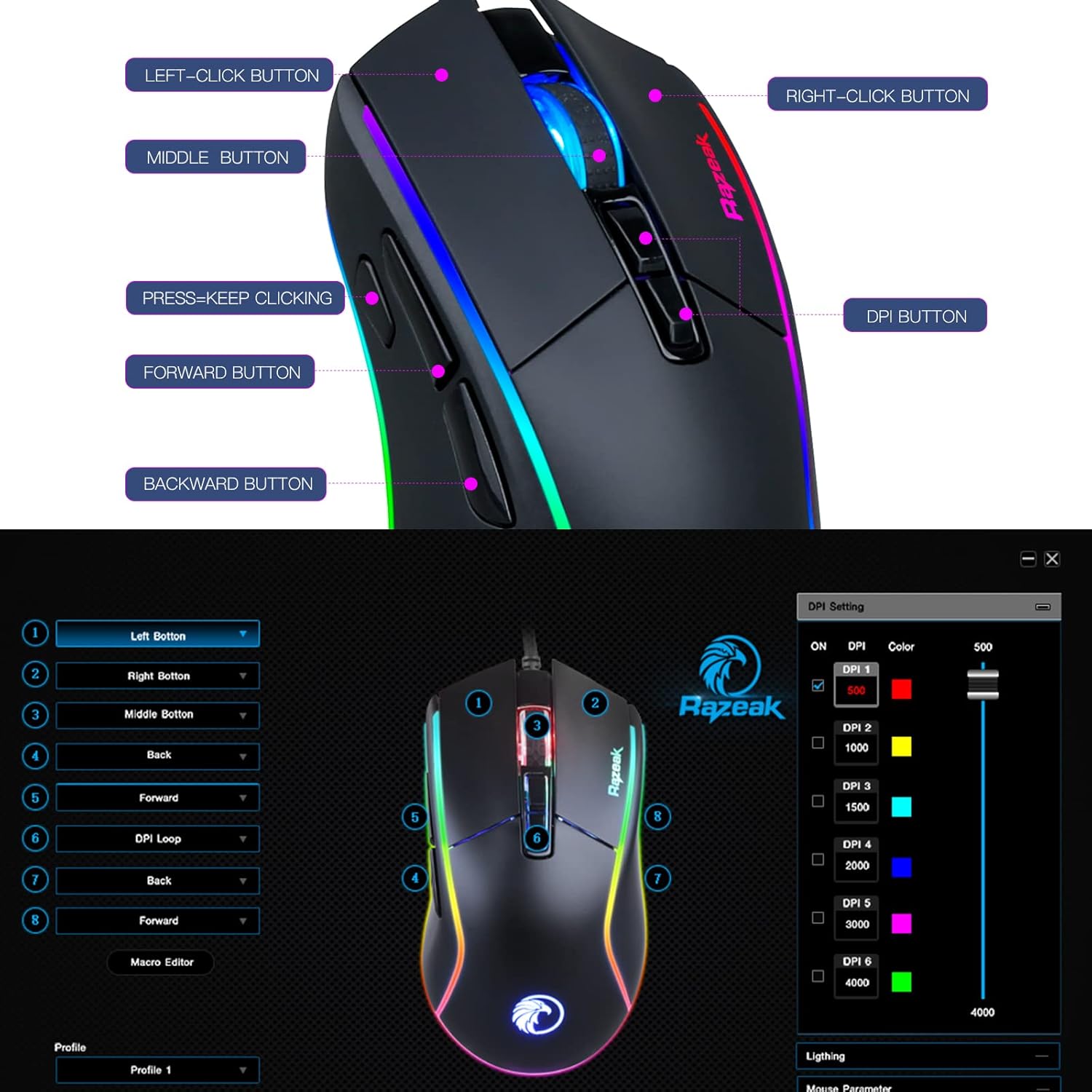
Image: RAZEAK RM-X18 Gaming Mouse with labels for Left-Click, Right-Click, Middle Button, Press-Keep Clicking, Forward Button, Backward Button, and DPI Button.
3. Konfigurazioa
The RAZEAK RM-X18 mouse is a plug-and-play device for basic functionality. For advanced customization, software installation is required.
3.1 Sagua konektatzea
- Bilatu erabilgarri dagoen USB ataka zure ordenagailuan.
- Plug the USB connector of the RAZEAK RM-X18 mouse into the USB port.
- The mouse will be automatically recognized by your operating system. Basic functions will be immediately available.
3.2 Software Installation (Optional, for advanced features)
To unlock the full potential of your RAZEAK RM-X18, including programmable buttons, macro recording, and advanced RGB customization, download and install the official RAZEAK software from the manufacturer's website. A link to the software can typically be found on the product page or by searching for "RAZEAK RM-X18 software".

Image: Screenshot of the RAZEAK RM-X18 software interface showing DPI settings and button assignments.
4. Funtzionamendu-argibideak
4.1 Adjusting DPI (Dots Per Inch)
The RAZEAK RM-X18 features 6 default DPI levels for quick sensitivity adjustments. The DPI button is located on the top of the mouse, behind the scroll wheel.
- Sakatu DPI botoia to cycle through the preset DPI levels: 500, 1000, 1500, 2000, 3000, and 4000.
- Each DPI level is typically indicated by a different color on the mouse logo or lighting strip.
- For precise DPI customization and to assign specific indicator colors, use the RAZEAK software.
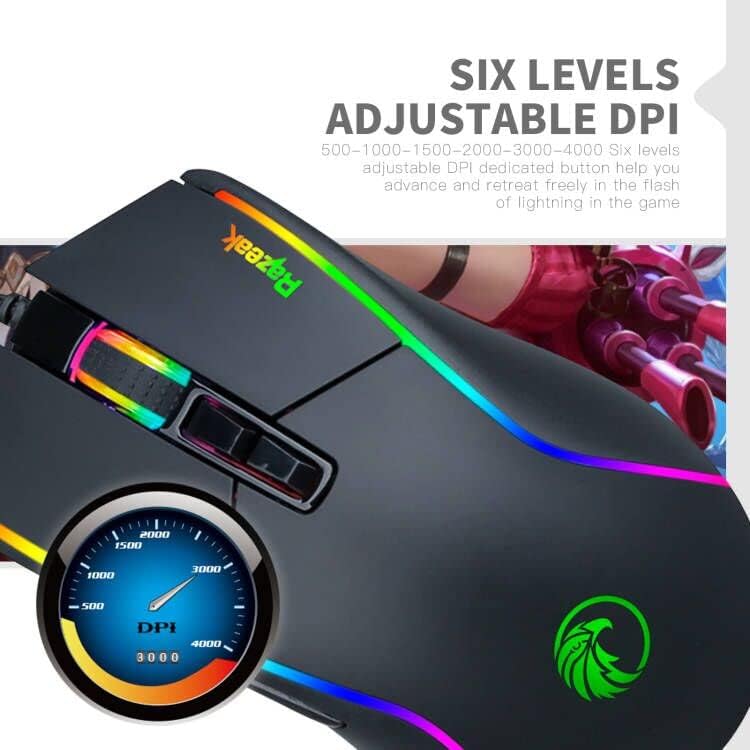
Image: Close-up of the RAZEAK RM-X18 mouse highlighting the DPI button and a graphic showing DPI levels from 500 to 4000.
4.2 Customizing RGB Backlight
The mouse features 9 cool RGB backlight modes and 16 million colors to personalize your gaming setup.
- To adjust the lighting effect, press the Left-Click button eta du DPI botoia simultaneously. This action cycles through various preset lighting modes.
- Bestela, erabili scroll wheel key eta du atzera tekla simultaneously to change the light effect.
- For full customization of colors, effects, and speed, use the RAZEAK software.
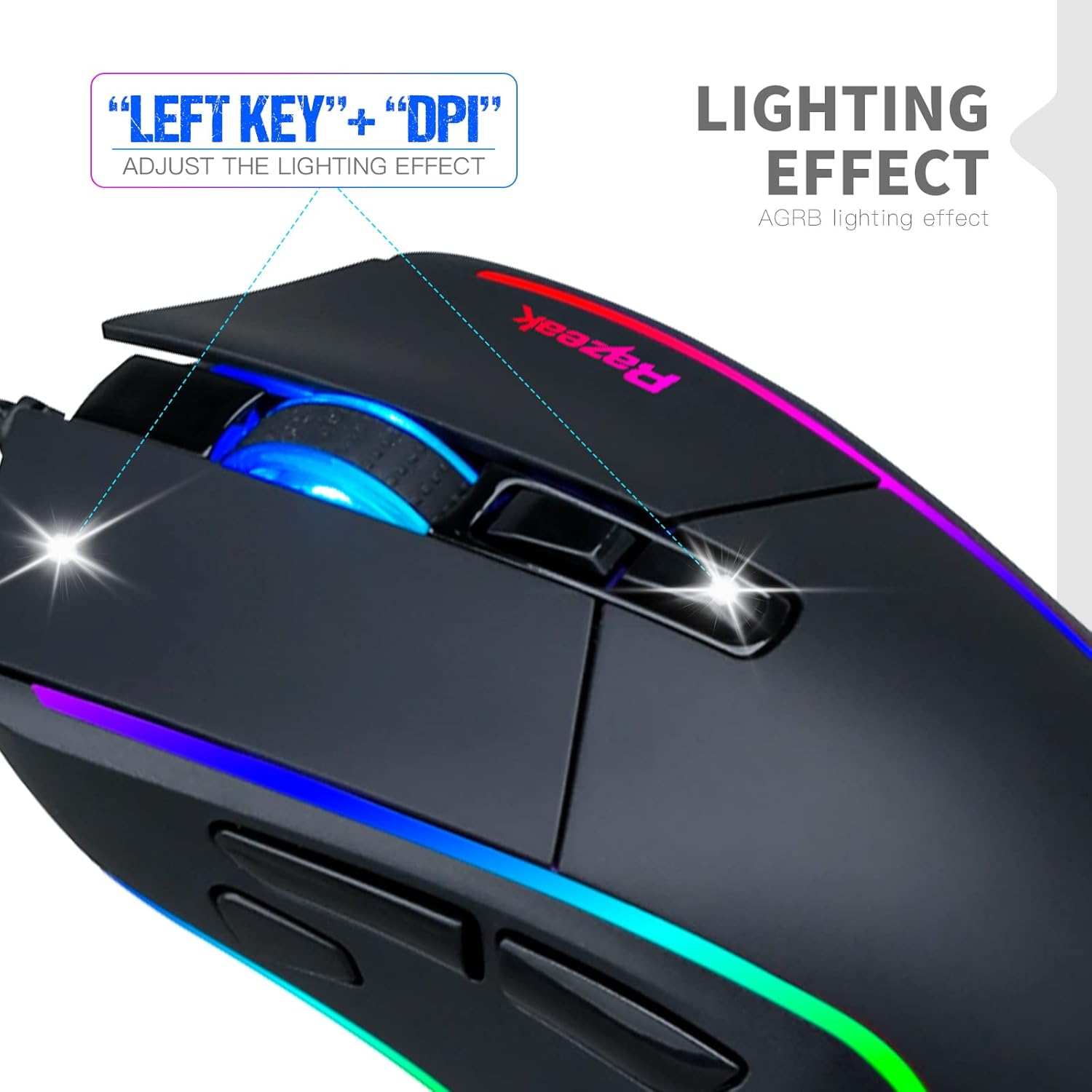
Image: A hand demonstrating how to adjust the lighting effect on the RAZEAK RM-X18 mouse by pressing the Left-Click and DPI buttons.

Image: Screenshot of the RAZEAK RM-X18 software interface showing lighting effect customization options.
4.3 Programa daitezkeen botoiak eta makroak
The RAZEAK RM-X18 features 8 buttons that can be customized for various functions, including macro recording, through the dedicated software.
- Download and install the RAZEAK software (refer to Section 3.2).
- Open the software to access the button assignment interface.
- Select each button and assign desired functions, keyboard shortcuts, or complex macros.
- Gorde zure profesionalafilejoko edo aplikazio desberdinetarako.

Image: Screenshot of the RAZEAK RM-X18 software interface displaying options for programming the 8 mouse buttons.
4.4 Switching Between Gaming and Office Modes
The mouse supports two distinct usage modes: Gaming and Office. These modes can be switched quickly without software.
- Moduz aldatzeko, sakatu Middle button (scroll wheel click) eta du Right-Click button aldi berean.
- This allows for quick adaptation of mouse settings to different tasks.
4.5 Produktuaren erakustaldi bideoa
Watch this official product video for a visual guide on the features and functionality of the RAZEAK RM-X18 Wired Gaming Mouse.
Video: An official demonstration of the RAZEAK RM-X18 Wired Gaming Mouse, showcasing its RGB lighting, DPI settings, and programmable buttons.
5. Mantentzea
Proper maintenance ensures the longevity and performance of your RAZEAK RM-X18 mouse.
- Garbiketa: Erabili zapi leun eta lehor bat saguaren gainazala garbitzeko. Zikinkeria egoskorra bada, garbitu pixka bat.ampGarbitu zapi bat urarekin edo garbiketa-soluzio leun batekin. Saihestu produktu kimiko gogorrak.
- Sentsoreen garbiketa: Occasionally clean the optical sensor on the bottom of the mouse with a cotton swab to ensure accurate tracking.
- Kableen zainketa: Kalteak ekiditeko, saihestu USB kablea estutzea edo gehiegi tiratzea.
- Biltegiratzea: Store the mouse in a clean, dry environment when not in use.
6. Arazoak
If you encounter issues with your RAZEAK RM-X18 mouse, refer to the following common solutions:
| Arazoa | Irtenbidea |
|---|---|
| Saguak ez du erantzuten. |
|
| DPI or RGB lighting is not changing. |
|
| Programmable buttons are not working. |
|
| Mouse cursor movement is erratic or inaccurate. |
|
7. Zehaztapenak
| Ezaugarri | Xehetasuna |
|---|---|
| Marka | RAZEAK |
| Ereduaren izena | RM-X18 |
| Konektibitate Teknologia | USB (kablea) |
| Mugimenduak detektatzeko teknologia | Optikoa |
| DPI mailak | Adjustable 6 levels: 500/1000/1500/2000/3000/4000 |
| Botoi kopurua | 8 (Programagarria) |
| Eskuen Orientazioa | Eskuin |
| RGB Atzeko argia | 9 modes, 16 million colors |
| Gailu bateragarriak | Ordenagailu pertsonala (PC) |
| Elementuaren pisua | 137 gramo |
| Energia iturria | Kable elektrikoa |
8. Bermea eta Laguntza
RAZEAK offers a comprehensive warranty and customer support for your RM-X18 Wired Gaming Mouse.
- Bermea: This product comes with a 2-YEAR manufacturer warranty.
- Bezeroarentzako arreta: For any questions, technical support, or warranty claims, please contact RAZEAK customer service. Messages are typically replied to within 24 hours.
- Harremanetarako informazioa: Refer to the RAZEAK official webgunean edo zure erosketa-dokumentazioan kontaktu-datu eguneratuenak lortzeko.