
1. Sarrera
Thank you for choosing the RAZEAK RM-X18 Wired Gaming Mouse. This manual provides detailed instructions for setting up, operating, and maintaining your new gaming mouse. Please read this manual thoroughly before use to ensure optimal performance and longevity of your device.
2. Produktuaren ezaugarriak
- Programmable 8 Buttons: Customize button functions, DPI settings, RGB lighting, and record macros using the dedicated software.
- Erabilera bikoitzeko moduak: Switch between gaming and office modes by simultaneously pressing the middle and right buttons.
- 9 RGB Backlight Modes: Enhance your gaming environment with 9 distinct backlight modes and 16 million customizable colors.
- 6 DPI maila erregulagarri: Default DPI settings include 500, 1000, 1500, 2000, 3000, and 4000. These values and their indicator colors can be customized via software.
- Diseinu ergonomikoa: Engineered for comfortable grip during extended use.
- Zehaztasun handiko sentsore optikoa: Equipped with an Avago 3050 sensor for accurate tracking.
3. Paketearen edukia
- RAZEAK RM-X18 Wired Gaming Mouse
- Erabiltzailearen eskuliburua
4. Konfigurazio gida
- Konektatu sagua: Plug the USB connector of the RAZEAK RM-X18 mouse into an available USB port on your computer.
- Gidariaren instalazioa: The mouse is plug-and-play for basic functionality. For advanced features such as button programming, DPI customization, and RGB lighting effects, please download and install the official RAZEAK software from the manufacturer's webgunea.

Image: The RAZEAK RM-X18 mouse connected to a computer, showcasing its RGB lighting and ergonomic design alongside a keyboard.
5. Funtzionamendu-argibideak
5.1 Botoien diseinua eta funtzioak
The RAZEAK RM-X18 mouse features 8 buttons, all of which can be customized using the dedicated software.
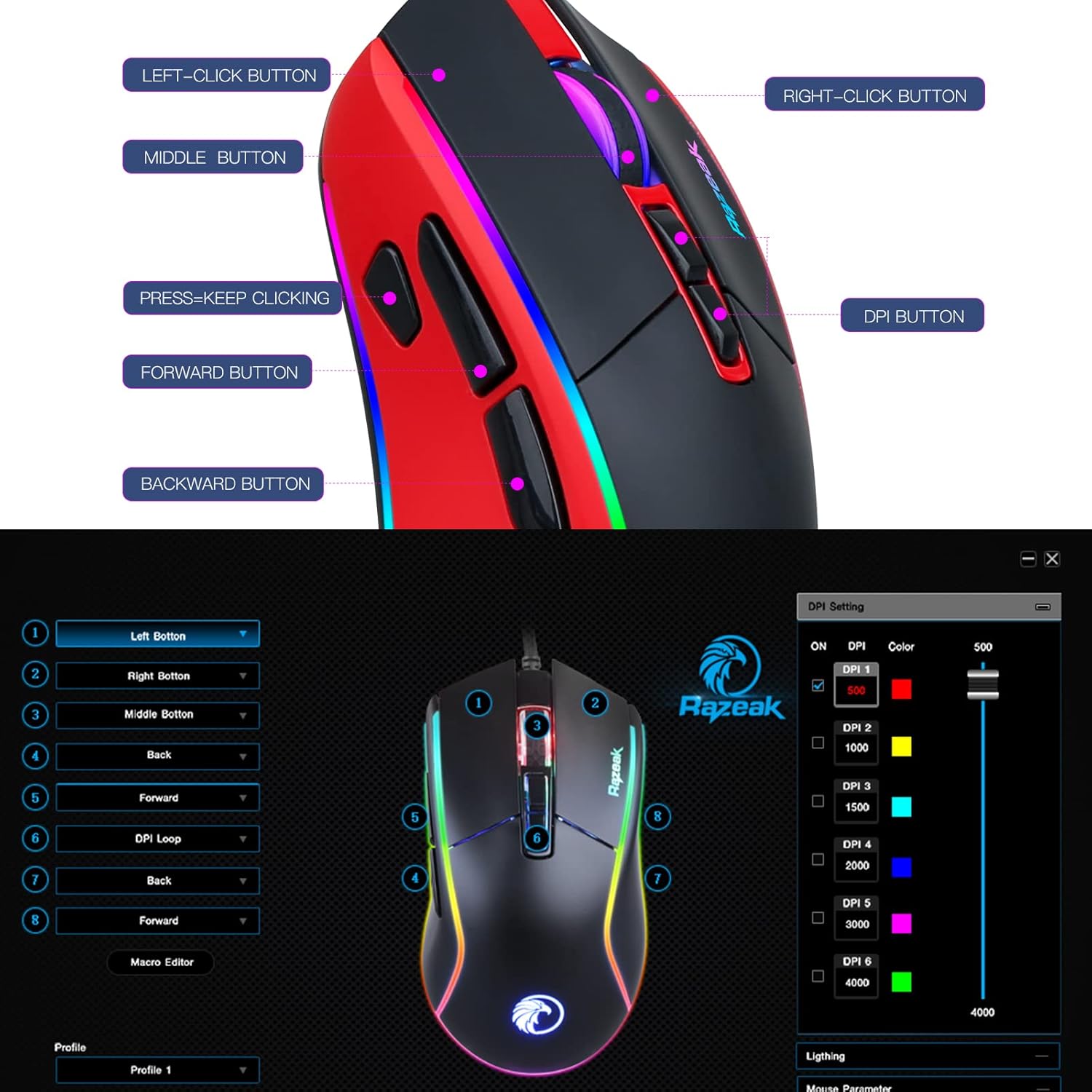
Image: A diagram illustrating the location and labels of the Left-Click, Right-Click, Middle Button, DPI Button, Press=Keep Clicking, Forward, and Backward buttons on the RAZEAK RM-X18 mouse.
- Ezkerreko botoia klikatzeko: Klik egiteko funtzio nagusia.
- Eskuineko botoiarekin klik egitea: Bigarren mailako klik funtzio estandarra.
- Middle Button (Scroll Wheel Click): Standard middle click function.
- DPI botoia: DPI ezarpenen artean txandakatzen da.
- Aurrera egiteko botoia: Aurrera nabigatzen du web nabigatzaileak edo file esploratzaileak.
- Atzera botoia: Atzeraka nabigatzen du web nabigatzaileak edo file esploratzaileak.
- "Press=Keep Clicking" Button: A dedicated button for rapid, continuous clicks, often referred to as a "fire button" in gaming. This button can be programmed to perform multiple left clicks with a single press.
5.2 DPI doikuntza
The mouse offers 6 adjustable DPI levels to suit various tasks and gaming preferences. Press the DPI botoia (located behind the scroll wheel) to cycle through the preset DPI levels: 500, 1000, 1500, 2000, 3000, and 4000.
For advanced customization, including setting specific numerical values for each DPI level and assigning indicator colors, use the RAZEAK software.

Image: A close-up of the RAZEAK RM-X18 mouse highlighting the DPI button and a graphic representation of the six adjustable DPI levels.
5.3 Button Programming and Macros
All 8 buttons on the RM-X18 mouse are programmable. To customize button functions, record macros, or assign specific actions, you must use the RAZEAK software. The software allows you to create profileaplikazio edo joko desberdinetarako.

Image: Screenshot of the RAZEAK software interface, showing options to program each of the 8 mouse buttons and manage profiles.
5.4 RGB argiztapenaren kontrola
The RM-X18 mouse features dynamic RGB lighting with 9 backlight modes and 16 million colors. You can adjust the lighting effects directly on the mouse or through the RAZEAK software.
- Saguaren gaineko doikuntza: Sakatu Left-Click Button eta du DPI botoia simultaneously to cycle through different lighting effects.
- Softwarearen pertsonalizazioa: Use the RAZEAK software for full control over lighting modes, colors, brightness, and speed.

Image: A close-up of the RAZEAK RM-X18 mouse, indicating the combination of the Left Key and DPI button to adjust lighting effects.

Image: The RAZEAK RM-X18 mouse displaying vibrant RGB lighting effects.
5.5 Switching Between Gaming and Office Modes
The mouse supports two distinct usage modes: Gaming and Office. To switch between these modes, simultaneously press the Erdiko botoia (scroll wheel click) and the Egin klik eskuineko botoian.
6. Software Installation and Usage
To unlock the full potential of your RAZEAK RM-X18 mouse, including advanced button programming, macro recording, and detailed RGB lighting customization, download the official software from the RAZEAK webgunea. Jarraitu pantailan agertzen diren argibideei instalaziorako.
The software interface allows you to:
- Assign custom functions to all 8 buttons.
- Erabiltzaile anitzeko profesionalak sortu eta kudeatufiles.
- Adjust DPI levels and their corresponding indicator colors.
- Configure RGB lighting effects, colors, and speed.
- Record and edit macros for complex command sequences.
Video: An official RAZEAK video demonstrating the features and customization options of the RM-X18 Wired Gaming Mouse, including RGB lighting, DPI settings, and programmable buttons.
7. Mantentzea
To ensure the longevity and optimal performance of your RAZEAK RM-X18 mouse, follow these maintenance guidelines:
- Garbiketa: Erabili zapi leun eta lehor bat saguaren gainazala garbitzeko. Zikinkeria egoskorra bada, garbitu pixka bat.ampGarbitu oihalak urarekin. Saihestu produktu kimiko gogorrak edo material urratzaileak erabiltzea.
- Sentsoreen zainketa: Jarraipen zehatza bermatzeko, mantendu saguaren azpialdeko sentsore optikoa garbi eta hautsik edo hondakinik gabe.
- Kableen kudeaketa: Kalteak ekiditeko, saihestu USB kablea estutzea edo gehiegi tiratzea.
- Biltegiratzea: Store the mouse in a clean, dry environment when not in use.
8. Arazoak
| Arazoa | Kausa posiblea | Irtenbidea |
|---|---|---|
| Sagua ez du erantzuten | USB konexio soltea, USB ataka akastuna, gidariaren arazoa. |
|
| Jarraipen zehaztugabea edo kurtsorearen atzerapena | Sentsore optiko zikina, sagu-oihalaren gainazal desegokia, DPI ezarpen okerra. |
|
| RGB argiztapena ez dabil edo ez dabil ondo | Software settings, mode conflict. |
|
| Botoiak ez dira programagarriak | Software not installed or not running, incorrect profile hautatua. |
|
9. Zehaztapenak
| Ezaugarri | Xehetasuna |
|---|---|
| Marka | RAZEAK |
| Ereduaren izena | RM-X18 |
| Konektibitate Teknologia | USB kableduna |
| Mugimenduak detektatzeko teknologia | Optical (Avago 3050 Sensor) |
| DPI mailak | 500/1000/1500/2000/3000/4000 (Adjustable) |
| Botoi kopurua | 8 (Programagarria) |
| RGB Atzeko argia | 9 Modes, 16.8 Million Colors |
| Eskuen Orientazioa | Eskuin |
| Gailu bateragarriak | Ordenagailu pertsonala |
| Hardware Plataforma | PC |
| Elementuaren pisua | 137 gramo |
10. Bermea eta Laguntza
RAZEAK offers a fabrikatzailearen urtebeteko bermea for the RM-X18 Wired Gaming Mouse. For any product inquiries, technical support, or warranty claims, please contact RAZEAK customer service. We aim to respond to messages within 24 hours.
Gorde erosketaren egiaztagiria bermea balioztatzeko.