1. Sarrera
This manual provides comprehensive instructions for the Generic AN-MR20GA Replacement Voice Remote Control. It covers setup, operation, maintenance, and troubleshooting to ensure optimal use with your compatible LG 4K Smart UHD TV models 75UN9070AUD and 86UN9070AUD.
2. Produktua amaitu daview
The AN-MR20GA is a replacement voice-enabled remote control designed to function with specific LG 4K Smart UHD TV models. It features standard navigation, numeric keys, and dedicated buttons for streaming services, along with voice command capabilities.
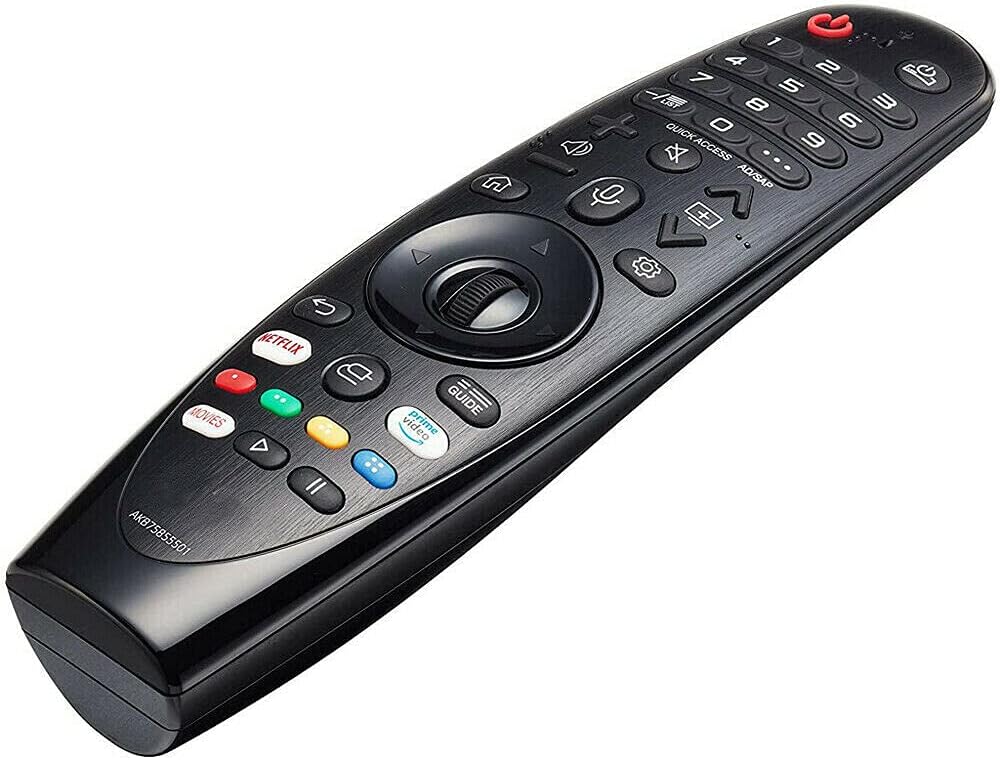
2.1. irudia: Aurrealdea view of the AN-MR20GA remote control, showing various buttons including power, numeric keypad, navigation wheel, volume, channel, and dedicated streaming service buttons.
2.1 Bateragarritasuna
This remote control is compatible with the following LG 4K Smart UHD TV models:
- LG 75UN9070AUD 75-inch 4K Smart UHD TV
- LG 86UN9070AUD 86-inch 4K Smart UHD TV
It may also be compatible with other LG models listed in the product description, such as various SK, UK, and OLED series TVs. Please refer to your TV's manual or the product listing for a complete list of compatible models.
3. Konfigurazioa
3.1 Bateriaren instalazioa
The remote control requires two (2) 1.5V AAA Alkaline batteries (not included).
- Kokatu bateriaren konpartimentuaren estalkia urrutiko agintearen atzealdean.
- Irristatu estalkia beherantz edo sakatu giltza irekitzeko.
- Sartu bi AAA pila, ziurtatuz terminal positiboa (+) eta negatiboa (-) konpartimentuaren barruko markekin behar bezala lerrokatuta daudela.
- Jarri bateriaren konpartimentuaren estalkia berriro bere lekuan, ondo klik egin arte irristatuz.

3.1. irudia: Itzuli view of the remote control with the battery compartment open, illustrating correct battery placement.
3.2 Pairing the Remote Control (Magic Remote Function)
To use the voice and pointer functions of this remote, it must be paired with your LG TV. This process is often referred to as 'registering' the Magic Remote.
- Ensure your TV is powered on and the batteries are correctly installed in the remote.
- Point the remote control directly at your TV screen.
- Sakatu Gurpila (Ados) button located in the center of the navigation pad.
- The TV should display a message indicating that the remote is registered or paired.
Oharra: If the TV fails to register the remote, turn the TV off and then back on, and repeat the pairing steps.
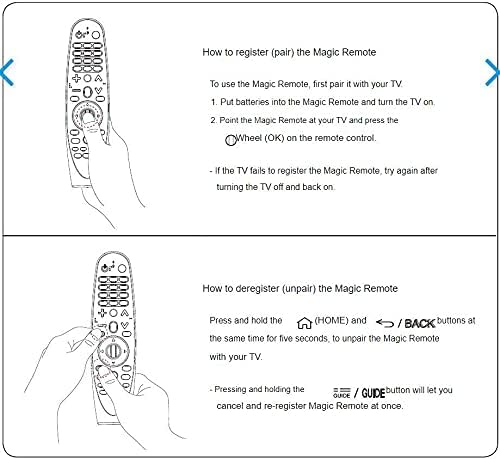
3.2. irudia: Visual guide for pairing the Magic Remote by pressing the Wheel (OK) button, and unpairing by holding HOME and BACK buttons simultaneously.
3.3 Unpairing the Remote Control
If you need to unpair (deregister) the remote control from your TV, follow these steps:
- Eduki sakatuta ETXERA botoia (
 ) eta ATZERA botoia (
 ) simultaneously for approximately five seconds.
 - The TV should display a message confirming the remote has been unpaired.
Aholkua: Sakatu eta eutsita GIDA button will allow you to cancel and re-register the Magic Remote at once.
4. Funtzionamendu-argibideak
4.1 Oinarrizko funtzioak
- Pizteko botoia: Telebista pizten edo itzaltzen du.
- Zenbakizko teklatua (0-9): Sartu zuzenean kanal zenbakiak.
- Bolumena igo/behera: Telebistaren bolumena doitzen du.
- Kanal gora/behera: Telebistako kateak aldatzen ditu.
- Nabigazio-panela (Gora/Behera/Ezkerra/Eskuina): Moves the cursor or selection on the screen.
- Gurpil-botoia (Ados): Confirms selections or activates the pointer function.
- Atzera botoia: Aurreko pantailara edo menura itzultzen da.
- Hasierako botoia: Accesses the TV's main menu or Smart TV interface.
4.2 Ahots kontrola
To use the voice control feature:
- Eduki sakatuta Mikrofonoa urrutiko aginteko botoia.
- Speak clearly into the microphone located on the remote.
- Askatu botoia hitz egiten amaitutakoan.
Exampahots komandoen fitxategiak: "Change to Channel 5", "Open Netflix", "Bilatu action movies", "What's the weather?"
4.3 Special Buttons
- Netflix botoia: Directly launches the Netflix application.
- Prime Video botoia: Directly launches the Amazon Prime Video application.
- Gida botoia: Programa elektronikoen gida (EPG) bistaratzen du.
- Quick Access / AD/SAP Button: Provides quick access to frequently used apps or functions, or activates Audio Description/Secondary Audio Program.
5. Mantentzea
5.1 Garbiketa
Urrutiko agintea garbitzeko:
- Ensure the batteries are removed before cleaning.
- Garbitu gainazala zapi leun, lehor eta lihorik gabeko batekin.
- Zikinkeria egoskorrerako, apur bat lehortuampGarbitu zapi bat urarekin edo garbitzaile leun eta ez-urratzaile batekin. Ez ihinztatu garbitzailea zuzenean urrutiko agintearen gainean.
- Avoid using harsh chemicals, solvents, or abrasive materials, as these can damage the remote's finish or internal components.
5.2 Biltegiratzea
When not in use for extended periods, remove the batteries to prevent leakage and corrosion. Store the remote in a cool, dry place away from direct sunlight and extreme temperatures.
6. Arazoak
6.1 Urruneko agintea ez da erantzuten
- Egiaztatu bateriak: Ensure batteries are inserted correctly and are not depleted. Replace with fresh AAA alkaline batteries if necessary.
- Ikusmen lerroa: Ziurtatu urrutiko agintearen eta telebistaren infragorri hargailuaren artean oztoporik ez dagoela.
- Urrutiko agintea berriro parekatu: If the remote uses Bluetooth (Magic Remote function), try re-pairing it with the TV as described in Section 3.2.
- TV Power Cycle: Turn off the TV, unplug it from the power outlet for a few minutes, then plug it back in and turn it on. Try the remote again.
6.2 Ahots-kontrola ez dabil
- Parekatzea: Ensure the remote is properly paired with the TV (Section 3.2), as voice functionality relies on this connection.
- Mikrofonoaren botoia: Make sure you are pressing and holding the Microphone button while speaking.
- Argi eta garbi hitz egin: Argi eta bolumen normalean hitz egin.
- Interneteko konexioa: Some voice commands may require the TV to be connected to the internet.
7. Zehaztapenak
| Ezaugarri | Xehetasuna |
|---|---|
| Modelo zenbakia | AN-MR20GA |
| Marka | Generikoa |
| Gailu bateragarriak | LG 75UN9070AUD, 86UN9070AUD 4K Smart UHD TVs, and other compatible LG models |
| Konektibitate Teknologia | Infrared, Bluetooth (for Magic Remote functions) |
| Elikatze Hornidura | 2 x 1.5V AAA bateria alkalinoak (ez dira barne hartzen) |
| Ezaugarri Berezia | Voice Control, Ergonomic Design |
| Kolorea | Beltza |
8. Bermea eta Laguntza
Specific warranty information for this Generic replacement remote control is not provided in the product details. Please refer to the seller's return policy or contact the seller directly for details regarding warranty coverage and customer support.


