
1. Sarrera
This manual provides detailed instructions for the setup, operation, maintenance, and troubleshooting of your LIONWEI USB C Docking Station (Model LIDK1002). Please read this manual thoroughly to ensure proper usage and optimal performance of the device.
2. Produktua amaitu daview
The LIONWEI USB C Docking Station is a versatile 15-in-1 hub designed to expand the connectivity of your laptop. It features multiple ports for video output, data transfer, network access, audio, and power delivery.
Ezaugarri nagusiak:
- Bideo irteera: 1x 4K HDMI, 2x DisplayPort (DP) for triple monitor support.
- Abiadura handiko datuen transferentzia: 1x USB A 3.1 (10Gbps), 3x USB A 3.0 (5Gbps), 1x USB C (10Gbps).
- USB ataka gehigarriak: 2x USB 2.0 for peripherals.
- Sareko konexioa: 1x RJ45 Gigabit Ethernet port.
- Memoria txartelaren zirrikituak: SD and TF card slots (up to 480Mbps, simultaneous operation).
- Audioa: 1x 3.5mm Audio/Mic Jack.
- Potentzia entrega: 1x 100W PD 3.0 USB C port for laptop charging (up to 87W output).
- Ostalari konexioa: 1x USB C Host port to connect to your laptop.

Figure 1: LIONWEI 15-in-1 Docking Station Port Layout
3. Paketearen edukia
Mesedez, egiaztatu elementu guztiak zure paketean daudela:
- LIONWEI USB C Docking Station (Model LIDK1002)
- USB-C to USB-C Cable (3.2 ft)
- Argibide eskuliburua

2. irudia: Zer dago kutxan
4. Konfiguratzeko argibideak
Follow these steps to set up your LIONWEI USB C Docking Station:
- Konektatu ordenagailu eramangarrira: Connect the included USB-C to USB-C cable from the 'Host' port on the docking station to a full-function USB-C or Thunderbolt port on your laptop. Ensure your laptop's USB-C port supports video output and power delivery for full functionality.
- Connect Power Adapter (Optional but Recommended): If your laptop requires charging via the docking station, connect your laptop's original USB-C power adapter to the 'PD Charging' port on the docking station. The docking station supports up to 100W input and provides up to 87W output to your laptop.
- Connect External Monitors:
- For HDMI displays, connect an HDMI cable from the docking station's HDMI port to your monitor.
- For DisplayPort displays, connect a DisplayPort cable from the docking station's DP ports to your monitors.
The docking station supports up to three external monitors simultaneously. Refer to the 'Operating Instructions' section for specific display configurations for Windows and macOS.

Figure 3: Triple Display Setup Example
- Konektatu periferikoak: Connect your USB devices (keyboard, mouse, external hard drives, etc.) to the available USB-A or USB-C data ports on the docking station.
- Konektatu Ethernetera: For a stable wired network connection, connect an Ethernet cable from your router/modem to the RJ45 Gigabit Ethernet port on the docking station.
- Konektatu audio gailuak: Plug your headphones or speakers into the 3.5mm Audio/Mic Jack.
- Memoria txartelak sartu: If needed, insert SD or TF cards into the corresponding slots.
The docking station is plug-and-play and generally does not require driver installation.
5. Funtzionamendu-argibideak
Bistaratzeko konfigurazioa:
The docking station supports various display modes (Extended, Mirror) depending on your operating system and laptop capabilities.
- Windows sistema eragilea: Supports Extended and Mirror modes across multiple displays. You can achieve up to three external displays with resolutions up to 4K@60Hz (DP1.4 source). The resolution will be limited by the lowest resolution monitor connected.
- MacOS: Supports up to three external monitors at 4K@60Hz in SST (Single Stream Transport) mode. This means all external monitors will display the same extended desktop, or mirror the laptop display. Due to macOS limitations, true independent extended displays (A+B+C+D) are not typically supported through a single MST hub.

Figure 4: Windows Display Configurations

Figure 5: macOS Display Configurations
Datuen transferentzia:
Utilize the USB 3.1 and USB C data ports for high-speed file transfers up to 10Gbps. The USB 3.0 ports offer speeds up to 5Gbps. SD and TF card slots support data transfer up to 480Mbps and can operate simultaneously.

6. irudia: Abiadura handiko datuen transferentzia
Potentzia entrega:
When a compatible power adapter is connected to the PD Charging port, the docking station can deliver up to 87W of power to charge your connected laptop. Ensure your laptop supports the PD protocol for this feature to function.
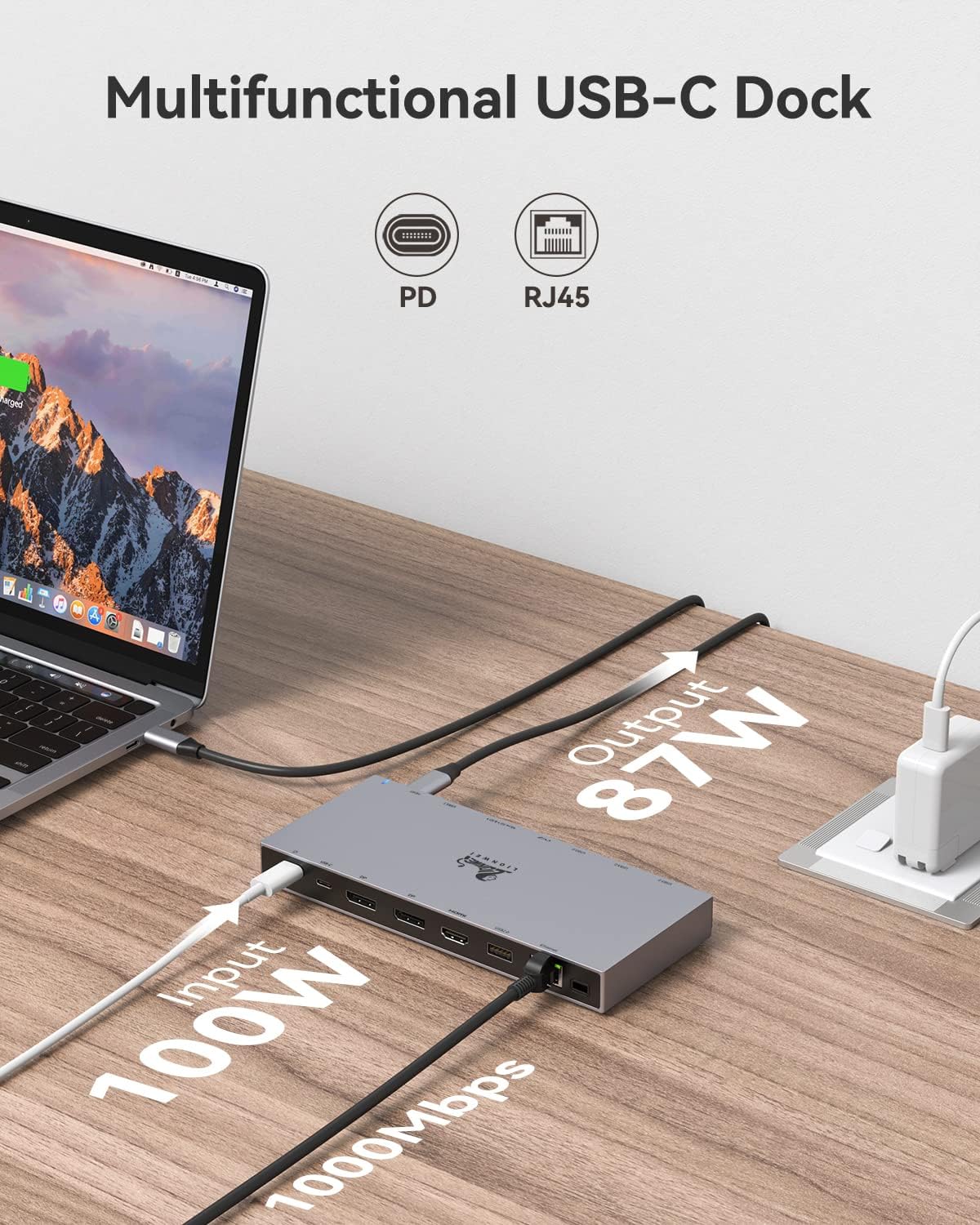
Figure 7: Power Delivery and Ethernet Connection
6. Mantentzea
Zure kargatzeko estazioaren iraupena eta errendimendu optimoa bermatzeko:
- Mantendu gailua garbi eta hautsik gabe. Erabili zapi leun eta lehor bat garbitzeko.
- Saihestu gailua muturreko tenperatura, hezetasun edo eguzki-argia zuzenaren eraginpean jartzea.
- Ez erori edo ez jarri gailua kolpe handirik.
- Deskonektatu kable guztiak gailua denbora luzez erabiltzen ez duzunean.
7. Arazoak
If you encounter issues with your LIONWEI USB C Docking Station, please refer to the following common problems and solutions:
| Arazoa | Balizko Kausa / Irtenbidea |
|---|---|
| No display or flickering on external monitors. |
|
| Laptop is not charging or charging slowly. |
|
| USB devices are not recognized or data transfer is slow. |
|
| Ethernet connection is unstable or not working. |
|
| Audio jack not working. |
|
8. Zehaztapenak
| Ezaugarri | Xehetasuna |
|---|---|
| Modelo zenbakia | LIDK1002 |
| Produktuaren neurriak | 1.18 x 0.79 x 0.39 hazbete |
| Elementuaren pisua | 5.3 ontza |
| Ostalariaren konexioa | USB-C (requires full-function USB-C or Thunderbolt port) |
| Bideo Irteera | 1x HDMI (4K@60Hz), 2x DisplayPort (4K@60Hz) |
| USB datu-ataka | 1x USB A 3.1 (10Gbps), 3x USB A 3.0 (5Gbps), 2x USB 2.0, 1x USB C (10Gbps) |
| Ethernet | RJ45 Gigabit Ethernet (10/100/1000Mbps) |
| Txartel irakurgailua | SD/TF (up to 480Mbps, simultaneous operation) |
| Audioa | 3.5mm Audio/Mic Jack |
| Potentzia Entrega | USB C PD 3.0 (100W input, up to 87W output to laptop) |
| Bateragarritasuna | Laptops with Thunderbolt or full-function USB C Port (e.g., MacBook, Dell, HP, Lenovo) |
| Ezaugarri bereziak | Triple Display, 10Gbps Data Transfer, 100W PD Charging, Driver-free |
| Eskuragarri dagoen lehen data | 15ko abuztuaren 2022a |
| Fabrikatzailea | LIONWEI |
9. Bermea eta Laguntza
LIONWEI provides an 18 hilabeteko bermea for this product from the date of purchase. This warranty covers manufacturing defects and ensures the product meets its specified performance. For any technical assistance, troubleshooting, or warranty claims, please contact LIONWEI customer support. We offer 24-hour online service to address your inquiries.
For support, please visit the official LIONWEI website or contact their customer service channels provided with your purchase documentation.