1. Produktua amaitu daview
This manual provides instructions for the SZHKHXD replacement remote control designed for various GREE AC Air Conditioner models. This remote offers essential functions for controlling your air conditioning unit.

1. irudia: Aurrealdea view of the SZHKHXD remote control, showing the LCD screen and various function buttons.

2. irudia: Atzealdea view of the SZHKHXD remote control, displaying battery type information and a QC Pass sticker.
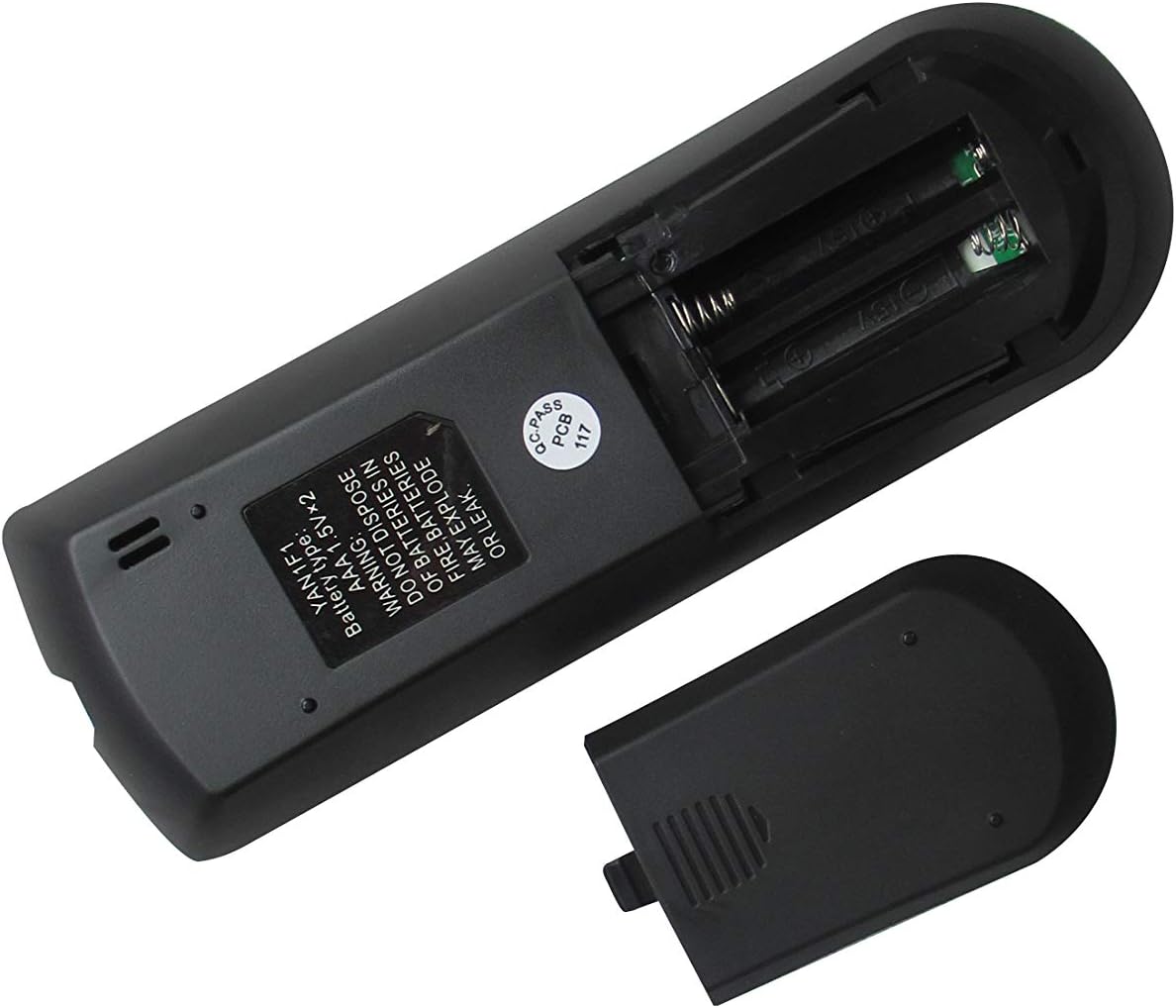
Figure 3: The remote control with its battery compartment open, revealing slots for two AAA batteries.

4. irudia: Atzealdea view of the remote control with the battery cover securely in place.
Eredu bateragarriak:
- GREE GWH12QC-K3DNA5G
- GREE GWH12QC-K3DNB2G
- GREE GWH09QB-K3DNA1G
- GREE GWH09QB-K3DNA5G
- GREE GWH09QB-K3DNB2G
- GREE GWH09QB-K3DNB4G
- GREE GWH09QB-K3DNB6G
- GREE GWH12QC-K3DNA1G
- GREE GWH12QC-K3DNA2G
2. Konfigurazioa
Bateriaren instalazioa
The remote control requires two (2) AAA 1.5V batteries (not included). Follow these steps to install them:
- Kokatu bateriaren konpartimendua urrutiko agintearen atzealdean.
- Slide the battery cover downwards to open it (refer to Figure 3).
- Sartu bi AAA pila, ziurtatuz terminal positiboa (+) eta negatiboa (-) konpartimentuaren barruko markekin behar bezala lerrokatuta daudela.
- Slide the battery cover back into place until it clicks securely (refer to Figure 4).
Warning: Do not dispose of batteries in fire. Batteries may explode or leak if mishandled.
3. Funtzionamendu-argibideak
Familiarize yourself with the buttons on your remote control to operate your GREE AC unit effectively.
Botoiaren funtzioak:
| Botoia | Funtzioa |
|---|---|
| MODUA | Funtzionamendu moduen artean txandakatzen da (adibidez, Hoztea, Berotzea, Haizagailua, Lehortzea, Autoa). |
| Boterea (⏻) | Turns the AC unit On or Off. |
| FAN | Haizagailuaren abiadura doitzen du (adibidez, Baxua, Ertaina, Altua, Automatikoa). |
| Swing | Activates or deactivates the vertical louver swing function. |
| Gora gezia (▲) | Increases temperature setting or navigates menu options. |
| Beheko gezia (▼) | Decreases temperature setting or navigates menu options. |
| TURBOA | Tenperatura aldaketa azkarretarako hozte edo berotze azkarra aktibatzen du. |
| LO | Engages sleep mode, which adjusts temperature and fan speed for comfortable sleep. |
| TEMP | Displays or cycles through temperature settings. |
| ERLOIA | Sets or displays the current time. |
| SENTITZEN | Activates the iFeel function, which senses the temperature at the remote's location. |
| ARGIA | Turns the display light on or off on the indoor unit. |
| KRONOLOGIA ON | Sets a timer for the AC unit to turn on automatically. |
| DENBORALIZAZIOA OFF | Sets a timer for the AC unit to turn off automatically. |
Oinarrizko funtzionamendua:
- Piztu/Itzali: Press the red Power button (⏻) unitatea pizteko edo itzaltzeko.
- Aukeratu modua: Sakatu MODUA button repeatedly to cycle through available operating modes (e.g., Cool, Heat, Fan, Dry, Auto). The selected mode will typically be displayed on the remote's LCD screen.
- Doitu Tenperatura: Use the Up (▲) and Down (▼) arrow buttons to set your desired temperature.
- Doitu haizagailuaren abiadura: Sakatu FAN button to cycle through different fan speeds (e.g., Auto, Low, Medium, High).
4. Mantentzea
Urruneko agintea garbitzea:
- Garbitu urrutiko agintearen gainazala zapi leun eta lehor batekin.
- Do not use liquid cleaners, abrasive cleaners, or chemical sprays, as these may damage the remote.
Bateria ordezkatzea:
- Replace batteries when the remote's display becomes dim or the remote no longer responds to commands.
- Always replace both batteries at the same time with new AAA 1.5V batteries.
- Ensure correct polarity (+/-) when inserting new batteries.
- Kendu pilak urrutiko agintea denbora luzez erabiliko ez baduzu, isuriak saihesteko.
5. Arazoak
Urrutiko agintearekin arazoak badituzu, jo ezazu honako arazo eta irtenbide ohikoenei:
- Urrunekoek ez dute erantzuten:
- Egiaztatu bateriak polaritate zuzenarekin behar bezala sartuta dauden.
- Ordeztu bateria zaharrak berriekin.
- Ensure there are no obstructions between the remote control and the AC unit's receiver.
- Confirm you are within the effective operating range of the AC unit.
- Display shows Celsius instead of Fahrenheit (or vice-versa):
- Some replacement remotes may default to Celsius. To switch, try pressing and holding the TEMP button for 3-5 seconds. If this does not work, try holding the MODUA button or a combination of TEMP and an arrow key. Refer to your specific AC unit's manual for remote control temperature unit conversion if this remote does not have a direct function for it.
- Funtzio batzuk ez dira funtzionatzen:
- This is a replacement remote. While designed to be compatible, some advanced or specific functions present on your original remote may not be supported by this universal replacement. Refer to the "Special Feature" note in the product specifications.
6. Zehaztapenak
| Ezaugarri | Xehetasuna |
|---|---|
| Produktuaren neurriak | 6.3 x 3.15 x 1.18 hazbete |
| Elementuaren pisua | 3.52 ontza |
| Beharrezko bateriak | 2 AAA bateria (ez daude barne) |
| Konektibitate Teknologia | Infragorriak |
| Gailu bateragarriak | AC Air Conditioner (Specific GREE models listed in Product Overview) |
| Onartutako gailuen gehienezko kopurua | 1 |
| Fabrikatzailea | SZHKHXD |
| Jatorrizko Herrialdea | Txina |
| Special Feature Note | Replacement item may not work with all functions as original. |
7. Bermea eta Laguntza
This product is manufactured by SZHKHXD. For specific warranty information or technical support, please contact the seller directly through the platform where the purchase was made. As this is a replacement remote, specific warranty details are typically handled by the seller rather than the original equipment manufacturer (GREE).
Please note that the product description indicates "Selling without batteries or instruction, No configuration." This manual serves as the primary instruction guide for basic operation and troubleshooting.


