
OMTech RYGEL-LPSD100
OMTech 100W laser elikatze iturriaren erabiltzailearen eskuliburua
Model: RYGEL-LPSD100
1. Sarrera
Thank you for choosing the OMTech 100W Laser Power Supply. This digital power supply is designed to provide stable and efficient power to your 80W, 90W, or 100W CO2 laser tube, ensuring optimal performance for your laser engraving and cutting machines. It features a real-time LCD display for convenient monitoring and incorporates dual fault protection for enhanced safety and extended lifespan.
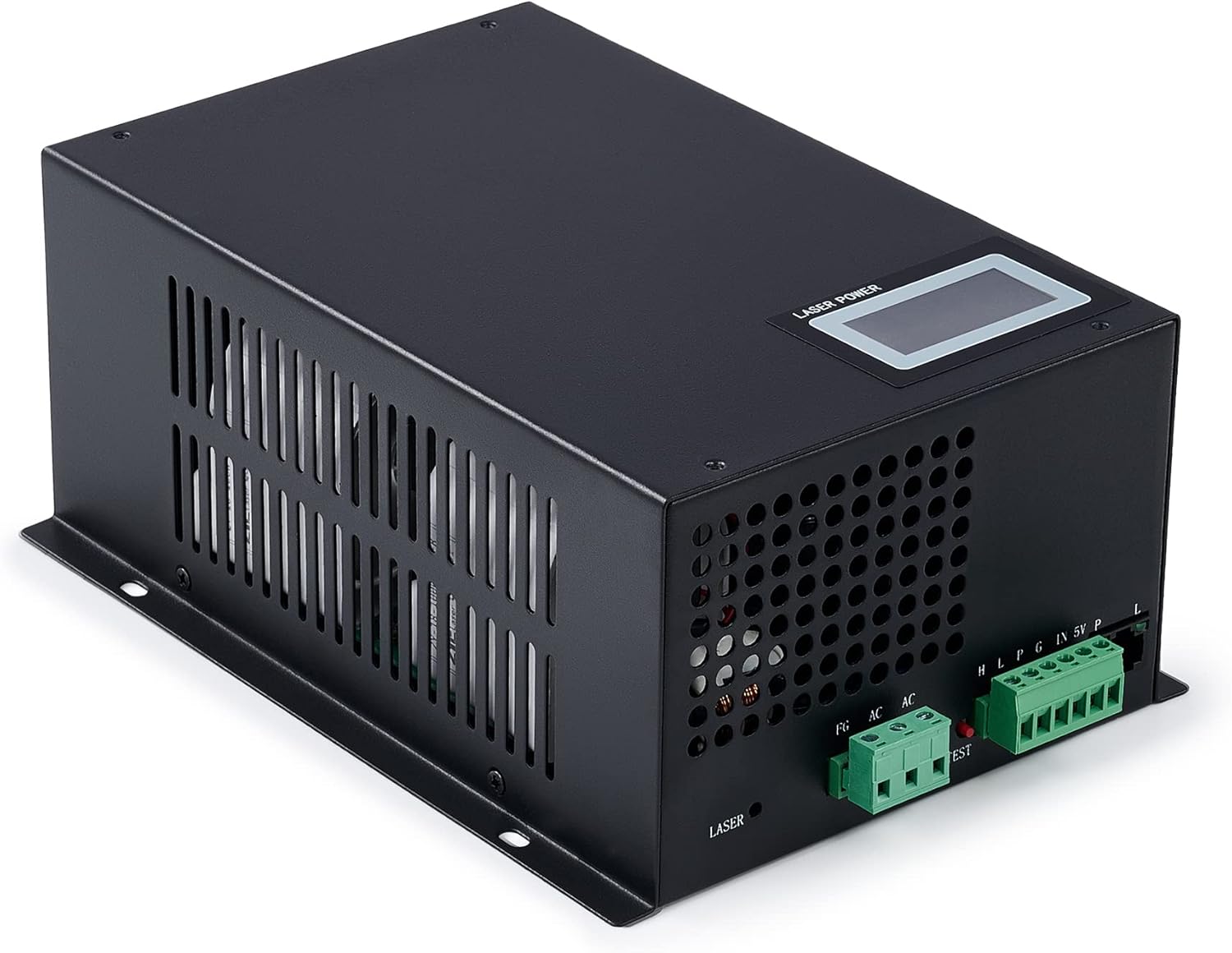
Figure 1: OMTech 100W Laser Power Supply
This manual provides detailed instructions for the safe and effective installation, operation, and maintenance of your new laser power supply. Please read it thoroughly before use and keep it for future reference.
2. Segurtasun-neurriak
Beti jarraitu segurtasun-jarraibide hauek ekipamenduari lesioak edo kalteak saihesteko:
- Segurtasun elektrikoa: Ensure the power supply is properly grounded. Do not operate with wet hands or in damp environments. Disconnect power before performing any maintenance or installation.
- Goi Boltage: Gailu honek bolumen handiarekin funtzionatzen dutage. Only qualified personnel should perform installation and troubleshooting. Never touch internal components when the unit is powered.
- Aireztapena: Berotu gehiegi berotzea saihesteko, ziurtatu aireztapen egokia dagoela energia-iturriaren inguruan. Ez blokeatu aireztapen-irekidurak.
- Bateragarritasuna: Use only with compatible CO2 laser tubes (80W-100W) as specified. Using an incompatible laser tube may cause damage.
- Babes-ezaugarriak: The unit includes overcurrent and short-circuit protection. Do not attempt to bypass or modify these safety features.

Figure 2: Dual Protection features, including short-time open-circuit protection and 130% overcurrent protection, designed to extend the service life of your CO2 laser engraver.
3. Produktuaren ezaugarriak
The OMTech 100W Laser Power Supply is engineered for reliability and performance:
- Errendimendu handia: Delivers greater than 90% efficiency with fast sub-1ms response times. Designed for an average service life of 30,000 hours.
- Real-Time LCD Display: Provides immediate feedback on output current (amperage), laser status, and water protection system status for easy monitoring.
- Dual Fault Protection: Features a robust protection circuit and durable enclosure to handle overcurrents up to 130% and short-time open-circuit faults, extending the unit's lifespan.
- Bateragarritasun zabala: Seamlessly integrates with any 80W to 100W CO2 laser system, including those from OMTech and other manufacturers.
- Exceptional Endurance: Rigorously tested to withstand 12 hours of full load at 140°F, 2 hours of 3D motion testing, and 500 start/stop cycles in 7 seconds.

Figure 3: Performance metrics highlighting the 30,000+ hour service life, 2-hour anti-knock test, 140°F full load test, and 7-second start/stop test.

4. irudia: hurbileko planoa view of the real-time LCD display, showing current output, water protection status, and laser signal status.
4. Konfigurazioa eta instalazioa
Follow these steps for proper installation of your laser power supply:
- Muntaketa: Securely mount the power supply in a well-ventilated area, away from excessive heat or moisture. Ensure all mounting points are stable.
- Kableatu konexioak: Each connection port is clearly labeled for straightforward wiring. Refer to the diagram below for proper connections to your laser tube, control board, and power source. Ensure all connections are tight and secure.
- Lurreratzea: Verify that the power supply and your laser machine are properly grounded to prevent electrical hazards.
- Water Protection System: Connect your laser machine's water protection system to the designated port on the power supply. This is crucial for preventing damage to the laser tube from overheating.
- Piztu: Once all connections are verified, connect the power supply to a suitable electrical outlet.
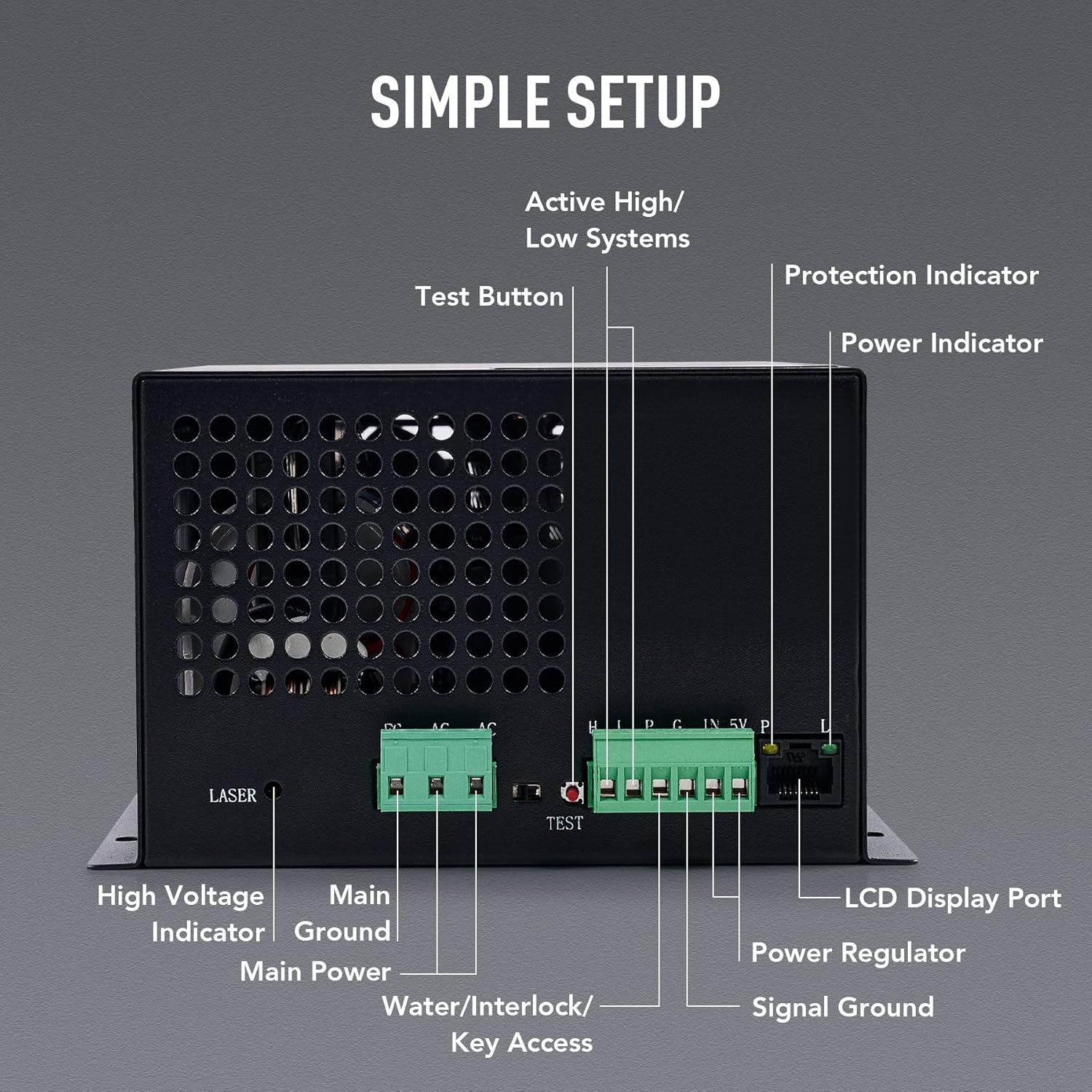
Figure 5: Detailed diagram showing clearly labeled connection ports for simple setup, including High Voltage Indicator, Main Ground, Main Power, Water/Interlock/Key Access, Test Button, Protection Indicator, Power Indicator, Power Regulator, Signal Ground, and LCD Display Port.
5. Funtzionamendua
Operating the OMTech 100W Laser Power Supply is intuitive:
- Piztu/Itzali: Use the main power switch on your laser machine or the power supply (if equipped) to turn the unit on or off.
- Monitoring with LCD: The integrated LCD display will show the real-time output current (in mA), the status of the water protection system (ON/OFF), and the laser signal status (ON/OFF). Monitor these readings during operation to ensure proper functioning.
- Potentzia doitzea: Laser power is typically controlled via your laser machine's software or control panel, which sends a signal to the power supply. Refer to your laser machine's manual for specific power adjustment procedures.
- Proba botoia: A 'TEST' button is provided on the power supply for quick verification of laser output. Use this button cautiously and only when the laser path is clear and safe.
6. Mantentzea
Regular maintenance ensures the longevity and optimal performance of your power supply:
- Garbiketa: Periodically clean the exterior of the power supply with a dry, soft cloth. Ensure ventilation grilles are free from dust and debris to maintain proper airflow. Deskonektatu beti energia garbitu aurretik.
- Konexioaren egiaztapenak: Regularly inspect all electrical connections for tightness and signs of wear or corrosion. Re-tighten any loose connections.
- Ingurumen-baldintzak: Operate the power supply within its specified environmental conditions (temperature, humidity) to prevent premature failure.
- Ikuskapen profesionala: For any internal issues or complex repairs, consult a qualified technician. Do not attempt to open the unit or perform internal repairs yourself.
7. Arazoak
If you encounter issues with your OMTech 100W Laser Power Supply, refer to the following common problems and solutions:
| Arazoa | Kausa posiblea | Irtenbidea |
|---|---|---|
| Argindarrik ez / Unitatea ez da pizten | Loose power connection, faulty power outlet, internal fuse blown. | Check power cable, test outlet, inspect fuse (if accessible and safe, otherwise contact support). |
| Laserrak ez du jaurtitzen | Water protection error, laser signal issue, faulty laser tube, loose connections. | Check LCD for water protection status. Verify laser signal from control board. Inspect laser tube. Ensure all wiring is secure. |
| Low laser output | Incorrect power settings, aging laser tube, power supply malfunction. | Adjust power settings in software. Consider laser tube replacement if old. Contact support if issue persists. |
| Gehiegi berotzea | Poor ventilation, excessive load, fan malfunction. | Ensure clear airflow around unit. Reduce load if possible. Check fan operation. |
If the problem persists after attempting these solutions, please contact OMTech customer support for further assistance.
8. Zehaztapen Teknikoak
Below are the detailed technical specifications for the OMTech 100W Laser Power Supply:

Figure 6: Visual representation of the technical specifications table.
| Zehaztapena | Balioa |
|---|---|
| Potentzia nominala | 100W |
| Sarrerako potentzia | 110 V AC |
| Sarrerako CA maiztasuna | 47-440Hz |
| Gehienez Irteera boltage | 28 kV DC |
| Max. Irteera Korrontea | 30 mA |
| Est. Service Life (MTTF) | 30,000 ordu. |
| Max. Erantzun Denbora | 1 milisegundo |
| Min. High-Level Voltage | 3.0V |
| Max. Low-Level Voltage | 0.8V |
| Max. Gainkorrontearen babesa | %130 |
| Zirkuitu irekiko babesa | Short Time |
| Hozte Sistema | Forced-Air Cooling (FAC) |
| Start/Stop Testing | 500x in 7 sec. |
| Neurriak | 9.1 × 6.3 × 3.6 in. (23×16.1×9.1 cm) |
| Pisu garbia | 6.2 lb (2.8 kg) |
9. Bermea eta Laguntza
OMTech products are backed by a comprehensive warranty. For specific warranty terms and conditions, please refer to the warranty card included with your product or visit the official OMTech website. Our dedicated customer support team is available to assist you with any questions or issues you may encounter.
Harremanetarako informazioa:
- Webgunea: www.omtechlaser.com
- Posta elektronikoa: Refer to your product documentation for support email.
- Telefonoa: Refer to your product documentation for support phone number.
When contacting support, please have your product model number (RYGEL-LPSD100) and purchase date ready.
10. About OMTech
OMTech is a leading provider of laser engraving and cutting solutions, committed to delivering high-quality products and exceptional customer service. We maintain a robust inventory in the US, ready to ship, and our dedicated support team is always available to assist our customers.
1. bideoa: Over batview of OMTech's operations, including warehouse facilities, inventory management, and customer support team, highlighting their commitment to service and product availability.
Ask a question about this manual
Ask about setup, troubleshooting, compatibility, parts, safety, or missing instructions. Manuals+ will review the question and use this page’s manual context to help answer it.