
1. Bukatu daview
The be quiet! Silent Wings Pro 4 120mm PWM fan is engineered for exceptional performance and quiet operation, making it ideal for high-end PC builds, especially on radiators and heatsinks. It features optimized fan blades for superior performance, a speed switch for adjustable maximum PWM speed, and a unique 6-pole fan motor with fluid-dynamic bearing for reduced vibration and smooth operation.

1. irudia: Aurrealdea view of the Silent Wings Pro 4 fan.
2. Konfigurazioa eta instalazioa
The Silent Wings Pro 4 offers versatile mounting options to suit various PC cooling needs. The fan comes with pre-attached radiator-optimized edge pieces, which are designed to prevent air from escaping through gaps when mounted on radiators, ensuring maximum airflow through the fins.
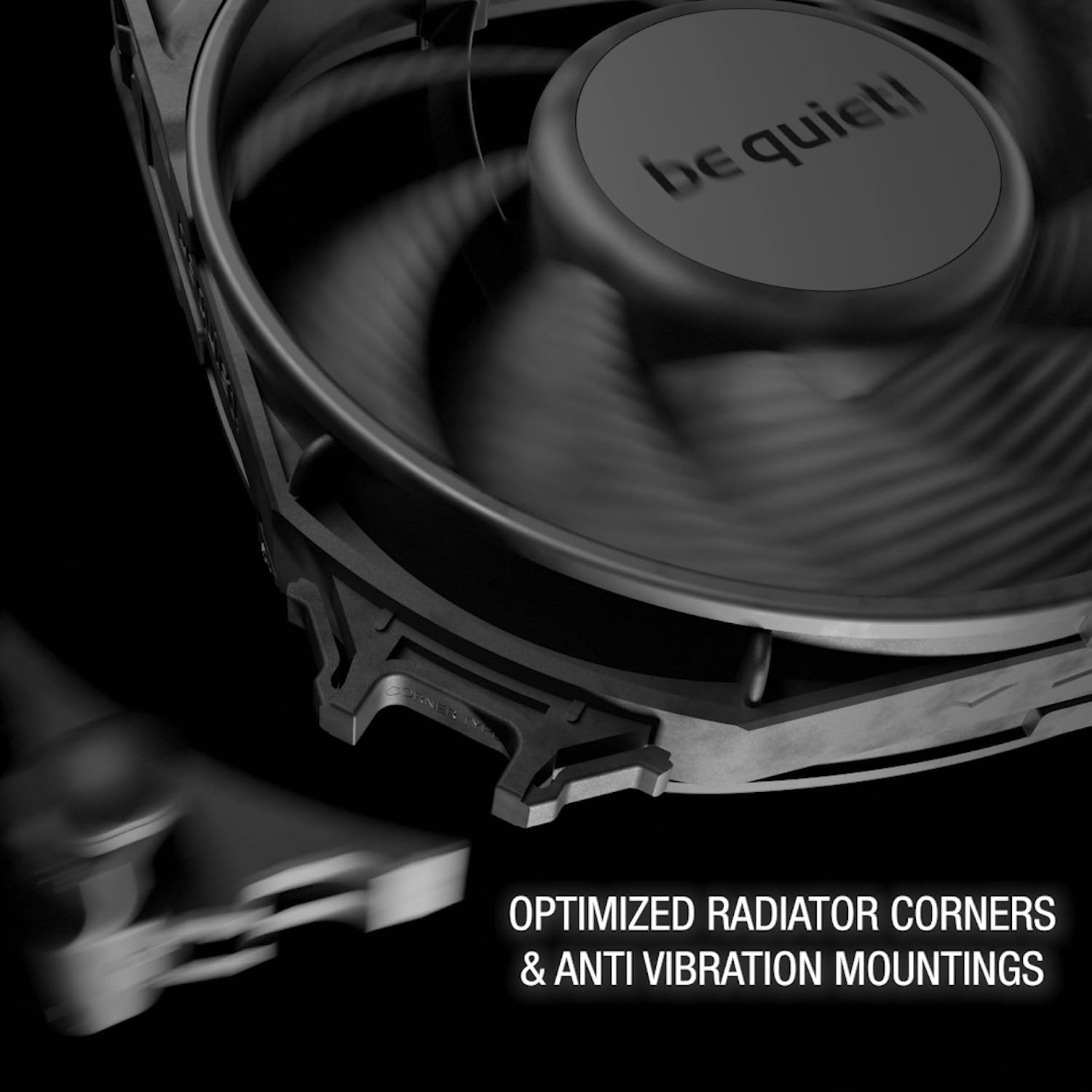
Figure 2: Optimized radiator corners and anti-vibration mountings.
For alternative mounting scenarios, such as case fan use, the fan includes additional mounting mechanisms. These include traditional screw-in mounts and anti-vibration clip-in sticks. To change the mounting corners, simply press the two clips on each corner and pull the current piece off. Then, align and push the desired mounting piece into place until it clicks securely.

Figure 3: Silent Wings Pro 4 fan with accessories, showing different mounting options.
The fan connects via a 4-pin PWM connector, featuring a lengthened 50cm fabric-sleeved cable for easy cable management and robust connection. This design minimizes the risk of accidental disconnections or cable damage during installation or maintenance.
3. Funtzionamendu-argibideak
The Silent Wings Pro 4 features a unique speed switch located on the fan's hub, allowing users to select between three maximum PWM speed modes: Medium-speed (M), High-speed (HS), and Ultra-High-speed (UHS).
- Medium-speed (M) Mode: Limits the fan's maximum speed to 1600 RPM. This mode is ideal for quiet operation in general computing tasks.
- High-speed (HS) Mode: Unlocks the fan's maximum speed to 2500 RPM. This provides increased cooling performance for more demanding workloads.
- Ultra-High-speed (UHS) Mode: Unleashes the fan's full potential at 3000 RPM, delivering maximum airflow and static pressure for extreme cooling requirements.
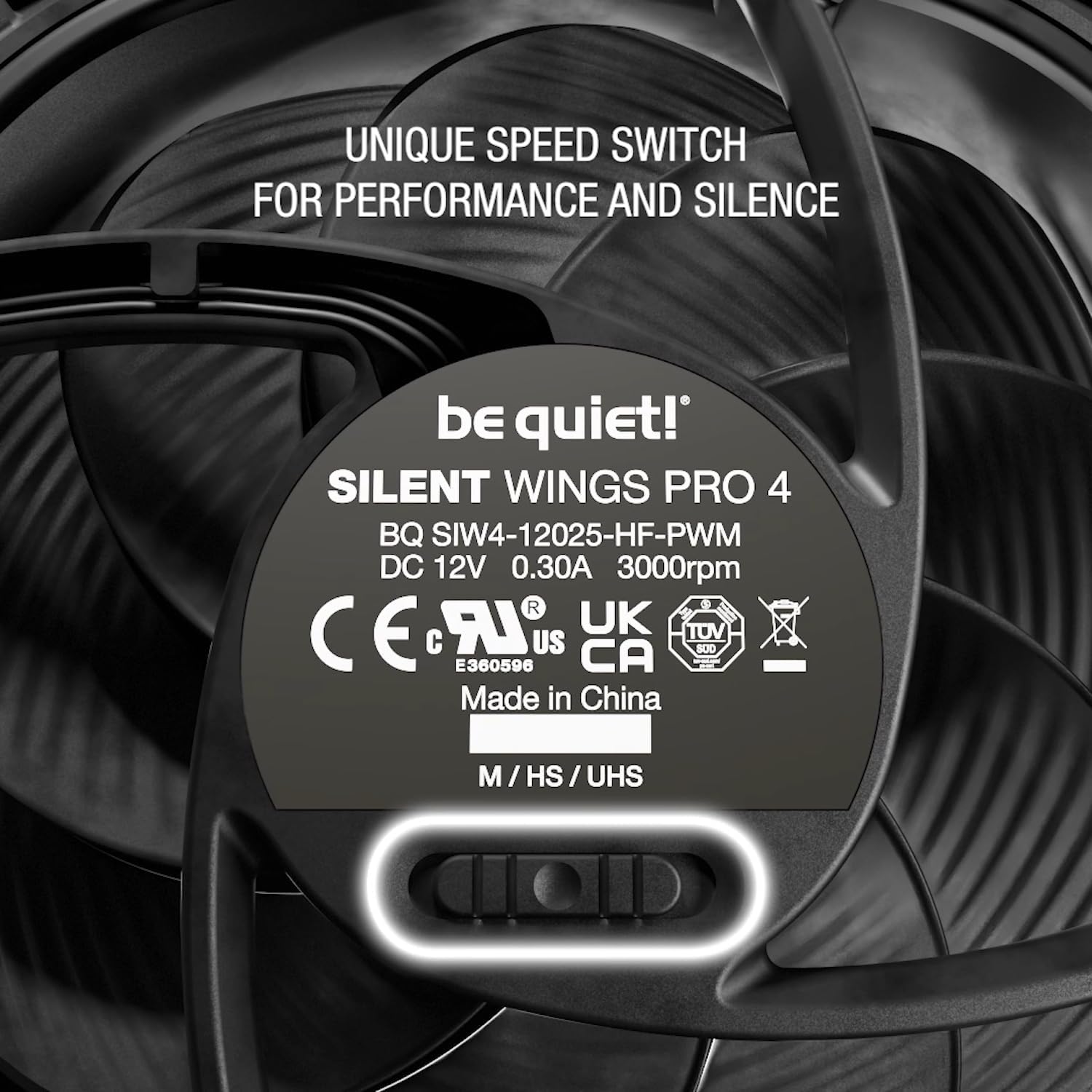
Figure 4: The speed switch on the fan hub allows selection of performance modes.
It is recommended to utilize the UHS mode in conjunction with a PWM curve controlled by your motherboard or fan controller. This allows for dynamic speed adjustment based on system temperature, providing optimal cooling when needed and quiet operation during lighter loads.
4. Mantentzea
Regular maintenance ensures the longevity and optimal performance of your Silent Wings Pro 4 fan.
- Garbiketa: Periodically clean the fan blades and frame to remove dust buildup. Use a soft, dry cloth or compressed air. Ensure the fan is powered off before cleaning.
- Ikuskapena: Check for any obstructions around the fan blades or unusual noises during operation.
- Kableen kudeaketa: Ensure the fan cable is not pinched or obstructing airflow within the PC case.
5. Arazoak
If you encounter issues with your Silent Wings Pro 4 fan, consider the following:
- Haizagailua ez dabil biraka: Ensure the 4-pin PWM connector is securely plugged into the motherboard or fan controller. Check BIOS/UEFI settings to confirm fan headers are enabled and configured correctly.
- Gehiegizko zarata: Verify that the fan is securely mounted and not vibrating against the case or other components. Check for any cables or debris obstructing the fan blades. Adjust the speed switch to a lower mode (M or HS) if maximum performance is not required.
- Hozte-errendimendu eskasa: Ensure the fan is oriented correctly for optimal airflow (intake or exhaust). Check for dust buildup on the fan or radiator fins. Confirm the speed switch is set to an appropriate performance mode (HS or UHS) for your cooling needs.
6. Zehaztapen Teknikoak
| Ezaugarri | Zehaztapena |
|---|---|
| Eredua | Silent Wings Pro 4 120mm PWM |
| Konektorea | 4-pin PWM |
| Neurriak (L x W x H) | 120 x 120 x 25 mm |
| Fan Speed @ 100% PWM / 12V | 3000 RPM |
| Air Flow @ 100% PWM / 12V | 83.9 CFM / 142.5 m³/h |
| Air Pressure @ 100% PWM / 12V | 5.31 mm H₂O |
| Noise Level @ 100% PWM / 12V | 36.9 dB(A) |
| Kablearen luzera | 500 mm |
| Bearing Technology | Fluid-Dynamic Bearing (FDB) |
| Motor Teknologia | 6-pole fan motor |
| Weight (incl. fixed cables) | 0.227 kg |
| Kolorea | Beltza |
7. Bermea eta Laguntza
For detailed warranty information and further support, please refer to the official documentation provided with your product or visit the be quiet! Store on Amazon.
Additional user guides and instructions for use are available in PDF format: