1. Sarrera
This manual provides detailed instructions for the installation, operation, and maintenance of your Fractal Design Define 7 Nano Black Solid Mini ITX PC Case. Please read this manual thoroughly before beginning assembly to ensure proper installation and to maximize the performance and longevity of your system.
The Define 7 Nano is a compact Mini ITX case designed for silent operation and flexible component support, offering a balance of size and functionality for small form factor builds.

1. irudia: Aurrealdea view of the Fractal Design Define 7 Nano Black Solid Mini ITX PC Case.
2. Segurtasun informazioa
Jarraitu segurtasun neurri hauek instalazioan eta funtzionamenduan zehar:
- Deskonektatu beti korronte-iturria hormako entxufetik edozein osagai instalatu edo kendu aurretik.
- Erabili eskumuturreko uhal antiestatiko bat deskarga elektrostatikoek (ESD) eragindako kalteak saihesteko osagai sentikorrei.
- Osagaiak kontu handiz maneiatu kalte fisikoak saihesteko.
- Ziurtatu ordenagailuaren kaxa behar bezala aireztatuta dagoela gehiegi berotzea saihesteko.
- Mantendu zorroa likidoetatik eta gehiegizko hezetasunetik urrun.
- Ez saiatu kaxaren egitura aldatzen, horrek bermea baliogabetu eta segurtasun arriskuak sor ditzakeelako.
3. Paketearen edukia
Egiaztatu osagai guztiak paketean daudela:
- Fractal Design Define 7 Nano PC Case
- Accessory Box (screws, zip ties, standoffs, cleaning cloth)
- Erabiltzailearen eskuliburua (dokumentu hau)
- Pre-installed fans (Dynamic X2 GP-12/GP-14, quantity may vary)

2. Irudia: Lehertuta view showing the various removable components of the Define 7 Nano case.
4. Setup and Component Installation
4.1. Prestaketa
- Deskonprimitu zorroa: Kontu handiz atera zorroa bere paketetik.
- Kendu alboko panelak: The side panels are secured with captive thumbscrews. Loosen the thumbscrews and slide the panels backward to remove them.
- Remove Top Panel (Optional): The top panel can be removed for easier access during installation or for enhanced airflow. Press the release button at the rear of the top panel and lift it off.
- Remove Front Panel (Optional): The front panel can be carefully pulled off from the bottom for access to front fan mounts and dust filters.
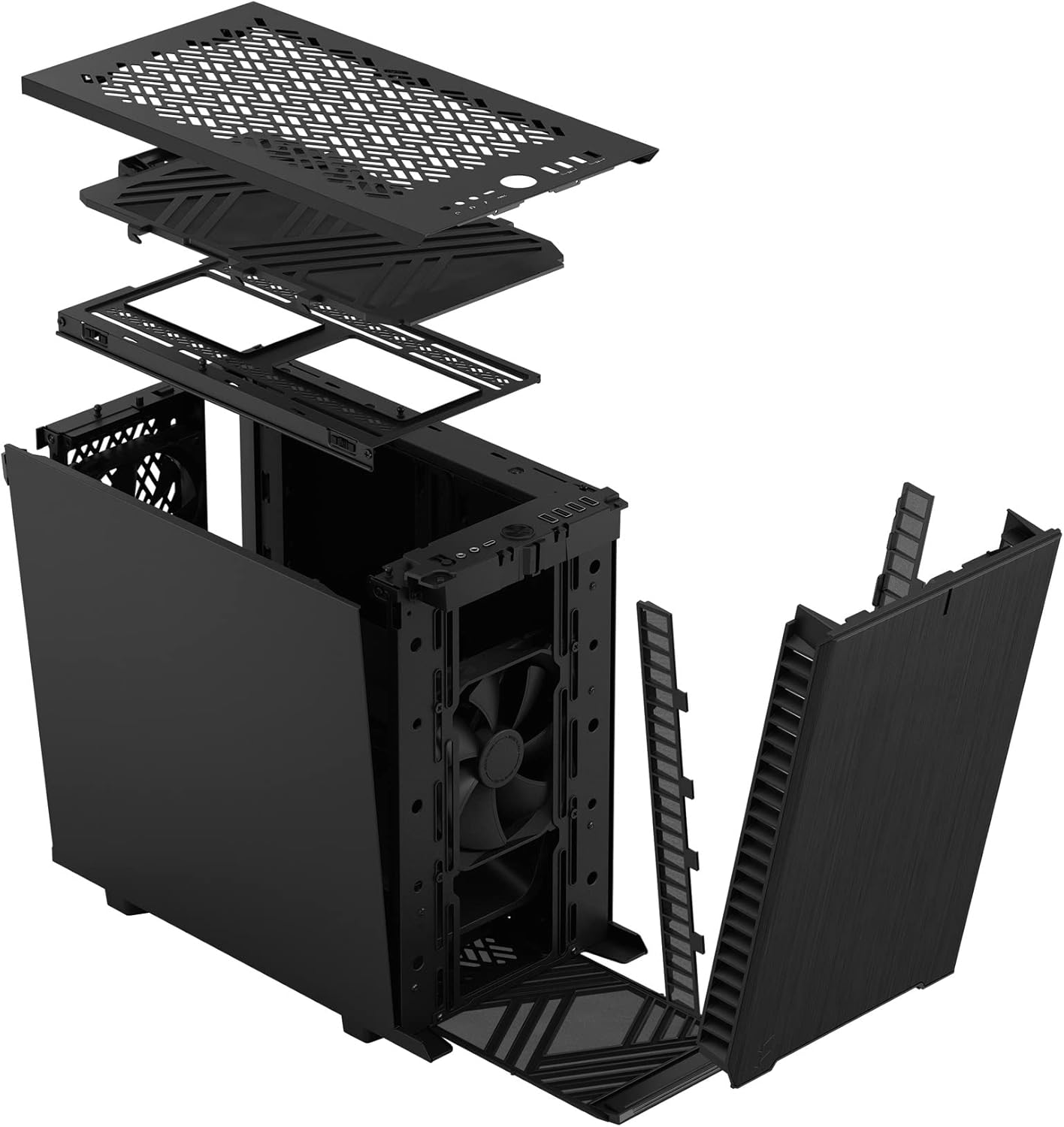
3. Irudia: Lehertuta view illustrating the removal process for the front and top panels.
4.2. Plaka amaren instalazioa
The Define 7 Nano supports Mini ITX motherboards.
- Instalatu I/O babesa: If your motherboard requires an I/O shield, install it into the rear opening of the case before mounting the motherboard.
- Position Motherboard: Align your Mini ITX motherboard with the pre-installed standoffs inside the case.
- Secure Motherboard: Use the provided screws from the accessory box to secure the motherboard to the standoffs.
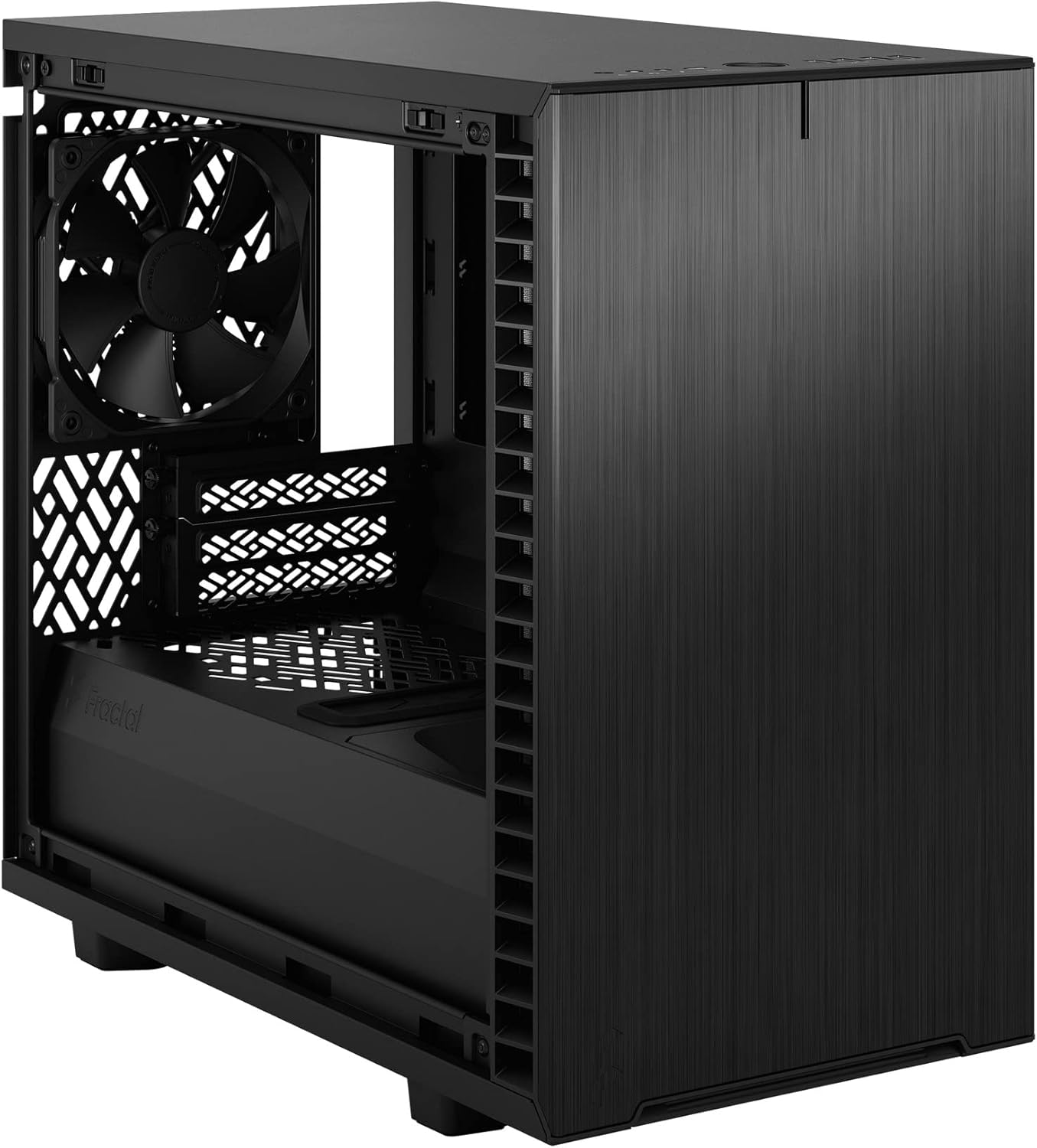
4. Irudia: Barrualdea view of the case, highlighting the motherboard mounting area and fan locations.
4.3. Elikatze-iturriaren (PSU) instalazioa
The Define 7 Nano supports ATX PSUs.
- Mount PSU Bracket: Attach the PSU mounting bracket to your power supply using the screws provided with the PSU.
- Slide PSU into Case: Slide the PSU with the attached bracket into the rear of the case.
- Secure PSU: Secure the PSU bracket to the case using the thumbscrews.
4.4. Biltegiratze unitatearen instalazioa
The case supports 2.5" SSDs and 3.5" HDDs.
- 2.5 hazbeteko unitateak: Mount 2.5" drives to the dedicated SSD brackets located behind the motherboard tray or on the PSU shroud. Secure with screws.
- 3.5 hazbeteko unitateak: Install 3.5" drives into the drive cage located beneath the PSU shroud. Secure with screws.
4.5. Txartel grafikoaren (GPU) instalazioa
- Remove PCIe Slot Covers: Kendu beharrezko PCIe zirrikituen estalkiak kaxaren atzealdetik.
- Txertatu GPUa: Carefully insert your graphics card into the primary PCIe slot on the motherboard.
- GPU segurua: Secure the graphics card to the case using the thumbscrews or standard screws.
4.6. Hozte-sistemaren instalazioa (haizagailuak/erradiadoreak)
The Define 7 Nano offers flexible cooling options.
- Aurrealdeko zaleak: Up to two 120/140mm fans or a 240/280mm radiator can be installed at the front.
- Zale nagusiak: Up to two 120/140mm fans or a 240mm radiator can be installed at the top (requires removing the solid top panel and installing the ventilated top panel).
- Atzeko haizagailua: One 120mm fan can be installed at the rear.
- Bottom Fan: One 120mm fan can be installed at the bottom.
Ensure fans are oriented correctly for optimal airflow (intake or exhaust).
4.7. Kableen kudeaketa
The case features routing channels and Velcro straps behind the motherboard tray for organized cable management.
- Ibilbide kableak: Pass power and data cables through the rubber grommets to the back of the motherboard tray.
- Kable seguruak: Use the pre-installed Velcro straps and included zip ties to bundle and secure cables.

5 irudia: Atzeko barrualdea view demonstrating the cable management system with Velcro straps.
4.8. Aurreko panelaren konexioak
Connect the front panel cables to the corresponding headers on your motherboard:
- Power Button (PWR SW)
- Reset Button (RESET SW)
- Power LED (PWR LED)
- HDD Activity LED (HDD LED)
- USB 3.0 goiburua
- USB Type-C Header (if applicable)
- HD Audio goiburua
Refer to your motherboard manual for exact header locations.
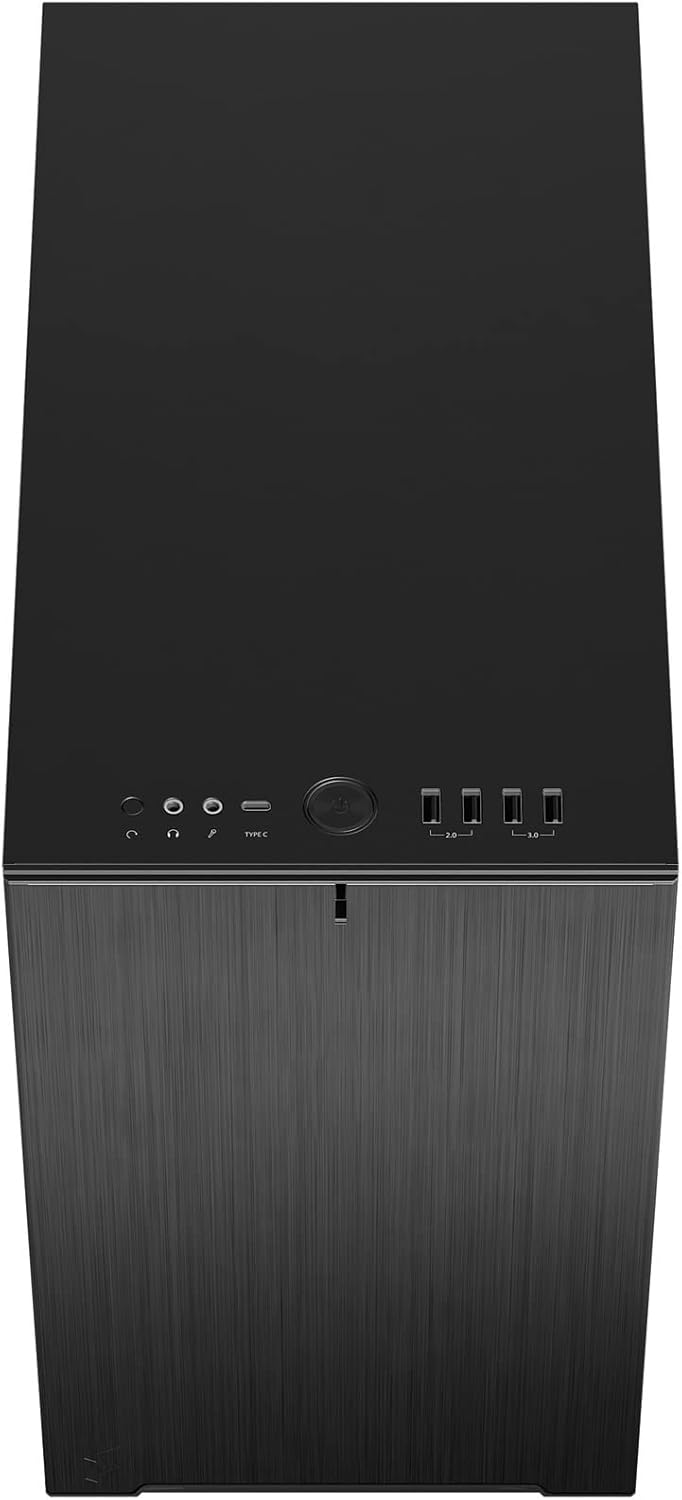
6 irudia: Goiko aurrealdea view displaying the front I/O panel with USB ports, audio jacks, and power button.
5. Funtzionamendu-argibideak
5.1. Piztu/Itzaltzea
- Piztu: Press the power button located on the front I/O panel.
- Itzali: Initiate a shutdown from your operating system. Alternatively, press and hold the power button for 5 seconds for a forced shutdown.
5.2. Using Front Panel Ports
The front I/O panel provides convenient access to:
- USB 3.0 portuak: Gailu bateragarriekin datu-transferentzia azkarra egiteko.
- USB C motako ataka: For modern devices requiring a Type-C connection.
- Audio-konektoreak: For connecting headphones and microphones.
6. Mantentzea
Mantentze-lan erregularrak zure ordenagailuaren osagaien errendimendu optimoa eta iraupena bermatzen laguntzen du.
6.1. Hauts-iragazkiaren garbiketa
The Define 7 Nano is equipped with easily removable dust filters to prevent dust buildup inside the case.
- Aurrealdeko iragazkia: Can be accessed by removing the front panel.
- Top Filter: Located beneath the ventilated top panel (if installed).
- Bottom Filter: Slides out from the front of the case.
Clean filters regularly (e.g., monthly) by rinsing them with water and allowing them to dry completely, or by using a soft brush or compressed air.
6.2. Garbiketa orokorra
- Erabili biguna, damp cloth to wipe down the exterior surfaces of the case.
- Saihestu akabera kaltetu dezaketen produktu kimiko gogorrak edo material urratzaileak erabiltzea.
- For interior cleaning, use compressed air to remove dust from components. Ensure the system is powered off and unplugged.
7. Arazoak
Atal honek aurki ditzakezun arazo ohikoenei heltzen die.
7.1. No Power / System Not Starting
- Egiaztatu energia-konexioak: Ensure the PSU is properly connected to the wall outlet and the power switch on the PSU is in the 'ON' position. Verify all internal power cables (24-pin ATX, 8-pin CPU, PCIe, SATA) are securely connected.
- Aurrealdeko paneleko goiburuak: Double-check that the power button header (PWR SW) is correctly connected to the motherboard.
- Motherboard/CPU: Ziurtatu CPUa eta RAMa behar bezala kokatuta daudela.
7.2. Zarata gehiegi
- Fan zarata: Check if any fan cables are obstructing fan blades. Ensure fans are securely mounted. Consider adjusting fan speeds in your motherboard's BIOS/UEFI or operating system.
- Bibrazioa: Ensure all components (PSU, drives, GPU) are securely fastened to prevent rattling.
7.3. Gehiegi berotzea
- Aire-fluxua: Verify that fans are oriented correctly (intake/exhaust) and that there is adequate airflow.
- Hauts-iragazkiak: Clean dust filters regularly to prevent restricted airflow.
- Pasta termikoa: Ensure CPU cooler has proper thermal paste application.
8. Zehaztapenak
| Ezaugarri | Zehaztapena |
|---|---|
| Ereduaren izena | Define 7 Nano |
| Modelo zenbakia | FD-C-DEF7N-01 |
| Kasu mota | Mini-dorrea |
| Plaka amaren bateragarritasuna | Mini ITX |
| Neurriak (L x W x H) | Gutxi gorabehera 18.74 x 11.38 x 17.91 hazbete (Paketea) |
| Pisua | Gutxi gorabehera. 18.37 kilo |
| Materiala | Aluminioa |
| Kolorea | Solido Beltza |
| Aurreko I / O Portuak | 5x USB 3.0, Audio In/Out, Power Button |
| Drive Bays | 2.5" SSD, 3.5" HDD (specific quantities vary by configuration) |
| Hozteko metodoa | Airea |
| Aurrez instalatutako zaleak | Dynamic X2 GP-12 (rear), Dynamic X2 GP-14 (front) |
9. Bermea eta Laguntza
Fractal Design products are manufactured to the highest quality standards and come with a limited warranty. For detailed warranty information, please refer to the official Fractal Design webgunea edo produktuarekin batera datorren berme-txartela.
For technical support, troubleshooting assistance, or to inquire about replacement parts, please visit the official Fractal Design support page:
www.fractal-design.com/support/
Please have your product model number (FD-C-DEF7N-01) and proof of purchase ready when contacting support.