
Sarrera
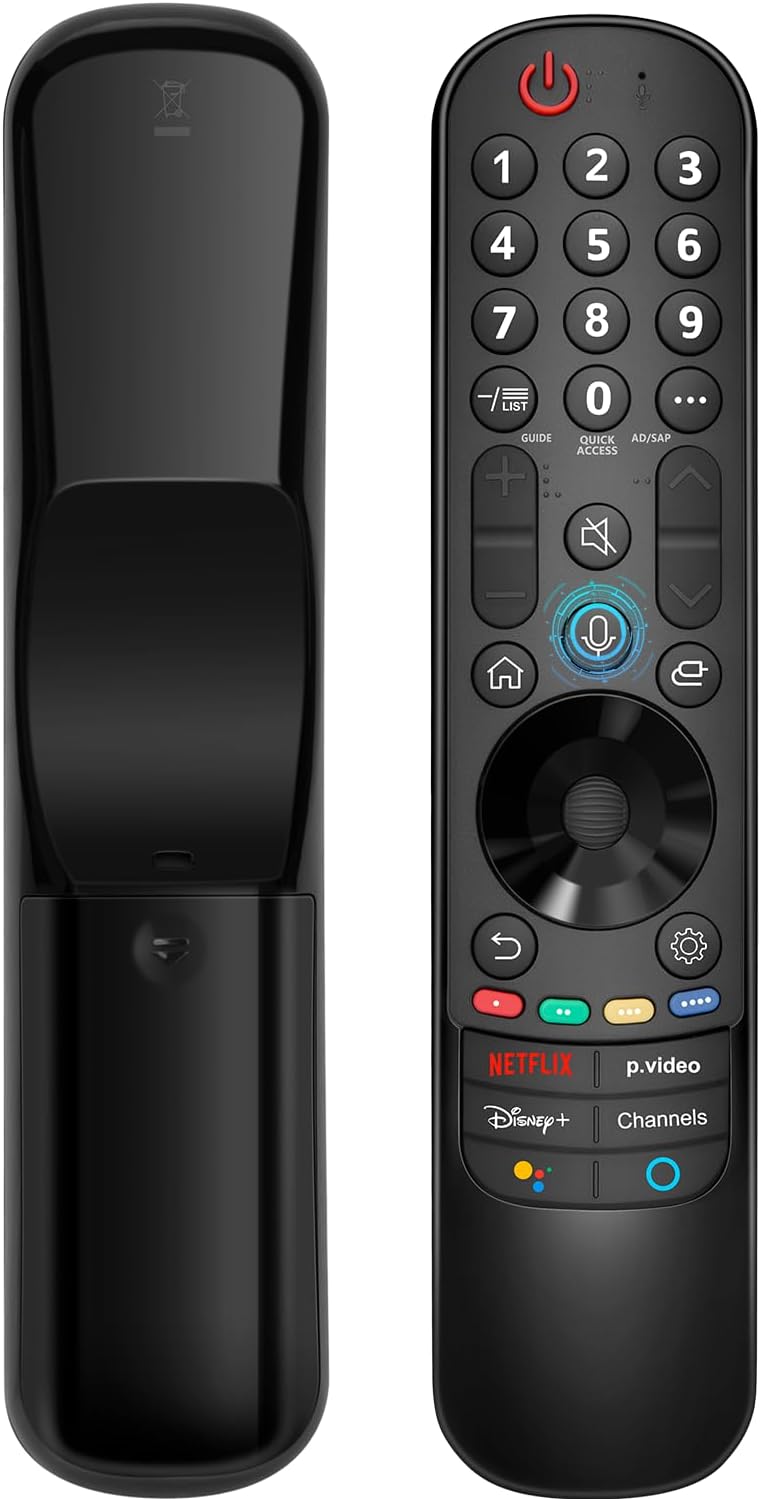
This manual provides instructions for the Angrox AN-MR21GA Magic Remote Control, designed as a replacement for compatible LG Smart TVs. This remote features pointer functionality, voice control, and dedicated shortcut buttons for enhanced navigation and user experience.
The remote is compatible with LG 2021, 2022, 2023, and 2024 OLED, QNED Mini-LED, NanoCell, and UHD TV series. It offers an ergonomic design with soft plastic buttons for comfortable use.
Bateragarritasuna
The Angrox AN-MR21GA Magic Remote Control is compatible with the following LG Smart TV series from 2021, 2022, 2023, and 2024:
- OLED TV Series: G1, G2, G3, G4, C1, C2, C3, C4, A1, A2, A3, A4 series.
- QNED Mini-LED TV Series: QNED99, QNED90 series.
- NanoCell TV Series: NANO99, NANO90, NANO85, NANO80, NANO75 series.
- UHD TV Series: UP80, UP75 series.
Specific compatible model numbers include, but are not limited to: 43NANO75UPA, 43UP7100ZUF, 43UP7560AUD, 43UP7700PUB, 43UP8000PUA, 50NANO75UPA, 50NANO77ZPA, 50NANO80UPA, 50NANO85APA, 50UP7100ZUF, 50UP7560AUD, 50UP7700PUB, 50UP8000PUA, 55NANO75UPA, 55NANO77ZPA, 55NANO80UPA, 55NANO85APA, 55NANO90UPA, 55UP7100ZUF, 55UP7560AUD, 55UP7700PUB, 55UP8000PUA, 60UP7700PUB, 60UP8000PUA, 65NANO75UPA, 65NANO77ZPA, 65NANO80UPA, 65NANO85APA, 65NANO90UPA, 65UP7100ZUF, 65UP7560AUD, 65UP7700PUA, 65UP7700PUB, 65UP8000PUA, 70UP7170ZUC, 70UP7570AUD, 70UP7770PUB, 70UP8070PUA, 75NANO75UPA, 75NANO80UPA, 75NANO85APA, 75NANO90UPA, 75QNED90UPA, 75QNED99UPA, 75UP7170ZUC, 75UP7570AUE, 75UP7770PUB, 75UP8070PUA, 82UP8770PUA, 86NANO75UPA, 86NANO85APA, 86NANO90UPA, 86NANO99UPA, 86QNED90UPA, 86QNED99UPA, 86UP8770PUA, BEJMR21GA, OLED48A1AUA, OLED48A1PUA, OLED48C1AUB, OLED48C1PUB, OLED55A1AUA, OLED55A1PUA, OLED55B1PUA, OLED55C1AUB, OLED55C1PUA, OLED55C1PUB, OLED55G1PUA, OLED65A1AUA, OLED65A1PUA, OLED65B1PUA, OLED65C1AUA, OLED65C1AUB, OLED65C1PUB, OLED65G1PUA, OLED77A1AUA, OLED77A1PUA, OLED77B1PUA, OLED77C1AUA, OLED77C1AUB, OLED77C1PUB, OLED77G1PUA, OLED83C1AUA, OLED83C1PUA, RCLLGEMR21GA, R-C-LLGEMR21GA, 43UP7670PUC, 43UP8000PUR, 50NANO75PUA, 50NANO80P, 50UP7670PUC, 50UP8000PUR, 55NANO80P, 55NANO90P, 55UP7670PUC, 55UP8000PUR, 60UP7670PUB, 60UP8000PUR.

Konfigurazioa eta parekatzea
The Angrox AN-MR21GA remote control is designed for easy setup without complex programming.
1. Bateriaren instalazioa
Insert two (2) AA batteries into the remote control. Ensure correct polarity (+/-) as indicated inside the battery compartment. Batteries are not included with the remote.
2. Zure telebistarekin parekatzea
There are two methods for pairing the remote with your LG Smart TV:
- Method 1 (Automatic Pairing):
- Piztu zure LG Smart TV.
- Insert 2*AA batteries into the remote.
- After approximately 20 seconds, point the remote control towards the TV.
- Sakatu Gurpila (Ados) botoia.
- The remote control should register automatically, and a "Pairing Complete" message will appear on the TV screen.
- Method 2 (Manual Pairing):
- Piztu zure LG Smart TV.
- Insert 2*AA batteries into the remote.
- Eduki sakatuta Hasiera (
 ) eta Itzuli () botoiak aldi berean 5 segundoz.
 - Ondoren, sakatu Gurpila (Ados) botoia.
- A "Pairing Complete" message should appear on the TV screen.

Funtzionamendu-argibideak
Basic Navigation and Pointer Function
The remote features a pointer function that allows you to navigate the TV screen by moving the remote. The Wheel (OK) button acts as a click function, and scrolling is also supported.
Ahots kontrola
The remote includes a voice function for issuing commands to your TV. Press and hold the voice button (microphone icon) while speaking your command. Examples include "Go back home," "Open P.Video," or "Play some music."

Lasterbide-botoiak
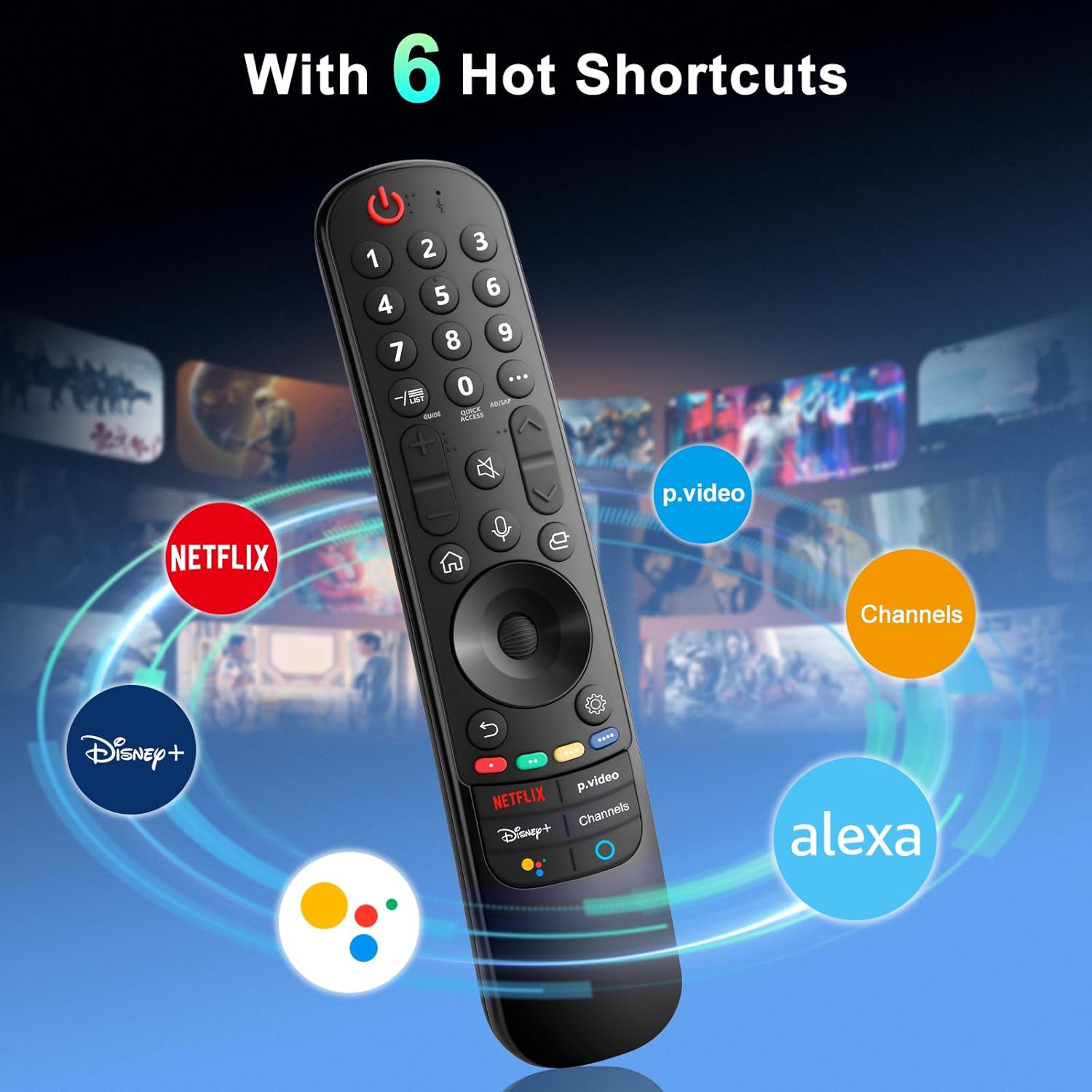
The remote provides dedicated shortcut buttons for quick access to popular streaming services and functions:
- NETFLIX: Netflix aplikazioa abiarazten du.
- P.Video: Launches the Prime Video application.
- Disney+: Launches the Disney+ application.
- Kanalak: Accesses TV channels.
- Google Laguntzailea: Google Laguntzailea aktibatzen du ahots-komandoetarako eta bilaketetarako.
- Alexa: Activates Amazon Alexa for voice commands and searches.

Botoien funtzio zehatzak
For buttons marked with a circle symbol (©), a long press (more than one second) may activate additional functions:
- 9©: Launch Quick Help.
- - / LIST©: Checking saved channels.
- GUIDE©: Launch Guide.
- 0©: QUICK ACCESS editatzeko pantaila agertzen da.
- ...©: Display additional buttons on the remote control.
- AD/SAP©: Configures SAP.
- Volume Up/Down©: Doitu bolumen-maila.
- Channel Up/Down©: Kanala alda dezakezu.
- Mute©: Select to turn off the sound from the TV.
- Accessibility©: Enter the Accessibility menu.
- Search©: Check out recommended contents. (Recommendation service may not be available depending on the countries you are in.)
- Voice Button (Microphone)©: Push and hold the button while speaking to use the voice recognition function.
- Home Button©: Hasierako menua bistaratzen du.
- Input Button©: Sarrera-iturburu bat hautatzen du.
- Settings Button©: Entering into the Home Dashboard.
- Back Button©: Joan aurreko urratsera.
- Exit Button©: Menua ixten du.
- Quick Settings Button©: Ezarpen azkarren menuan sartzen da.
- All Settings Button©: Enters the All Settings menu.
- Launch Record Button©: Launch Record. (Some models may not be supported.)
Arazoak konpontzea
- Urrunekoek ez dute erantzuten:
- Ensure batteries are correctly inserted and have sufficient charge. Replace with new AA batteries if necessary.
- Re-attempt the pairing process (see "Setup and Pairing" section).
- Ensure there are no obstructions between the remote and the TV's infrared receiver. This remote primarily operates via line-of-sight.
- Pointer Function Not Working:
- Ensure the remote is properly paired.
- Try re-pairing the remote using Method 2 (holding Home and Back buttons).
- Ahots-kontrola ez dabil:
- Ensure the remote is properly paired and the TV supports voice control.
- Confirm that the voice button is being pressed and held while speaking.
- Check TV settings to ensure voice recognition is enabled.
- Buttons Feel Flimsy or Stick:
- This may indicate a manufacturing defect. Contact customer support for assistance.
Zehaztapenak
| Marka | Angrox |
| Modelo zenbakia | AN-MR21GA |
| Produktuaren neurriak | 7.48 x 1.18 x 1.18 hazbete (18.54 x 4.06 x 1.77 cm) |
| Elementuaren pisua | 3.2 ontza |
| Beharrezko bateriak | 2 AA bateria (ez dago barne) |
| Ezaugarri bereziak | Ergonomic design, No Programming Required, Universal compatibility (for specified LG models), Voice Search, Pointer Function |
| Onartutako gailuen gehienezko kopurua | 1 |
| Gailu bateragarriak | LG Smart Televisions (2021-2024 UHD, OLED, QNED, NanoCell series) |
Mantentzea
- Garbiketa: Erabili zapi leun eta lehor bat urrutiko agintea garbitzeko. Ez erabili garbitzaile likidorik edo material urratzailerik.
- Bateria ordezkatzea: Replace batteries when the remote's performance degrades. Remove batteries if the remote will not be used for an extended period to prevent leakage.
- Biltegiratzea: Gorde urrutiko agintea leku fresko eta lehor batean, eguzki-argitik eta muturreko tenperaturetatik babestuta.
- Manipulazioa: Avoid dropping the remote or subjecting it to strong impacts, as this can damage internal components.
Bermea eta Laguntza
For warranty information or technical support, please contact the manufacturer, Angrox, directly through their official channels or the retailer where the product was purchased. Please retain your proof of purchase for warranty claims.
Manufacturer: Angror
Laguntza gehiago lortzeko, bisita dezakezu Angrox Store on Amazon.