
WANGCL IND26864
WANGCL Multimeter LCD Digital USB Tester User Manual
Eredua: IND26864 | Marka: WANGCL
1. Sarrera
The WANGCL Multimeter LCD Digital USB Tester is a versatile diagnostic tool designed for monitoring and testing various electrical parameters of electronic devices. It is capable of measuring voltage, current, power, resistance, and capacity, making it ideal for assessing the performance of mobile phone chargers, data cables, and mobile power supplies. This device provides real-time data to help identify and troubleshoot charging issues.

1.1. irudia: Aurrealdea view of the WANGCL Multimeter LCD Digital USB Tester, displaying its color screen and various input/output ports.
2. Segurtasun informazioa
Please read all safety instructions carefully before using the device. Failure to follow these instructions may result in electric shock, fire, or damage to the device or connected equipment.
- Elikatze-iturria: Always use a compliant and stable power supply. Ensure the input voltage and current do not exceed the device's specified limits.
- Tenperatura: Avoid exposing the device to extreme heat or direct sunlight. Operate within the specified temperature range (0~80°C).
- Aireztapena: Bermatu gailua behar bezala aireztatuta dagoela funtzionamenduan zehar, gehiegi berotzea saihesteko.
- Hezetasuna: Mantendu gailua lehor. Ez jarri uraren edo beste likido batzuen eraginpean.
- Manipulazioa: Kontu handiz maneiatu gailua. Saihestu erortzea edo kolpe bortitzak jasatea.
- Desmihiztatu: Do not attempt to disassemble, repair, or modify the device. Refer all servicing to qualified personnel.
- Konexioa: Ensure all connections are secure and correct before applying power. Incorrect connections can cause damage.
Note: This safety information is derived from standard product safety guidelines and typical product packaging warnings.
3. Produktuaren ezaugarriak
The WANGCL Multimeter LCD Digital USB Tester offers a comprehensive set of features for detailed electrical analysis:
- Aplikazio zabala: Suitable for testing mobile phone chargers, data cables, and mobile power supplies.
- Denbora errealeko jarraipena: Continuously monitors charging parameters of electronic devices.
- Hainbat interfaze: Equipped with 8 types of interfaces for broad compatibility:
- Type-C male input
- Type-C female input
- Type-C female chassis output
- 5525/5521 female input
- 5525/5521 male output
- USB3.0 male input
- USB3.0 female header output
- Mikro USBa
- Bluetooth konexioa: Supports Bluetooth remote control for setting and measuring via a mobile phone application.
- Multifunctional Protections: Includes overload protection, power-off memory, timer charging, and battery full power-off functions.
- Koloretako pantaila: Features a 1.8-inch 128*160 color screen for clear display of data.
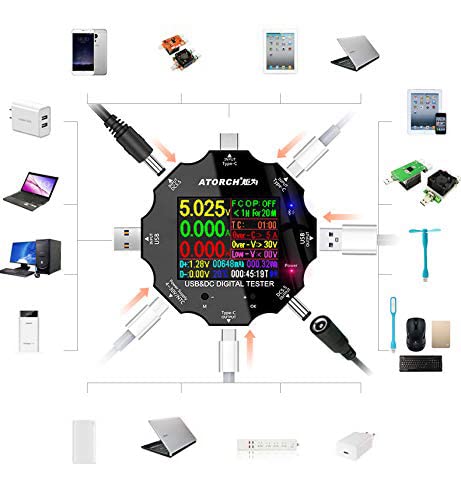
Figure 3.1: Diagram illustrating the various input and output interfaces of the USB tester and its broad compatibility with different devices.
4. Zehaztapenak
| Parametroa | Balioa |
|---|---|
| liburukiatage Neurketa-eremua | 3.60V~32.00V |
| Uneko Neurketa-Eremua | 0.00~5.10A |
| USB Load Limit | 5V 1A/2A/3A (Max 15W) |
| Capacity/Power Accumulation Range | 0~99999mAh / 0~999.99Wh |
| Potentzia neurtzeko tartea | 000.00 ~ 163.00W |
| Impedance Measurement Range | 1~999.9Ω |
| Tenperatura neurtzeko tartea | 0~80°C |
| Denbora tartea | 999 ordu 59 minutu 59 segundo |
| Sarrera Interfazeak | Type-C / Micro USB / USB / DC5.5 |
| USB D+ D- Voltage Barrutia | 0V~2.99V |
| Pantaila mota | 1.8 inches 128*160 color screen |
| Self-consumption Current | <0.025A |
| Funtzionamendu-tenperatura | -10~+60°C |
| Neurriak | 6.2 x 6.2 x 1.4 cm |
| Elementuaren pisua | 65 g |
5. Konfigurazioa
Follow these steps to set up your WANGCL USB Tester for first use:
- Despaketatzea: Carefully remove the USB tester from its packaging. Inspect the device for any signs of damage.
- Hasierako piztea: Connect the tester to a USB power source (e.g., a wall charger, power bank, or computer USB port) using one of its input interfaces (Type-C, Micro USB, or USB). The screen should light up, displaying the current measurements.
- Kontrolak ezagutu: Locate the physical buttons on the device. These are typically used for navigating menus and changing display modes.
6. Funtzionamendu-argibideak
The USB tester is designed for straightforward operation. Here are the basic steps for common measurements:
- Konektatu energia iturria: Plug the tester's input port (e.g., USB-A male, Type-C male) into your power source (e.g., wall charger, power bank, computer USB port).
- Connect Device Under Test: Plug the device you wish to test (e.g., smartphone, tablet, USB fan) into one of the tester's output ports (e.g., USB-A female, Type-C female).
- Irakurri neurriak: The color screen will immediately display real-time measurements such as voltage (V), current (A), power (W), accumulated capacity (mAh), and accumulated energy (Wh).
- Navigate Display Modes: Use the physical buttons (usually labeled 'M' for Mode and 'OK' or '+' for selection/next) to cycle through different display screens or measurement parameters. This may include detailed views of D+/D- voltage, temperature, timing, and impedance.
- Datuak berrezartzea: To clear accumulated capacity and energy data, typically press and hold a specific button (refer to on-screen prompts or specific model instructions if available) while on the main display.
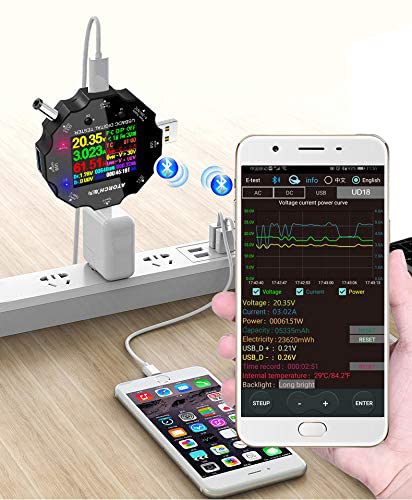
Figure 6.1: The USB tester actively measuring power flow between a wall charger and a mobile phone, with Bluetooth enabled.
7. Bluetooth Connectivity and Mobile App
The WANGCL USB Tester supports Bluetooth connectivity, allowing you to monitor and control the device remotely via a dedicated mobile application. This feature provides a more detailed view of data and additional control options.
- Deskargatu aplikazioa: Bilatu the "E_Test" application in your mobile device's app store (e.g., Apple App Store for iOS, Google Play Store for Android). Download and install the application.
- Gaitu Bluetootha: Ziurtatu Bluetootha gaituta dagoela zure gailu mugikorrean.
- Pizteko probatzailea: Connect the USB tester to a power source to turn it on.
- Parekatzea: Open the "E_Test" app. The app should automatically detect nearby WANGCL USB testers. Select your device from the list to initiate pairing. Follow any on-screen prompts within the app to complete the connection.
- Monitoreatu datuak: Konektatu ondoren, egin dezakezu view real-time data, historical graphs, and adjust settings directly from your mobile phone.
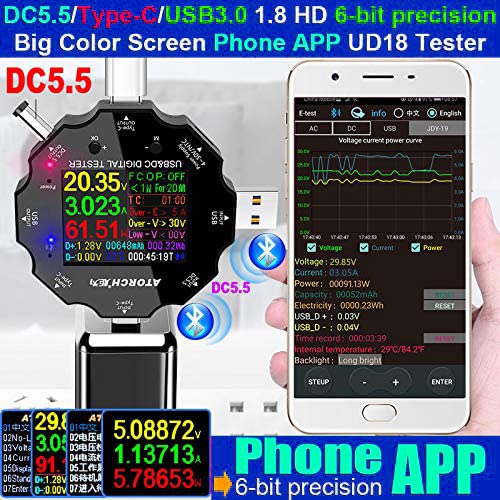
Figure 7.1: The USB tester displaying data on its screen while simultaneously transmitting data to a connected smartphone app for detailed analysis.
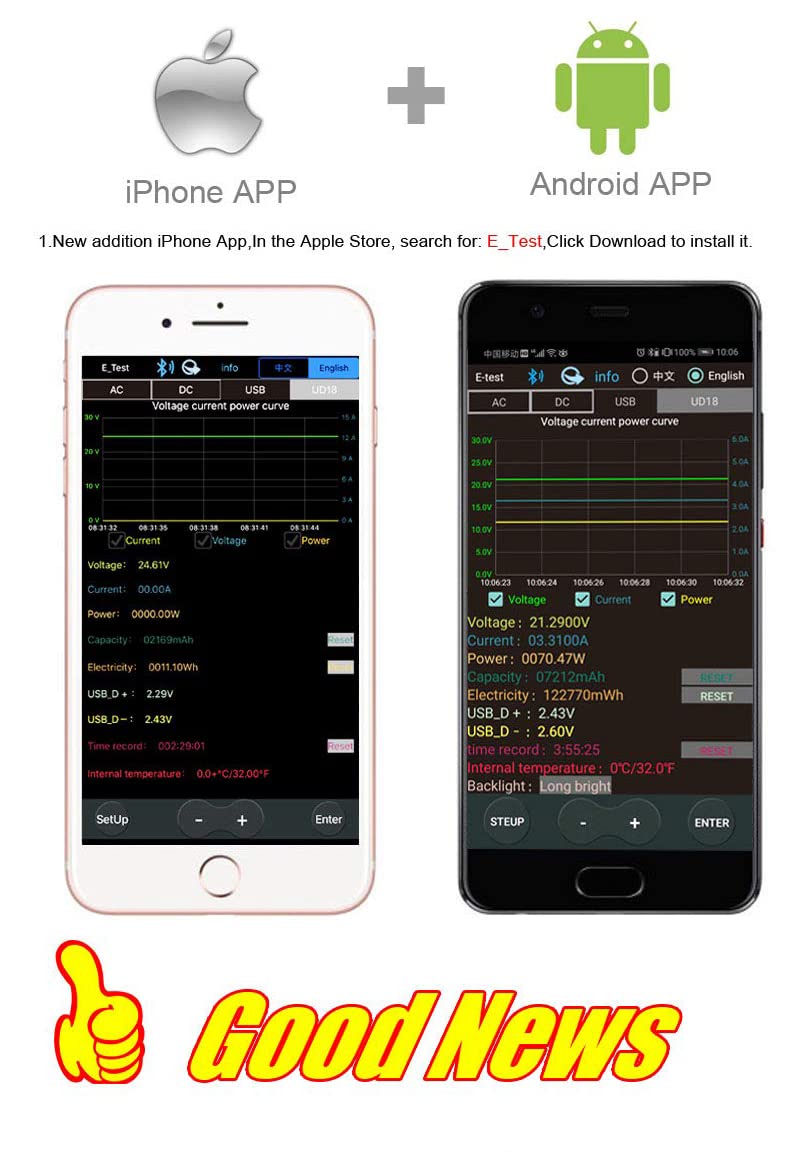
Figure 7.2: Screenshots of the "E_Test" application interface on both iPhone and Android devices, showing similar data display capabilities.
8. Mantentzea
Proper maintenance ensures the longevity and accuracy of your WANGCL USB Tester:
- Garbiketa: Erabili zapi leun eta lehor bat gailua garbitzeko. Ez erabili garbitzaile urratzailerik, disolbatzailerik edo produktu kimiko gogorrik.
- Biltegiratzea: Gorde gailua leku fresko eta lehor batean, eguzki-argitik, tenperatura muturrekoetatik eta hezetasun handitik babestuta.
- Manipulazioa: Saihestu gailua erortzea edo bibrazio bortitzak jasatea.
- Portuko zainketa: Keep the USB and other ports free from dust and debris.
9. Arazoak
If you encounter issues with your WANGCL USB Tester, refer to the following common problems and solutions:
| Arazoa | Balizko Kausa / Irtenbidea |
|---|---|
| Gailua ez da pizten. |
|
| No readings displayed. |
|
| Bluetooth konexioak huts egin du. |
|
| Irakurketa okerrak. |
|
10. Bermea eta Laguntza
WANGCL is committed to providing quality products. For specific warranty details and support, please refer to your purchase documentation or contact the seller directly.
- Itzultzeko politika: This product typically comes with a 30-day return policy from the date of purchase. Please check the specific terms and conditions of your retailer.
- Laguntza teknikoa: For technical assistance, troubleshooting beyond this manual, or warranty claims, please contact the seller, WANGCL EU, through the Amazon messaging system or the platform where the product was purchased.
Ask a question about this manual
Ask about setup, troubleshooting, compatibility, parts, safety, or missing instructions. Manuals+ will review the question and use this page’s manual context to help answer it.