
1. Introduction to HUD
HUD, short for Head Up Display, is a device that projects crucial driving data directly onto the front windshield of your vehicle. This innovative technology allows drivers to view information such as speed, engine RPM, water temperature, voltage, and single mileage without diverting their gaze from the road. By keeping essential data within the driver's line of sight, the HUD significantly enhances driving safety and helps maintain optimal focus on the road ahead. The M10 HUD offers various operating interface modes and color schemes, providing a customizable and technologically advanced driving experience.
2. Paketearen edukia
Mesedez, egiaztatu ondorengo elementu guztiak zure paketean sartuta daudela:
- 1 x M10 Head Up Display Unit
- 1 x Reflective Film
- 1 x OBD Cable
- 1 x Anti-skid Pad
- 1 x ingelesezko erabiltzailearen eskuliburua

Figure 2.1: Contents of the M10 HUD package, including the main unit, cables, and accessories.
3. Konfigurazioa eta instalazioa
The M10 HUD is designed for simple plug-and-play installation, compatible with 95% of cars equipped with an OBD2 or GPS interface.
- Lekua: Place the anti-skid pad on your dashboard in a position that allows for clear projection onto the windshield without obstructing your view errepidearena.
- Reflective Film (Optional): For optimal clarity and to eliminate unwanted reflections, apply the included reflective film to the windshield where the HUD will project. Ensure the area is clean and dry before application.
- Konexioa: Locate your vehicle's OBD2 port (typically under the dashboard on the driver's side). Connect the provided OBD cable to the HUD unit and then to the vehicle's OBD2 port.
- Piztu: Once connected, the HUD unit will power on automatically with the vehicle's ignition.
Bateragarritasunari buruzko ohar garrantzitsua:
- The OBD2 HUD is only suitable for cars that comply with the OBD II protocol.
- All Italian and some Japanese cars may not be compatible; in such cases, please select a GPS model HUD.
- OBDII models in Europe and the United States must be produced after 2004.
- Asian car brands with OBDII models can be used if produced after 2008.
4. Funtzionamendu-argibideak
4.1. Basic Display Functions
The M10 HUD provides a clear, high-definition display of essential vehicle data, making your long drives more comfortable and safer. Key displayed information includes:
- Vehicle Speed (KM/H or MPH)
- Motorraren RPM
- Uraren Tenperatura
- Bateria Voltage
- Driving Distance (Single Mileage)
- Berehalako erregai-kontsumoa
- Gidatzeko Denbora
- Erlojua
- 100 km Acceleration
The HUD features an ambient decorative lighting and RPM light. A light sensor allows the HUD to automatically adjust its brightness according to the surrounding environment, ensuring optimal visibility day or night. Manual brightness adjustment is also available for user preference.

4.1 Irudia: Gainetikview of the HUD display functions and indicators.
4.2. Multi-Display Interface Modes
The M10 HUD allows you to switch between various display modes to customize the information presented. Short press the wave button on the unit to cycle through the available modes.
- Speed + Engine RPM
- Speed + Trip Distance
- Speed + Travel Time
- Abiadura + Erlojua
- Speed + Fuel Consumption
- Speed + 100 km Acceleration
- Speed + Water Temperature
- Speed + Voltage
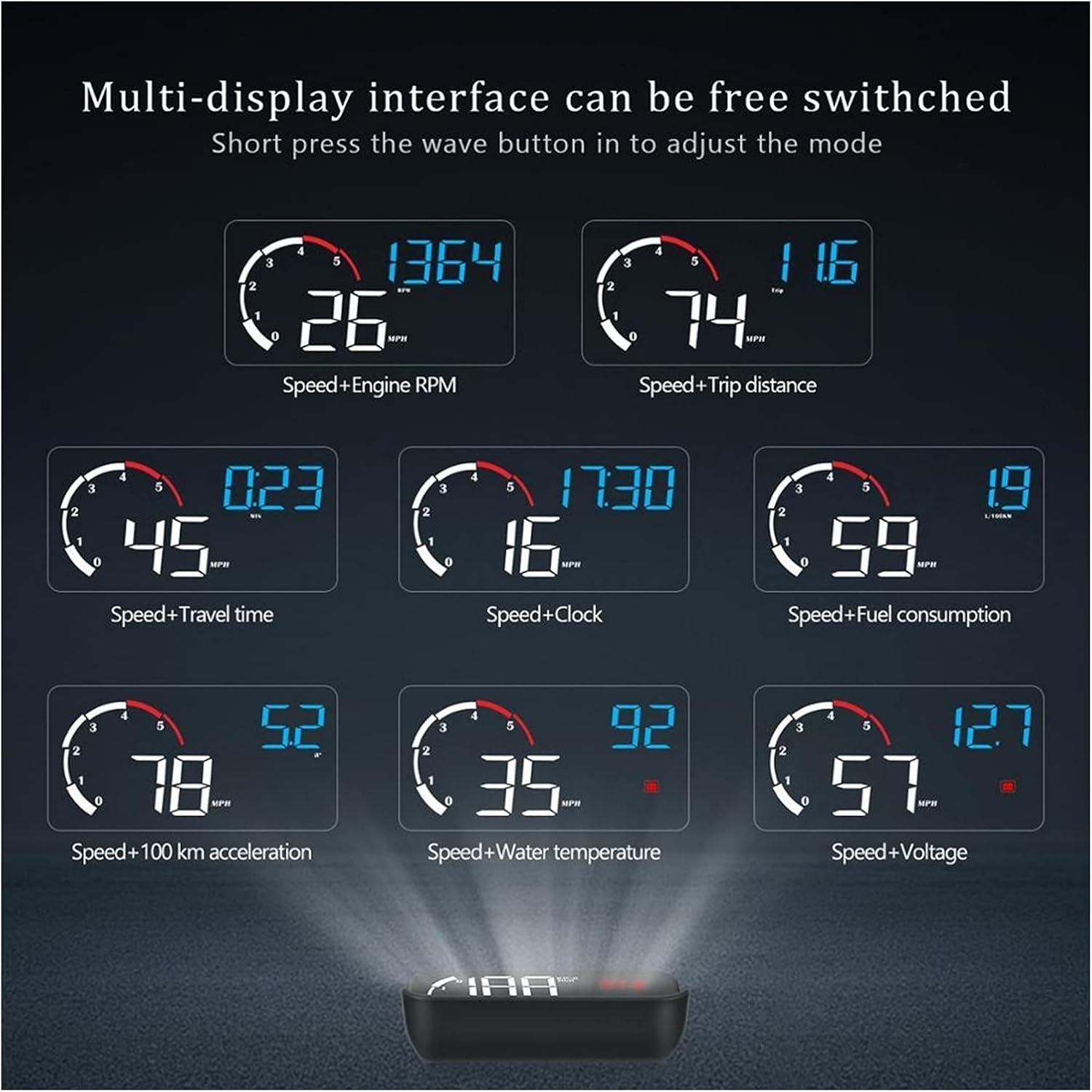
4.2. irudia: Adibamples of different display modes available on the M10 HUD.
4.3. Multiple Alarm and Reminder Modes
To further enhance driving safety, the M10 HUD incorporates several alarm and reminder functions that alert the driver to potential issues or conditions:
- Motorraren matxura kodearen alarma: Alerts you to detected engine diagnostic trouble codes.
- Uraren tenperatura altua alarma: Warns if the engine coolant temperature exceeds a safe limit.
- Abiadura Gaineko Alarma: Notifies you if your vehicle exceeds a preset speed limit.
- Engine RPM Alarm: Alerts if engine RPM goes beyond a safe operating range.
- Nekea gidatzeko alarma: Reminds you to take a break after extended driving periods.
- Vol. Baxuatage Alarma: Indicates if the vehicle's battery voltage drops below a critical level.
- Shift Reminder: Suggests optimal gear shifts for fuel efficiency or performance.

Figure 4.3: Visual representation of the M10 HUD's alarm and reminder features.

Figure 4.4: The M10 HUD in operation, displaying driving speed and other data on the windshield.
5. Mantentzea
To ensure the longevity and optimal performance of your M10 HUD, follow these simple maintenance guidelines:
- Garbiketa: Use a soft, dry cloth to gently wipe the display screen and the unit's exterior. Avoid using abrasive cleaners, solvents, or chemical sprays, as these can damage the surface.
- Biltegiratzea: When not in use for extended periods, store the HUD in a cool, dry place away from direct sunlight and extreme temperatures.
- Manipulazioa: Handle the unit with care to prevent drops or impacts, which could damage internal components.
- Kableen zainketa: Ensure the OBD cable is not kinked or pinched, as this can lead to damage and connectivity issues.
6. Arazoak
If you encounter issues with your M10 HUD, please refer to the following common troubleshooting steps:
- Pantailarik ez/Energiarik ez:
- Ziurtatu OBD kablea HUD unitatera eta ibilgailuaren OBD2 atakara ondo konektatuta dagoela.
- Egiaztatu zure ibilgailuaren piztea piztuta dagoela.
- Check your vehicle's fuse box for any blown fuses related to the OBD port or accessory power.
- Abiadura-irakurketa zehaztugabea:
- The HUD's speed reading is typically derived from the vehicle's ECU. Small discrepancies may occur. Refer to the user manual's advanced settings for potential calibration options if available.
- Double Image/Ghosting:
- This can occur due to the windshield's layered structure. Applying the included reflective film can significantly reduce or eliminate this effect.
- Adjust the angle of the HUD unit to minimize reflections.
- HUD Not Turning Off:
- Some vehicles may continue to supply power to the OBD port after the ignition is off. If the HUD remains on, disconnect it when the vehicle is parked for extended periods.
- Alarms Not Functioning:
- Ensure the alarm settings are enabled and configured correctly within the HUD's menu (refer to the full user manual for specific menu navigation).
If the problem persists after attempting these steps, please consult the comprehensive user manual provided with your product or contact customer support.
7. Zehaztapenak
| Ezaugarri | Zehaztapena |
|---|---|
| Marka | Generikoa |
| Modelo zenbakia | M10 (Manufacturer Part Number: 661647555853) |
| Bistaratzeko tamaina | 3.5 inches (approximate projection size) |
| Materiala | Glass (for projection surface) |
| Elementuaren pisua | 1.32 kilo (gutxi gorabehera 600 gramo) |
| Konektibitatea | OBD2 Port |
| Fabrikatzailea | Lifyn2 |
| Eskuragarri dagoen lehen data | 26ko abuztuaren 2022a |