
Sarrera
Thank you for choosing the ANNKE 6MP PoE Panoramic Surveillance Camera. This manual provides essential information for the proper installation, operation, and maintenance of your security camera. Please read this manual thoroughly before using the product and retain it for future reference.
Produktuaren Ezaugarriak
- 180° Ultra-Wide Panoramic View: Equipped with two lenses and BSI sensors, this camera delivers a seamless 180° field of view with 6MP clarity, eliminating distortion common in multi-camera setups.
- 6MP High Resolution: Capture vivid details with 6-megapixel resolution, providing superior image quality compared to standard 1080p cameras.
- Gaueko ikusmen koloretsua: Two integrated spotlights enable full-color surveillance even in low-light conditions, enhancing visibility and detail at night.
- AI mugimenduaren detekzio aurreratua: Intelligently distinguishes between people and vehicles, sending real-time alerts and minimizing false alarms. Customizable detection zones and lines are supported.
- Bi norabideko audioa: Communicate directly through the camera with built-in microphone and speaker, allowing for interaction with visitors or deterring intruders.
- IP66 Eguraldiarekiko erresistentzia balorazioa: Designed for outdoor use, the camera is protected against dust and powerful water jets, ensuring reliable operation in various weather conditions.
- H.265 bideo-konpresioa: Efficient H.265 compression technology reduces file sizes, saving storage space and bandwidth without compromising video quality.
- Tokiko biltegiratze euskarria: Supports Micro SD cards up to 256GB for continuous local recording (card not included).
- Intelligent WDR Function: Wide Dynamic Range (WDR) technology balances exposure in scenes with both very bright and very dark areas, ensuring clear images in challenging lighting.
- Bateragarritasun zabala: Accessible via the ANNKE Vision app on smartphones and compatible with various web browsers including Google Chrome, Firefox, Microsoft Edge, and Safari.

Image: A diagram illustrating how one ANNKE dual-lens camera with a single cable provides the coverage of two traditional cameras, simplifying installation and reducing costs.
Paketearen edukia
Mesedez, egiaztatu paketea elementu hauek dituen:
- 1 x ANNKE Dual Lens Camera
- 1 x 1m sareko kablea
- 1 x Muntatzeko plaka
- 1 x Mounting Hole Stencil
- 1 x Argibide eskuliburua
- 1 x Zaintza eranskailua
- 1 x Torloju paketea
Konfigurazio Gida
1. Unboxing eta Hasierako Ikuskapena
Carefully remove all components from the packaging. Inspect the camera and accessories for any signs of damage. Ensure all items listed in the "Package Contents" section are present.
2. Instalazio fisikoa
Choose a suitable mounting location that provides the desired 180° panoramic view and is within range of your PoE network cable. The camera is designed for outdoor use with an IP66 rating.
- Use the provided mounting hole stencil to mark the drilling positions on the wall or ceiling.
- Beharrezkoa bada, zuloak egin eta takoak sartu horman.
- Secure the mounting plate to the surface using the screws from the screw pack.
- Attach the camera to the mounting plate, ensuring it is firmly fixed. Adjust the camera angle for optimal coverage.

Image: The ANNKE camera mounted on an exterior wall, demonstrating its IP66 weatherproof construction against rain.
3. Network Connection (PoE)
This camera supports Power over Ethernet (PoE), simplifying installation by providing both power and data through a single Ethernet cable.
- Connect one end of the provided network cable to the camera's Ethernet port.
- Connect the other end of the network cable to a PoE-enabled switch, NVR, or PoE injector.
- Ensure the network connection is stable. The camera will power on automatically.
4. Initial Configuration via ANNKE Vision App
For initial setup and remote access, download the ANNKE Vision app.
- Deskargatu "ANNKE Vision" aplikazioa App Store-tik (iOS) edo Google Play Store-tik (Android).
- Register for an ANNKE account or log in if you already have one.
- Tap the "+" icon to add a new device. Follow the on-screen instructions to scan the QR code on the camera or manually enter its serial number.
- Behin gehituta, egin dezakezu view the live feed and configure camera settings.

Image: The ANNKE Vision app interface on a smartphone, illustrating remote access and motion detection notifications.
Funtzionamendu-argibideak
1. Bizi View
Access the live video feed through the ANNKE Vision app or a compatible web browser. The 180° panoramic view provides comprehensive coverage.

Image: A visual representation of the ANNKE camera's 180-degree stitched panoramic view, showing its wide coverage without distortion.

Image: The ANNKE camera's interface displayed across various devices, highlighting its wider compatibility with different browsers and the mobile app.
2. Grabaketa eta Erreprodukzioa
The camera supports continuous recording to a Micro SD card (up to 256GB, not included) or to a compatible NVR. Recorded footage can be accessed and played back through the app or web interfazea.

Irudia: Xehetasun zehatza view of the camera's Micro SD card slot, emphasizing its 256GB storage capacity for continuous recording.

Image: A bar chart illustrating the storage benefits of H.265 compression compared to H.264, showing H.265 uses significantly less space.
3. Mugimenduaren detekzioa eta alertak
Configure AI-powered motion detection to receive alerts for specific events.
- In the app settings, navigate to "Motion Detection" or "Event Detection."
- Enable "Person Detection" and "Vehicle Detection" to filter out irrelevant movements.
- Define custom detection zones or lines to monitor specific areas of interest.
- Set up notification preferences to receive real-time alerts on your smartphone.
- Activate the customizable siren for active deterrence when motion is detected.
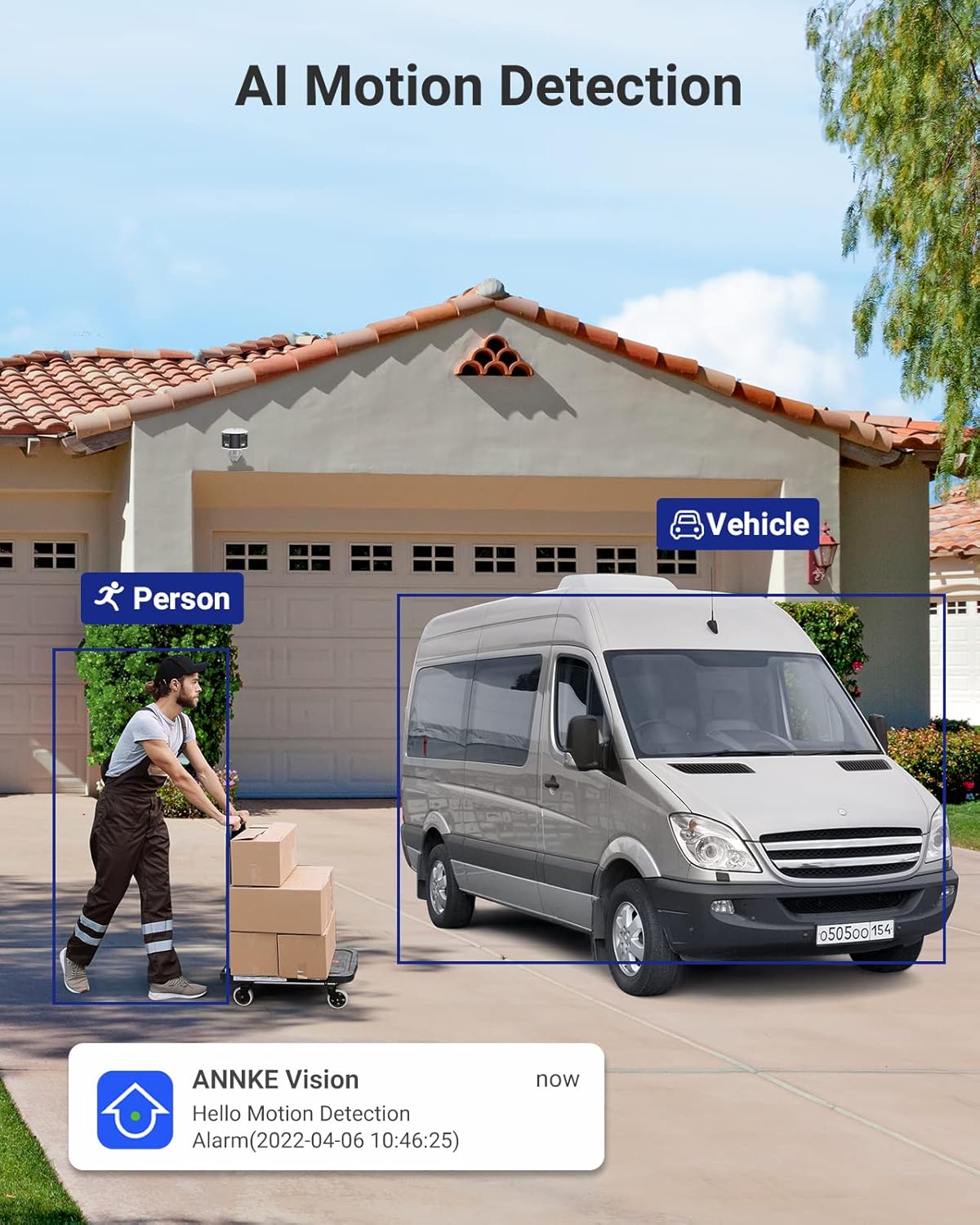
Image: The camera's AI motion detection in action, identifying a person and a vehicle, accompanied by a mobile app notification.

Image: An illustration of the camera's audible siren feature deterring an intruder, highlighting its active alarm capabilities.
4. Bi norabideko audioa
Use the two-way audio feature to communicate with individuals near the camera.
- Zuzenetik view ANNKE Vision aplikazioan, sakatu mikrofonoaren ikonoa hitz egiteko.
- Your voice will be transmitted through the camera's speaker.
- The camera's built-in microphone will capture audio from the environment.

Image: A delivery person interacting with the camera's two-way audio, demonstrating its communication capabilities.
5. Gaueko Ikusmena
The camera automatically switches to full-color night vision in low-light conditions, utilizing its integrated spotlights to provide clear, vibrant images.

Image: The camera's full-color night vision in operation, illuminating a backyard scene with its two spotlights.
6. Eremu Dinamiko Zabala (WDR)
The Intelligent WDR function helps to produce clear images in scenes with high contrast lighting, preventing overexposure in bright areas and underexposure in dark areas.

Image: A visual comparison demonstrating the effectiveness of the Intelligent WDR function, showing improved image clarity in high-contrast lighting.
Mantentzea
- Garbiketa: Regularly clean the camera lens with a soft, dry cloth to ensure clear image quality. Do not use harsh chemicals or abrasive materials.
- Firmware eguneraketak: Check for and install firmware updates through the ANNKE Vision app or ANNKE webgunea errendimendu optimoa, segurtasuna eta funtzio berrietarako sarbidea bermatzeko.
- Biltegiratze kudeaketa: If using a Micro SD card, periodically check its status and manage recorded footage. Consider backing up important recordings to another storage device.
- Kableen ikuskapena: Periodically inspect the network cable for any signs of wear or damage, especially in outdoor installations, to maintain a reliable connection.
Arazoak konpontzea
| Arazoa | Irtenbide posiblea |
|---|---|
| No Power/Camera Not Turning On |
|
| Ez dago bideo-jariorik |
|
| Irudiaren kalitate eskasa |
|
| Mugimendu-detekzioa ez dabil |
|
| Bi norabideko audio arazoak |
|
Zehaztapenak
| Ezaugarri | Xehetasuna |
|---|---|
| Ereduaren izena | AP-I51DW0104 |
| Marka | ANNKE |
| Konektibitate Teknologia | Kable bidezkoa (PoE) |
| Bideo Harrapaketa Ebazpena | 6 MP |
| Ezaugarri bereziak | Night Vision (Full-Color), Motion Detection, Two-Way Audio, AI Person/Vehicle Detection, WDR |
| Gailu bateragarriak | Smartphone, NVR, Web Nabigatzaileak |
| Muntatze Mota | Hormako Muntaia |
| Kolorea | Zuria, Beltza |
| Forma-faktorea | Bala |
| Materiala | Metala |
| Alarma mota | Audioa eta Mugimendua |
| Argi iturri mota | Infrared, Spotlights |
| Kontrol-metodoa | Aplikazioa |
| Kanal kopurua | 1 |
| Energia iturria | Wired Electric (PoE) |
| liburukiatage | 12 Volt |
| Viewangelua | 180 gradu |
| Elementuaren neurriak | 45 x 32 x 9 cm |
| Biltegiratze euskarria | Mikro SD txartela 256 GB arte (ez dago barne) |
Bermea eta Laguntza
ANNKE products come with a standard manufacturer's warranty. For detailed warranty information, please refer to the warranty card included in your package or visit the official ANNKE webgunea.
For technical assistance, troubleshooting, or any product-related inquiries, please contact ANNKE Customer Support:
- Lineako laguntza: Bisitatu ANNKE Support Center maiz egiten diren galderen, giden eta harremanetarako aukeren atala ikusteko.
- Posta elektronikoko laguntza: Ikusi zure produktuaren ontzia edo ANNKE webwebgunean azken laguntza-helbide elektronikoa lortzeko.
- Marka Denda: Explore other ANNKE products and resources at the official ANNKE Amazon Store.
Please have your model number (AP-I51DW0104) and purchase details ready when contacting support.