
Sarrera
This manual provides comprehensive instructions for the setup, operation, and maintenance of your Yealink W78P DECT IP Phone System. Please read this manual thoroughly before using the device to ensure proper functionality and to prevent damage. Keep this manual for future reference.
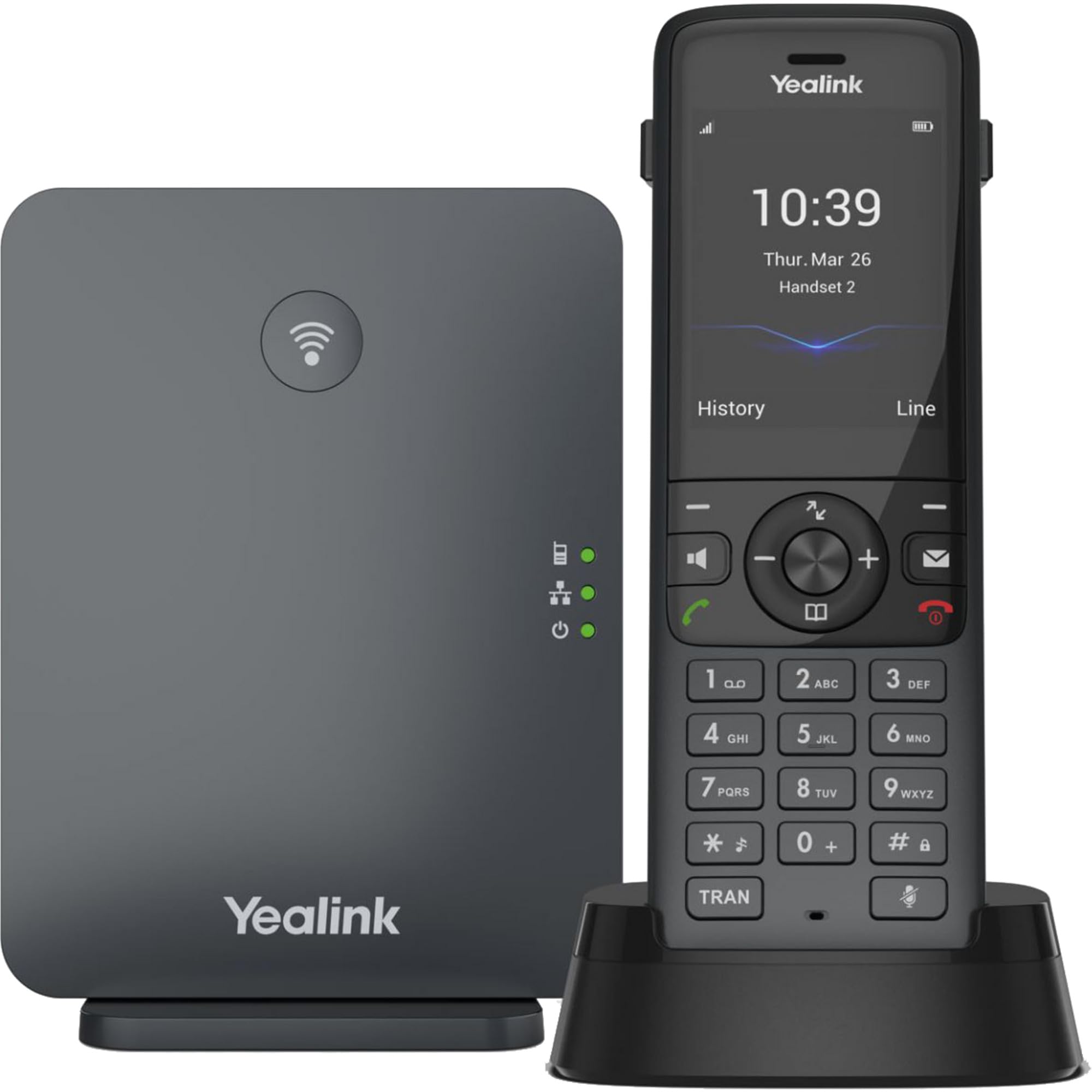
Image: The Yealink W78P system, featuring the W70B base station and the W78H cordless handset in its charging cradle.
Kutxan dagoena
Egiaztatu elementu guztiak zure paketean daudela:
- W78H telefonoa
- W70B Oinarrizko Estazioa
- Telefonoaren kargatzeko euskarria
- Power Adapter for Handset Charging Cradle and Base Station
- Sare-kablea
Konfigurazio Gida
1. Connecting the Base Station (W70B)
- Potentzia-konexioa: Connect the power adapter to the W70B base station and plug it into a power outlet. Alternatively, if your network supports Power over Ethernet (PoE), connect the base station to a PoE-enabled network switch using the provided network cable.
- Sare-konexioa: Connect one end of the network cable to the LAN port on the W70B base station and the other end to your router or network switch.
- Wait for the base station to power on and obtain an IP address. The network indicator LED on the base station will illuminate steadily when connected.
2. Charging the Handset (W78H)
- Connect the power adapter to the handset charging cradle and plug it into a power outlet.
- Place the W78H handset into the charging cradle. The battery icon on the handset display will indicate charging status. Allow the handset to charge fully before initial use.
3. Initial Handset Registration
The W78H handset typically comes pre-registered to the W70B base station in a W78P package. If registration is required or if you are adding a new handset:
- On the W70B base station, press and hold the registration button until the registration LED flashes.
- On the W78H handset, navigate to Menu > Settings > Registration > Register Handset.
- Select the desired base station (if multiple are detected) and enter the base station PIN (default is 0000).
- The handset will display "Handset Subscribed" upon successful registration.
Funtzionamendu-argibideak
Deiak egitea eta jasotzea
- Dei bat egiteko: Markatu zenbakia eta sakatu Deitu key (green phone icon).
- Dei bati erantzuteko: Sakatu Deitu tekla edo Bozgorailua giltza.
- Dei bat amaitzeko: Sakatu Amaitu deia key (red phone icon).
- Berriro markatzea: Sakatu Deitu key to access the call history and select a number to redial.
Dei-eginbide aurreratuak
- Eutsi: Dei batean zehar, sakatu Eutsi soft key. Press it again to resume the call.
- transferentzia: Dei batean zehar, sakatu Transferentzia soft key, dial the new number, and press Transferentzia berriz.
- Hitzaldia: Dei batean zehar, sakatu Konf soft key, dial the second party's number, and once connected, press Konf berriro ere alderdi guztiekin bat egiteko.
Entzungailuen konexioa
- Bluetooth entzungailua: The W78H handset supports Bluetooth connectivity. Navigate to Menu > Settings > Bluetooth to enable Bluetooth and pair with your headset.
- 3.5mm Jack Headset: Connect a compatible 3.5mm headset to the headset jack on the side of the W78H handset.
DECT Radio Coverage
The W78P system offers a radio coverage of up to 50 meters indoors and up to 300 meters outdoors, under ideal conditions. Environmental factors may affect actual range.
Mantentzea
Garbiketa
- Wipe the handset and base station with a soft, damp oihal.
- Ez erabili garbitzaile edo disolbatzaile urratzailerik.
- Garbitu aurretik, ziurtatu gailua itzalita eta deskonektatuta dagoela.
Bateria zaintzea
- The W78H handset provides up to 21 hours of talk time and 166 hours of standby time under ideal conditions.
- Bateriaren iraupen optimoa lortzeko, saihestu tenperatura muturrekoak.
- Charge the handset regularly. A 10-minute charge provides approximately 2 hours of talk time.
Arazoak konpontzea
If you encounter issues with your Yealink W78P system, refer to the table below for common problems and solutions.
| Arazoa | Kausa posiblea | Irtenbidea |
|---|---|---|
| Markatze-tonurik ez | Base station not powered or not connected to network. | Check power and network cable connections to the W70B base station. Ensure network indicator LED is steady. |
| Telefonoak "Erregistratu gabe" bistaratzen du | Handset lost registration with base station. | Re-register the handset to the base station following the steps in the "Initial Handset Registration" section. |
| Audio kalitate eskasa | Out of DECT range, interference, or network issues. | Move closer to the base station. Check for sources of interference (e.g., Wi-Fi routers, microwaves). Verify network stability. |
| Telefonoa ez da kargatzen | Charging cradle not powered or handset not seated correctly. | Ensure the charging cradle's power adapter is connected. Re-seat the handset firmly in the cradle. |
Zehaztapen Teknikoak
| Ezaugarri | Xehetasuna |
|---|---|
| Marka | Yealink |
| Modelo zenbakia | W78P |
| Kolorea | Beltza |
| Materiala | Akrilonitrilo Butadieno Estirenoa (ABS) |
| Elementuaren neurriak (L x W x H) | 24 x 51 x 157 milimetro |
| Elementuaren pisua | 500 gramo |
| Energia iturria | Bateriaren bidez |
| Pila kopurua | 1 Litio-ioi |
| Telefonoz hitz egiteko denbora | 21 ordu |
| Telefonoaren zain egoteko denbora | 166 ordu |
| Gailu bateragarriak | Yealink W56H, Yealink W57R, Yealink W59R, Yealink W73H, Yealink W78H |
| Deitzailearen IDa | Bai |
| Lerro anitzeko eragiketa | Bai |
| Jatorrizko Herrialdea | AEB |
| UPC | 841885125675, 841885109125 |
Bermearen informazioa
The Yealink W78P DECT IP Phone System comes with a 2 urteko fabrikatzailearen bermea. Please retain your proof of purchase for warranty claims. For detailed terms and conditions, refer to the warranty documentation included with your product or visit the official Yealink webgunea.
Bezeroarentzako Arreta
For technical assistance, troubleshooting beyond this manual, or service inquiries, please contact Yealink customer support. You can find contact information on the official Yealink website or through your product vendor.