
Sarrera
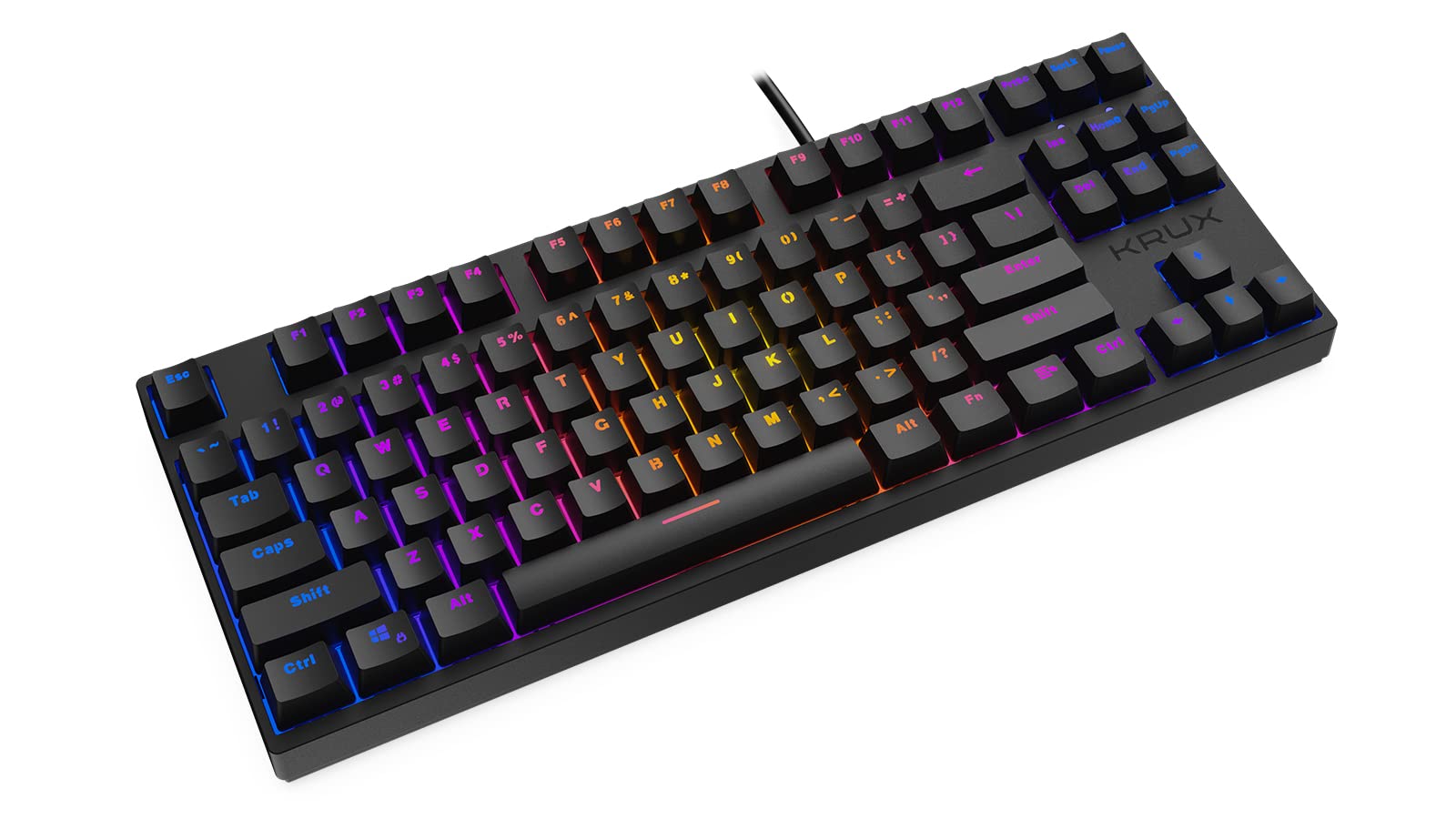
Thank you for choosing the KRUX Atax Pro RGB Outemu Brown KRX0039 Wired Gaming Keyboard. This manual provides essential information for setting up, operating, maintaining, and troubleshooting your new mechanical gaming keyboard. Please read this manual thoroughly before use to ensure optimal performance and longevity of your device.
Konfigurazioa
Follow these steps to set up your KRUX Atax Pro RGB keyboard:
- Deskonprimitu teklatua: Kontu handiz atera teklatua paketetik. Ziurtatu osagai guztiak daudela.
- Konektatu ordenagailura: Plug the USB-A connector of the keyboard cable into an available USB-A port on your computer or laptop.
- Gidariaren instalazioa: Teklatua plug-and-play da. Zure sistema eragileak (Windows, macOS, Linux) automatikoki detektatu eta instalatu beharko lituzke beharrezko kontrolatzaileak. Oinarrizko funtzionalitaterako ez da software gehigarririk instalatu behar normalean.
- Kokalekua: Place the keyboard on a stable, flat surface. Adjust the rear feet for your preferred typing angle.
Funtzionamendu-argibideak
The KRUX Atax Pro RGB keyboard offers various functions beyond standard typing:
Oinarrizko Funtzioak
- Giltza estandarrak: Tekla alfanumeriko eta sinbolo estandar guztiek espero bezala funtzionatzen dute.
- Funtzio-teklak (F1-F12): Tekla hauek beren ohiko funtzioak betetzen dituzte.
- Nabigazio Klusterra: Includes Insert, Home, Page Up, Delete, End, Page Down for document navigation.
- Gezi-teklak: Standard directional control.
RGB atzeko argiztapenaren kontrola
The keyboard features customizable RGB backlighting. Use the following key combinations with the Fn key (located near the right Alt key) to control lighting effects:
- Fn + F1-F12: Specific multimedia or system functions (refer to keycap legends for exact functions).
- Fn + PrtSc: Cycle through various RGB lighting modes.
- Fn + Scrlk: Doitu atzeko argiaren distira.
- Fn + Pause: Change backlight color or direction in certain modes.

Joko Ezaugarriak
- N-teklaren birjartzea: The keyboard supports N-key rollover, allowing multiple simultaneous key presses to be registered accurately, which is beneficial for gaming.
- Ghostingaren aurkakoa: Prevents unintended key presses from registering when multiple keys are pressed at once.
Mantentzea
Mantentze egokiak zure teklatuaren iraupena eta errendimendua bermatzen ditu:
- Tekla-tapoiak garbitzea: Erabili biguna, damp cloth with mild soap and water to gently wipe the keycaps. Avoid excessive moisture.
- Tekla azpiko garbiketa: For deeper cleaning, you may carefully remove keycaps using a keycap puller (not included) and use compressed air to remove dust and debris from the switches.
- Txasisa garbitzea: Wipe the keyboard chassis with a dry or slightly damp oihal.
- Saihestu likidoak: Ez isuri likidorik teklatuaren gainean. Isurketa bat gertatzen bada, deskonektatu berehala teklatua eta utzi guztiz lehortzen berriro konektatu aurretik.
- Biltegiratzea: Gorde teklatua leku fresko eta lehor batean, eguzki-argitik eta muturreko tenperaturetatik babestuta.

Arazoak konpontzea
If you encounter issues with your KRUX Atax Pro RGB keyboard, try the following solutions:
- Teklatuak ez du erantzuten:
- Ziurtatu USB kablea ondo konektatuta dagoela bai teklatuan bai ordenagailuan.
- Saiatu teklatua beste USB ataka batera konektatzen.
- Berrabiarazi ordenagailua.
- Probatu teklatua beste ordenagailu batean sistemaren arazo espezifiko bat baztertzeko.
- RGB Backlighting Not Working:
- Check if the backlight brightness is turned down (Fn + Scrlk).
- Cycle through lighting modes (Fn + PrtSc) to see if it reactivates.
- Ziurtatu teklatuak USB atakatik nahikoa energia jasotzen duela.
- Erregistratzen ez diren giltza espezifikoak:
- Remove the keycap and check for any debris or obstruction around the switch. Use compressed air to clean.
- If the issue persists, it may indicate a faulty switch.
- Ghosting or Input Lag:
- Ziurtatu zure ordenagailuaren USB kontrolatzaileak eguneratuta daudela.
- Avoid connecting the keyboard through unpowered USB hubs.
Zehaztapenak
| Ezaugarri | Xehetasuna |
|---|---|
| Marka | KRUX |
| Ereduaren izena | Atax PRO RGB Outemu Brown TKL |
| Modelo zenbakia | KRX0039 |
| Konektibitate Teknologia | USB-A (Kableduna) |
| Teklatuaren deskribapena | Mekanikoa |
| Aldatu mota | Outemu Brown (Tactile) |
| Gako kopurua | 87 |
| Atzeko argia | RGB |
| Kolorea | Beltza |
| Gomendatutako Erabilerak | Jolasa |
| Elementuaren pisua | 940 gramo |
| Gailu bateragarriak | Ordenagailu eramangarria, ordenagailua |

Bermea eta Laguntza
Bermea: Produktu hau a 2 urteko fabrikatzailearen bermea from the date of purchase. This warranty covers defects in materials and workmanship under normal use. It does not cover damage caused by misuse, accident, modification, or unauthorized repair.
Laguntza teknikoa: For technical assistance, warranty claims, or further inquiries, please contact KRUX customer support through their official website or the retailer where the product was purchased. Please have your product model number (KRX0039) and proof of purchase ready when contacting support.