
1. Produktua amaitu daview
The MI Xiaomi X Series 4K Ultra HD Smart Android LED TV L43M7-A2IN offers a high-quality viewing experience with its 4K Ultra HD resolution and smart features. This manual provides essential information for setting up, operating, and maintaining your television.

Irudia: Aurrealdea view of the Xiaomi X Series 4K Ultra HD Smart Android LED TV.
Ezaugarri nagusiak:
- Pantaila: 4K Ultra HD (3840 x 2160) resolution, 60 Hz refresh rate, 178-degree wide viewangelua.
- Irudiaren hobekuntza: Dolby Vision, HDR10, HLG, Reality Flow MEMC, Vivid Picture Engine, DCI-P3 94% Colour Gamut.
- Audioa: 30 Watts Output, Dolby Audio, DTS Virtual:X, DTS-HD.
- Smart TV: Android TV 10, PatchWall 4 with IMDb integration, Kids Mode with Parental Lock, Universal search, Chromecast built-in, Ok Google.
- Errendimendua: Quad core A55 CPU processor, 2GB RAM + 16GB Storage.
- Konektibitatea: Dual Band Wi-Fi (2.4 GHz/ 5 GHz), 3 HDMI ports, 2 USB ports, Bluetooth 5.0, Optical, Ethernet, 3.5mm earphone Jack.

Image: Visual summary of the TV's key features including display, audio, and smart capabilities.
2. Segurtasun informazioa
Mesedez, irakurri arretaz segurtasun-jarraibide guztiak telebista erabili aurretik. Gorde eskuliburu hau etorkizunean erreferentzia gisa.
- Ez blokeatu aireztapen-irekidurak. Ziurtatu telebistaren inguruan nahikoa leku aire-fluxu egokia izan dadin.
- Do not place the TV near heat sources or in direct sunlight.
- Babestu korronte-kablea ibiltzeko edo atximur ez dadin.
- Erabili soilik fabrikatzaileak zehaztutako eranskinak/osagarriak.
- Deskonektatu telebista tximista-ekaitzetan edo denbora luzez erabili gabe dagoenean.
- Jarri zerbitzu-zerbitzu guztiak zerbitzu-pertsonal kualifikatuari.
- Mantendu bateriak haurren eskura ez dauden lekuetan. Bota erabilitako bateriak arduraz.
3. Zer dago kutxan
Egiaztatu osagai guztiak ontzian daudela:
- 1 x MI Xiaomi X Series 4K Ultra HD Smart Android LED TV
- 2 x Mahai-euskarri oinarria
- 1 x Urruneko kontrola
- 4 x Torloju (euskarria muntatzeko)
- 2 x AAA bateria (urrutiko aginterako)
- 1 x Erabiltzailearen eskuliburua (dokumentu hau)
4. Konfigurazioa
4.1 Installing the Table Stand
- Kontu handiz jarri telebista aurpegia behera gainazal bigun eta lau batean, pantaila kaltetu ez dadin.
- Lerrokatu mahai-euskarri bakoitza telebistaren behealdeko torloju-zuloekin.
- Secure each base using the provided screws. Ensure they are tightened firmly.
- Kontu handiz altxatu telebista zutik eta jarri gainazal egonkor eta mailakatu batean.
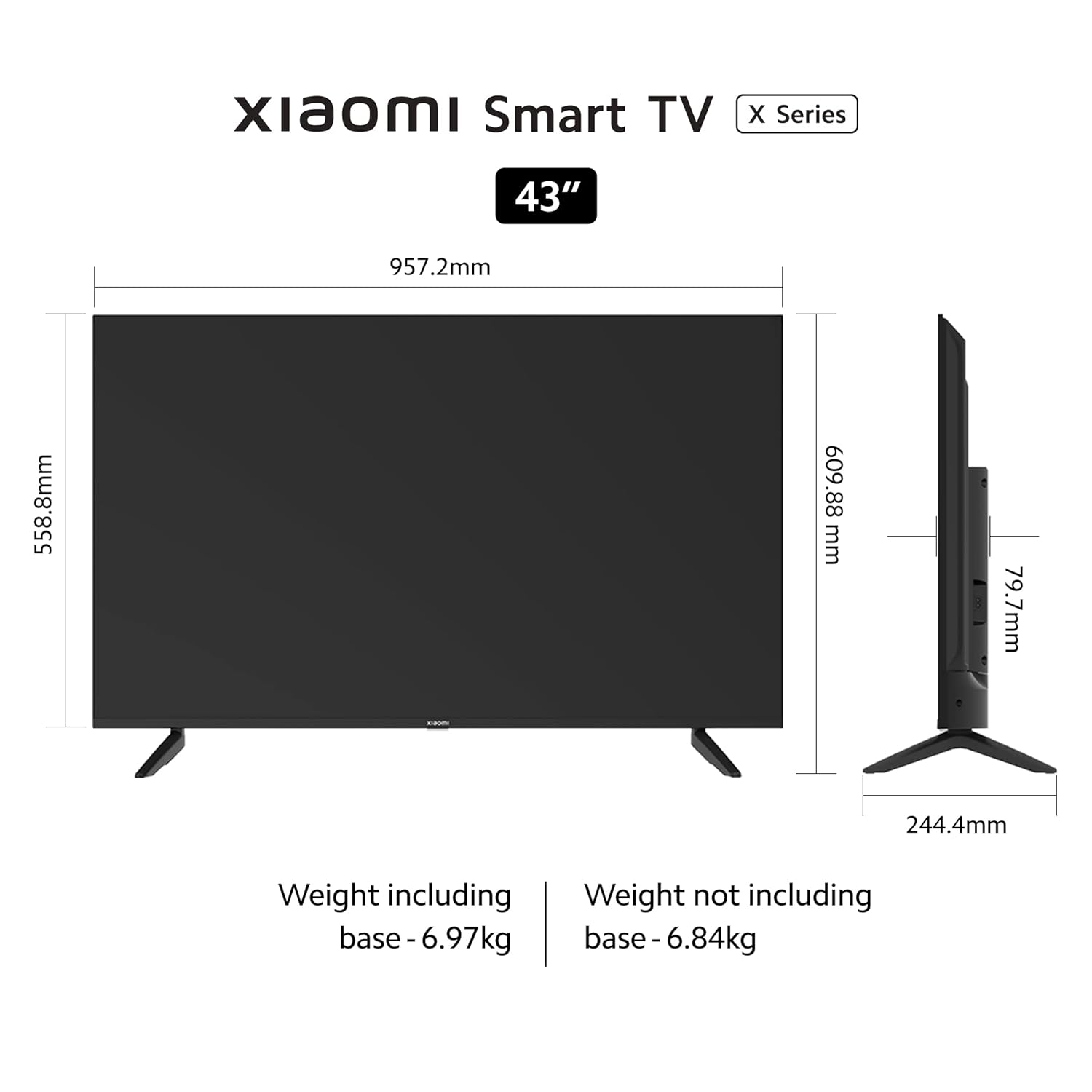
Image: Diagram showing the dimensions and weight of the TV, useful for stand installation and placement.
4.2 Horman muntatzea (aukerakoa)
If you choose to wall mount your TV, please use a VESA-compatible wall mount kit (200 x 200 mm) and follow the instructions provided with the wall mount. Professional installation is recommended.
4.3 Gailuak konektatzea
Telebistak hainbat ataka ditu kanpoko gailuak konektatzeko:

Irudia: Gertuko planoa view of the rear connectivity ports on the Xiaomi X Series TV.
- HDMI atakak (x3): Connect gaming consoles, set-top boxes, Blu-ray players. Supports eARC on one port.
- USB atakak (x2): Connect hard drives, USB flash drives, or other USB devices.
- Ethernet ataka: Kable bidezko internet konexiorako.
- Portu optikoa: Soinu-barretara edo etxeko zinema-sistemetara audio irteera digitalerako.
- 3.5 mm-ko aurikularretarako konektua: Entzungailuak edo kanpoko bozgorailuak konektatzeko.
- AV sarrera: Bideo konposatu eta audio estereo irteerak dituzten gailu zaharrak konektatzeko.
Nahi dituzun gailu guztiak konektatu ondoren, konektatu telebistaren elikatze-kablea hormako entxufe batera.
5. Funtzionamendu-argibideak
5.1 Urruneko kontrola
Insert the two AAA batteries into the remote control, observing the correct polarity. The remote control uses Bluetooth for connectivity.

Image: The sleek remote control for the Xiaomi X Series TV, highlighting quick access buttons.
- Pizteko botoia: Telebista pizten edo itzaltzen du.
- Google Laguntzailearen botoia: Ahots-kontrola aktibatzen du.
- Nabigazio Pad: Menu nabigaziorako.
- Ados botoia: Hautaketak berresten ditu.
- Atzera botoia: Aurreko pantailara itzultzen da.
- Hasierako botoia: Android TV-ren hasierako pantailara sartzen da.
- Bolumen-botoiak: Adjusts volume. Double tap volume down to mute.
- PatchWall Button: Long press to enter quick settings menu.
- Aplikazioaren lasterbideen botoiak: Direct access to popular streaming services like Netflix and Prime Video.
5.2 Initial Setup and Smart TV Features
Upon first power-on, the TV will guide you through the initial setup process, including language selection, network connection (Wi-Fi or Ethernet), and Google account sign-in.

Image: The Android TV 10 interface with Google Play, Ok Google, and Chromecast built-in features.
- Android TV 10: Access a wide range of apps from the Google Play Store.
- PatchWall 4: An integrated content platform with IMDb integration, offering personalized recommendations and access to 300+ free live channels.
- Haurren modua gurasoen blokeoarekin: Kudeatu haurren edukietarako sarbidea.
- Chromecast integratua: Edukia zure telefonotik edo tabletetik zuzenean telebistara igorri.
- Ados Google: Erabili ahots-komandoak edukia bilatzeko, etxe adimenduneko gailuak kontrolatzeko eta gehiagorako.
- Miracast: Mirror your Android device's screen to the TV.

Image: The PatchWall interface displaying various content categories and streaming apps.
5.3 Pantaila eta audio ezarpenak
Navigate to the TV settings menu to adjust picture and sound preferences.

Image: The TV screen displaying content with Dolby Vision, HDR10, and HLG support for enhanced picture quality.
- Irudi moduak: Aukeratu aurrezarritako hainbat irudi moduren artean (adibidez, Estandarra, Bizirik, Filma, Jokoa) edo pertsonalizatu ezarpenak, hala nola distira, kontrastea, kolorea eta zorroztasuna.
- HDR ezarpenak: The TV supports Dolby Vision, HDR10, and HLG for superior contrast and color with compatible content.
- Soinu moduak: Aukeratu soinu aurrezarpenen artean (adibidez, Estandarra, Musika, Filma) edo doitu berdinketaren ezarpenak.
- Dolby Audio / DTS: Enable or configure Dolby Audio and DTS Virtual:X / DTS-HD for immersive sound experiences.

Image: The TV displaying content with an overlay highlighting 30W speakers, Dolby Audio, and DTS-HD sound technologies.
6. Mantentzea
Mantentze egokiak zure telebistaren iraupena eta errendimendu optimoa bermatzen ditu.
- Pantaila garbitzea: Garbitu pantaila astiro-astiro zapi leun eta pelusik gabeko batekin. Orba egoskorrak izanez gero, garbitu apur batampGarbitu zapia urarekin edo pantaila-garbitzaile espezializatu batekin. Ez ihinztatu likidoa zuzenean pantailan.
- Markoa garbitzea: Erabili zapi leun eta lehor bat telebistaren markoa eta euskarria garbitzeko.
- Aireztapena: Ensure the ventilation openings on the back of the TV are not obstructed by dust or debris.
- Elikatze kablea: Aldian-aldian egiaztatu kable elektrikoa kalterik dagoen. Kaltetuta badago, jarri harremanetan zerbitzu-langileekin.
7. Arazoak
Arazoak badituzu, jo ezazu honako ohiko irtenbide hauetara:
| Arazoa | Irtenbide posiblea |
|---|---|
| Botererik ez | Egiaztatu elikatze-kablea telebistara eta hormako entxufean ondo konektatuta dagoen. Saiatu beste entxufe batekin. |
| Ez dago irudirik, baina soinua badago | Egiaztatu sarrera-iturria. Ziurtatu kanpoko gailuak piztuta eta behar bezala konektatuta daudela. |
| Soinurik ez, baina irudia badago | Check volume levels. Ensure TV is not muted. Check audio output settings if using external audio systems. |
| Urruneko kontrola ez dabil | Replace batteries. Ensure no obstructions between the remote and TV. Re-pair the Bluetooth remote if necessary. |
| Wi-Fi konexio arazoak | Berrabiarazi bideratzailea eta telebista. Egiaztatu Wi-Fi pasahitza. Ziurtatu telebista bideratzailearen irismenean dagoela. |
| Telebista adimendunen aplikazioak ez dira kargatzen | Check internet connection. Clear app cache/data in TV settings. Update apps or TV firmware. |
If the problem persists after trying these solutions, please contact MI customer support.
8. Zehaztapenak
Detailed technical specifications for the MI Xiaomi X Series 4K Ultra HD Smart Android LED TV L43M7-A2IN:
| Ezaugarri | Xehetasuna |
|---|---|
| Modelo zenbakia | L43M7-A2IN |
| Pantailaren tamaina | 43 hazbete (108 cm) |
| Bistaratzeko Teknologia | LED |
| Ebazpena | 4K Ultra HD (3840 x 2160) |
| Freskatze tasa | 60 Hz |
| Viewangelua | 178 gradu |
| HDR euskarria | Dolby Vision, HDR10, HLG |
| Audio Irteera | 30 Watt |
| Audio Teknologia | Dolby Audio, DTS Virtual:X, DTS-HD |
| Sistema eragilea | Android TV 10 |
| Prozesadorea | Quad core A55 CPU |
| RAM | 2 GB |
| Biltegiratzea | 16 GB |
| Wi-Fi | Dual Band (2.4 GHz/ 5 GHz) |
| Bluetootha | Bluetooth 5.0 |
| HDMI atakak | 3 (with eARC support) |
| USB atakak | 2 |
| Beste konexio batzuk | Optical, Ethernet, 3.5mm Earphone Jack, AV Input |
| Produktuaren neurriak (L x W x H) | 24.4D x 95.7Z x 61A zentimetro |
| Elementuaren pisua | 6970 gramo |
| VESA muntaketa estandarra | 200 x 200 mm |
9. Bermea eta Laguntza
Your MI Xiaomi X Series 4K Ultra HD Smart Android LED TV L43M7-A2IN comes with a comprehensive warranty.
- Berme Epea: 1 year comprehensive warranty on the product, plus an additional 1 year free warranty on the display panel from the date of purchase.
- Berme erreklamazioa: Markaren bermea Amazonen faktura erabiliz erabil daiteke.
- Bazterketak: Any physical damages to the unit are not covered under warranty.
- Fabrikatzailea: DIXON TECHNOLOGIES (INDIA) LIMITED.
- Bezeroarentzako laguntza: For assistance, contact the brand toll-free number at 1800 103 6286.
For further information regarding EMI options, replacement policy, or other details, please refer to the product detail page on Amazon or the official MI webgunea.
10. Produktuen bideoak
Watch these official videos for more information about your Xiaomi X Series TV.
Bideoa: Amaiera batview of the Xiaomi X Series Smart TV, highlighting its design and core features.
Video: A detailed look at the display technology and smart functionalities of the Xiaomi X Series TV.