
1. Sarrera
This manual provides detailed instructions for the proper use and maintenance of your Obbug Bluetooth Headset, Model YYK-530. Please read this manual thoroughly before using the product to ensure optimal performance and longevity.
2. Paketearen edukia
Egiaztatu elementu guztiak zure paketean daudela:
- 1 x Obbug Bluetooth Headset
- 1 x Kargatzeko kasua
- 1 x USB motako C kargatzeko kablea
- 1 x Ear Hat (replacement ear tip)
- 1 x Erabiltzailearen eskuliburua
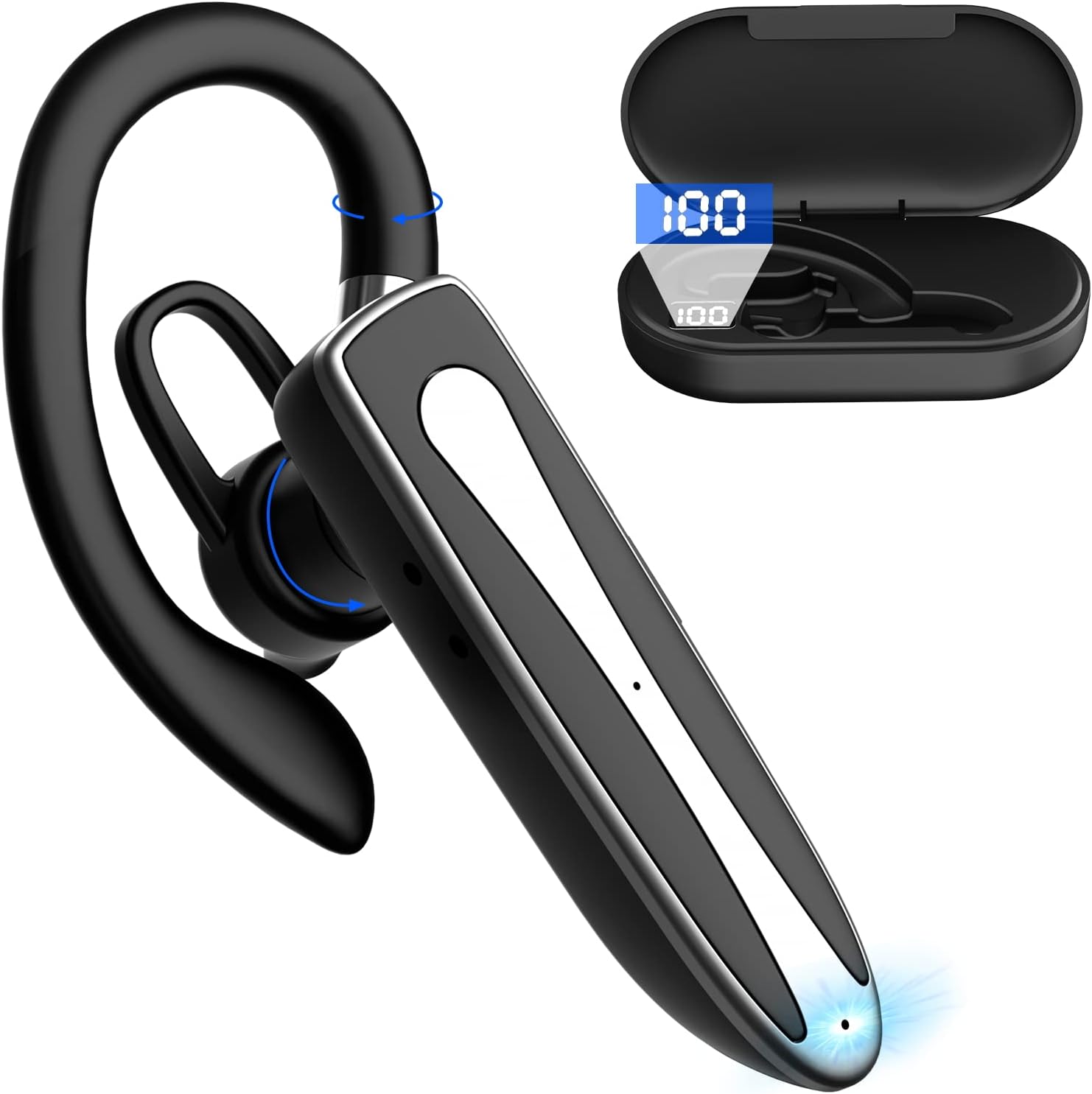
Image 2.1: Obbug Bluetooth Headset YYK-530 and its charging case.
3. Produktuaren ezaugarriak
- Bluetooth 5.1 teknologia: Provides stable connection and clear audio.
- Bateriaren iraupen hedatua: Up to 80 hours of continuous use with the charging case.
- Diseinu erosoa eta erregulagarria: Flexible earhook and rotatable boom mic for left or right ear wear.
- CVC8.0 Noise Reduction: Deien argitasuna hobetzen du atzeko planoko zarata murriztuz.
- Bateragarritasun zabala: Connects with most Bluetooth-enabled devices including smartphones, tablets, and computers.
- Esku libreko deiak: Integrated microphone for convenient communication.

Image 3.1: Illustration of CVC8.0 Noise Reduction for clear audio.
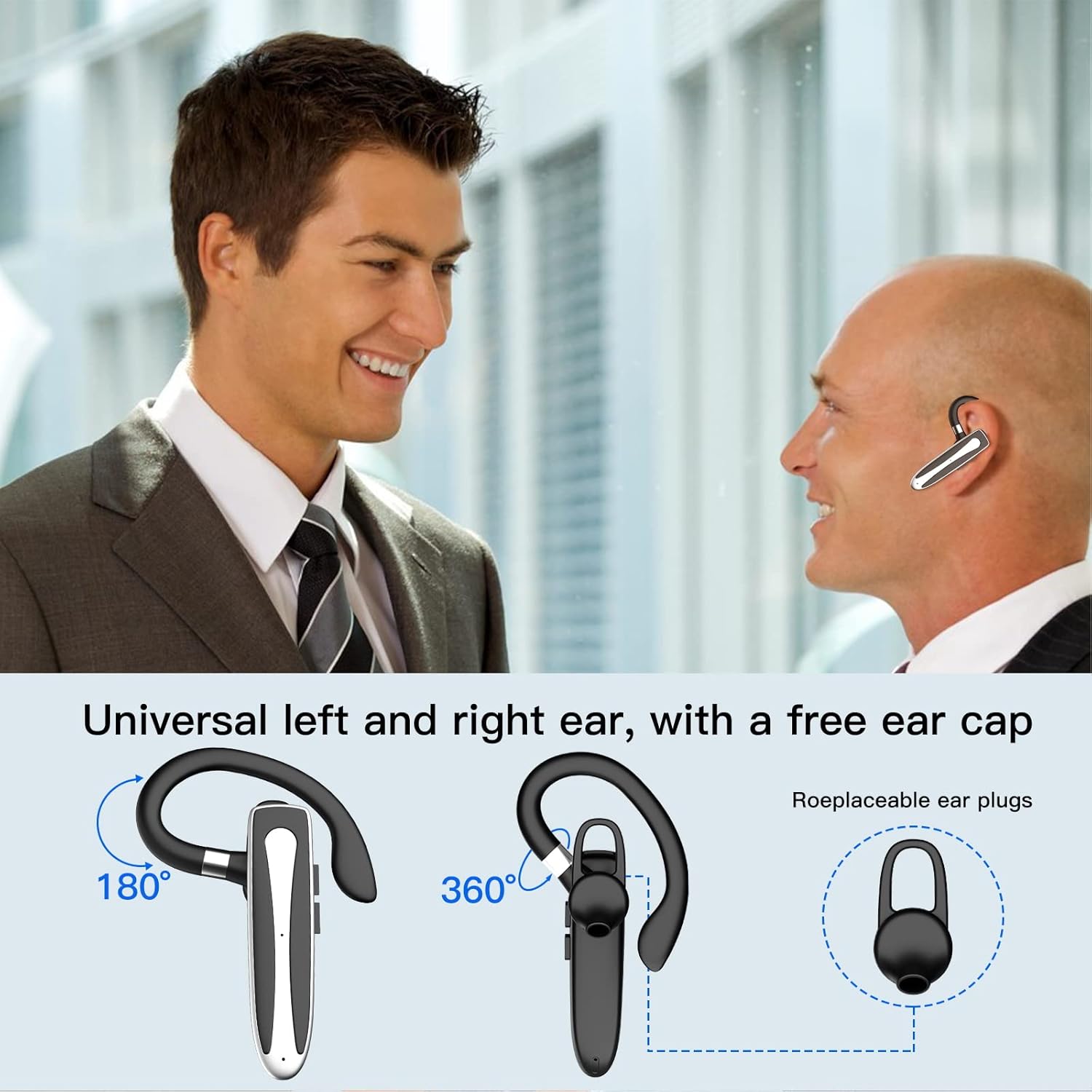
Image 3.2: Diagram illustrating the dual microphone noise reduction processing.
4. Konfigurazioa
4.1 Entzungailuak eta zorroa kargatzea
Before first use, fully charge the headset and its charging case.
- Place the headset into the charging case.
- Connect the USB Type-C cable to the charging port on the case and to a power source (e.g., USB wall adapter, computer USB port).
- The charging indicator on the case will show charging status. A full charge typically takes 1.5 hours.

Image 4.1: The Type-C charging port on the charging case.

Image 4.2: Battery life and charging time information for the headset and case.
4.2 Gailu batekin parekatzea
Aurikularrak Bluetooth 5.1 erabiltzen du haririk gabeko konexiorako.
- Piztu: Take the headset out of the charging case, or press and hold the Multi-function Button until the indicator light flashes blue and red, indicating pairing mode.
- Aktibatu Bluetootha: Zure gailuan (smartphone-a, tableta, etab.), joan Bluetooth ezarpenetara eta aktibatu Bluetooth-a.
- Hautatu gailua: In the list of available devices, select "YYK-530".
- Berretsi konexioa: Once connected, the headset indicator light will flash blue slowly, and your device will show "Connected".

Image 4.3: Illustration of optimal Bluetooth connection distance (within 10 meters).
4.3 Connecting to Two Devices Simultaneously
The headset supports connecting to two Bluetooth devices at the same time.
- Connect the headset to the first device (e.g., Phone A) as described in Section 4.2.
- Turn off Bluetooth on the first device. The headset will re-enter pairing mode.
- Connect the headset to the second device (e.g., Phone B) as described in Section 4.2.
- Turn on Bluetooth on the first device. The headset should automatically reconnect to both devices.
You can now answer calls or play music from either connected device.

Image 4.4: Step-by-step guide for connecting the headset to two devices.
4.4 Entzungailuak janztea
The headset is designed for comfortable wear on either the left or right ear.
- The earhook can rotate 360° vertically and 360° horizontally to fit your preferred angle.
- The retractable earhook can be adjusted to fit the shape of your ear.

Image 4.5: The headset's adjustable design for left or right ear wearing.
5. Funtzionamendu-argibideak
5.1 Piztu/Itzali
- Piztu: Take the headset out of the charging case, or press and hold the Multi-function Button for approximately 3 seconds until the indicator light flashes blue.
- Itzali: Place the headset back into the charging case, or press and hold the Multi-function Button for approximately 5 seconds until the indicator light flashes red and then turns off.
5.2 Deien kudeaketa
- Deia erantzun/amaitu: Sakatu funtzio anitzeko botoia behin.
- Deia baztertu: Sakatu eta eutsi funtzio anitzeko botoia 2 segundo inguru.
- Berriz markatu azken zenbakia: Sakatu bi aldiz funtzio anitzeko botoia.
5.3 Musika erreproduzitzea
- Erreproduzitu/Pausatu: Sakatu funtzio anitzeko botoia behin.
- Hurrengo ibilbidea: Sakatu eta eutsi bolumena igotzeko botoiari.
- Aurreko pista: Eduki sakatuta bolumena jaisteko botoia.
5.4 Bolumen kontrola
- Handitu bolumena: Sakatu bolumena igotzeko botoia.
- Murriztu bolumena: Sakatu Bolumena Jaisteko botoia.
5.5 Ahots-laguntzailearen aktibazioa
Activate your device's voice assistant (Siri, Google Assistant) directly from the headset.
- Aktibatu Ahots Laguntzailea: Sakatu hiru aldiz funtzio anitzeko botoia.

Image 5.1: The headset supports activation of Siri and Google Assistant.
6. Mantentzea
- Clean the headset and charging case regularly with a soft, dry cloth.
- Saihestu gailua muturreko tenperaturen, hezetasunaren edo substantzia korrosiboen eraginpean jartzea.
- Store the headset in its charging case when not in use to protect it and keep it charged.
- Ez saiatu gailua zuk zeuk desmuntatzen edo konpontzen. Jarri harremanetan bezeroarentzako zerbitzura laguntza lortzeko.
7. Arazoak
7.1 Headset Not Powering On
- Ensure the headset is fully charged. Place it in the charging case and connect the case to a power source.
- Press and hold the Multi-function Button for 3-5 seconds to power on.
7.2 Ezin da gailuarekin parekatu
- Ensure the headset is in pairing mode (indicator flashes blue and red).
- Itzali Bluetooth-a zure gailuan eta piztu berriro.
- Ensure the headset is within 10 meters of your device and there are no significant obstacles.
- Garbitu gailuko Bluetooth parekatze-zerrenda eta saiatu berriro parekatzen.
7.3 Soinurik ez edo soinu kalitate eskasa
- Doitu bolumena bai entzungailuetan bai konektatutako gailuan.
- Ziurtatu entzungailuak behar bezala konektatuta daudela zure gailura.
- Hurbildu gailura Bluetooth-aren eremuan zaudela ziurtatzeko.
- Egiaztatu beste haririk gabeko gailuetatik interferentziarik dagoen.
8. Zehaztapenak
| Ezaugarri | Zehaztapena |
|---|---|
| Ereduaren izena | YYK-530 |
| Marka | Obbug |
| Konektibitate Teknologia | Haririk gabeko (Bluetooth) |
| Bluetooth bertsioa | 5.1 |
| Bluetooth barrutia | Gehienez 33 oin (10 metro) |
| Zarata Kontrola | Sound Isolation (CVC8.0 Noise Reduction) |
| Entzungailuaren forma | Belarrizko kako |
| Bateriaren iraupena (entzungailuak) | 5 ordu (gutxi gorabehera) |
| Bateriaren iraupena (kargatzeko zorroarekin) | Up to 80 Hours (approx.) |
| Kargatzeko Denbora | 1.5 ordu |
| Kargatzeko ataka | USB C motakoa |
| Uraren Erresistentzia Maila | Iragazgaitza |
| Elementuaren pisua | 4.9 ontza (0.14 kilogramo) |
| Maiztasun barrutia | 20 Hz - 20,000 Hz |
| Gailu bateragarriak | Cellphones, Desktops, Laptops, Telephones |

Image 8.1: The headset is compatible with a wide range of Bluetooth-enabled devices.
9. Bermea eta bezeroarentzako laguntza
The Obbug Bluetooth Headset comes with a 1-month replacement warranty.
For any questions, issues, or support needs, please contact our customer service. We offer 24-hour customer service to assist you.
Mesedez, kontsultatu erosketa-dokumentazioa harremanetarako datu zehatzak lortzeko.