
1. Sarrera
This manual provides instructions for the installation, operation, and maintenance of the Golmar T590 VD (Serie 90) Intercom Telephone, model 19950590. This device is designed for use within Golmar intercom systems and is specifically compatible with the Golmar T-840B telephone system. It is not compatible with other brands or models outside the specified Golmar series.
The Golmar T590 VD is a 4-wire digital installation telephone, featuring a durable ABS plastic housing in white (RAL9003) and a detachable handset cable for ease of connection and maintenance.
2. Konfigurazioa eta instalazioa
2.1 Paketearen edukia
- Golmar T590 VD Intercom Telephone
- Handset with detachable cable
- Muntatzeko hardwarea (barne badago)
2.2 Bateragarritasuna
Garrantzitsua: This telephone is exclusively designed for Golmar systems, specifically the T-840B telephone. It is not compatible with intercom systems from other manufacturers.
2.3 Kableatzeko jarraibideak
The Golmar T590 VD utilizes a 4-wire digital installation system. Refer to the main system's wiring diagram for the Golmar T-840B for precise connection points. Ensure all connections are secure and correctly polarized.
- Identify the 4-wire digital connection points on your Golmar T-840B system.
- Connect the corresponding wires from the T590 VD telephone to these points.
- Attach the detachable handset cable to the telephone unit.
- Mount the telephone securely to a wall or desired surface using appropriate hardware.
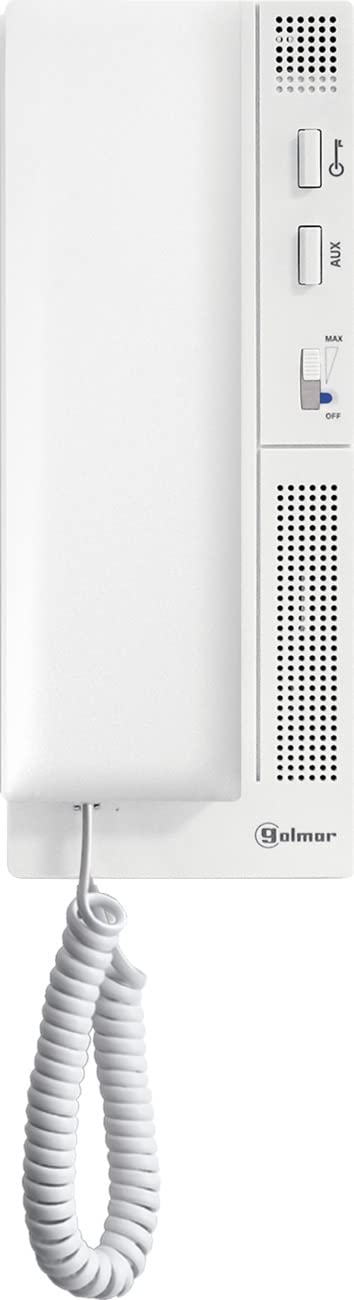
1. irudia: Aurrealdea view of the Golmar T590 VD Intercom Telephone. This image shows the white ABS plastic housing and the handset.
3. Funtzionamendu-argibideak
The Golmar T590 VD is a wired telephone designed for single-line operation within a compatible Golmar intercom system.
3.1 Dei bat egitea
- Altxatu telefonoa.
- Wait for a dial tone (if applicable to your system configuration).
- Use the keypad to dial the desired extension or external number.
- Speak into the handset and listen for a response.
- Replace the handset to end the call.
3.2 Dei bat jasotzea
- When the telephone rings, lift the handset to answer the call.
- Speak into the handset and listen for the caller.
- Replace the handset to end the call.
3.3 Caller Identification (Caller ID)
This telephone supports caller identification. If your Golmar system and service provider support Caller ID, the incoming caller's information will be displayed (if the telephone unit has a display, which is not specified but implied by "Ja" for Nummerherkenning/Identificatie van beller). Note: The T590 VD is a basic intercom phone, typically without a display. The Caller ID feature might refer to the system's capability rather than the phone itself displaying it. For this manual, we assume basic functionality.
4. Mantentzea
The Golmar T590 VD telephone requires minimal maintenance to ensure long-lasting performance.
4.1 Garbiketa
- Erabili biguna, damp cloth to wipe the exterior of the telephone.
- Avoid using abrasive cleaners, solvents, or strong chemicals, as these can damage the ABS plastic housing.
- Ensure no liquid enters the internal components of the telephone.
4.2 Kableen kudeaketa
Periodically check the detachable handset cable and the main connection wires for any signs of wear or damage. If any cables are damaged, contact a qualified technician for replacement or repair.
5. Arazoak
If you experience issues with your Golmar T590 VD telephone, refer to the following common troubleshooting steps:
| Arazoa | Kausa posiblea | Irtenbidea |
|---|---|---|
| Ez dago markatze-tonurik / Ezin dira deiak egin |
|
|
| Ezin dut deitzailea entzun / Deitzaileak ezin nau entzun |
|
|
| No incoming calls |
|
|
If the problem persists after attempting these steps, please contact Golmar customer support or a qualified technician.
6. Zehaztapenak
| Ezaugarri | Xehetasuna |
|---|---|
| Marka | GOLMAR |
| Eredua | T590 VD (Serie 90) |
| Fabrikatzailearen Erreferentzia | 19950590 |
| Telefono mota | Kableatua |
| Instalazio mota | 4-wire Digital |
| Gailu bateragarriak | Golmar models, specifically T-840B |
| Materiala | Akrilonitrilo Butadieno Estirenoa (ABS) |
| Kolorea | Zuria (RAL9003) |
| Energia iturria | Corded Electric (powered by intercom system) |
| Markagailu mota | Teklatu bakarra |
| Erantzungailu mota | Digital (refers to the system it connects to) |
| Lerro anitzeko eragiketa | Supports one line |
| Deitzailearen identifikazioa | Yes (system dependent) |
7. Bermea eta Laguntza
7.1 Bermearen informazioa
This Golmar product comes with a full manufacturer's warranty. For specific details regarding the warranty period and coverage, please refer to the documentation provided with your purchase or contact Golmar customer service directly.
7.2 Bezeroarentzako laguntza
If you have any questions, require technical assistance, or need to report a problem with your Golmar T590 VD telephone, please contact Golmar customer support. Contact information can typically be found on the manufacturer's official webgunean edo produktuaren ontzian.
When contacting support, please have your product model (T590 VD) and manufacturer reference number (19950590) available.