
Logicool M550MGR
Logicool Signature M550MGR Silent Wireless Mouse User Manual
Model: M550MGR
1. Sarrera
The Logicool Signature M550MGR is a silent wireless mouse designed for comfort and productivity. It features the unique SmartWheel for versatile scrolling and SilentTouch technology for reduced click noise. This mouse offers dual connectivity options: Bluetooth Low Energy and the Logi Bolt USB receiver, ensuring stable performance across various operating systems.

Image: The Logicool Signature M550MGR mouse, highlighting its ergonomic design and advanced scrolling capabilities.
2. Paketearen edukia
- Logicool Signature M550MGR Wireless Mouse
- Logi Bolt USB hargailua
- AA bateria 1 (aurrez instalatuta)
- Erabiltzailearen dokumentazioa (eskuliburu hau)
3. Konfigurazioa
3.1. Bateriaren instalazioa
- Kokatu bateriaren konpartimendua saguaren azpialdean.
- Ireki bateriaren konpartimenduaren estalkia.
- Ensure the AA battery is correctly oriented according to the polarity indicators (+/-).
- Itxi bateriaren konpartimenduaren estalkia.
3.2. Zure sagua konektatzea
The M550MGR offers two connection methods: Logi Bolt USB receiver or Bluetooth Low Energy.
3.2.1. Logi Bolt USB hargailuaren konexioa
- Remove the Logi Bolt USB receiver from the battery compartment or packaging.
- Konektatu Logi Bolt USB hartzailea zure ordenagailuko USB ataka libre batean.
- The mouse should automatically connect. If not, ensure the mouse is powered on.
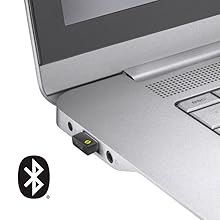
Image: The Logi Bolt USB receiver connected to a laptop, illustrating the wireless connection method.
3.2.2. Bluetooth Low Energy Connection
- Ziurtatu zure gailuaren Bluetooth-a gaituta dagoela.
- Piztu sagua.
- Press and hold the connect button on the underside of the mouse for 3 seconds until the LED indicator starts blinking rapidly.
- On your device, go to Bluetooth settings and select "Logicool M550MGR" from the list of available devices to pair.
- The LED indicator will turn solid for a few seconds, then turn off, indicating a successful connection.

Image: Visual representation of the two connectivity options: Bluetooth and the Logi Bolt USB receiver.
4. Funtzionamendu-argibideak
4.1. Oinarrizko funtzioak
- Ezkerreko klik: Lehen mailako ekintza, hautaketa.
- Egin klik eskuineko botoiarekin: Bigarren mailako ekintza, testuinguru menuak.
- Korritzeko gurpila: Joan gora edo behera dokumentuetan zehar eta web orrialdeak.
4.2. Gurpil Adimendunaren Mugimendua
The SmartWheel automatically switches between two scrolling modes:
- Line-by-line Scrolling: For precise navigation, ideal for detailed work.
- Hyper-fast Scrolling: Spin the wheel quickly to effortlessly glide through long documents and web pages. The wheel will automatically switch to this mode when spun with momentum.

Irudia: Gertutik view of the SmartWheel, demonstrating its design for efficient scrolling.
4.3. SilentTouch Teknologia
The M550MGR incorporates SilentTouch technology, which reduces click noise by 90% compared to traditional mice, while maintaining the familiar click feel. This creates a quieter work environment without compromising tactile feedback.

Image: A user operating the silent mouse in a calm environment, illustrating the benefit of SilentTouch technology.
5. Ezaugarriak
- Gurpil Adimenduna: Automatic switching between precise line-by-line and hyper-fast scrolling.
- SilentTouch Teknologia: 90% reduced click noise with retained click feel.
- Konektibitate bikoitza: Connect via Logi Bolt USB receiver or Bluetooth Low Energy.
- Diseinu ergonomikoa: Comfortable shape with rubber side grips for extended use.
- Bateriaren iraupen luzea: Up to 24 months on a single AA battery.
- OS anitzeko bateragarritasuna: Supports Windows, macOS, Chrome OS, iPadOS, and Android.
6. Bateriaren informazioa
- Bateria mota: 1 x AA alkaline battery.
- Bateriaren iraupena: Up to 24 months, depending on usage.
- Bateria ordezkatzea: Replace the AA battery when the LED indicator on the mouse turns red or when performance degrades. Follow the installation steps in Section 3.1.
7. Bateragarritasuna
The Logicool Signature M550MGR mouse is compatible with the following operating systems:
- Logi Bolt Connection:
- Windows 10, 11 edo berriagoa
- macOS 10.10 edo berriagoa
- Chrome OS
- Bluetooth Low Energy Connection:
- Windows 10, 11 edo berriagoa
- macOS 10.15 edo berriagoa
- Chrome OS
- iPadOS 13.4 edo berriagoa
- Android 5.0 edo berriagoa
Note: This mouse is not compatible with Logitech Unifying receivers.
8. Mantentzea
- Garbiketa: Erabili zapi leun eta lihorik gabeko bat saguaren gainazala garbitzeko. Zikinkeria egoskorra bada, garbitu pixka bat.ampGarbitu oihalak urarekin. Saihestu produktu kimiko gogorrak edo material urratzaileak.
- Sentsore: Keep the optical sensor on the underside of the mouse clean and free from dust or debris for optimal tracking performance.
- Biltegiratzea: When not in use for extended periods, turn off the mouse to conserve battery life. Store in a dry, cool place.
9. Arazoak
9.1. Saguak ez du erantzuten
- Ziurtatu sagua piztuta dagoela.
- Egiaztatu bateriaren maila eta ordeztu behar izanez gero.
- For Logi Bolt connection: Ensure the receiver is securely plugged into a working USB port. Try a different USB port.
- For Bluetooth connection: Ensure Bluetooth is enabled on your device and the mouse is paired. Try re-pairing the mouse (refer to Section 3.2.2).
- Berrabiarazi ordenagailua edo gailua.
9.2. Kurtsorearen mugimendu irregularra
- Garbitu saguaren azpialdeko sentsore optikoa.
- Ziurtatu sagua gainazal egoki batean erabiltzen ari zarela. Saihestu gainazal oso islatzaileak edo gardenak.
- Move the mouse closer to the Logi Bolt receiver or your Bluetooth-enabled device to reduce interference.
9.3. SmartWheel Not Switching Modes
- Ensure the wheel is spun with enough momentum to activate hyper-fast scrolling.
- Check for any debris around the scroll wheel that might impede its movement.
10. Zehaztapenak
| Marka | Logicool |
| Modelo zenbakia | M550MGR |
| Kolorea | Grafitoa |
| Konektibitate Teknologia | Bluetooth, Logi Bolt (USB) |
| Mugimenduak detektatzeko teknologia | Optikoa |
| Ezaugarri bereziak | SilentTouch, Wireless |
| Produktuaren neurriak | 6.1 x 10.82 x 3.88 cm |
| Elementuaren pisua | 97.4 g |
| Bateria mota | 1 x AA bateria |
| Etengabeko Erabilera Denbora | Gehienez 24 hilabete |
11. Bermea eta Laguntza
The Logicool Signature M550MGR Wireless Mouse comes with a 2 urteko fabrikatzailearen bermea erosketa-datatik aurrera.
For technical support, warranty claims, or additional information, please visit the official Logicool support webwebgunera edo jarri harremanetan bezeroarentzako arreta-zerbitzura. Gorde erosketaren frogagiria bermearen ondorioetarako.
Official Logicool Support: www.logicool.co.jp
Ask a question about this manual
Ask about setup, troubleshooting, compatibility, parts, safety, or missing instructions. Manuals+ will review the question and use this page’s manual context to help answer it.