
1. Sarrera
This manual provides essential information for the proper use and care of your ZdalaMit AH81-11699A Replacement Remote Control. This remote is designed as a direct replacement for specific Samsung Soundbar models, requiring no programming for immediate use.
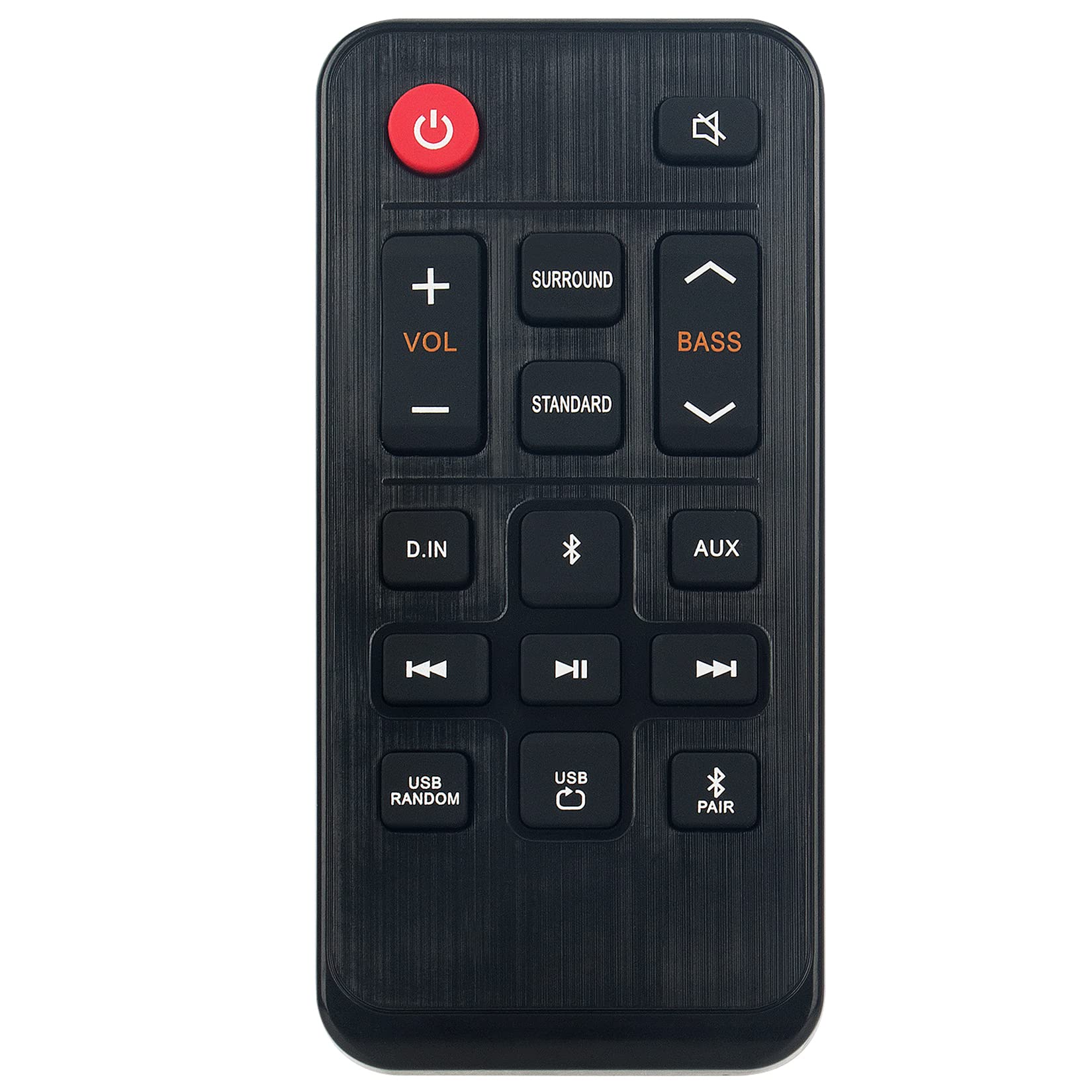
1.1. irudia: The ZdalaMit AH81-11699A Replacement Remote Control. This image displays the front view of the black remote control, featuring various buttons for power, volume, mute, and other soundbar functions.
2. Bateragarritasuna
The AH81-11699A Replacement Remote Control is compatible with the following Samsung Soundbar models:
- HW-T400
- HW-T400/ZA
- HW-T400/XU
- HWT400
- HWT400/ZA
No programming is required for these models. Simply insert the battery, and the remote is ready for use.
3. Konfigurazioa
To begin using your replacement remote control, follow these simple steps for battery installation:
- Kokatu bateriaren konpartimendua: On the back of the remote control, identify the battery compartment cover.
- Ireki konpartimendua: Gently slide or press the latch to open the battery compartment cover.
- Sartu bateria: Insert one CR2032 coin cell battery into the compartment. Ensure the positive (+) side of the battery is facing upwards, as indicated by the diagram inside the compartment.
- Itxi konpartimendua: Jarri berriro bateriaren konpartimentuaren estalkia, ondo sartuta dagoela ziurtatuz klik eginez.
The remote control is now ready for operation. No additional pairing or programming is necessary for compatible Samsung Soundbar models.
4. Funtzionamendu-argibideak
The AH81-11699A remote control features 18 buttons designed for intuitive control of your Samsung Soundbar. Point the remote directly at your soundbar for optimal performance.
- Pizteko botoia: Sakatu soinu-barra pizteko edo itzaltzeko.
- Bolumena igo/behera: Use the '+' and '-' buttons to adjust the soundbar's volume level.
- Mututu botoia: Press to temporarily silence the soundbar's audio. Press again to restore sound.
- Iturriaren botoia: Cycle through available input sources (e.g., Bluetooth, Optical, HDMI).
- Soinu Moduaren botoia: Change the sound effect mode (e.g., Standard, Surround, Game).
- Baxu/Agudoen kontrola: Adjust bass and treble levels (if supported by your soundbar model).
- Other Function Buttons: Additional buttons may control specific soundbar features. Refer to your soundbar's original manual for detailed functionality.
Ensure there are no obstructions between the remote control and the soundbar's infrared receiver for proper signal transmission. The maximum effective range is approximately 33 feet (10 meters).
5. Mantentzea
Mantentze egokiak zure urrutiko agintearen iraupena eta errendimendu optimoa bermatzen ditu.
- Garbiketa: Wipe the remote control with a soft, dry cloth. Do not use liquid cleaners, solvents, or abrasive materials, as these can damage the surface or internal components.
- Bateria ordezkatzea: Replace the CR2032 battery when the remote's responsiveness decreases or it stops functioning. Always use a fresh, high-quality CR2032 alkaline battery.
- Biltegiratzea: Store the remote control in a cool, dry place away from direct sunlight, extreme temperatures, and high humidity.
- Saihestu tantoak: Babestu urrutiko agintea kolpe fisikoetatik, erorketek barneko zirkuituak kaltetu baititzakete.
6. Arazoak
If you experience issues with your remote control, refer to the following common solutions:
| Arazoa | Kausa posiblea | Irtenbidea |
|---|---|---|
| Urrutiko agintea ez da erantzuten. | Bateria hilda edo gaizki instalatuta. | Replace the CR2032 battery, ensuring correct polarity (+ side up). |
| Urrutiko agintea irismen laburreko edo tarteka erantzun du. | Weak battery; Obstruction between remote and soundbar; Remote not pointed correctly. | Replace battery. Remove any objects blocking the signal path. Ensure the remote is pointed directly at the soundbar's IR receiver. |
| Botoi espezifikoek ez dute funtzionatzen. | Button malfunction; Soundbar does not support the function. | Test other buttons. If only specific buttons fail, the remote may be faulty. Verify if your soundbar model supports the intended function. |
| Remote works but soundbar functions incorrectly. | Issue with the soundbar itself. | Refer to your Samsung Soundbar's original user manual for troubleshooting soundbar-specific issues. |
Urrats hauek arazoa konpontzen ez badute, jarri harremanetan bezeroarentzako arreta-zerbitzuarekin.
7. Zehaztapenak
- Ereduaren izena: AH81-11699A
- Marka: ZdalaMit
- Konektibitate Teknologia: Infragorriak
- Gailu bateragarriak: Samsung Soundbar (HW-T400 series)
- Bateria mota: 1 x CR2032 Coin Cell (Alkaline recommended)
- Gehienezko barrutia: Approximately 33 Feet (10 meters)
- Button Quantity: 18
- Kontroladore mota: Botoien Kontrola
- Neurriak (L x W x H): 4.76" x 2.18" x 0.55" (12.09 cm x 5.54 cm x 1.40 cm)
- Kolorea: Beltza
- Ezaugarri berezia: Diseinu ergonomikoa
8. Bermea eta Laguntza
This ZdalaMit AH81-11699A Replacement Remote Control comes with a 1 urteko bermea erosketa-datatik aurrera, fabrikazio-akatsak estaliz.
For warranty claims, technical assistance, or any other inquiries, please contact our customer support. We are available to assist you with any questions or concerns you may have regarding your product.
Contact information for support is typically provided at the point of purchase or on the product packaging.