

Sarrera
This manual provides comprehensive instructions for the Xtrfy M8 Wireless Gaming Mouse. Designed for professional gamers, the M8 offers an ultra-lightweight design, symmetrical shape, and lag-free 2.4 GHz wireless connectivity.
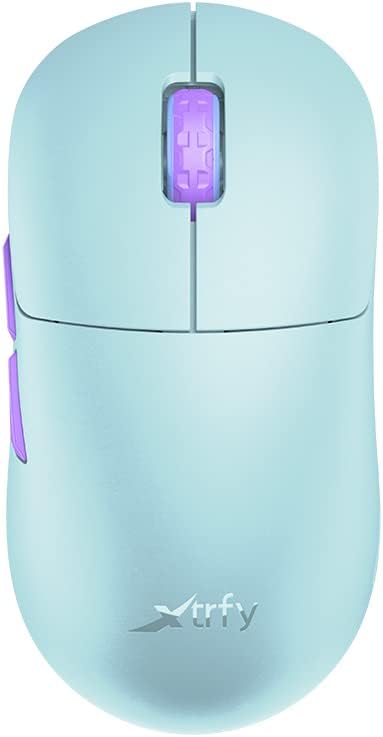
Image: The Xtrfy M8 Wireless Gaming Mouse in Frosty Mint, showcasinbere diseinu ergonomikoa.
A key design feature is its ultra-low front, measuring just 4mm, which allows for a unique grip style.

Irudia: Gertutik view of the Xtrfy M8 mouse's front, highlighting its low profile 4 mm-koak.
Paketearen edukia
Egiaztatu elementu guztiak zure paketean daudela:
- Xtrfy M8 Wireless Gaming Mouse
- USB-C kargatzeko kablea
- USB haririk gabeko hartzailea (donglea)
- USB-A to USB-C Adapter (for receiver extension)
- Argibide eskuliburua (dokumentu hau)

Image: The USB-C charging cable and the USB wireless receiver (dongle) for the Xtrfy M8 mouse.
Konfigurazioa
- Kargatu sagua: Before first use, connect the USB-C charging cable to the mouse and a powered USB port. The mouse has an internal Lithium Ion battery.
- Connect the USB Wireless Receiver:
- Insert the USB wireless receiver directly into an available USB-A port on your computer.
- For optimal signal strength or if your computer's USB port is not easily accessible, use the provided USB-A to USB-C adapter with the charging cable to extend the receiver closer to the mouse.
- Piztu sagua: Locate the power switch on the underside of the mouse. Slide the switch to the "ON" position.
- Konexio automatikoa: The mouse should automatically connect to the receiver. No additional pairing software is typically required for 2.4 GHz wireless operation.

Image: The underside of the Xtrfy M8 mouse, displaying the power switch, optical sensor, and hardware adjustment buttons.
Funtzionamendu-argibideak
The Xtrfy M8 mouse features standard left and right click buttons, a scroll wheel, and two side buttons. All functions are plug-and-play compatible with most operating systems.
Hardware Adjustments
The Xtrfy M8 allows for on-the-fly adjustment of key performance settings directly from the mouse hardware, without the need for software. These settings are typically located on the underside of the mouse.
- DPI/CPI (Dots Per Inch / Counts Per Inch): Adjusts mouse sensitivity. Use the dedicated button on the mouse bottom to cycle through preset DPI levels. An indicator light may change color to show the current setting.
- Polling Rate (PR): Determines how often the mouse reports its position to the computer. Higher polling rates (e.g., 1000 Hz) provide smoother tracking but consume more battery.
- Lift-off Distance (LOD): Controls how high the mouse can be lifted before tracking stops. A lower LOD prevents unwanted cursor movement when repositioning the mouse.
Refer to the markings near the buttons on the mouse's underside for specific adjustment procedures.

Irudia: Albokoa view of the Xtrfy M8 mouse, highlighting the main click buttons, scroll wheel, and two programmable side buttons.
Karga eta bateria
The Xtrfy M8 Wireless Gaming Mouse is equipped with a rechargeable Lithium Ion battery. To charge the mouse, connect the supplied USB-C cable to the front port of the mouse and the other end to a powered USB port on your computer or a USB wall adapter.
- A small LED indicator on the mouse will typically show charging status (e.g., solid light for charging, off or different color for fully charged).
- The mouse can be used while charging, though the cable connection point may feel unusual during active use.
- Battery life varies based on usage and polling rate settings.
Mantentzea
Proper maintenance ensures the longevity and performance of your Xtrfy M8 mouse.
- Garbiketa: Erabili zapi leun eta lehor bat saguaren gainazala garbitzeko. Zikinkeria egoskorra bada, garbitu pixka bat.ampGarbitu oihalak urarekin. Saihestu produktu kimiko gogorrak edo material urratzaileak.
- Sentsore: Mantendu saguaren azpialdean dagoen sentsore optikoa garbi eta hautsik edo hondakinik gabe. Erabili kotoi-zapi bat edo aire konprimitua beharrezkoa bada.
- Biltegiratzea: Denbora luzez erabiltzen ez baduzu, gorde sagua leku lehor eta fresko batean.
- Kableen zainketa: Avoid sharp bends or excessive pulling on the USB-C charging cable to prevent damage.
Arazoak konpontzea
If you encounter issues with your Xtrfy M8 mouse, refer to the following common solutions:
- Saguak ez du erantzuten:
- Ziurtatu sagua piztuta dagoela.
- Check if the USB wireless receiver is securely plugged into a working USB port.
- Verify the mouse battery is charged. Connect the charging cable and observe the indicator light.
- Saiatu hartzailea beste USB ataka batera konektatzen.
- Atzerapena edo deskonexioak:
- Ensure the receiver is close to the mouse and not obstructed by metal objects.
- Avoid placing the receiver near other wireless devices that may cause interference (e.g., Wi-Fi routers, other wireless peripherals).
- Lower the polling rate setting on the mouse if experiencing frequent disconnections in a crowded wireless environment.
- Jarraipen zehaztugabea:
- Garbitu saguaren azpialdeko sentsore optikoa.
- Ziurtatu sagua gainazal egoki batean erabiltzen ari zarela (sagu-alfonbra bat erabiltzea gomendatzen da).
- Adjust the DPI/CPI settings to a comfortable level.
- Scroll Wheel Issues (e.g., jumping):
- Ensure the mouse firmware is up to date (check the Xtrfy official website for any available updates).
- If the issue persists, contact Xtrfy customer support.
Zehaztapenak
| Modelo zenbakia | M8 |
| Marka | Xtrfy |
| Konektibitate Teknologia | Radio Frequency (2.4 GHz), USB (for charging/wired mode) |
| Mugimenduak detektatzeko teknologia | Optikoa |
| Ezaugarri bereziak | Lightweight, Wireless |
| Elementuaren pisua | 1.94 ontza (55 gramo inguru) |
| Pilak | 1 litio ioizko bateria (barne) |
| Paketearen neurriak | 7.32 x 4.06 x 2.44 hazbete |
| ASIN | B0BMLF5FMT |
| Eskuragarri dagoen lehen data | 16ko azaroaren 2022a |
Bermea eta Laguntza
The Xtrfy M8 Wireless Gaming Mouse typically comes with a 1-year manufacturer's warranty. For specific warranty details, claims, or technical support, please contact Xtrfy directly through their official webgunea.
Xtrfy Official Webgunea: www.xtrfy.com
Always refer to the manufacturer's official resources for the most current support information and firmware updates.