
Wooask G5 PRO OFF B
Wooask G5 Pro Offline Language Translator Device User Manual
Model: G5 PRO OFF B
1. Sarrera
The Wooask G5 Pro is an advanced language translator device designed for seamless communication across various languages. It offers highly accurate online translation for up to 138 languages and accents, alongside robust offline translation capabilities for 8 key languages. This compact and portable device is ideal for travel, business, and learning, ensuring clear and efficient communication even without an internet connection.

Image: The Wooask G5 Pro translator device, showcasinbere diseinu beltz dotorea eta formatu trinkoa.
2. Paketearen edukia
- Wooask G5 Pro Translator Device
- USB kargatzeko kablea
- Erabiltzailearen eskuliburua
- Offline Language Activation Card (pre-charged)
3. Gailua amaitu daview
Familiarize yourself with the components of your Wooask G5 Pro device:
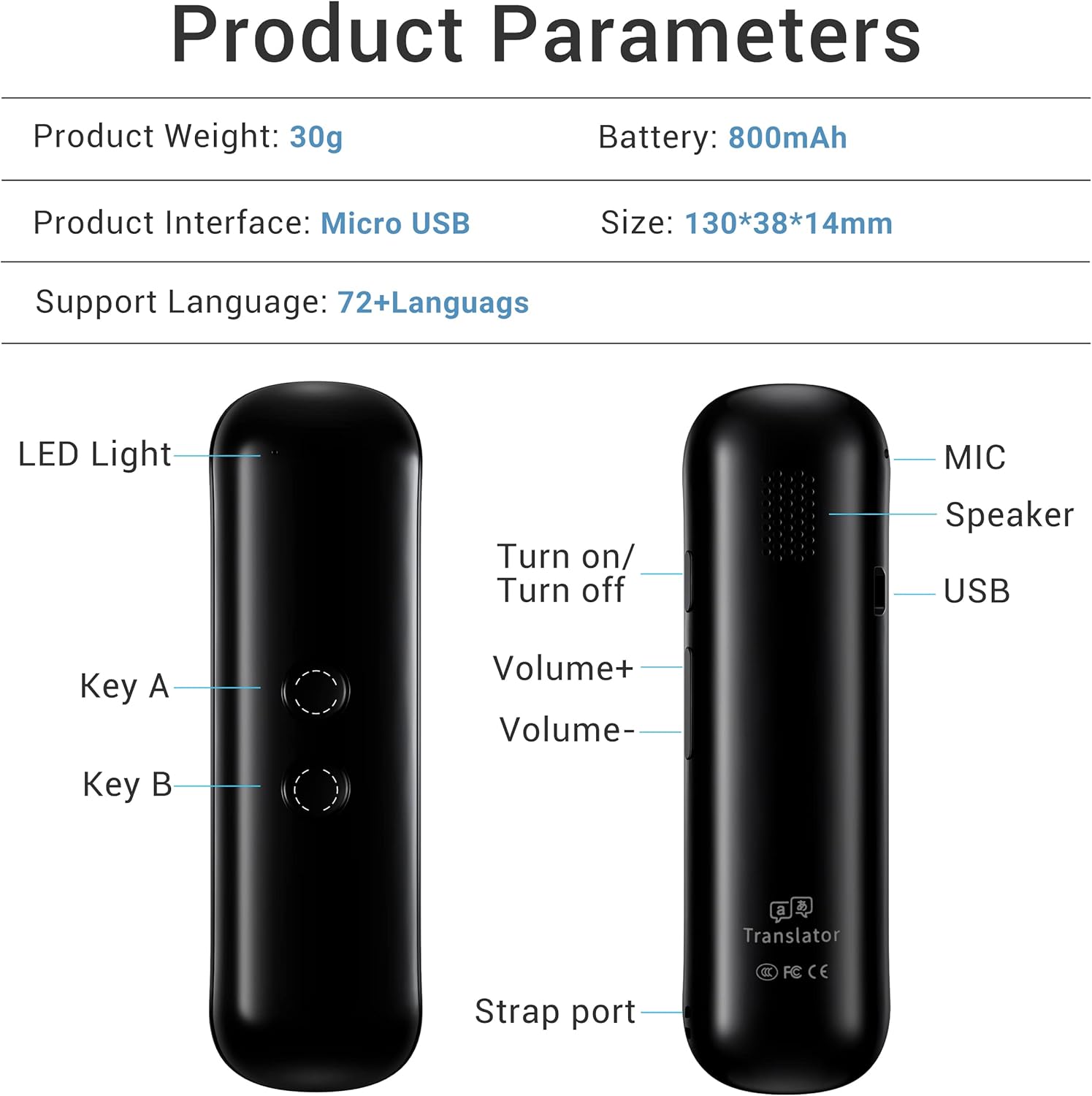
Image: Diagram illustrating the various parts of the Wooask G5 Pro, including buttons, ports, and indicators.
| Osagaia | Deskribapena |
|---|---|
| LED Argia | Indicates device status (e.g., charging, connected). |
| A gakoa | Press and hold to speak for Language A. |
| B tekla | Press and hold to speak for Language B. |
| Piztu / Desaktibatu | Pizteko botoia. |
| Bolumena+ / Bolumena- | Doitu bozgorailuaren bolumena. |
| MIKROA | Ahots-sarrerarako mikrofonoa. |
| Hizlaria | Outputs translated audio. |
| USB ataka | Gailua kargatzeko. |
| Uhalaren ataka | Eskumuturreko uhal baterako atxikitzeko puntua. |
4. Konfigurazioa
4.1 Gailua kargatzea
Before first use, fully charge your Wooask G5 Pro. Connect the device to a power source using the provided USB cable. The LED indicator will show charging status. A full charge takes approximately 1 hour and provides up to 10 hours of continuous use or 30 days of standby time.

Image: Visual representation of the Wooask G5 Pro's battery endurance, highlighting charging, continuous use, and standby times.
4.2 Aplikazioaren instalazioa
The Wooask G5 Pro requires the Wooask APP to function. Download the official Wooask APP from your smartphone's app store (available for iOS and Android).

Image: The Wooask G5 Pro device shown alongside a smartphone displaying the Wooask APP interface, emphasizing app usage.
4.3 Bluetooth parekatzea
- Ensure your Wooask G5 Pro is powered on.
- Gaitu Bluetootha zure telefonoan.
- Open the Wooask APP. The app will guide you through the pairing process. Select 'Wooask G5 Pro' from the list of available Bluetooth devices.
- Confirm the pairing on both the device and your smartphone if prompted.
4.4 Offline Language Download
For offline translation, you must download the desired language packs through the Wooask APP. The device supports offline translation in 8 languages: Chinese, English, French, German, Japanese, Russian, Spanish, and Korean. Use the provided Offline Language Activation Card to unlock these features within the app.
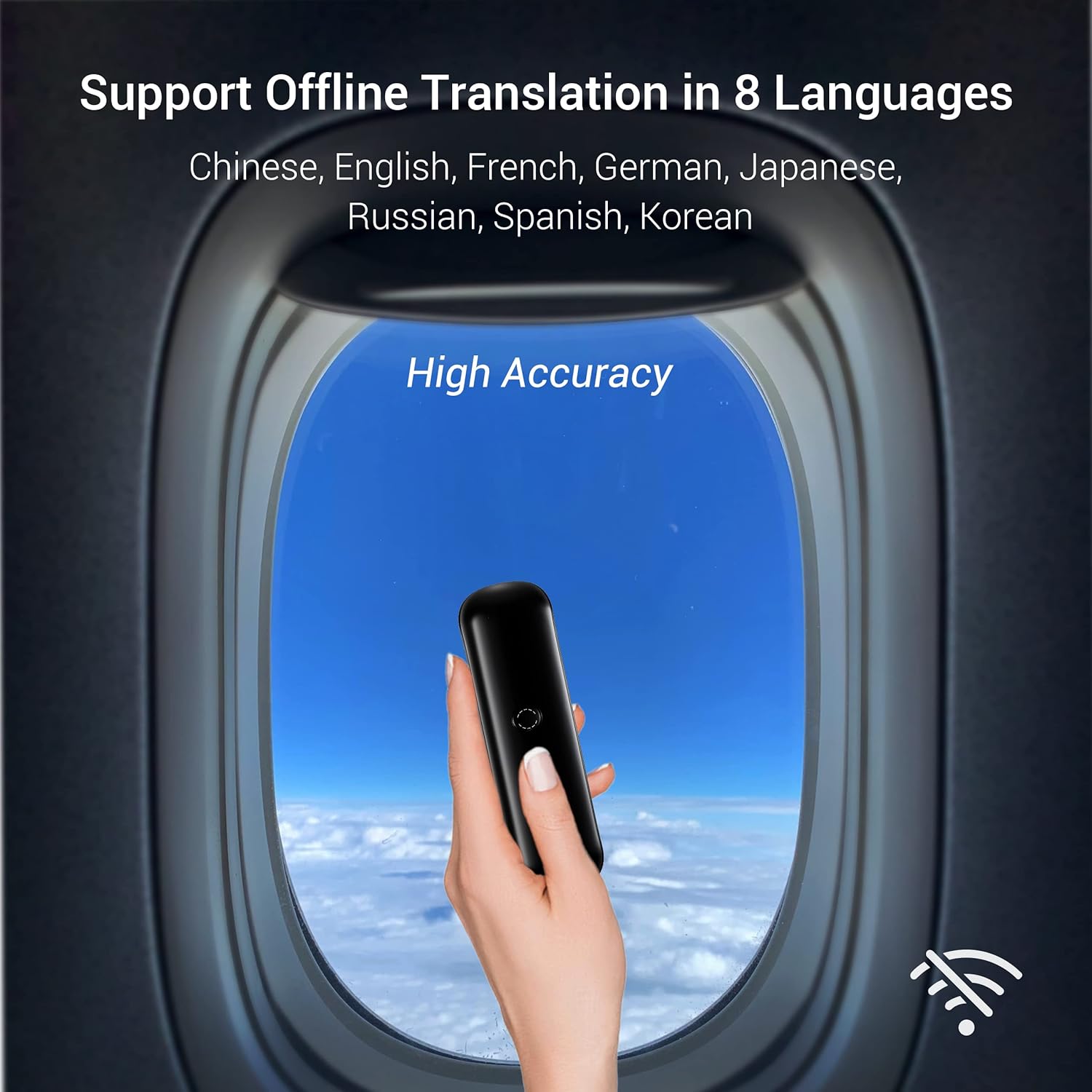
Image: A visual depicting the Wooask G5 Pro device held against an airplane window, highlighting its offline translation capability for 8 languages.
5. Funtzionamendu-argibideak
5.1 Online Translation (138 Languages)
Ensure your smartphone has an active internet connection and the Wooask APP is open and connected to the G5 Pro.
- In the Wooask APP, select the source and target languages for translation.
- To speak in Language A, press and hold A gakoa on the device, speak clearly into the microphone, and release the button when finished.
- To speak in Language B, press and hold B tekla on the device, speak clearly into the microphone, and release the button when finished.
- The translated text will appear on your phone screen, and the device will output the audio translation.

Image: A group of people engaged in conversation, with speech bubbles showing real-time translation, illustrating the device's 97% accuracy and rapid response.
5.2 Offline Translation (8 Languages)
After downloading the necessary offline language packs via the app, you can use the device without an internet connection.
- In the Wooask APP, switch to offline mode and select one of the 8 supported offline languages.
- Erabili A gakoa eta B tekla as described for online translation.
- The device will process and output the translation using the downloaded language data.

Image: A world map with various greetings in different languages, visually representing the Wooask G5 Pro's support for 143 online languages.
6. Mantentzea
6.1 Bateria zaintzea
- Kargatu gailua aldizka bateriaren osasuna mantentzeko.
- Saihestu bateria maiz erabat deskargatzea.
- Gorde gailua leku fresko eta lehor batean denbora luzez erabiltzen ez duzunean.
6.2 Garbiketa
- Garbitu gailua zapi leun eta lehor batekin.
- Ez erabili garbitzaile likidorik edo material urratzailerik.
7. Arazoak
7.1 Gailua ez da aplikaziora konektatzen
- Ensure Bluetooth is enabled on your smartphone and the device is powered on.
- Make sure the Wooask APP is open and running in the foreground on your smartphone.
- Restart both the device and the app, then attempt to pair again.
- Check app permissions to ensure it has access to Bluetooth and microphone.
7.2 Offline Translation Not Working
- Verify that the desired offline language packs have been successfully downloaded and activated within the Wooask APP.
- Ensure you are in the correct offline mode setting within the app.
7.3 Inaccurate Translation
- Argi eta erritmo moderatuan hitz egin mikrofonoari.
- Ensure there is minimal background noise.
- Confirm that the correct source and target languages are selected in the app.
7.4 Bateriaren iraupen laburra
- Ziurtatu gailua guztiz kargatuta dagoela erabili aurretik.
- Reduce continuous usage time if possible.
- Close other unnecessary applications on your smartphone that might be consuming power.
8. Zehaztapenak
| Ezaugarri | Xehetasuna |
|---|---|
| Modelo zenbakia | G5 PRO OFF B |
| Paketearen neurriak | 6.42 x 2.68 x 1.14 hazbete |
| Elementuaren pisua | 4.6 ontza |
| Bateria | Litio-ioizko bateria 1 (barne), 800 mAh |
| Kargatzeko Interfazea | Mikro USBa |
| Online Languages Supported | Up to 138 languages and accents |
| Offline Languages Supported | 8 languages (Chinese, English, French, German, Japanese, Russian, Spanish, Korean) |
| Fabrikatzailea | Wooask Tech. |
9. Bermea eta Laguntza
The Wooask G5 Pro comes with a Lifetime Warranty. For any technical assistance, troubleshooting beyond this manual, or warranty claims, please contact Wooask customer support through the official Wooask webwebgunea edo zure erosketarekin emandako harremanetarako informazioa.
Ask a question about this manual
Ask about setup, troubleshooting, compatibility, parts, safety, or missing instructions. Manuals+ will review the question and use this page’s manual context to help answer it.