
Sarrera
The Tzumi Probuds V2 offer a blend of comfort and high-quality audio for hands-free listening and phone calls. Designed for versatility and convenience, these true wireless earbuds are an ideal companion for daily use. They feature intuitive touch controls, voice assistant compatibility, and the ability to use each earbud independently.
The compact charging case ensures your Probuds V2 are always ready, providing extended listening time on the go. This manual provides essential information on setting up, operating, maintaining, and troubleshooting your Probuds V2 to ensure optimal performance.
Paketearen edukia
- Probuds V2 Wireless Earbuds
- Kargatzeko kaxa
- Silicone Earbud Tips
- Lepoko uhala
- C motako karga-kablea
- Argibide eskuliburua (dokumentu hau)
Konfigurazioa
1. Charging the Probuds V2
Before first use, fully charge your Probuds V2 and their charging case. Connect the included Type-C charging cable to the charging port on the case and to a compatible USB power source. The charging time for a full charge is approximately 5 hours. Indicators on the case will show charging status.
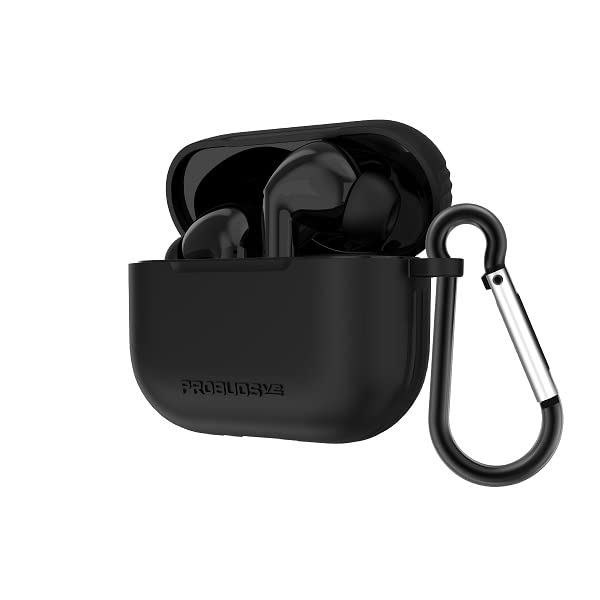
Image: Tzumi Probuds V2 wireless earbuds shown inside their open charging case. The case is black and has a black carabiner clip attached to its side, indicating portability. The earbuds themselves are also black and fit snugly within the case.
2. Zure gailuarekin parekatzea
- Ensure the Probuds V2 are charged and placed inside the charging case.
- Ireki kargatzeko zorroa. Aurikularrak automatikoki sartuko dira parekatze moduan.
- Zure gailuan (smartphone-a, tableta, etab.), joan Bluetooth ezarpenetara.
- Bilatu available devices and select "Probuds V2" from the list.
- Behin konektatuta, baieztapen akustiko bat entzungo duzu, eta entzungailuak erabiltzeko prest egongo dira.
- The Probuds V2 utilize reliable Bluetooth 5.0 technology for a stable connection.
3. Achieving a Comfortable Fit
The Probuds V2 come with silicone earbud tips designed for a comfortable fit. Experiment with different tip sizes (if provided, though not explicitly mentioned in input, it's standard) to find the best seal for optimal sound quality and comfort. Gently insert each earbud into your ear canal and twist slightly to secure them. A neck strap is also included for added security during activities.
Operating Your Probuds V2
Ukitu Kontrolak
The Probuds V2 feature full touch controls for media playback and call management. Specific touch gestures for functions like play/pause, skip track, answer/end call, and activating voice assistant are typically detailed in a quick start guide or on the product packaging. Refer to those for precise commands.
- Komunikabideen kontrola: Manage your music and audio playback.
- Ahots kontrola: Aktibatu zure gailuaren ahots-laguntzailea (adibidez, Siri, Google Assistant).
Call Management and Single Earbud Use
The Probuds V2 allow for high-quality phone calls. Each earbud can be used separately, providing flexibility for shared calls or listening to music while keeping one ear open to your surroundings.
Bateriaren iraupena
Enjoy up to 5 hours of music playback time on a single charge. The charging case provides additional charges, extending the total standby time to approximately 40 hours.
Mantentzea
Proper care will extend the life of your Probuds V2.
- Garbiketa: Garbitu aldizka entzungailuak eta kargatzeko zorroa oihal leun, lehor eta lihorik gabeko batekin. Saihestu produktu kimiko gogorrak edo material urratzaileak erabiltzea.
- Biltegiratzea: Erabiltzen ez dituzunean, gorde entzungailuak kargatzeko zorroan hautsetik eta kalteetatik babesteko.
- Saihestu hezetasuna: Do not expose the earbuds or charging case to excessive moisture, rain, or liquids.
- Tenperatura: Store and operate the device within recommended temperature ranges to prevent battery degradation.
Arazoak konpontzea
| Arazoa | Balizko Kausa / Irtenbidea |
|---|---|
| Entzungailuak ez dira parekatzen |
|
| Ez dago soinurik entzungailuetatik |
|
| Kargatzeko kaxa ez da kargatzen |
|
| Aurikularrak ez dira kargatzen, zorroan badaude. |
|
Zehaztapenak
| Ezaugarri | Xehetasuna |
|---|---|
| Ereduaren izena | ProBuds V2 |
| Modelo zenbakia | 8016SC |
| Konektibitate Teknologia | Haririk gabekoa |
| Haririk gabeko Komunikazio Teknologia | Bluetootha |
| Bluetooth bertsioa | 5.0 |
| Materiala | Silikona |
| Kargatzeko Denbora | 5 ordu |
| Kontrol mota | Komunikabideen kontrola |
| Kontrol-metodoa | Ukitu, Ahotsa |
| Bateriaren iraupena (musika erreprodukzioa) | Gehienez 5 ordu |
| Egonean Denbora | Gehienez 40 ordu |
| Belarrien Kokatzea | Belarrian |
| Forma-faktorea | Belarrian |
| Kolorea | Beltza |
| UPC | 841351180160 |
| Fabrikatzailea | Tzumi |
Bermea eta Laguntza
For warranty information and customer support, please refer to the warranty card included with your product or visit the official Tzumi website. You can also contact Tzumi customer service directly for assistance with product inquiries, technical support, or warranty claims.
Fabrikatzailea: Tzumi