1. Sarrera
Thank you for choosing the Generic M29 Pro Wireless Earbuds. This manual provides detailed instructions on how to set up, operate, maintain, and troubleshoot your new earbuds. Please read this manual carefully before use to ensure optimal performance and longevity of your device.
2. Paketearen edukia
Ziurtatu behean zerrendatutako elementu guztiak zure paketean daudela:
- M29 Pro Wireless Earbuds (Left and Right)
- Kargatzeko kaxa
- USB motako C kargatzeko kablea
- Erabiltzailearen eskuliburua

Image: Contents of the M29 Pro Wireless Earbuds package, showing the earbuds, charging case, USB-C data cable, and instruction manual.
3. Produktua amaitu daview
The M29 Pro Wireless Earbuds feature an ergonomic in-ear design, touch controls, and an LED display on the charging case for battery status. The earbuds are designed for comfortable, all-day wear.
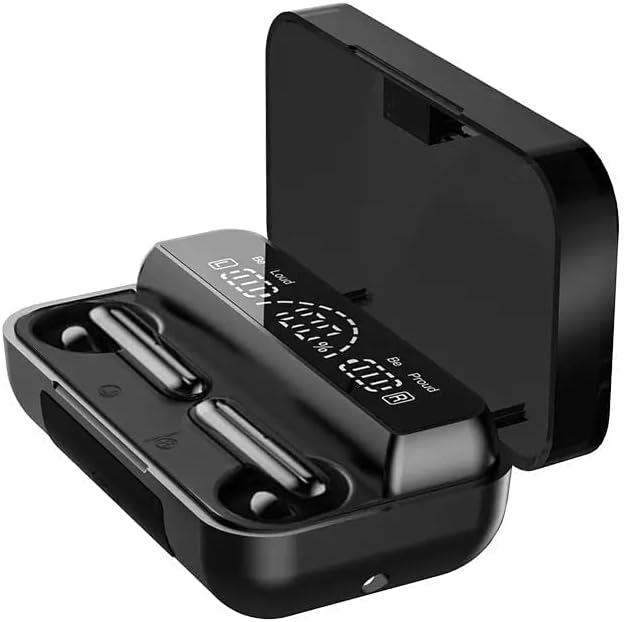
Image: The M29 Pro Wireless Earbuds resting in their open charging case, highlighting their compact design.
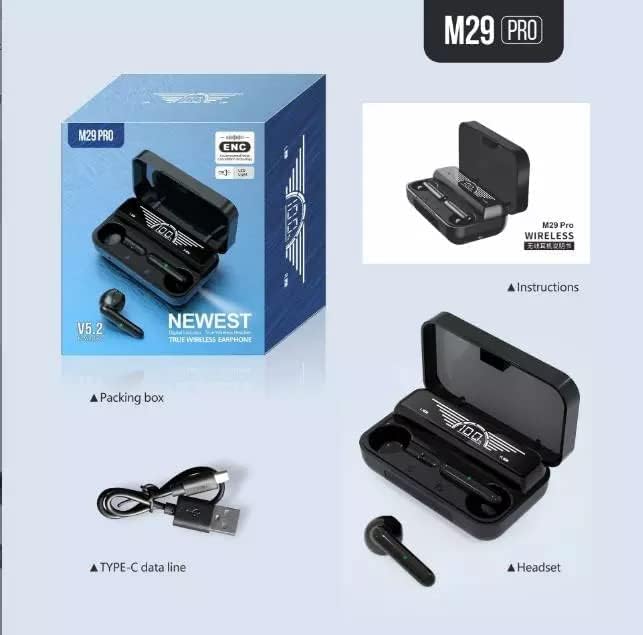
Image: The M29 Pro Wireless Earbuds inside the charging case, with the LED display clearly showing the battery percentage for both the case and individual earbuds.
4. Kargatzea
4.1 Hasierako karga
Before first use, fully charge the earbuds and the charging case. Place the earbuds into the charging case and connect the USB Type-C cable to the charging port on the case and a power source. The LED display on the case will indicate the charging status.
4.2 Entzungailuak kargatzea
Place the earbuds into the charging case. They will automatically begin charging. The LED display on the case will show the individual earbud battery levels.
4.3 Kaxa kargatzea
Connect the charging case to a power source using the provided USB Type-C cable. The LED display will show the case's battery percentage. A full charge for both the case and earbuds takes approximately 2 hours.
4.4 Energia Bankuaren Funtzioa
The charging case can also function as a power bank to charge other devices. Connect your device to the USB output port on the charging case using an appropriate cable (not included).
5. Piztu/Itzali
5.1 Piztu
- Automatikoa: Ireki kargatzeko kaxa, eta entzungailuak automatikoki piztuko dira.
- eskuliburua: Press and hold the touch control area on both earbuds for approximately 3 seconds until you hear a power-on prompt.
5.2 Itzali
- Automatikoa: Jarri entzungailuak berriro kargatzeko zorroan eta itxi tapa. Automatikoki itzaliko dira eta kargatzen hasiko dira.
- eskuliburua: Press and hold the touch control area on both earbuds for approximately 5 seconds until you hear a power-off prompt.
6. Bluetooth parekatzea
6.1 Lehen aldiz parekatzea
- Ziurtatu entzungailuak guztiz kargatuta daudela.
- Ireki kargatzeko zorroa. Entzungailuak automatikoki sartuko dira parekatze moduan, entzungailuetan LED argi keinukari batek adierazita.
- Gaitu Bluetootha zure telefonoan edo beste gailu batean.
- Bilatu "M29 Pro" in the list of available Bluetooth devices.
- Select "M29 Pro" to connect. Once connected, you will hear a confirmation sound, and the earbud LED lights will turn off.
The M29 Pro uses Bluetooth V5.1 technology for a stable connection up to 10 meters.
6.2 Re-connection
After initial pairing, the earbuds will automatically connect to the last paired device when taken out of the charging case, provided Bluetooth is enabled on the device and it is within range.
7. Ukitu Kontrolak
The M29 Pro earbuds feature intuitive touch controls for various functions:
| Ekintza | Funtzioa |
|---|---|
| Single tap (Left/Right) | Erreproduzitu/Pausatu musika, Erantzun/Amaitu deia |
| Sakatu bikoitza (ezkerreko entzungailua) | Aurreko pista |
| Sakatu bikoitza (eskuineko entzungailua) | Hurrengo pista |
| Triple tap (Left/Right) | Aktibatu Ahots Laguntzailea |
| Press and hold (Left/Right) | Baztertu sarrerako deia |
| Long press (Left/Right) | Toggle Active Noise Cancellation (ANC) |
8. Audio Ezaugarriak
The M29 Pro earbuds are engineered to deliver a high-fidelity audio experience with deep bass and clear sound, enhanced by CVC 8.0 noise cancellation technology to minimize external distractions.

Image: An internal diagram of an earbud, highlighting the moving coil unit design for surging bass and HiFi sound effects, ensuring good audio resolution and minimal distortion for an immersive listening experience.
9. Mantentzea
- Garbiketa: Garbitu aldizka entzungailuak eta kargatzeko zorroa oihal leun eta lehor batekin. Saihestu likidoak edo garbitzaile urratzaileak erabiltzea.
- Biltegiratzea: Gorde entzungailuak kargatzeko zorroan erabiltzen ez dituzunean babesteko eta kargatuta mantentzeko.
- Saihestu muturreko baldintzak: Ez jarri entzungailuak tenperatura altuen, hezetasunaren edo eguzki-argiaren eraginpean.
- Uraren erresistentzia: The earbuds are sweat-resistant, making them suitable for sports. However, they are not waterproof; avoid submerging them in water.
10. Arazoak
| Arazoa | Irtenbidea |
|---|---|
| Entzungailuak ez dira parekatzen | Ensure earbuds are charged. Turn off and on Bluetooth on your device. Forget "M29 Pro" from your device's Bluetooth list and try pairing again. |
| Aurikular bakarra funtzionatzen du | Jarri bi entzungailuak berriro kargatzeko zorroan, itxi tapa eta ireki berriro. Ziurtatu bi entzungailuak kargatuta daudela. |
| Soinurik ez | Check device volume. Ensure earbuds are connected. Try re-pairing. |
| Kargatzeko kaxa ez da kargatzen | Ensure the USB-C cable is properly connected to both the case and the power source. Try a different cable or power adapter. |
11. Zehaztapenak
| Ezaugarri | Xehetasuna |
|---|---|
| Ereduaren izena | M29 Pro |
| Marka | Generikoa |
| Konektibitate Teknologia | Haririk gabekoa (Bluetooth V5.1) |
| Entzungailuen forma-faktorea | Belarri barnean |
| Zarata Kontrola | Active Noise Cancellation (CVC 8.0) |
| Kontrol-metodoa | Ukitu Kontrola |
| Kargatzeko Kutxa Bateria | 2000mAh (Litiozko polimeroa) |
| Entzungailuak jolasteko denbora | Approximately 6 hours (per charge) |
| Jolas-denbora osoa (zorroarekin) | Gehienez 48 ordu |
| Egonean Denbora | 280 ordu |
| Karga osoa denbora | Approximately 2 hours (case and earbuds) |
| Materiala | ABS plastikoa |
| Kolorea | Beltza |
| Paketearen neurriak | 13.8 x 11.8 x 7.1 cm |
| Pisua | 140 gramo |
12. Segurtasun informazioa
- Ez desmuntatu edo aldatu produktua.
- Urruti eduki haurrengandik eta maskotak.
- Entzumen-kalteak saihesteko, saihestu denbora luzez bolumen altuan entzutea.
- Bota ezazu produktua arduraz tokiko araudiaren arabera.
13. Bermea eta Laguntza
Bermeari buruzko informazioa edo laguntza teknikoa lortzeko, jo dendariarekin edo jarri harremanetan zuzenean fabrikatzailearekin. Gorde erosketa-agiria erosketaren frogagiri gisa.


