
1. Sarrera
Thank you for choosing AWOL VISION DLP Link 3D Glasses. These active shutter glasses are designed to provide a bright, vivid, and immersive 3D viewing experience with compatible DLP-Link 3D projectors. This manual will guide you through the setup, operation, and maintenance of your new 3D glasses.
Ezaugarri nagusiak:
- Bateragarritasuna: Designed for AWOL VISION LTV-2500, LTV-3000 Pro, LTV-3500 Pro, Vanish TV, and other DLP-LINK 3D projectors.
- Iraupen luzeko bateria kargagarria: Gehienez 50 ordu etengabe erabiltzeko karga bakarrean.
- Diseinu ergonomikoa: Lightweight (28 grams) and comfortable, suitable for extended wear and compatible with prescription glasses.
- Zabala ViewAngelua: 178° for distortion-free viewing.
- Bright & Vivid: Less than 1.5 ms response time and 38% high transmittance for clear, lossless 3D effects.


2. Paketearen edukia
Ziurtatu elementu guztiak kutxan daudela:
- AWOL VISION DLP Link 3D Glasses
- Glasses wipe
- USB kargatzeko kablea
- Glasses Storage Case
- Glasses Storage Bag
- Argibide eskuliburua (dokumentu hau)

3. Produktua amaitu daview
Familiarize yourself with the components of your AWOL VISION 3D Glasses:
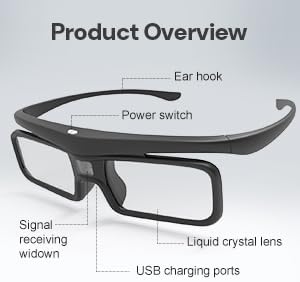
- Switch potentziala: Located on the top of the frame, used for powering on/off and 3D image reversal.
- Liquid Crystal Lens: The active shutter lenses that create the 3D effect.
- Seinalea jasotzeko leihoa: Receives the DLP-Link synchronization signal from the projector.
- USB kargatzeko ataka: Barneko bateria berriro kargatzeko.
- Belarri-kakoa: Egokitzapen seguru eta erosoa eskaintzen du.
4. Konfigurazioa
Betaurrekoak kargatzea:
Before first use, fully charge your 3D glasses. Connect the provided USB charging cable to the USB charging port on the glasses and to a standard USB power source (e.g., computer USB port, USB wall adapter). The LED indicator will show charging status. A full charge typically takes 2-3 hours and provides up to 50 hours of continuous use.
Connecting to a DLP-Link 3D Projector:
These glasses automatically synchronize with DLP-Link 3D projectors. No manual pairing is required. Ensure your projector is set to output 3D content.
For detailed instructions on how to watch 3D movies with AWOL VISION 3D glasses, please refer to the video below:
5. Funtzionamendu-argibideak
Piztu/Itzali:
- Piztu: Press the power button once. The LED indicator will light up.
- Itzali: Press and hold the power button for 3 seconds until the LED indicator flashes three times and turns off.
Note: The glasses will power off automatically after 5 minutes without an IR signal to conserve battery.
3D Reversal:
If the 3D effect appears inverted (e.g., background in foreground), tap the power button to switch the direction of the 3D image sequence between left-to-right and right-to-left. This can resolve issues where the 3D image is not correctly aligned.

6. Mantentzea
Garbiketa:
Use the provided glasses wipe or a soft, lint-free cloth to clean the lenses. Avoid using abrasive cleaners or solvents that could damage the lens coating.
Biltegiratzea:
When not in use, store the 3D glasses in the provided storage case or bag to protect them from dust, scratches, and physical damage. Store in a cool, dry place away from direct sunlight and extreme temperatures.
Bateria zaintzea:
To prolong battery life, avoid fully discharging the glasses frequently. Recharge them when the battery is low. If storing for an extended period, charge the glasses to about 50% every few months.
7. Arazoak
- No 3D Effect / Blurred Image:
- Ziurtatu betaurrekoak piztuta daudela.
- Verify your projector is outputting 3D content and is compatible with DLP-Link technology.
- Tap the power button on the glasses to perform a 3D reversal, as the image sequence might be incorrect.
- Check if the content being played is indeed 3D.
- Ensure the glasses are charged.
- Glasses Not Turning On:
- Kargatu betaurrekoak gutxienez 30 minutuz.
- Ziurtatu pizteko botoia irmo sakatuta dagoela.
- Intermittent 3D Effect / Flickering:
- Ensure there are no obstructions between the glasses and the projector's 3D signal emitter.
- Check for strong ambient light sources that might interfere with the signal.
- Ensure the glasses are within the recommended viewing distance of the projector.
8. Zehaztapenak
| Elementuaren eredu-zenbakia | DG-001 |
| Lente mota | Kristal likidoa obturadore aktiboarekin |
| Erantzun Denbora | < 1.5 ms |
| Argiaren transmisioa | %38 |
| Bateriaren iraupena | Gehienez 50 ordu (etengabeko erabilera) |
| Pisua | 28 gramo (0.99 ontza) |
| Lan Distantzia | Gehienez 26.2 oin (8 m) |
| Sarrera baloratua | DC 5V - 1A |
| Laneko Tenperatura | 0°C - 45°C (32°F - 113°F) |
| Biltegiratze Tenperatura | -10°C - 60°C (14°F - 140°F) |

9. Bermea eta Laguntza
AWOL VISION is committed to providing excellent customer service and product quality.
- 30-Day Price Protection: Ensures you get the best value.
- 2 Years Product Support: Dedicated support for your product.
Jarri harremanetan laguntzarekin:
- Telefonoa / WhatsApp: +1 (888) 891-6866
- Posta elektronikoa: support@awolvision.com


