
CaDA C66008W
CaDA Master C66008W London Underground Station Building Blocks Kit: Instruction Manual
Modeloa: C66008W | Marka: CaDA
Sarrera
This manual provides comprehensive instructions for the assembly, operation, and maintenance of your CaDA Master C66008W London Underground Station Building Blocks Kit. This detailed model features a modular design, functional elements, and an integrated LED lighting system, offering an engaging building experience.
Konfigurazioa eta Muntaketa
The CaDA Master C66008W kit contains 1836 high-quality building blocks. Follow the included professional and detailed assembly instructions for a clear and straightforward building process.

Figure 1: The CaDA Master C66008W kit packaging and the fully assembled London Underground Station model.
Eraikuntza modularra
The model features a quick-removable construction, allowing you to easily detach and reattach different floors to access interior details. This modular design enhances both the building process and the display options.

Figure 2: Illustration of the modular build, demonstrating how different sections of the station can be separated to reveal interior details such as the bathroom, bar, piano, storage, and escalators.
LED argien instalazioa
The kit includes an LED light set. During assembly, integrate the LED components as indicated in the instruction manual. The lighting system is powered via a USB socket, allowing you to illuminate the model and control light modes.

Figure 3: The assembled London Underground Station model, highlighting its British street view style and the integrated USB-powered LED lights.

Figure 4: The London Underground Station model showcasing its illumination through USB-based lights, demonstrating both lit and unlit states.
Operating Functional Elements
The CaDA C66008W model incorporates several interactive features:
- Ground Floor Details: The ground floor includes a newspaper stand, a ticket machine, a metro station gate entrance, and an underground escalator.
- Second Floor Details: The second floor features a coffee bar, a lounge area, a piano, and toilets, providing a detailed interior.
- Functional Gate Line: The station entrance includes a functioning gate line mechanism. Operate this carefully to observe its movement.
- LED argiztapena: Connect the USB power supply to activate the LED lights. Refer to the assembly instructions for specific light mode controls.

5. irudia: Gehiegizko batview diagram highlighting the architectural details and key features of the CaDA London Underground Station model, such as the tea room, air conditioner unit, and the layout of the ground floor with stairs, ticket hall, and newspaper stand.

6. irudia: A view of the station's interior, emphasizing the detailed modular construction and the ability to view internal spaces.

Figure 7: A detailed breakdown of the first floor, showing the newspaper stand, functioning ticket machine, gate line, and escalator, alongside the second floor's tea room interior, counter, piano, and toilet.
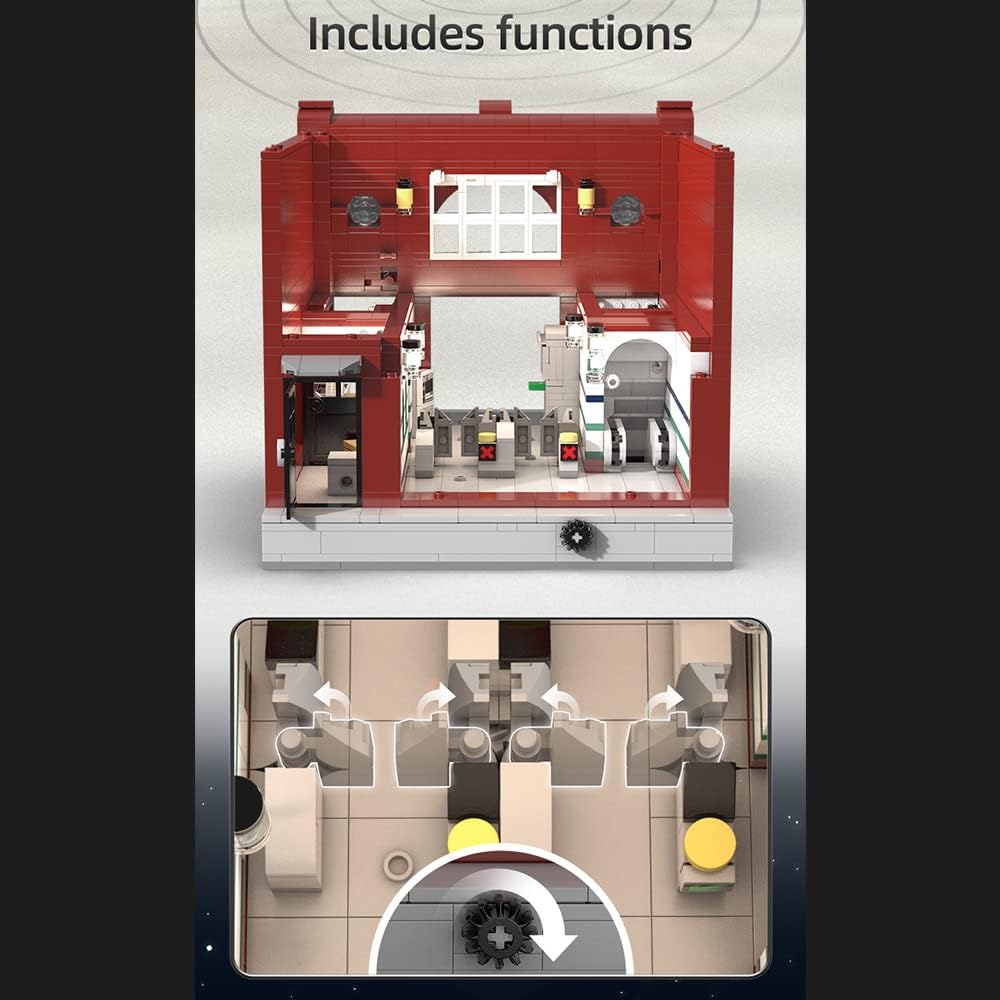
Figure 8: An illustration of the internal mechanism that drives the functioning gate line, demonstrating its operational principle.
Mantentzea
To ensure the longevity and appearance of your CaDA London Underground Station model, follow these maintenance guidelines:
- Garbiketa: Gently dust the model regularly with a soft, dry cloth or a soft brush to prevent dust accumulation. For stubborn dirt, a slightly damp oihalak erabil daitezke, baina saihestu gehiegizko hezetasuna.
- Biltegiratzea: Gorde modeloa leku fresko eta lehor batean, eguzki-argitik babestuta, kolorea aldatu edo materiala hondatu ez dadin.
- Manipulazioa: Handle the model with care, especially when moving or disassembling modular sections, to avoid accidental detachment of pieces.
- LED Arreta: Ensure the USB connection for the LED lights is secure and free from damage. Avoid pulling on the wires.
Arazoak konpontzea
Atal honek aurki ditzakezun arazo ohikoenak jorratzen ditu:
- Falta diren piezak: In the rare event of missing pieces, please contact CaDA customer support with details of the missing components.
- LED argiak ez funtzionatzen:
- Ensure the USB power cable is securely connected to both the model and a functioning power source.
- Check for any visible damage to the LED wires or connectors.
- Verify that the power source is providing adequate power.
- Functional Elements (e.g., Gate Line) Stiff or Not Moving Smoothly:
- Ensure all connecting pieces are correctly aligned and fully pressed together as per the instructions.
- Sometimes, new mechanisms may require a few cycles of operation to loosen up. Operate the function gently several times.
- Check for any misplaced blocks obstructing the movement.
Zehaztapenak
| Ezaugarri | Xehetasuna |
|---|---|
| Modelo zenbakia | C66008W |
| Marka | CaDA |
| Pieza kopurua | 1836 |
| Materiala | Plastikoa |
| Produktuaren neurriak (L x W x H) | 26.4 x 19.2 x 18.6 cm |
| Elementuaren pisua | 3.3 kg |
| Muntaia Beharrezkoa | Bai |
| Beharrezko bateriak | No (USB powered LED) |
| Gaia | London Underground |
| Fabrikatzailea | Shenzhenshi Saounidi Dianzikeji Youxiangongsi |
Bezeroarentzako Arreta
For any inquiries, suggestions, or assistance with your CaDA Master C66008W kit, please contact CaDA customer support. Refer to the product packaging or official CaDA webharremanetarako informazioa lortzeko gunea.
Ask a question about this manual
Ask about setup, troubleshooting, compatibility, parts, safety, or missing instructions. Manuals+ will review the question and use this page’s manual context to help answer it.