
HP 6458e
HP Envy 6458e All-in-One Wireless Color Inkjet Printer Instruction Manual
1. Sarrera
This manual provides detailed instructions for setting up, operating, maintaining, and troubleshooting your HP Envy 6458e All-in-One Wireless Color Inkjet Printer. Please read this manual thoroughly to ensure optimal performance and longevity of your device.
1.1 Zer dago kutxan
- HP ENVY 6458e All-in-One Printer
- HP 67 konfigurazio-kartutxo beltza
- HP 67 konfigurazio hiru koloreko kartutxoa
- Erregulazio-fleyera
- Konfigurazio gida
- Erreferentzia gida
- Elikatze-kablea

2. Konfigurazioa
2.1 Initial Power On and Cartridge Installation
- Unpack the printer and remove all protective packaging materials.
- Konektatu elikatze-kablea inprimagailura eta gero hormako entxufe batera.
- Piztu inprimagailua.
- Open the ink cartridge access door and install the HP 67 Setup Black and Tri-Color cartridges as indicated by the printer's display or setup guide.
2.2 Sare batera konektatzea (Wi-Fi)
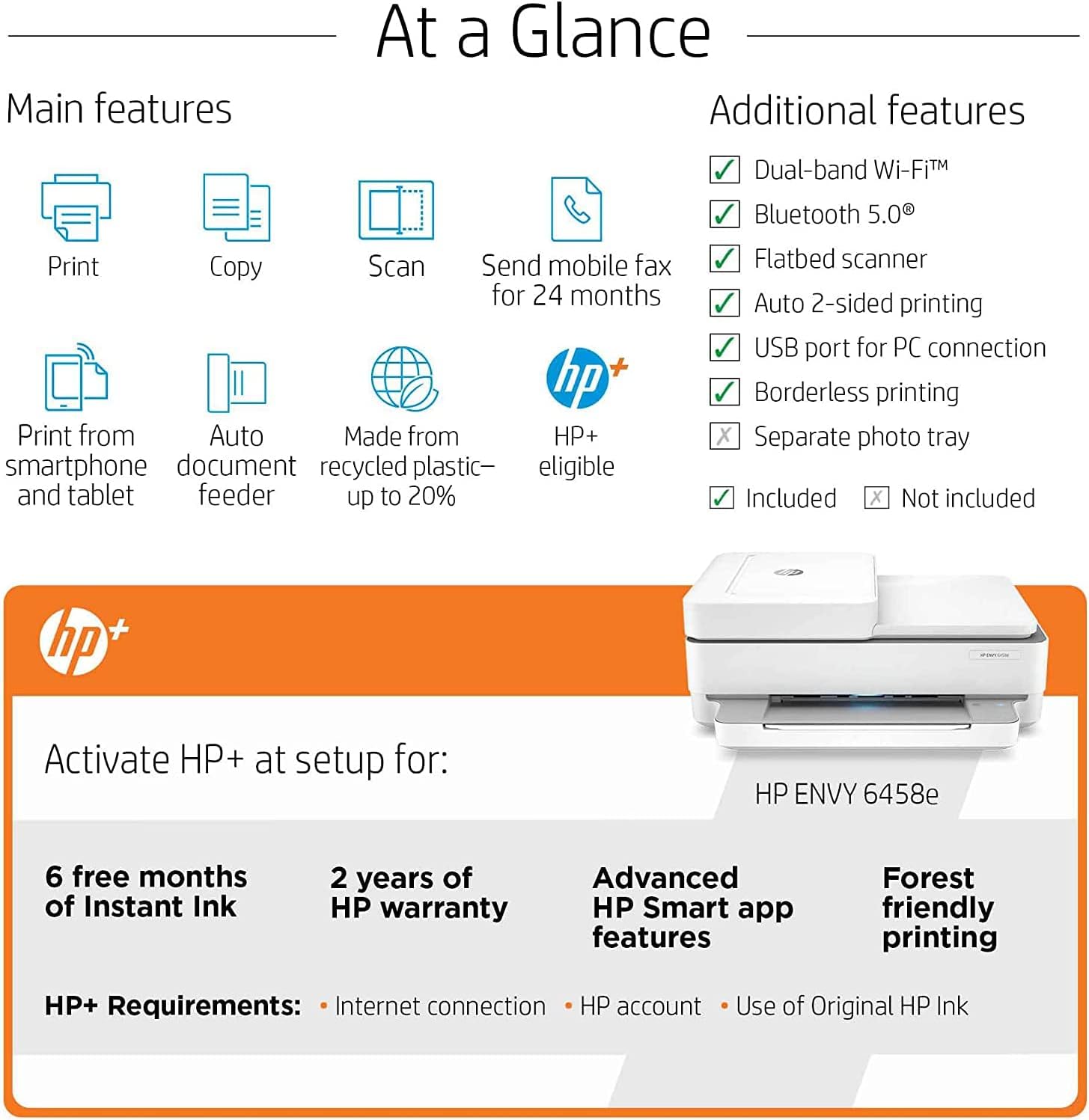
The HP Envy 6458e utilizes dual-band Wi-Fi for wireless connectivity. For optimal setup and functionality, download the HP Smart app on your mobile device or computer.
- Deskargatu eta instalatu HP Smart aplikazioa from your device's app store or HP's official webgunea.
- Open the HP Smart app and follow the on-screen instructions to add your new printer. The app will guide you through connecting the printer to your Wi-Fi network.
- Ensure your mobile device or computer is connected to the same Wi-Fi network you intend to connect the printer to.

2.3 USB konexioa (aukerakoa)
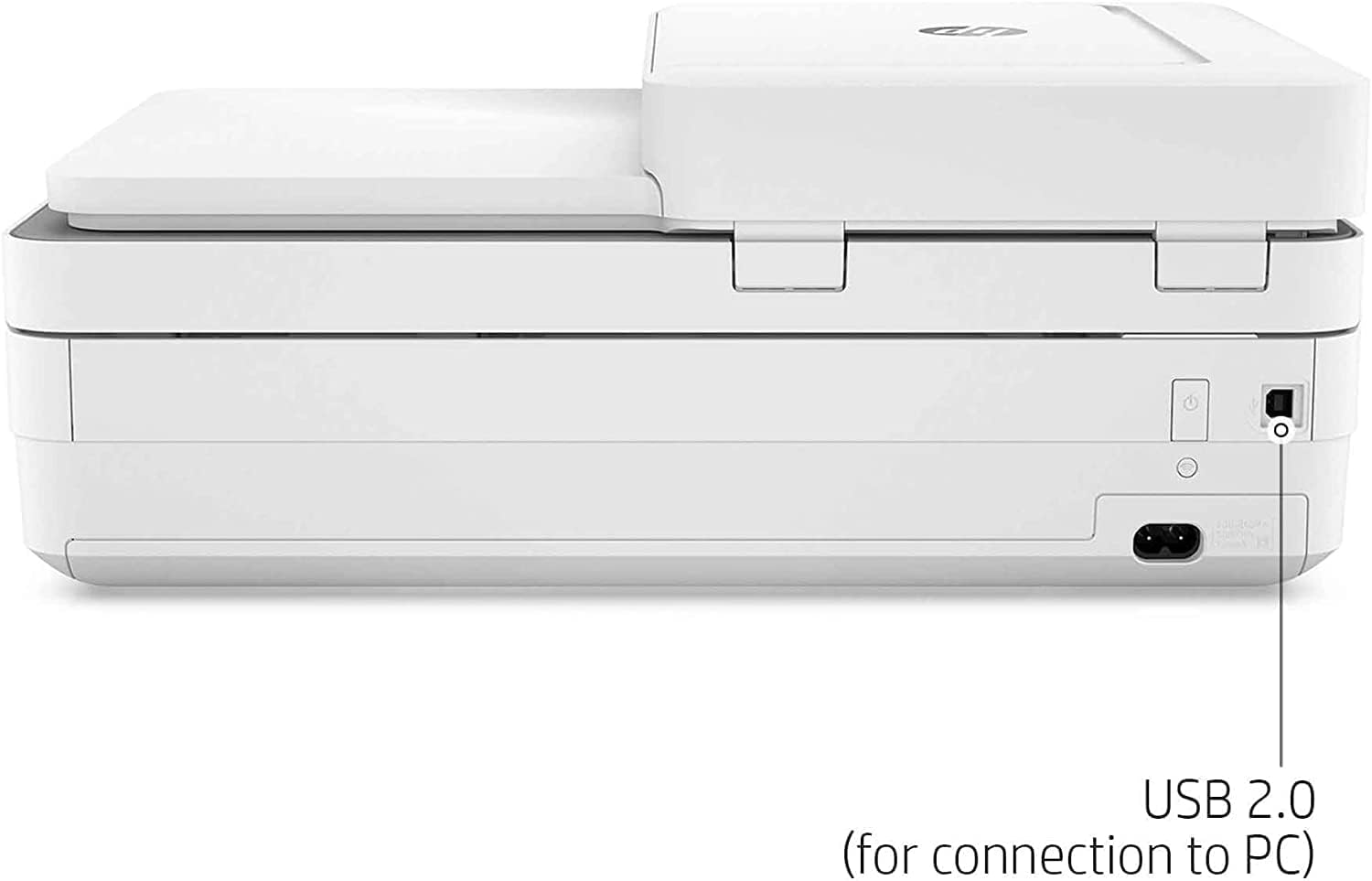
For a direct connection, you can use a USB 2.0 cable (not included) to connect the printer to your computer.
3. Inprimagailuaren funtzionamendua
3.1 Papera kargatzea
Load up to 100 sheets of standard paper into the input tray. The printer supports various media types, including glossy photo paper, up to 8.5 x 11 inches.
3.2 Dokumentuak eta argazkiak inprimatzea
- Ordenagailu batetik: Select "Print" from your application, choose the HP Envy 6458e, and adjust settings as needed (e.g., color, duplex, paper type).
- Gailu mugikorretatik: Use the HP Smart app, Apple AirPrint, or Mopria-certified applications to print directly from your smartphone or tablet.
- Mugarik gabeko inprimaketa: The printer supports borderless printing for photos up to 8.5 x 11 inches.
- Bi aldeetako inprimaketa automatikoa: This feature allows for automatic duplex printing, saving paper.

3.3 Dokumentuak eskaneatzea
The HP Envy 6458e features both a flatbed scanner and a 35-sheet Automatic Document Feeder (ADF).
- Ohe lauko eskanerra: For single pages, delicate documents, or items that cannot go through the ADF. Lift the scanner lid, place the document face down on the glass, and close the lid.
- Dokumentuen elikadura automatikoa (ADF): For scanning multiple pages quickly. Load up to 35 sheets into the ADF tray.
- Initiate scanning via the HP Smart app or your computer's scanning software.

3.4 Dokumentuak kopiatzea
Use the flatbed scanner or ADF to make copies. The printer supports up to 35 copies per run.
- Jarri dokumentua eskailera lauan edo ADFn.
- Use the printer's control panel or the HP Smart app to select copy options (e.g., number of copies, color/black & white).
3.5 Mobile Fax
The HP Smart app allows you to send mobile faxes for 24 months as part of the HP+ benefits.
4. Mantentzea
4.1 Tinta-kartutxoak ordezkatzea
When an ink cartridge is low or empty, the printer will indicate this. Replace cartridges with genuine HP 67 series ink cartridges. Follow the instructions provided with the new cartridges or refer to the HP Smart app for guidance.
If enrolled in HP Instant Ink, cartridges will be shipped to you automatically before you run out.
4.2 Inprimagailua garbitzea
- Kanpoaldea: Garbitu kanpoko gainazalak leun batekin, damp, litxarrik gabeko oihala.
- Eskanerraren beira: Erabili lipurrik gabeko zapi leun bat dampened with glass cleaner (non-abrasive) to clean the scanner glass. Do not spray cleaner directly onto the glass.
- ADF arrabolak: Kontsultatu HP laguntza website or the HP Smart app for specific instructions on cleaning ADF rollers if paper feed issues occur.
5. Arazoak
5.1 Ohiko arazoak eta irtenbideak
| Gaia | Balizko Kausa / Irtenbidea |
|---|---|
| Inprimagailua ez da Wi-Fira konektatzen | Ensure the printer is within range of your Wi-Fi router. Restart your router and printer. Use the HP Smart app for guided troubleshooting. The printer features self-healing Wi-Fi to help maintain connection. |
| Print quality issues (streaks, faded prints) | Check ink levels and replace low cartridges. Run a print head cleaning cycle from the HP Smart app or printer software. Ensure you are using appropriate paper for your print settings. |
| Paper ataskatzeak | Carefully remove any jammed paper from the input tray, output tray, or inside the printer. Ensure paper is loaded correctly and not overloaded. Use recommended paper types. |
| Eskanerra ez dabil | Ensure the printer is connected to your computer or network. Restart the printer and computer. Use the HP Print and Scan Doctor tool (available from HP support) for diagnostics. |
Konponketa zehatzagoetarako, jo HP laguntzara. webgunea edo HP Smart aplikazioa.
6. Zehaztapenak
| Ezaugarri | Xehetasuna |
|---|---|
| Ereduaren izena | HP Envy 6458e |
| Funtzioak | Print, Copy, Scan, Mobile Fax |
| Inprimatzeko Teknologia | Inkjet |
| Inprimatzeko abiadura (beltza) | Gehienez 10 ppm (ISO) |
| Inprimatze-abiadura (koloretan) | Gehienez 7 ppm (ISO) |
| Inprimatzeko bereizmena (Beltza) | Errendatutako 1200 x 1200 ppp arte |
| Inprimatzeko bereizmena (kolorea) | Gehienez 4800 x 1200 ppp optimizatua |
| Scan Resolution (Optical) | Gehienez 1200 ppp |
| Kopiatu Ebazpena | Up to 300 x 300 dpi (Black & Color) |
| Dokumentuen elikadura automatikoa (ADF) | 35 fitxa |
| Sarrerako erretiluaren edukiera | Gehienez 100 orri |
| Irteera erretiluaren edukiera | 25 fitxa |
| Duplex Inprimaketa | Automatikoa |
| Konektibitatea | 1 Hi-Speed USB 2.0, 1 Wi-Fi 802.11ac (dual band) |
| Mugikorreko inprimaketa | HP Smart app, Apple AirPrint, Chrome OS, Mopria-certified |
| Neurriak (W x D x H) | 17.02" x 20.13" x 7.6" (with input tray extended) |
| Pisua | 13.58 kilo |
| Duty Cycle (Monthly) | Gehienez 1000 orrialde |
7. Bermea eta Laguntza
7.1 Produktuaren bermea
This HP Envy 6458e printer comes with a 90-day limited warranty. For specific terms and conditions, please refer to the warranty documentation included with your product or visit the official HP support webgunea.
7.2 Bezeroarentzako laguntza
Laguntza teknikoa, kontrolatzaileak deskargatzeko edo informazio gehiago lortzeko, bisitatu HPren laguntza ofiziala webgunea:
The HP Smart app also provides access to support resources and diagnostic tools.
Ask a question about this manual
Ask about setup, troubleshooting, compatibility, parts, safety, or missing instructions. Manuals+ will review the question and use this page’s manual context to help answer it.