
Produktua amaituview
The Clarion JM-Carry On is a portable speaker designed for versatile audio playback. It features a wired microphone input, multi-color light effects, and an in-built battery for on-the-go use. Its compact and portable design allows for easy transport and setup in various environments.

Image: Clarion JM-Carry On Portable Bluetooth Speaker shown with its wired microphone.
Bideoa: Amaiera batview of the Clarion Portable Bluetooth Speaker, highlighting its features and audio performance.
Paketearen edukia
Mesedez, markatu laukitxoa elementu hauetarako:
- Clarion JM-Carry On Portable Bluetooth Speaker
- Kablezko Mikrofonoa
- Kargatzeko kablea
Hasierako konfigurazioa
- Hizlariari kargatzea: Connect the provided charging cable to the speaker's charging port and a suitable power source. The LED indicator will show charging status. Ensure the speaker is fully charged before first use for optimal battery life.
- Piztu/Itzali: Locate the power switch on the speaker. Slide it to the 'ON' position to power on the device. Slide it to 'OFF' to power off.
- Bluetooth bidezko lotura
- Piztu bozgorailua. Automatikoki Bluetooth parekatze moduan sartuko da, LED keinukari batek adierazita.
- Zure telefonoan edo tabletan, gaitu Bluetootha eta bilatu eskuragarri dauden gailuak.
- Select "Clarion JM-Carry On" from the list. A confirmation tone will sound upon successful pairing.
- Connecting Wired Microphone: Insert the wired microphone's plug into the designated microphone input jack on the speaker.
Operazio Gida
- Modu aukeraketa: Use the 'Mode' button to switch between Bluetooth (BT), FM Radio, USB, and AUX input modes.
- Bluetooth modua: Once paired, audio from your connected device will play through the speaker. Use your device or the speaker's controls for volume and track navigation.
- FM irrati modua: In FM mode, press and hold the 'Play/Pause' button to auto-scan and save available radio stations. Use the 'Next/Previous' buttons to navigate through saved stations.
- USB/AUX modua: Insert a USB drive into the USB port for MP3 playback or connect an external audio device via the AUX input using a 3.5mm audio cable.
- TWS (True Wireless Stereo) Functionality: To connect two JM-Carry On speakers for stereo sound, ensure both speakers are in Bluetooth mode and not connected to any device. Press and hold the TWS button on one speaker until you hear a pairing tone. The two speakers will connect, and then you can pair your device to the primary speaker.
- Soinu kontrola: Adjust the master volume using the main rotary knob. Separate controls may be available for microphone volume and echo effects.
- LED argi-efektuak: The speaker features multi-color LED light effects. Use the dedicated 'Light' button to cycle through different light modes or turn them off.
Zainketa eta Mantentzea
- Garbiketa: Erabili zapi leun eta lehor bat bozgorailuen kanpoaldea garbitzeko. Ez erabili garbitzaile edo disolbatzaile urratzailerik.
- Biltegiratzea: Gorde bozgorailua leku fresko eta lehor batean, eguzki-argitik eta muturreko tenperaturetatik babestuta.
- Bateria zaintzea: Bateriaren iraupena luzatzeko, saihestu bateria maiz erabat deskargatzea. Kargatu bozgorailua aldizka, denbora luzez erabiltzen ez bada ere.
- Uraren erresistentzia: Bozgorailu hau ez da iragazgaitza. Saihestu uraren edo hezetasun handiaren eraginpean jartzea.
Arazoak konpontzeko gida
| Arazoa | Irtenbidea |
|---|---|
| Bozgorailuak ez du pizten. | Ensure the battery is charged. Connect the charging cable and try again. Check the power switch position. |
| Bozgorailuaren soinurik ez. | Check the volume level on both the speaker and the connected device. Ensure the correct input mode (BT, AUX, USB) is selected. |
| Bluetooth parekatzeak huts egiten du. | Ensure the speaker is in pairing mode. Turn off and on Bluetooth on your device. Move the device closer to the speaker. Disconnect from other Bluetooth devices. |
| Mikrofonoa ez dabil. | Ensure the microphone is securely plugged into the correct jack. Check the microphone volume control on the speaker. |
| FM irratiaren harrera eskasa da. | Adjust the speaker's position. Extend any external antenna if available. |
Zehaztapen Teknikoak
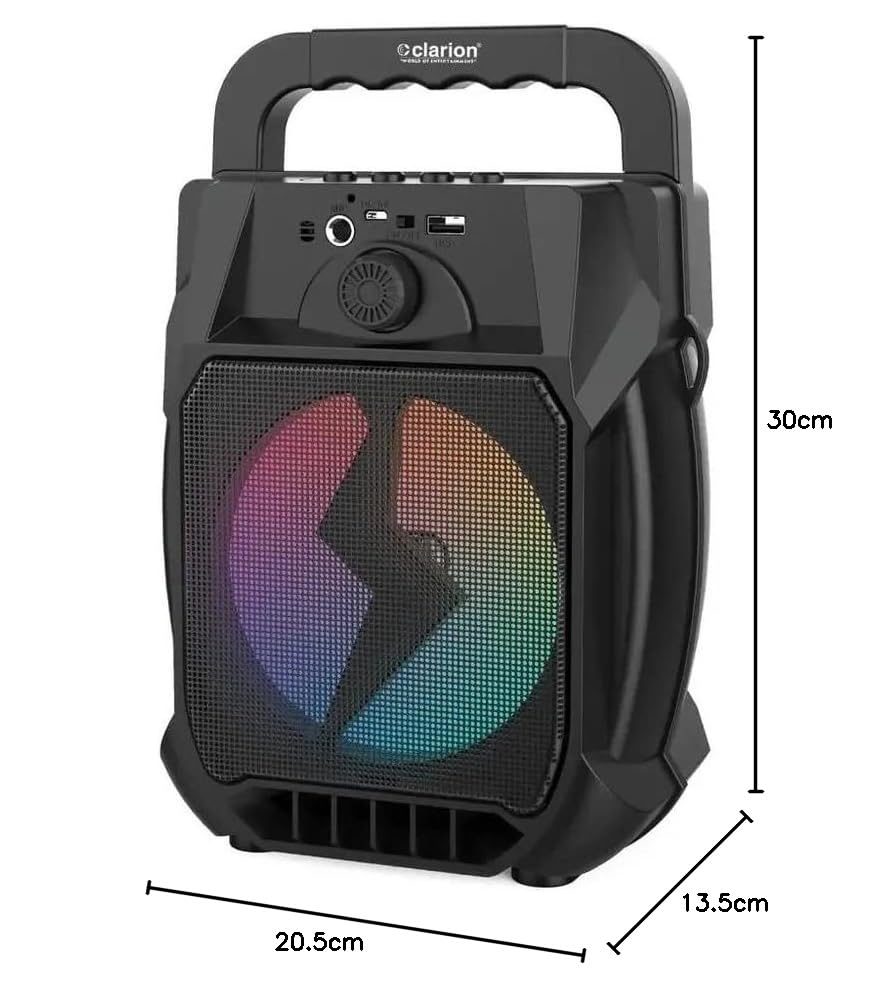
Image: Clarion JM-Carry On Portable Bluetooth Speaker with its dimensions indicated.
- Marka: Clarion (Generic)
- Ereduaren izena: JM-Carry On
- Bozgorailuaren irteera-potentzia maximoa: 20 watt RMS
- Konektibitate Teknologia: Laguntzailea, Bluetooth, USB
- Audio irteera modua: Estereoa
- Muntatze mota: Zutikako eserlekua
- Hizlari mota: Satelitea
- Produktuaren Ezaugarriak: Built-In Microphone, Radio, Subwoofer, Multi-color Light Effect, Sound Controller
- Kontrol-metodoa: Ukitu
- Woofer Driver Diameter: 6.5 hazbete
- Bateriaren batez besteko iraupena: 3-4 ordu
- Bateriaren edukiera: 1.2 Amp Orduak (3.7V)
- Elementuaren neurriak (L x W x H): 13.5 x 20.5 x 30 zentimetro
- Gailu bateragarriak: Smartphone, Tablet
- Energia iturria: Bateriaren bidez
Bermea eta Bezeroarentzako Arreta
This Clarion JM-Carry On Portable Bluetooth Speaker comes with a 1 urteko bermea on the speaker unit from the date of purchase. Please retain your purchase receipt as proof of warranty.
For any technical assistance, troubleshooting, or warranty claims, please contact Clarion Computers customer support. Refer to your purchase documentation for specific contact details or visit the official Clarion Computers weblaguntza-informaziorako gunea.
Note: The warranty typically covers manufacturing defects and does not cover damage caused by misuse, accidents, unauthorized modifications, or normal wear and tear.