
Sarrera
The CAD Audio WX1000HH is a frequency agile UHF wireless handheld microphone system designed for clear and reliable audio transmission. Operating in the 510-570mHz frequency band, it offers 100 selectable channels to ensure optimal signal clarity and minimize interference. This system features convenient auto-scan and IR sync functions for quick setup and channel changes. Built with durable all-metal construction, the WX1000HH is suitable for various demanding environments. This manual provides essential information for setting up, operating, and maintaining your wireless microphone system.
Paketearen edukia
Mesedez, egiaztatu behean zerrendatutako elementu guztiak zure paketean sartuta daudela:
- WX1000HH Handheld Microphone Transmitter
- WX1000 UHF Wireless Receiver
- Hargailurako korronte-egokigailua
- Mikrofono Clip
- Rack Mount Hardware
- Antenna Relocation Kit
- Audio Cable (likely 1/4" TS to 1/4" TS or XLR to 1/4" TS)
- Erabiltzailearen eskuliburua (dokumentu hau)

1. irudia: All components of the CAD Audio WX1000HH system, including the handheld microphone, receiver, power adapter, microphone clip, rack mount hardware, antenna relocation kit, and an audio cable.
Konfigurazioa
1. Hartzailearen konfigurazioa
- Lekua: Position the WX1000 receiver on a stable, flat surface or install it into a standard equipment rack using the included rack mount hardware. Ensure adequate ventilation around the unit.
- Antena konexioa: Connect the included antennas to the ANT connectors on the rear panel of the receiver. If rack-mounting, use the antenna relocation kit to position the antennas for optimal reception.
- Potentzia-konexioa: Connect the supplied power adapter to the DC INPUT on the rear of the receiver and then plug it into a suitable AC power outlet.
- Audio irteera: Connect the receiver's audio output (Balanced XLR or Unbalanced 1/4" TS) to your mixer, amplifier, or PA system using an appropriate audio cable.

2. irudia: The WX1000 UHF Wireless Receiver shown with rack mount ears attached, ready for installation into an equipment rack.

3. irudia: Rear panel of the WX1000 receiver, showing the ANT connectors, Balanced XLR output, Unbalanced 1/4" TS output, and DC INPUT for power.
2. Handheld Microphone Setup
- Bateriaren instalazioa: Unscrew the bottom cap of the handheld microphone. Insert two fresh AA batteries, observing the correct polarity (+/-) as indicated inside the battery compartment.
- Txapel segurua: Screw the bottom cap back onto the microphone securely.

4. irudia: The CAD Audio WX1000HH handheld microphone with its bottom cap removed, revealing the battery compartment for two AA batteries.
Funtzionamendu-argibideak
1. Piztu/Itzaltzea
- Hartzailea: Press the Power button on the front panel of the receiver. The display will illuminate.
- Eskuko mikrofonoa: Press and hold the power button on the microphone body until the display illuminates.
2. Channel Selection and Synchronization (IR Sync)
The WX1000HH system features 100 switchable UHF frequencies and an auto-scan function to find clear channels. Up to 20 systems can be used simultaneously.
- Eskaneatu automatikoki: On the receiver, press the "SET" button to initiate an auto-scan. The receiver will search for and select an available, interference-free frequency.
- IR sinkronizazioa: Once the receiver has selected a frequency, align the IR window on the handheld microphone with the IR sensor on the receiver (usually near the display). Press the "IR Sync" or "SET" button on the receiver (refer to receiver display for specific prompt). The frequency information will be transmitted to the microphone, synchronizing the two units.
- Egiaztapena: Confirm that the frequency displayed on the microphone matches the frequency on the receiver.
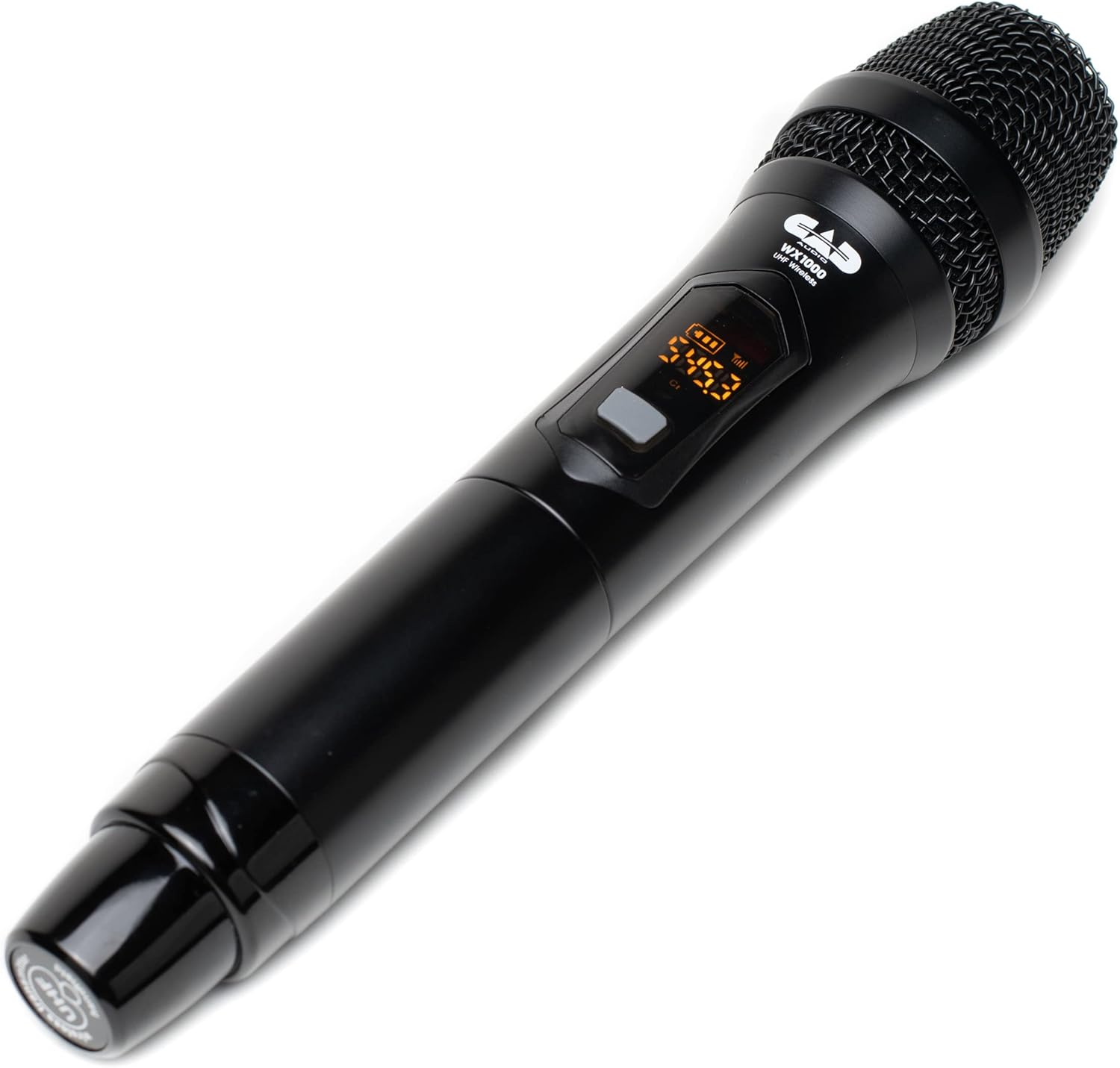
5. irudia: Close-up of the CAD Audio WX1000HH handheld microphone's display, showing frequency and battery level indicators.
3. Bateria-mailaren adierazleak
Both the handheld microphone transmitter and the receiver feature battery level indicators. Monitor these indicators to ensure uninterrupted operation. The handheld microphone provides over 12 hours of operation with two AA batteries.
4. Eragiketa-eremua
The system offers an operating range of up to 295 feet (90 meters) between the transmitter and receiver under optimal conditions. Environmental factors, obstacles, and other wireless devices can affect this range.
5. Gomendatutako erabilerak
This system is suitable for various applications including singing, speech, and karaoke.
Mantentzea
- Garbiketa: Use a soft, dry cloth to clean the exterior of the receiver and microphone. Do not use liquid cleaners or solvents.
- Bateria ordezkatzea: Replace AA batteries in the handheld microphone when the low battery indicator appears. Always use fresh, high-quality batteries. Remove batteries if the microphone will not be used for an extended period.
- Biltegiratzea: Gorde sistema leku fresko eta lehor batean, eguzki-argitik eta muturreko tenperaturetatik babestuta.
Arazoak konpontzea
| Arazoa | Kausa posiblea | Irtenbidea |
|---|---|---|
| Ez dago soinurik mikrofonotik |
|
|
| Interferentzia edo estatikoa |
|
|
| Funtzionamendu-eremu laburra |
|
|
Zehaztapenak
| Eredua | WX1000HH |
| Mikrofonoaren forma-faktorea | Eskukoa |
| Maiztasun Banda | UHF (510-570 MHz) |
| Kanal kopurua | 100 (Frequency Agile) |
| Eragiketa-eremua | Gehienez 295 oin (90 metro) |
| Mikrofonoaren energia iturria | 2 x AA pila |
| Mikrofonoaren bateriaren iraupena | > 12 ordu |
| Materiala | Metal (Receiver), Metal (Microphone) |
| Seinaleen eta zarataren arteko erlazioa | 75 dB |
| Konektibitate Teknologia | XLR (Balanced), 1/4" TS (Unbalanced) |
| Produktuaren neurriak (hartzailea) | 12.1 x 2.8 x 16 hazbete (L x W x H) |
| Elementuaren pisua | 4 libra (Sistema) |
| UPC | 631922109757 |
Bermea eta Laguntza
Bermeari buruzko informazioa eta laguntza teknikoa lortzeko, jo ezazu CAD Audio ofizialera. webwebgunera edo jarri harremanetan bezeroarentzako arreta-zerbitzura zuzenean. Gorde erosketa-agiria erosketaren frogagiri gisa berme-erreklamazioetarako.
CAD Audio Ofiziala Webgunea: www.cadaudio.com