
Sarrera
This manual provides essential instructions for the proper use and maintenance of your Kawai Universal Mini HD Satellite Remote Control. This remote is designed for seamless compatibility with various Kawai satellite receiver models, including Kw 900, Kw 6820, Kn 650, Kw 2000, 6850, 6950, and 8400. Please read this manual thoroughly before operating the device to ensure optimal performance and longevity.
Produktua amaituview
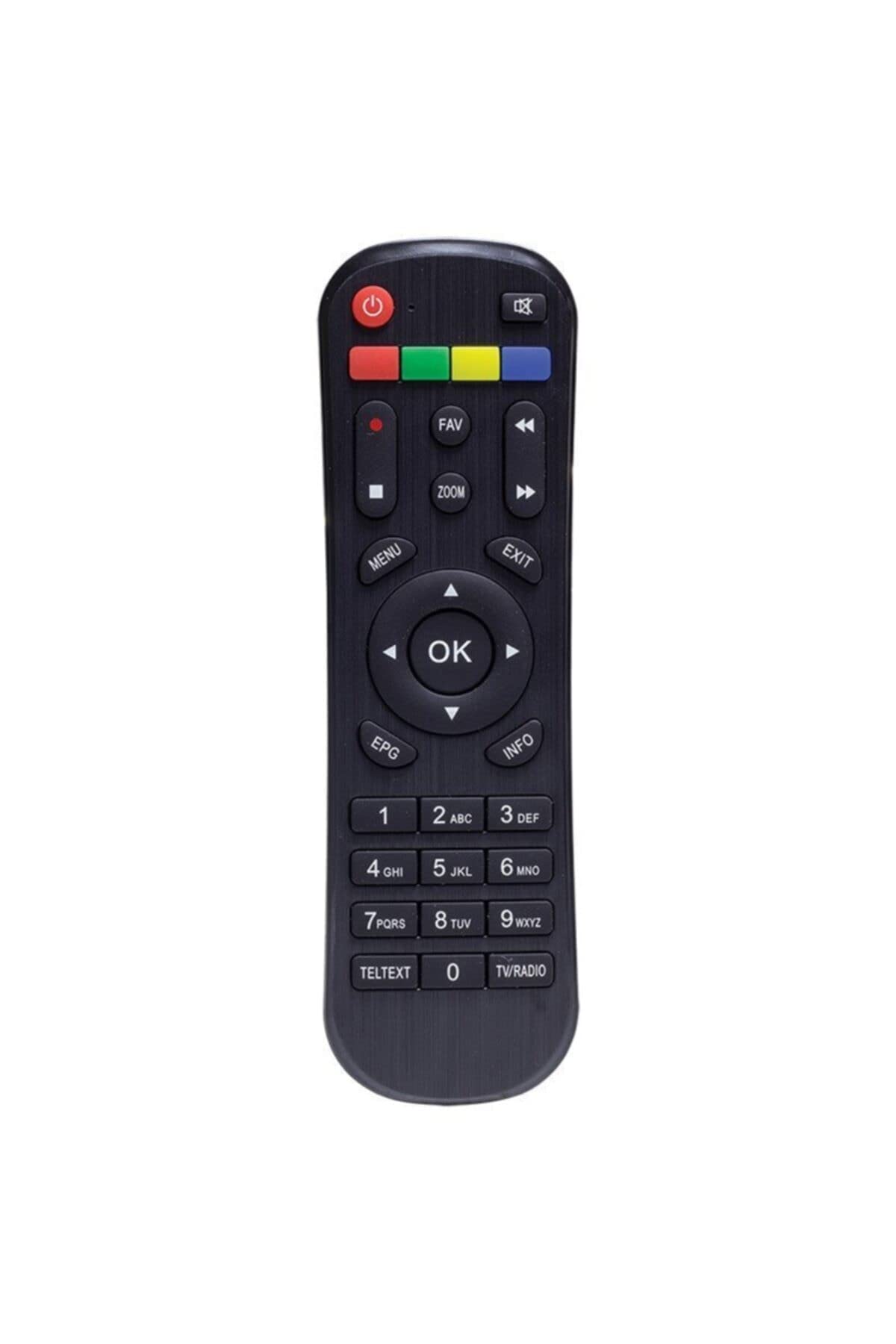
1. irudia: Aurrealdea view of the Kawai Universal Mini HD Satellite Remote Control. This image displays the ergonomic design and button layout of the remote, highlighting its compact size and standard control functions.
The Kawai Universal Mini HD Satellite Remote Control is a compact and efficient device designed to provide full control over your compatible Kawai satellite receiver. Its intuitive button layout ensures ease of use for channel navigation, volume control, menu access, and other essential functions.
Konfigurazioa
1. Bateriaren instalazioa
- Kokatu bateriaren konpartimendua urrutiko agintearen atzealdean.
- Irristatu bateriaren estalkia behera edo geziak adierazten duen norabidean irekitzeko.
- Sartu bi AAA pila (ez daude barne), ziurtatuz terminal positiboak (+) eta negatiboak (-) konpartimentuaren barruko diagramen araberakoak direla.
- Jarri bateriaren estalkia berriro bere lekuan sartuz, ondo klik egin arte.
2. Hasierako Erabilera
This remote control is pre-programmed for compatibility with the listed Kawai satellite receiver models. No additional pairing or setup is typically required. Simply point the remote at your satellite receiver and begin operation.
- Ensure there are no obstructions between the remote control and the satellite receiver.
- Confirm that the satellite receiver is powered on.
Funtzionamendu-argibideak
Familiarize yourself with the primary functions of the remote control buttons:
- Pizteko botoia (●): Turns the satellite receiver on or off.
- Kanal gora/behera (CH +/-): Telebista katea aldatzen du.
- Bolumena igo/behera (VOL +/-): Audioaren bolumena doitzen du.
- Mututu (MUTU): Audio irteera isilarazten du.
- Zenbaki-botoiak (0-9): Sartu kanal zenbakiak zuzenean.
- Menua (MENUA): Accesses the satellite receiver's main menu.
- Nabigazio botoiak (▲ ▼ ◀ ▶): Nabigatu menuko aukeretan.
- OK/Enter (OK): Menuetako hautaketak berresten ditu.
- Exit/Back (EXIT): Exits current menu or returns to the previous screen.
- Informazioa (INFO): Programaren informazioa erakusten du.
Specific button functions may vary slightly depending on your Kawai satellite receiver model. Refer to your receiver's manual for detailed information on advanced features.
Mantentzea
Garbiketa
Urrutiko agintea garbitzeko, erabili zapi leun eta lehor bat. Zikinkeria egoskorra bada, garbitu arinki.ampen the cloth with water or a mild, non-abrasive cleaner. Avoid using harsh chemicals, solvents, or abrasive materials, as these can damage the remote's surface and internal components.
Bateria ordezkatzea
Replace batteries when the remote control's response becomes sluggish or stops functioning. Always replace both batteries simultaneously with new ones of the same type (AAA). Do not mix old and new batteries, or different types of batteries, as this can lead to leakage or damage.
- Kendu bateria zaharrak berehala isuriak saihesteko.
- Bota erabilitako bateriak tokiko araudiaren arabera.
Arazoak konpontzea
| Arazoa | Kausa posiblea | Irtenbidea |
|---|---|---|
| Urruneko kontrola ez dabil. |
|
|
| Botoi batzuek ez dute funtzionatzen. |
|
|
Zehaztapenak
- Marka: Kawai (Listed as Generic by seller)
- Fabrikatzailea: Generikoa
- ASIN: B0BW4KLTDS
- Lehenengo data eskuragarri: 17ko otsailaren 2023a
- Bateragarritasuna: Kawai Kw 900, Kw 6820, Kn 650, Kw 2000, 6850, 6950, 8400 Mini HD Satellite Receivers
- Energia iturria: 2 x AAA bateria (ez daude barne)
Bermea eta Laguntza
For warranty information and technical support, please refer to the documentation provided with your original Kawai satellite receiver or contact the retailer from whom you purchased this remote control. Keep your purchase receipt as proof of purchase.
For further assistance, you may also visit the official Kawai website or contact their customer service department if available in your region.


