
Axis Komunikazioak 02316-002
AXIS Q6225-LE PTZ Kameraren Erabiltzailearen Eskuliburua
Eredua: 02316-002
1. Sarrera
Erabiltzailearen eskuliburu honek Axis Communications AXIS Q6225-LE PTZ kameraren instalazio, funtzionamendu eta mantentze-lanetarako argibide osoak eskaintzen ditu. Irakurri arretaz eskuliburu hau produktua erabili aurretik, funtzionaltasun eta segurtasun egokia bermatzeko. Kamera hau kanpoko zaintza sendoa egiteko diseinatuta dago, baldintza zailetan.
2. Segurtasun informazioa
Produktuari kalterik edo langileei lesiorik ez egiteko, jarraitu segurtasun neurri hauek:
- Instalazioa: Instalazioa langile kualifikatuek egin behar dute, tokiko eta estatuko elektrizitate eta eraikuntza araudi guztien arabera.
- Elikatze-iturria: Erabili gailu honetarako zehaztutako elikatze-iturria (60 watt) soilik. Ziurtatu elikatze-iturria egonkorra dela eta kameraren baldintzak betetzen dituela.
- Ingurumena: Kamera kanpoan erabiltzeko diseinatuta dago. Hala ere, saihestu muturreko baldintzetan jartzea bere funtzionamendu-eremu zehaztutik kanpo.
- Garbiketa: Deskonektatu korrontea garbitu aurretik. Erabili zapi leun eta lehor bat. Ez erabili garbitzaile likido edo aerosolik.
- Aldaketak: Ez saiatu kamera aldatzen edo desmuntatzen. Honek bermea baliogabetu eta segurtasun arriskuak sor ditzake.
3. Paketearen edukia
Egiaztatu elementu guztiak paketean daudela:
- AXIS Q6225-LE PTZ Kamera
- Instalazio Gida
- Muntatzeko euskarria eta hardwarea
- Sareko kable konektorea
- Dokumentazioa eta softwarearen CDa (hala badagokio)
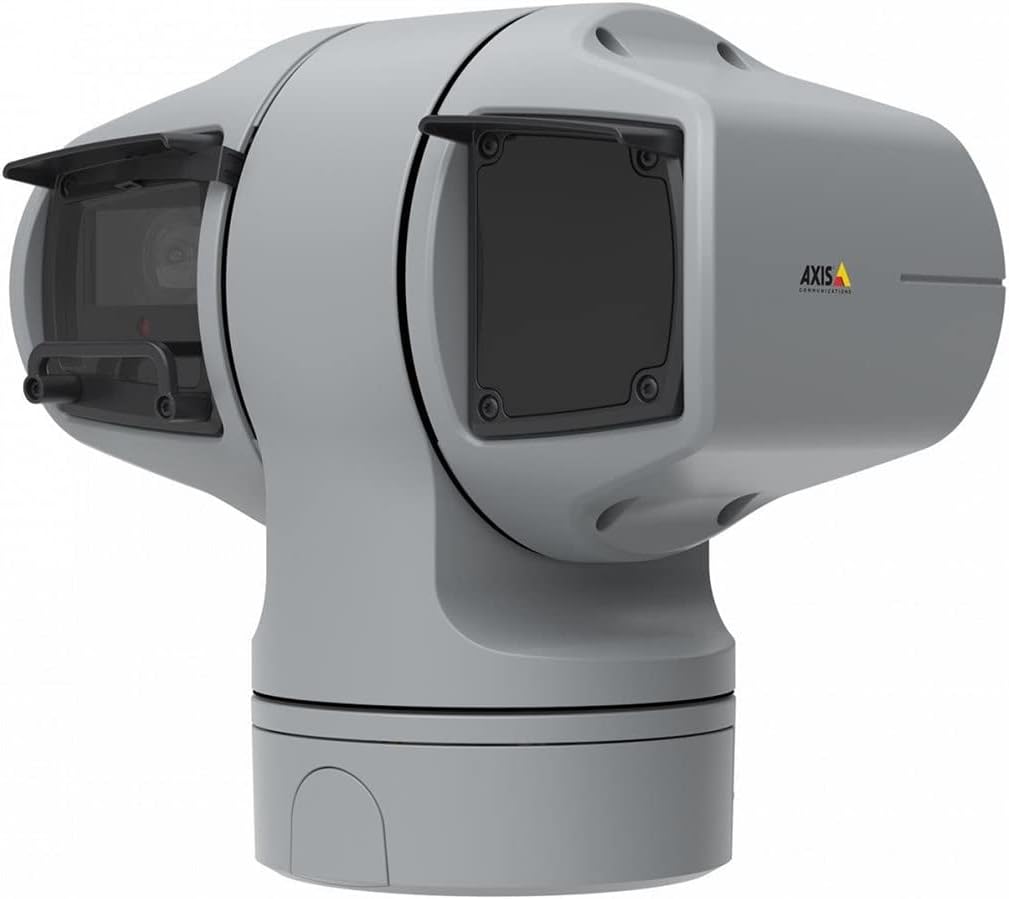
1. irudia: AXIS Q6225-LE PTZ kamera. Irudi honek gris koloreko PTZ kamera unitatea erakusten du, kanpoko zaintzarako diseinatutako karkasa sendoa eta lente sistema integratua nabarmenduz.
4. Konfigurazioa eta instalazioa
4.1 Kamera muntatzea
AXIS Q6225-LE horman muntatzeko diseinatuta dago. Ziurtatu muntatzeko gainazala nahikoa sendoa dela kameraren pisua eusteko eta ingurumen-baldintzak jasateko.
- Aukeratu muntatzeko kokapen egoki bat, nahi den eremua eskaintzen duena. view eta energia eta sare konexioen eskura dago.
- Erabili emandako muntaketa-txantiloia horman zuloak markatzeko.
- Zulo pilotuak egin eta muntatzeko euskarria torloju eta aingura egokiak erabiliz finkatu.
- Lotu kamera euskarrira, ondo finkatuta dagoela ziurtatuz.
4.2 Energia eta sare konexioa
Konektatu kamera entxufe eta sarera honela:
- Potentzia: Konektatu kablea 60 watteko energia-iturri batera. Ziurtatu konexioa ondo babestuta dagoela eta eguraldiarekiko erresistentea dela.
- Sarea: Konektatu Ethernet kable bat zure sareko etengailutik edo bideratzailetik kameraren sareko atakara. Kamerak Wi-Fi onartzen du haririk gabeko komunikaziorako. Ikusi sarearen konfigurazio atala haririk gabeko konfigurazioari buruzko informazioa lortzeko.
4.3 Hasierako konfigurazioa
Instalazio fisikoa eta konexioa egin ondoren, sartu kameraren web hasierako konfiguraziorako interfazea:
- Ireki a web arakatzailea kamerarekin sare berera konektatutako ordenagailu batean.
- Sartu kameraren IP helbidea arakatzailearen helbide-barran. IP helbidea ezezaguna bada, erabili AXIS IP Utility tresna hura aurkitzeko.
- Jarraitu pantailan agertzen diren argibideei administratzaile konturako pasahitz berri bat konfiguratzeko.
- Konfiguratu oinarrizko sare-ezarpenak, data/ordua eta bideo-jarioaren ezarpenak.
5. Kameraren funtzionamendua
5.1 Panoramika, Inklinazio eta Zoom (PTZ) Kontrola
AXIS Q6225-LE kamerak PTZ gaitasun osoak ditu, eta horrek urrunetik doitzea ahalbidetzen du. viewangelua eta zoom maila. Kontrola normalean kameraren bidez egiten da web interfazea edo bideo kudeaketa software (VMS) bateragarria.
- pan: Biratu kamera horizontalki eremu zabalago bat estaltzeko.
- okertu: Doitu kamera bertikalki honetara: view altuera desberdinetako objektuak.
- Zoom optikoa: Erabili zoom optikoa urruneko objektuak handitzeko, irudiaren kalitatea galdu gabe.
5.2 Mugimenduaren detekzioa eta alertak
Kamerak mugimendu-alertak soilik onartzen ditu. Konfiguratu mugimendu-detekzio-eremuak eta sentsibilitate-ezarpenak hemen: web Mugimendua detektatzen denean grabazioak edo jakinarazpenak abiarazteko interfazea.
5.3 Infragorri (IR) argiztapena
Infragorri argi iturriekin hornituta, kamerak bideo zaintza garbia eskaintzen du argi gutxiko edo iluntasun osoan. IR argiztapena automatikoki aktibatzen da edo eskuz kontrola daiteke.
6. Mantentzea
6.1 Garbiketa
Kameraren lentea eta karkasa aldizka garbitzea gomendatzen da errendimendu optimoa bermatzeko, batez ere hautsez betetako edo ingurune gogorretan.
- Garbitu lentea astiro-astiro zapi leun eta pelusik gabeko batekin. Zikinkeria egoskorra izanez gero, erabili gainazal optikoetarako bereziki diseinatutako lenteak garbitzeko soluzio bat.
- Garbitu kameraren karkasa iragarkiarekinamp oihal. Saihestu garbitzaile edo disolbatzaile urratzaileak.
6.2 Firmware eguneraketak
Aldian-aldian egiaztatu Axis Communications webfirmware eguneratzeetarako gunea. Kameraren firmwarea eguneratuta mantentzeak azken funtzioetarako, segurtasun hobekuntzetarako eta akatsen konponketetarako sarbidea bermatzen du.
7. Arazoak
Atal honek zure AXIS Q6225-LE kamerarekin izan ditzakezun arazo ohikoenak jorratzen ditu.
| Arazoa | Kausa posiblea | Irtenbidea |
|---|---|---|
| Ez dago bideo-jariorik | Argia deskonektatuta, sare arazoa, IP helbide okerra. | Egiaztatu konexioa. Egiaztatu sareko kablea edo Wi-Fi konexioa. Berretsi kameraren IP helbidea. |
| Irudi kalitate eskasa | Lente zikina, foku desegokia, argitasun gutxiko baldintzak. | Garbitu lentea. Doitu fokua honen bidez web interfazea. Ziurtatu argiztapen egokia edo egiaztatu IR funtzionaltasuna. |
| PTZ kontrolak ez dute erantzuten | Sarearen latentzia, softwarearen akatsa, motorraren arazoa. | Egiaztatu sareko konexioa. Berrabiarazi kamera. Arazoak jarraitzen badu, jarri harremanetan laguntzarekin. |
8. Zehaztapenak
| Ezaugarri | Xehetasuna |
|---|---|
| Modelo zenbakia | 02316-002 |
| Marka | Ardatz Komunikazioak |
| Muntatze Mota | Hormako Muntaia |
| Kolorea | Zuria |
| Materiala | Metala |
| Wattage | 60 watt |
| Konektibitate Teknologia | Haririk gabekoa, Wi-Fi |
| Barruko/Kanpoko erabilera | Kanpoan |
| Kontrol-metodoa | Urrunekoa |
| Argazki sentsoreen teknologia | CMOS |
| Bideo Harrapaketa formatua | MPEG-4 |
| Argi iturri mota | Infragorriak |
| Alerta mota | Mugimendua bakarrik |
| Zoom mota | Zoom optikoa |
| Elementuaren pisua | 0.01 kilogramo (0.352 ontza) |
| Dakarten osagaiak | Kamera/ Osagarriak |
9. Bermea eta Laguntza
Bermeari buruzko informazioa eta laguntza teknikoa lortzeko, jo ezazu Axis Communications-en webgune ofizialera. webwebgunera edo jarri harremanetan zure baimendutako saltzailearekin. Gorde erosketa-agiria erosketaren frogagiri gisa.
Sareko baliabideak: www.axis.com
Lotutako dokumentuak02316-002


Ask a question about this manual
Ask about setup, troubleshooting, compatibility, parts, safety, or missing instructions. Manuals+ will review the question and use this page’s manual context to help answer it.